
1. Уводзіны
This manual provides detailed instructions for the installation, operation, and maintenance of your CP PLUS 4MP Wi-Fi Floodlight Camera, model CP-F42A. Please read this manual thoroughly before using the product to ensure proper functionality and safety. This camera combines high-resolution video surveillance with integrated floodlighting for enhanced security.
2. Інфармацыя па бяспецы
- Ensure the power supply matches the camera's requirements.
- Не спрабуйце разбіраць або мадыфікаваць камеру.
- Install the camera in a location where it is protected from extreme weather conditions, although it has an IP54 rating, direct exposure to heavy rain or prolonged submersion is not recommended.
- Трымайце камеру далей ад крыніц цяпла і прамых сонечных прамянёў.
- Звяртайцеся з камерай асцярожна, каб пазбегнуць фізічных пашкоджанняў.
- Consult a qualified electrician for installation if you are unsure about electrical wiring.
3. Змесціва ўпакоўкі
Праверце наяўнасць усіх прадметаў у камплекце:
- CP PLUS 4MP Wi-Fi Floodlight Camera (CP-F42A)
- Адаптар сілкавання
- Мантажныя шрубы і дзюбелі
- Кароткае кіраўніцтва карыстальніка (не ўваходзіць у гэты дапаможнік)
4. Прадукт скончыўсяview
The CP-F42A is an outdoor Wi-Fi floodlight camera designed for surveillance and illumination. It features a 4MP sensor for clear video, H.265 video compression for efficient storage, and a 110° viewing angle. The integrated floodlight provides illumination, and the PIR sensor detects motion up to 12 meters.
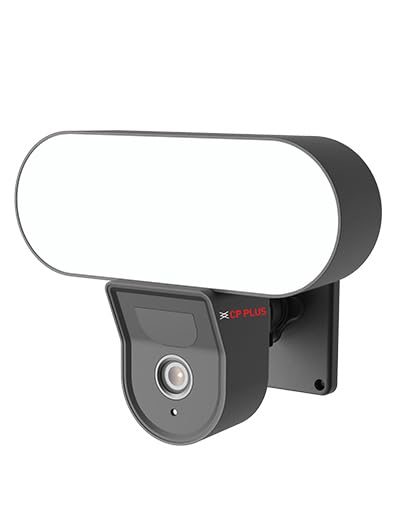
Выява: спераду view of the CP PLUS 4MP Wi-Fi Floodlight Camera CP-F42A, showing the camera lens and the integrated floodlight panel.
Ключавыя кампаненты:
- Аб'ектыў камеры: Captures 4MP video.
- Floodlight Panel: Забяспечвае падсвятленне.
- Датчык PIR: Выяўляе рух.
- Мікрафон: Для ўводу гуку.
- Дакладчык: Для двухбаковага аўдыёвываду.
- Мантажны кранштэйн: Для бяспечнай усталёўкі.
5. Настройка
5.1 Фізічная ўстаноўка
- Выберыце месца: Выберыце месца на адкрытым паветры з празрыстым view of the area you wish to monitor and within Wi-Fi range. Ensure the mounting surface is sturdy.
- Адзначыць кропкі свідравання: Выкарыстоўвайце мантажны кранштэйн у якасці шаблону, каб адзначыць адтуліны для шруб на сцяне.
- Свідраваць адтуліны: Drill pilot holes at the marked points. Insert wall plugs if mounting on masonry.
- Устанавіце камеру: Secure the mounting bracket to the wall using the provided screws. Attach the camera to the bracket.
Image: The CP PLUS Floodlight Camera mounted on the exterior of a house, illustrating a typical installation scenario during the day.
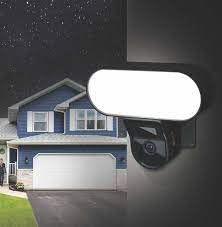
Image: The CP PLUS Floodlight Camera mounted on the exterior of a house at night, with the floodlight illuminated, demonstrating its night-time functionality.
5.2 Падключэнне харчавання
Connect the provided power adapter to the camera's power input port and then plug it into a suitable electrical outlet. Ensure the connection is secure and protected from moisture.
5.3 Wi-Fi Connection and App Pairing
- Спампаваць прыкладанне: Пошук the "ezyKam+" app (or the recommended CP PLUS app) on your smartphone's app store (iOS or Android) and install it.
- Стварыць уліковы запіс: Адкрыйце праграму і зарэгіструйце новы ўліковы запіс або ўвайдзіце ў сістэму, калі ён у вас ужо ёсць.
- Дадаць прыладу: Follow the in-app instructions to add a new device. Select "Floodlight Camera" or a similar option.
- Падключыцеся да Wi-Fi: The app will guide you through connecting the camera to your home Wi-Fi network. This usually involves scanning a QR code on the camera or entering your Wi-Fi credentials.
- Поўная ўстаноўка: Once connected, you can name your camera and adjust initial settings.
Image: Branding for CP PLUS ezyKam+ Wi-Fi Floodlight Full Color Camera, indicating compatibility with Alexa and Google Home, relevant for app pairing and smart home integration.
6. Інструкцыя па эксплуатацыі
Access all camera functions through the dedicated mobile application.
6.1 У прамым эфіры View
Адкрыйце праграму і абярыце камеру са спісу прылад, каб view the live video feed. You can pinch to zoom and pan across the image.
6.2 Запіс і прайграванне
- Ручная запіс: Націсніце кнопку запісу ў прамым эфіры view каб пачаць/спыніць запіс уручную.
- Запіс падзеі: The camera automatically records when motion is detected. These recordings are stored on the installed microSD card (if any) or cloud storage (subscription may be required).
- Прайграванне: Доступ да запісанага footage through the "Playback" or "History" section in the app.
6.3 Выяўленне руху і абвесткі
Configure motion detection sensitivity and areas within the app settings. When motion is detected, the camera can send push notifications to your phone and trigger recording. The PIR sensor has a detection range of 6-12 meters.
6.4 Кіраванне пражэктарам
The floodlight can be controlled manually via the app or set to activate automatically upon motion detection during specific times or low-light conditions. Adjust brightness and duration settings in the app.
6.5 Двухбаковае аўдыё
Выкарыстоўвайце значкі мікрафона і дынаміка ў прамым эфіры view to communicate with visitors or deter intruders. Press and hold the microphone icon to speak, and release to listen.
6.6 Начное бачанне
The camera features infrared (IR) night vision for clear black-and-white video in low-light conditions and can also utilize the floodlight for full-color night vision when activated. The night vision range is up to 12 meters.
7. Тэхнічнае абслугоўванне
7.1 Ачыстка
Wipe the camera lens and floodlight panel with a soft, damp тканінай, каб выдаліць пыл і бруд. Не выкарыстоўвайце агрэсіўныя хімікаты або абразіўныя ачышчальнікі.
7.2 Абнаўленне прашыўкі
Periodically check the app for available firmware updates. Keeping your camera's firmware up-to-date ensures optimal performance and security features.
7.3 Кіраванне сховішчам
If using a microSD card, regularly check its status in the app. Format the card periodically to maintain performance. Back up important recordings before formatting.
8. Выпраўленне непаладак
| праблема | Магчымае рашэнне |
|---|---|
| Камера не ўключаецца. | Check power adapter connection and ensure the outlet is functional. |
| Немагчыма падключыцца да Wi-Fi. | Ensure the camera is within Wi-Fi range. Verify Wi-Fi password. Try resetting the camera and router. |
| Дрэнная якасць відэа. | Check Wi-Fi signal strength. Clean the camera lens. Ensure sufficient lighting. |
| Выяўленне руху не працуе. | Adjust motion detection sensitivity and area settings in the app. Ensure there are no obstructions. |
| Floodlight not activating. | Check floodlight settings in the app. Ensure it's set to activate on motion or during low light. |
9. Тэхнічныя характарыстыкі
| Асаблівасць | Дэталь |
|---|---|
| Нумар мадэлі | CP-F42A |
| дазвол | 4MP (Effective Still Resolution: 4 MP) |
| Кампрэсія відэа | H.265, MPEG |
| Viewing кут | 110 градусаў |
| PIR Адлегласць | 6~12 метраў |
| Бесправадныя тэхналогіі | Wi-Fi |
| Дыяпазон начнога бачання | 12 Meters (Infrared, Night Color) |
| Частата кадраў | 20 кадраў у секунду |
| Аптычны зум | 3x |
| Міжнародны рэйтынг абароны | IP54 |
| Тып абвесткі | Толькі рух |
| Крыніца харчавання | Правадная электрычная |
| Уключаныя кампаненты | Перахаднік |
| Памеры (Д х Ш х У) | 20 х 12 х 10 сантыметраў |
| Вага прадмета | 630 г |
| Выкарыстанне ў памяшканні/на вуліцы | На адкрытым паветры |
| Тэхналогія фотадатчыка | CMOS |
| Рэкамендуемае выкарыстанне | Home Security, Night Vision |
10. Гарантыя і падтрымка
Каб атрымаць інфармацыю аб гарантыі і тэхнічнай падтрымцы, звярніцеся да афіцыйнага сайта CP PLUS. webсайт або звярніцеся ў службу падтрымкі кліентаў. Захоўвайце чэк аб куплі як пацвярджэнне пакупкі для прэтэнзій па гарантыі.
CP PLUS Official Webсайт: www.cpplusworld.com