
Thomson 24HA2S13C
Кіраўніцтва карыстальніка для 24-цалевага HD-тэлевізара THOMSON 24HA2S13C з падтрымкай Android і дысплеем 12V
Model: 24HA2S13C
Важная інфармацыя па бяспецы
Read all instructions before operating the TV. Keep this manual for future reference. Follow all warnings and instructions marked on the product.
- Не перакрывайце вентыляцыйныя адтуліны.
- Не ўсталёўвайце паблізу крыніц цяпла.
- Абараніце сеткавы шнур ад наступання або заціскання.
- Выкарыстоўвайце толькі насадкі/аксэсуары, указаныя вытворцам.
- Адключайце разетку падчас навальніцы або калі не выкарыстоўвалі на працягу доўгага часу.
- Звяртайцеся да кваліфікаванага абслугоўваючага персаналу.
Прадукт скончаныview
The THOMSON 24HA2S13C is a 24-inch HD Smart Android TV designed for versatile use, including camping with its 12V power supply. It features Google Assistant, Wi-Fi, Bluetooth, Dolby Digital audio, and a triple-tuner for various signal reception.

Выява: спераду view of the THOMSON 24HA2S13C 24-inch Smart Android TV, showing the screen displaying streaming service logos and a family enjoying the TV in a campналада.
Змест пакета
Праверце, ці ўсе прадметы ўваходзяць у камплект:
- THOMSON 24HA2S13C Smart Android TV
- Пульт дыстанцыйнага кіравання
- Power Adapter (12V compatible)
- Тумбы пад тэлевізар (2)
- Шрубы для падстаўкі пад тэлевізар
- Кіраўніцтва карыстальніка (гэты дакумент)
- Кароткае кіраўніцтва
Настройка
1. Мацаванне падставак для тэлевізара
- Асцярожна пакладзеце тэлевізар экранам уніз на мяккую, роўную паверхню, каб пазбегнуць пашкоджання экрана.
- Align the TV stands with the mounting holes on the bottom of the TV.
- Замацуйце падстаўкі з дапамогай прадугледжаных шруб. Пераканайцеся, што яны надзейна зацягнуты.

Image: The THOMSON 24HA2S13C TV showing two possible stand positions for different furniture widths. The image highlights the flexibility in stand placement.
2. Падключэнне сілкавання
Connect the 12V power adapter to the TV's power input and then to a suitable power source. For camping or mobile use, connect to a 12V DC power outlet.

Image: The THOMSON 24HA2S13C TV mounted in a caravan, with a 12V power adapter shown, illustrating its suitability for mobile use.
3. Падключэнне знешніх прылад
Тэлевізар мае розныя парты для падключэння знешніх прылад:
- HDMI: For high-definition audio and video devices (e.g., game consoles, Blu-ray players).
- USB: Для падключэння USB-назапашвальнікаў для прайгравання медыяфайлаў.
- LAN: Для праваднога падключэння да Інтэрнэту.
- Антэна/Спадарожнік: Для прыёму сігналаў вяшчання.
- AV IN: Для старых аналагавых прылад.
- Аўдыёвыхад (аптычны): Для падлучэння да знешніх гукавых сістэм.
- CI+: Для модуляў умоўнага доступу.

Выява: Задняя частка view of the THOMSON 24HA2S13C TV, detailing the various input and output ports available for connectivity.
Эксплуатацыя тэлевізара
1. Майстар пачатковай налады
Пры першым уключэнні тэлевізар правядзе вас праз працэс пачатковай налады. Гэта ўключае ў сябе:
- Выбар мовы.
- Сеткавае падключэнне (Wi-Fi або Ethernet).
- Google account sign-in (optional, but recommended for full Smart TV features).
- Channel scanning (for DVB-T2/C/S2).
2. Функцыі дыстанцыйнага кіравання
The included remote control provides access to all TV functions. It features backlit buttons for use in low light and a dedicated "Favorite" button for quick access to your preferred app.

Image: The remote control for the THOMSON 24HA2S13C TV, highlighting its ergonomic design, backlit buttons, and voice control capabilities.
3. Функцыі Smart TV (Android TV)
This TV runs on Android TV, providing access to a wide range of applications and services:
- Сэрвісы струменевай перадачы: Access Netflix, Prime Video, YouTube, Disney+, and more.
- Памочнік Google: Use voice commands to search for content, control playback, and get information. Activate by pressing the Google Assistant button on the remote.
- Убудаваны Chromecast: Cast content from compatible smartphones, tablets, or computers directly to your TV.
- Крама Google Play: Download additional apps and games.

Image: The THOMSON 24HA2S13C TV screen showing the Android TV home interface with popular streaming applications and content recommendations.
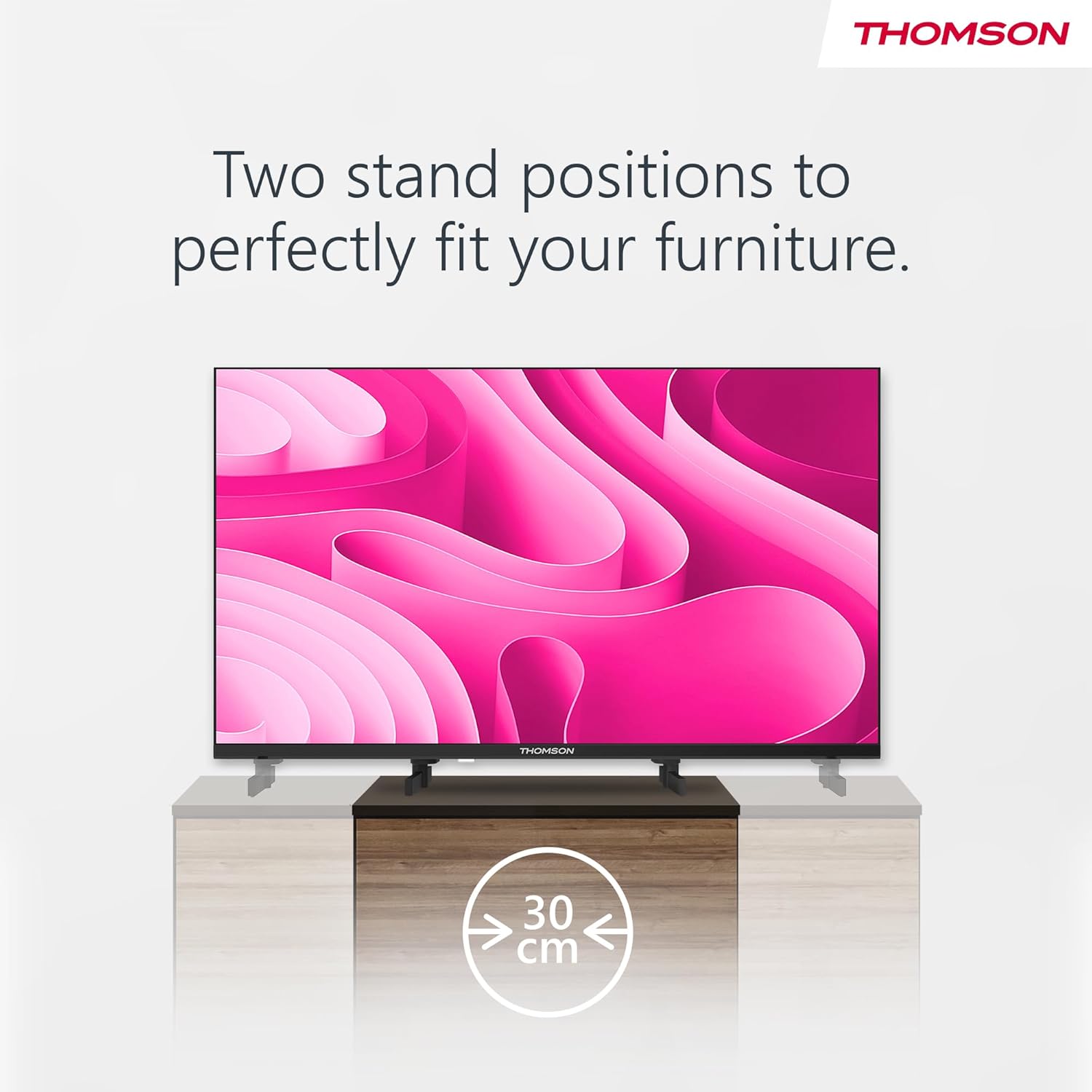
Image: A person using the voice control feature of the THOMSON TV remote, demonstrating interaction with Google Assistant.
Тэхнічнае абслугоўванне
Чыстка тэлевізара
- Заўсёды адключайце тэлевізар ад сеткі перад чысткай.
- Use a soft, dry cloth to wipe the screen and cabinet. Do not use liquid cleaners or aerosol sprays.
- Для ўстойлівых плям злёгку пачысціцеampen a microfiber cloth with water and gently wipe. Avoid excessive moisture.
Абнаўлення праграмнага забеспячэння
Тэлевізар можа атрымліваць абнаўленні праграмнага забеспячэння для паляпшэння прадукцыйнасці і дадання новых функцый. Пераканайцеся, што ваш тэлевізар падключаны да Інтэрнэту, каб атрымліваць гэтыя абнаўленні. Звычайна вы можаце праверыць наяўнасць абнаўленняў у меню налад тэлевізара.
Ліквідацыю непаладак
| праблема | Магчымая прычына | Рашэнне |
|---|---|---|
| Няма ўлады | Шнур сілкавання не падключаны; разетка неактыўная. | Праверце падключэнне шнура харчавання. Праверце разетку з іншай прыладай. |
| Няма выявы, але гук ёсць | Няправільная крыніца ўваходнага сігналу выбрана; праблема з падсветкай. | Press the "Input" button on the remote to select the correct source. Contact support if issue persists. |
| Няма гуку, але выява ёсць | Volume too low or muted; audio cables loose. | Increase volume. Check mute status. Ensure audio cables are securely connected. |
| Пульт дыстанцыйнага кіравання не працуе | Батарэйкі разрадзіліся; паміж пультам і тэлевізарам ёсць перашкода. | Замяніце батарэйкі. Выдаліце ўсе перашкоды. Пераканайцеся, што пульт накіраваны на ІЧ-датчык тэлевізара. |
| Немагчыма падключыцца да Wi-Fi | Няправільны пароль; праблемы з маршрутызатарам; тэлевізар занадта далёка ад маршрутызатара. | Verify Wi-Fi password. Restart router. Move TV closer to router or use a wired connection. |
Тэхнічныя характарыстыкі
| Асаблівасць | Дэталь |
|---|---|
| Марка | Томсан |
| мадэль | 24HA2S13C |
| Памер экрана | 24 цалі (60 см) |
| Тэхналогія адлюстравання | святлодыёд |
| дазвол | 1366 x 768 (HD) |
| Аперацыйная сістэма | Android TV |
| Асаблівасці | Google Assistant, Chromecast Built-in, 12V Power Supply, Dolby Audio, Triple Tuner (DVB-T2/C/S2) |
| Сувязь | Wi-Fi, Bluetooth, HDMI (x3), USB (x2), LAN, Optical Audio Out, AV In, CI+ |
| тtage | 12 В (пастаянны ток) |
| Памеры прадукту (Ш x Г x В) | 53.5 х 15.1 х 35.3 см (з падстаўкай) |
| Вага | 3.5 кг |
Каб атрымаць падрабязную інфармацыю аб энергаэфектыўнасці, звярніцеся да базы дадзеных ЕС EPREL: https://eprel.ec.europa.eu/qr/1456673

Image: The EU Energy Label for the THOMSON 24HA2S13C TV, showing an energy efficiency rating of E and power consumption of 18 kWh/1000h.
Гарантыя і падтрымка
This Thomson TV comes with a 3-year guarantee. For technical support, warranty claims, or service inquiries, please contact your local Thomson service provider or refer to the manufacturer's webсайт.
Manufacturer: STREAMVIEW GMBH
Webсайт: www.streamview.com
электронная пошта: кантакт@стрымview.com
Афіцыйнае відэа пра прадукт
Паглядзіце гэта відэа для візуальнага ўяўленняview of the Thomson 24-inch Easy TV.
Відэа: Кароткі аглядview of the Thomson 24-inch Easy TV, showcasing its design and features. This video is provided by the vendor Streamview GmbH.
Ask a question about this manual
Ask about setup, troubleshooting, compatibility, parts, safety, or missing instructions. Manuals+ will review the question and use this page’s manual context to help answer it.