
Уводзіны
This manual provides comprehensive instructions for the setup, operation, maintenance, and troubleshooting of your Timex Men's Command Encounter 45mm Watch. Please read this manual carefully to ensure proper use and longevity of your timepiece.
Прадукт скончаныview
The Timex Command Encounter is a robust digital watch designed for durability and functionality. It features a 45mm square case, a digital negative display, and is water-resistant up to 100 meters. The watch includes standard timekeeping functions, a chronograph, timer, and alarm.

Малюнак 1: Спераду view of the Timex Command Encounter 45mm Watch. This image displays the watch face with its digital negative display, showing the time, date, and various mode indicators like CHRONO, TIMER, and ALARM. The watch features a green case and strap with a camouflage pattern on the display bezel.
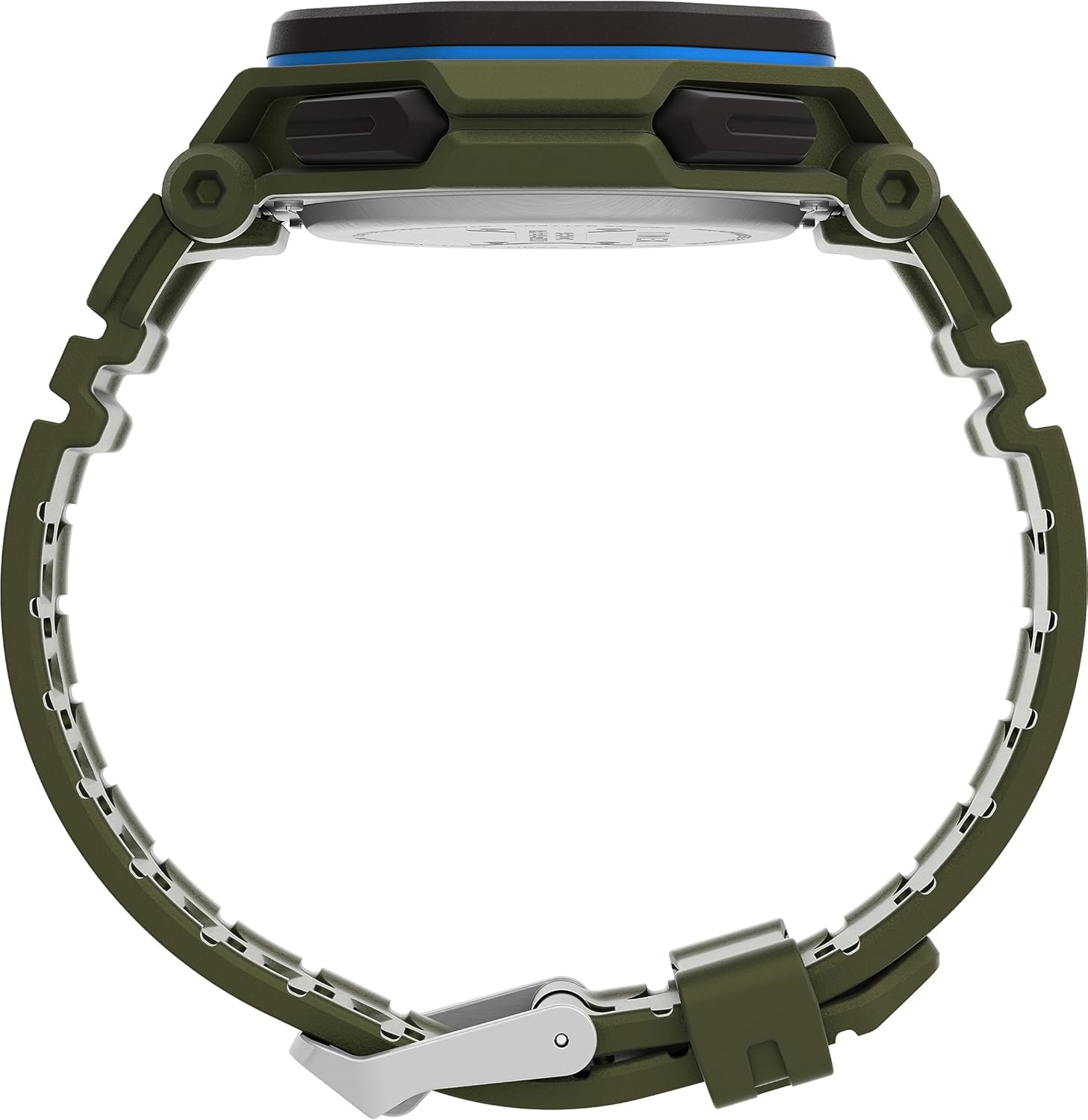
Малюнак 2: бок view of the Timex Command Encounter 45mm Watch. This image highlights the profile гадзінніка, шоўasing the robust case design and the textured green strap. The buttons on the side of the watch are also visible.

Малюнак 3: Задняя частка view of the Timex Command Encounter 45mm Watch. This image focuses on the stainless steel case back, which is engraved with "TIMEX", "SHOCK RESISTANT", "WATER RESISTANT 100M", and "STAINLESS STEEL BACK". The four screws securing the case back are also visible.
Настройка
1. Пачатковае ўключэнне і акумулятар
Your Timex Command Encounter watch comes with a pre-installed Lithium Metal battery (CR2025). The watch should be ready for use upon arrival. If the display is blank, press any button to activate it. If the watch does not power on, the battery may need replacement (refer to the Maintenance section).
2. Устаноўка часу і даты
- Націсніце РЭЖЫМ button (typically on the lower left) repeatedly until the time setting mode is displayed. The seconds digits will likely be flashing.
- Націсніце СКІД button (typically on the lower right) to cycle through the adjustable fields: seconds, hours, minutes, year, month, day.
- Выкарыстоўвайце СТАРТ button (typically on the upper right) to increase the value of the flashing field. Hold the button to rapidly advance the digits.
- Пасля таго, як усе налады правільныя, націсніце кнопку РЭЖЫМ кнопку, каб выйсці з рэжыму налад і вярнуцца да звычайнага адлюстравання часу.
3. 12/24-гадзінны фармат
While in the time setting mode, when the hour digits are flashing, pressing the СТАРТ button may toggle between 12-hour (with AM/PM indicator) and 24-hour formats. Consult the specific button functions for your model if this does not work as described.
Інструкцыя па эксплуатацыі
1. Асноўныя правілы адліку часу
The watch displays the current time (hours, minutes, seconds) and date (month, day, day of week) in its primary mode. The negative display provides clear visibility in various lighting conditions.
2. Начны свяцільнік INDIGLO®
Каб актываваць начны свяцільнік INDIGLO®, націсніце кнопку INDIGLO button (typically on the upper left). The entire display will illuminate for a few seconds, allowing for easy reading in low-light environments.
3. Хранограф (секундамер)
- Націсніце РЭЖЫМ кнопку, пакуль на дысплеі не з'явіцца «CHRONO» або «STW».
- Прэса СТАРТ каб пачаць адлік часу.
- Прэса СТАРТ again to pause timing. Press СТАРТ аднавіць.
- To record a lap or split time, press SPL/SET while the chronograph is running. The display will momentarily show the lap time.
- Каб спыніць хранограф, націсніце СТОП.
- Каб скінуць хранограф да нуля, націсніце СКІД пасля прыпынку.
4. Timer (Countdown)
- Націсніце РЭЖЫМ button until "TIMER" or "TMR" appears on the display.
- Каб усталяваць час адліку, націсніце СКІД to select the flashing digit (hours, minutes, seconds). Use СТАРТ каб наладзіць значэнне.
- Прэса СТАРТ каб пачаць зваротны адлік.
- Прэса СТАРТ зноў, каб прыпыніць. Націсніце СТАРТ аднавіць.
- Калі таймер дасягне нуля, прагучыць сігнал трывогі. Націсніце любую кнопку, каб спыніць сігнал трывогі.
5. Сігналізацыя
- Націсніце РЭЖЫМ кнопку, пакуль на дысплеі не з'явіцца надпіс «ALARM» або «ALM».
- Каб усталяваць час будзільніка, націсніце СКІД to select the flashing digit (hours, minutes). Use СТАРТ каб наладзіць значэнне.
- Каб уключыць або выключыць будзільнік, націсніце SPL/SETНа дысплеі з'явіцца/знікне значок сігналу трывогі.
- Калі гучыць будзільнік, націсніце любую кнопку, каб адключыць яго.
Тэхнічнае абслугоўванне
1. Чыстка гадзінніка
Рэгулярна чысціце гадзіннік мяккай губкайamp cloth. For stubborn dirt, a mild soap solution can be used, followed by rinsing with clean water and thorough drying. Avoid using harsh chemicals or abrasive materials, as these can damage the watch case or strap.
2. Воданепранікальнасць
Your Timex Command Encounter watch is water-resistant up to 100 meters (330 feet). This means it is suitable for showering, swimming, and snorkeling. Do not press any buttons while the watch is submerged in water, as this can compromise the water resistance seal. Avoid exposing the watch to extreme temperature changes, which can also affect the seals.
3. Замена батарэі
The watch uses a CR2025 Lithium Metal battery. Battery life varies depending on usage, especially the frequency of INDIGLO® night-light activation. When the display dims or functions become erratic, it's time to replace the battery. Battery replacement should ideally be performed by a qualified watch technician to ensure the water resistance seal is properly re-seated.
If replacing the battery yourself, carefully remove the four screws on the case back (refer to Figure 3). Gently pry open the case back. Note the battery's orientation before removal. Replace with a new CR2025 battery, ensuring proper polarity. Carefully re-seat the gasket and secure the case back with the screws. Self-replacement may void warranty or compromise water resistance if not done correctly.
Ліквідацыю непаладак
| праблема | Магчымая прычына | Рашэнне |
|---|---|---|
| Дысплей пусты або цьмяны. | Нізкі або разраджаны акумулятар. | Заменіце батарэю CR2025. |
| Час/дата няправільныя. | Няправільна настроена або скінута з-за замены батарэі. | Выконвайце інструкцыі «Устаноўка часу і даты» ў раздзеле «Налада». |
| Кнопкі не рэагуюць. | Магчыма, гадзіннік знаходзіцца ў рэжыме блакавання, альбо батарэя вельмі разраджаная. | Try pressing all buttons to see if any respond. If not, replace battery. If still unresponsive, contact support. |
| Вада ўнутры гадзінніка. | Compromised water resistance seal (e.g., buttons pressed underwater, extreme temperature changes, damaged gasket). | Неадкладна аднясіце гадзіннік у кваліфікаваны цэнтр па рамонце гадзіннікаў. Не спрабуйце сушыць яго самастойна. |
Тэхнічныя характарыстыкі
- Нумар мадэлі: TW2V93700VQ
- Памер корпуса: 45 мм
- Матэрыял папружкі: Green (8 inch)
- Тып дысплея: Лічбавы негатыўны дысплей
- Матэрыял аб'ектыва: Мінеральнае шкло
- Воданепранікальнасць: 100 метраў (330 футы)
- Тып батарэі: 1 літый-металічная батарэйка (CR2025)
- Асаблівасці: Chronograph, Timer, Alarm, INDIGLO® Night-Light
- Краіна паходжання: Кітай
Гарантыя і падтрымка
Гадзіннікі Timex вырабляюцца па высокіх стандартах і маюць абмежаваную гарантыю. Падрабязную інфармацыю пра гарантыю можна знайсці ў гарантыйным талоне, які ўваходзіць у камплект пакупкі, або на афіцыйным сайце Timex. webсайт. Захоўвайце пацвярджэнне пакупкі для прэтэнзій па гарантыі.
Каб атрымаць тэхнічную падтрымку, абслугоўванне або запчасткі, звярніцеся ў службу падтрымкі кліентаў Timex. Кантактную інфармацыю звычайна можна знайсці на Timex. webсайце або на ўпакоўцы.
Афіцыйны Timex Webсайт: www.timex.com