
ATTACK SHARK M71
ATTACK SHARK M71 Wireless Mechanical Keyboard User Manual
Мадэль: M71
Уводзіны
This manual provides detailed instructions for the setup, operation, and maintenance of your ATTACK SHARK M71 75% TKL Wireless Mechanical Keyboard. Please read this guide thoroughly to ensure proper use and to maximize your keyboard's performance and lifespan.

Image: The ATTACK SHARK M71 keyboard showcasing its 68% layout and key features like aluminum alloy body, three-mode connection, and RGB backlight.
Змест пакета
Праверце наяўнасць усіх прадметаў у камплекце:
- ATTACK SHARK M71 Wireless Mechanical Keyboard
- Кабель Type-C
- Бесправадны прыёмнік 2.4G
- Keycap Puller / Switch Puller (Two-in-one tool)
- Complimentary 61 additional PBT OEM keycaps (different color layout)
- Кіраўніцтва карыстальніка

Image: A visual representation of the items included in the ATTACK SHARK M71 keyboard package, including the keyboard, cables, and extra keycaps.
Video: Unboxing the Blueberry version of the M71 keyboard, showing the package contents and a demonstration of its typing sound.
Прадукт скончаныview
The ATTACK SHARK M71 is a 75% TKL wireless mechanical keyboard featuring a full aluminum CNC chassis, multi-mode connectivity, hot-swappable switches, and RGB lighting. Its compact design and robust construction are engineered for both gaming and productivity.
Асноўныя характарыстыкі:
- Full Aluminum CNC Body: Constructed from international standard 6063 aluminum alloy for durability and a premium feel.
- Трохрэжымнае падключэнне: Supports Bluetooth 5.0/3.0, 2.4G wireless, and wired USB-C connections.
- Перамыкачы з магчымасцю гарачай замены: Compatible with 3/5-pin switches, allowing for easy customization without soldering.
- Канструкцыя мацавання пракладкі: Incorporates anti-static IPEX switch pads, PORON sound-absorbing cotton, and PET acoustic switch pads to enhance typing feel and reduce noise.
- RGB LED асвятленне: Features customizable RGB backlighting and a side LED light strip.
- Акумулятар 4600 мАг: Забяспечвае пашыранае выкарыстанне бесправадной сувязі.
- PBT OEM Keycaps: Durable keycaps with GMK-like characters.
Кампаненты:
Familiarize yourself with the main components of your keyboard:
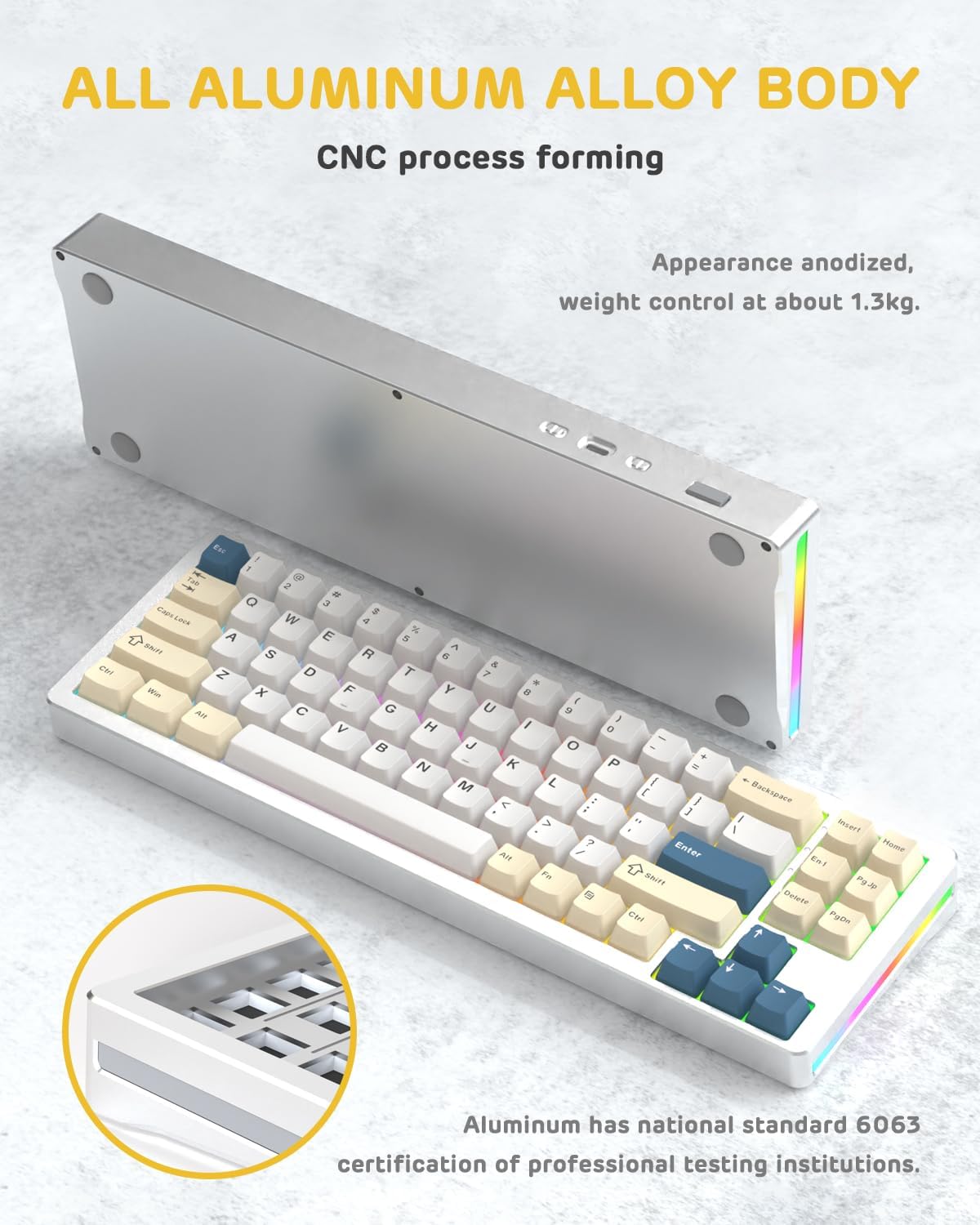
Выява: бок А view of the M71 keyboard highlighting its full aluminum alloy body and CNC process forming.

Выява: Выбухнула view illustrating the multi-layered gasket mount structure, including the PBT keycaps, aluminum alloy upper cover, customized switch body, PC positioning board, PORON filled cotton, anti-static IPEX switch underpad, PET singing pad, PCB board, PORON shaft seat cushion, PET sound backing pad, wing light strip, and aluminum alloy base.
Настройка
1. Connectivity Modes:
The M71 keyboard supports three connection modes: Bluetooth, 2.4G wireless, and wired USB-C.
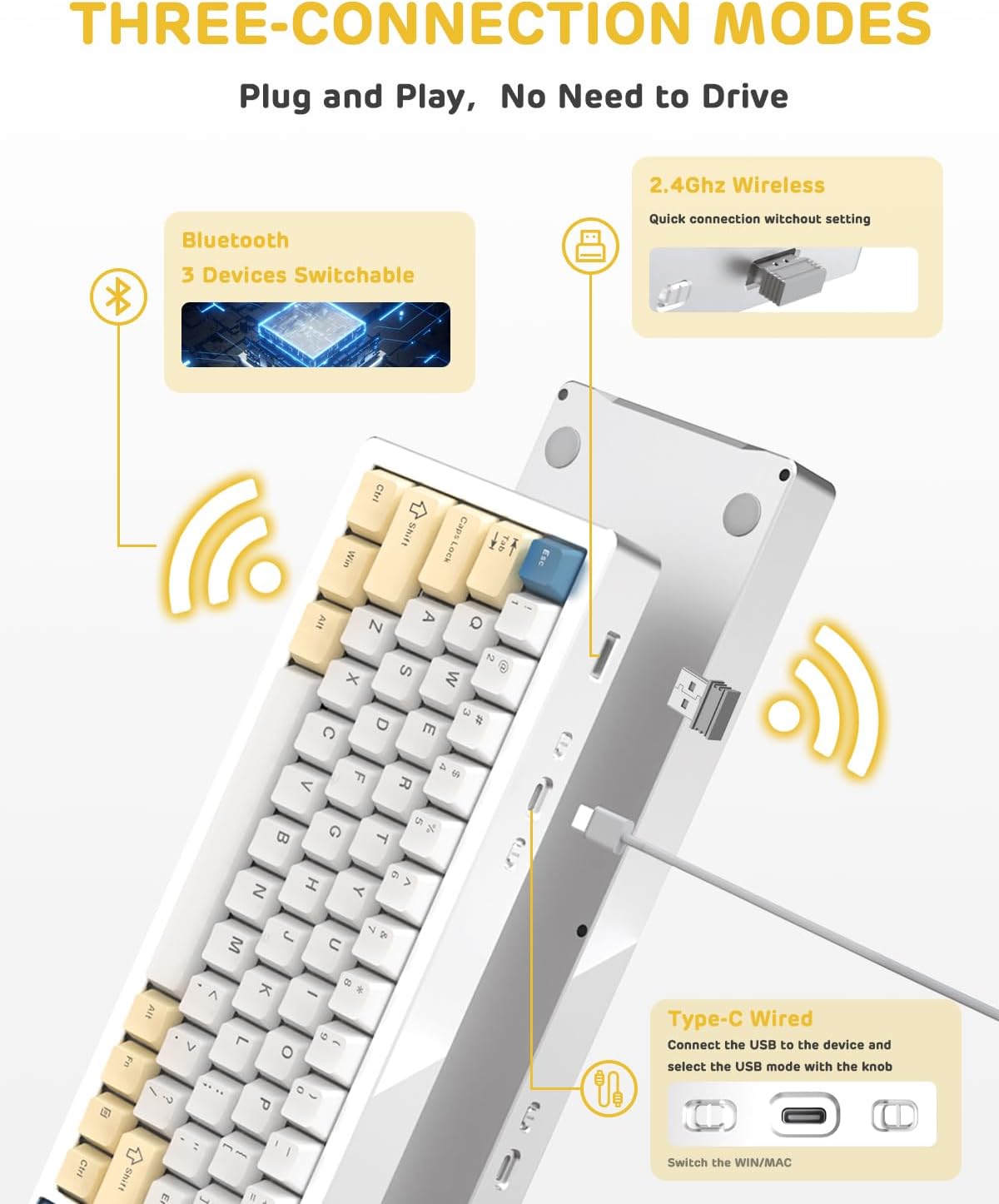
Image: A visual guide to the three connectivity options: Bluetooth for up to 3 devices, 2.4GHz wireless with a receiver, and wired Type-C connection.
Правадное злучэнне:
- Connect the provided Type-C cable to the keyboard's USB-C port and to your computer's USB port.
- Ensure the mode switch on the keyboard is set to the wired (USB-C) position.
- Клавіятура будзе аўтаматычна распазнана вашай сістэмай.
Бесправадное злучэнне 2.4G:
- Знайдзіце бесправадны прыёмнік (адаптар) 2.4G у камплекце.
- Падключыце прыёмнік 2.4G да даступнага USB-порта вашага кампутара.
- Усталюйце перамыкач рэжымаў на клавіятуры ў становішча бесправадной сувязі 2.4G.
- Клавіятура павінна падключыцца аўтаматычна.
Злучэнне Bluetooth:
- Усталюйце перамыкач рэжымаў на клавіятуры ў становішча Bluetooth.
- На камп'ютары або прыладзе адкрыйце налады Bluetooth і знайдзіце новыя прылады.
- The keyboard should appear as "ATTACK SHARK M71" or similar. Select it to pair.
- The keyboard can connect to up to 3 Bluetooth devices. Use Fn + 1/2/3 для пераключэння паміж спалучанымі прыладамі.
2. Battery Charging and Status:
The M71 keyboard is equipped with a 4600mAh battery. To charge, connect the keyboard via the USB-C cable to a power source (e.g., computer USB port, USB wall adapter).

Image: A diagram showing how to check the battery level using Fn+ALT(R) and the visual indicators on the keyboard's side LED strip.
- To check the battery level in wireless mode, press Fn + ALT (Right). The side LED strip will indicate the charge level.
- Battery life is approximately 1-2 weeks with lighting enabled and up to 4 weeks with lighting disabled.
Інструкцыя па эксплуатацыі
1. Multimedia Keys:
The keyboard features 12 multimedia keys accessible via the Fn камбінацыі клавіш:
- Fn + F1-F12: Access various multimedia functions (e.g., volume control, play/pause, calculator, email).
- Fn + 1/2: Кіраванне яркасцю экрана.
2. Кіраванне асвятленнем RGB:
Customize the keyboard's RGB backlight and side LED strip:

Image: The M71 keyboard displaying its RGB backlight and side LED strip, along with a close-up of the PBT keycaps.
- Fn + Ctrl (Right): Switch between different side LED light strip modes.
- Fn + Tab: Toggle white light mode.
- Refer to the full user manual for additional lighting effect controls and customization options via the programmable software.
3. Programmable Software:
The keyboard supports a dedicated driver program for advanced customization. You can download the software from the official ATTACK SHARK website to personalize lighting effects, key assignments, and macros. The keyboard is compatible with Windows 2000/XP/Vista/7/8/10/11, Android, and iOS.
Тэхнічнае абслугоўванне
1. Ачыстка:
- Выкарыстоўвайце мяккую, сухую тканіну для працірання паверхні клавіятуры.
- For deeper cleaning, remove keycaps using the provided keycap puller and use compressed air to clear debris from between switches.
- Пазбягайце выкарыстання агрэсіўных хімікатаў або абразіўных матэрыялаў.
2. Hot-Swapping Switches:
The M71 keyboard features hot-swappable sockets, allowing you to change switches without soldering.

Выява: буйны план view of the hot-swappable White Jade linear switches on the M71 keyboard, demonstrating how they can be easily removed and replaced.
- Выключыце клавіятуру або адлучыце яе ад прылады.
- Use the switch puller tool to carefully grip the switch and pull it straight up.
- Align the pins of the new switch with the holes on the PCB and press down gently until it clicks into place. Ensure pins are not bent.
- The PCB supports both 3-pin and 5-pin switches.
Video: A demonstration of the disassembly process for the M71 keyboard, showing how to remove keycaps and switches, revealing the gasket mount structure.
Ліквідацыю непаладак
| выпуск | Магчымае рашэнне |
|---|---|
| Клавіятура не рэагуе ў бесправадным рэжыме. |
|
| Клавішы не рэгіструюцца або ўводзяцца два разы. |
|
| RGB-падсветка не працуе або працуе няправільна. |
|
| Праблемы са спалучэннем Bluetooth. |
|
Тэхнічныя характарыстыкі
| Асаблівасць | Дэталь |
|---|---|
| мадэль | М71 |
| Макет | 75% TKL (71 клавіш) |
| Сувязь | Bluetooth 5.0/3.0, 2.4G Wireless, USB-C Wired |
| Выключальнікі | Hot-swappable (3/5-pin compatible), Pre-lubed Linear White Jade Switch |
| Клавішы | PBT OEM Keycaps |
| Стыль мантажу | Мацаванне пракладкі |
| Матэрыял шасі | Full Aluminum CNC (6063 alloy) |
| Ёмістасць батарэі | 4600 мАг |
| Асвятленне | RGB Backlight, RGB LED Side Light Strip |
| Сумяшчальнасць | Windows 2000/XP/Vista/7/8/10/11, Android, iOS, Mac |
| Памеры прадукту | 13.78 см Д х 4.53 см Ш х 1.22 см В |
| Вага прадмета | 2.86 фунта |
Гарантыя і падтрымка
For warranty information and technical support, please refer to the official ATTACK SHARK webсайт або звярніцеся непасрэдна ў службу падтрымкі кліентаў. Захоўвайце чэк аб куплі як пацвярджэнне пакупкі для любых гарантыйных прэтэнзій.
вытворца: АТАКА АКУЛА
Прадавец: Ajazz US
Дата першай даступнасці: 4 жніўня 2023 г