
Amazon Echo Show 21
Кіраўніцтва карыстальніка Amazon Echo Show 21
Model: Echo Show 21
1. Уводзіны
Welcome to your new Amazon Echo Show 21. This smart display is designed to be the central hub for your home, offering a large Full HD screen for entertainment, organization, and communication. With built-in Fire TV and Alexa, you can stream content, manage your smart home, make video calls, and keep your family organized with customizable widgets.

Figure 1.1: Amazon Echo Show 21 Overview
The Echo Show 21 integrates seamlessly into your daily life, providing a visual and interactive experience for all your Alexa commands.
2. Пачатак працы: Налада
2.1 Што ў камплекце
- Прылада Echo Show 21
- Alexa Voice Remote with batteries (2 AAA included)
- Power adapter (30W) and 5 ft. cord (white)
- Wall mount, anchors, screws, mounting template
- Кароткае кіраўніцтва
2.2 Пачатковая налада
The Echo Show 21 is designed for simple setup. You will need a Wi-Fi connection.
- Уключэнне: Падключыце адаптар сілкавання да Echo Show 21 і ўстаўце яго ў разетку. Прылада аўтаматычна ўключыцца.
- Падключэнне Wi-Fi: Follow the on-screen instructions to connect your device to your Wi-Fi network. Amazon Wi-Fi simple setup can automatically connect your device if you are a Prime member and have previously saved your Wi-Fi credentials.
- Уваход у ўліковы запіс Amazon: Увайдзіце, выкарыстоўваючы ўліковыя дадзеныя вашага ўліковага запісу Amazon.
- персаналізацыя: Customize your home screen, set up profiles, and configure your preferred settings.
- Аддаленае спалучэнне: The included Alexa Voice Remote should pair automatically. If not, follow the on-screen instructions or refer to the quick start guide for manual pairing.
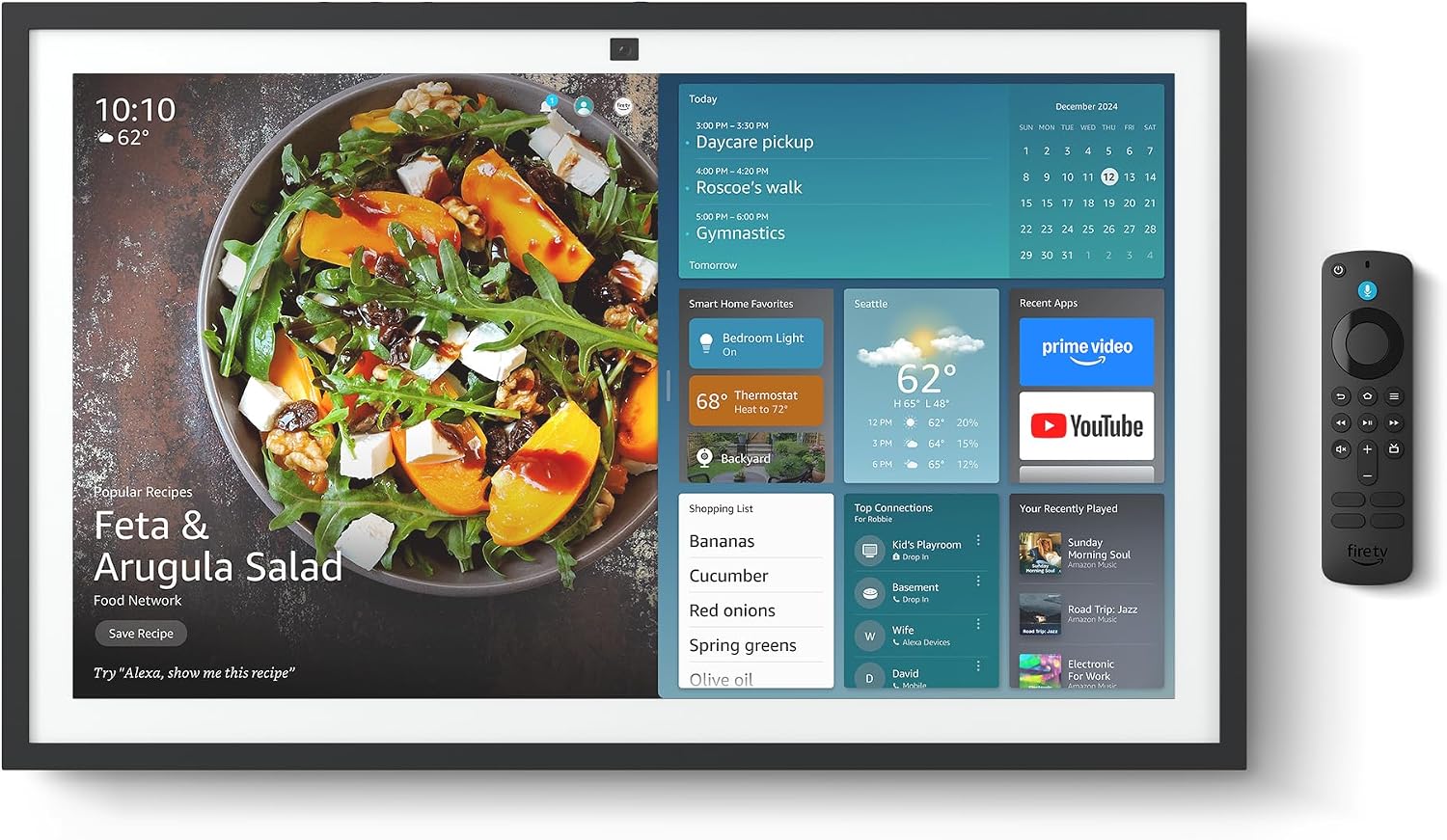
Figure 2.1: Echo Show 21 with Alexa Voice Remote
2.3 Варыянты мантажу
The Echo Show 21 can be wall-mounted using the included hardware or placed on a stand (sold separately). Wall mounting requires an electric drill.
3. Кіраванне Echo Show 21
3.1 Галасавое кіраванне з дапамогай Alexa
Your Echo Show 21 is primarily controlled by voice using Alexa. Simply say the wake word "Alexa" followed by your command or question.
- Агульныя каманды: «Алекса, якое надвор'е?», «Алекса, пастаў таймер на 10 хвілін».
- Музыка і аўдыё: "Alexa, play pop music," "Alexa, play my morning playlist."
- Video & Entertainment: "Alexa, open Prime Video," "Alexa, play The Boys on Netflix."
3.2 Fire TV Integration
Enjoy endless entertainment with built-in Fire TV. Use the included Alexa Voice Remote or voice commands to navigate.

Figure 3.1: Fire TV Interface
- Access thousands of apps like Prime Video, Netflix, YouTube, Apple TV.
- Stream movies, TV shows, and live content.
- The Fire TV remote allows for traditional navigation and playback control.
3.3 Home Screen & Widgets
The 21-inch display is ideal for organizing your day with customizable widgets.

Figure 3.2: Customizable Home Screen Widgets
- Keep important information like calendars, shopping lists, and weather in view.
- Personalize your home screen with family photos.
3.4 Кіраванне разумным домам
Control compatible smart devices using your voice or the smart home dashboard.

Figure 3.3: Smart Home Dashboard
- Turn lights on/off, adjust thermostats, or view жывыя трансляцыі з камер.
- Supports Zigbee, Matter, and Thread Border Router for broad compatibility.
3.5 Відэазванкі
Connect with family and friends using the 13 MP camera with auto-framing, wide field of vision, 3.3x zoom, and noise reduction.

Figure 3.4: Echo Show 21 as a Digital Photo Frame
The camera can also be used to display your favorite memories as a digital photo frame.
4. Тэхнічнае абслугоўванне
Каб забяспечыць даўгавечнасць і аптымальную працу вашага Echo Show 21, выконвайце наступныя рэкамендацыі па тэхнічным абслугоўванні:
- Ачыстка экрана: Выкарыстоўвайце мяккую тканіну без ворса, каб акуратна працерці экран. Для выдалення ўстойлівых плям злёгку працярыцеampen the cloth with water. Avoid abrasive cleaners or sprays directly on the screen.
- Ачыстка корпуса прылады: Wipe the exterior surfaces with a dry, soft cloth. Do not use harsh chemicals or solvents.
- Вентыляцыя: Ensure the device's ventilation openings are not blocked to prevent overheating.
- Абнаўленні праграмнага забеспячэння: Your Echo Show 21 receives automatic software security updates. Ensure your device is connected to Wi-Fi to receive these updates.
5. Выпраўленне непаладак
If you encounter issues with your Echo Show 21, try the following common solutions:
- Прылада не адказвае: Try saying "Alexa" again clearly. If unresponsive, unplug the power adapter for a few seconds and then plug it back in to restart the device.
- Няма падключэння да Wi-Fi: Check your router and modem to ensure they are working correctly. Restart your router. On the Echo Show 21, go to Settings > Network to re-select your Wi-Fi network and re-enter the password.
- Праблемы з аўдыя: Ensure the volume is not muted or too low. Say "Alexa, turn up the volume." Check audio settings in the device menu.
- Камера не працуе: Ensure the physical camera shutter is open and the mic/camera-off button is not activated (red light indicates off).
- Пульт не адказвае: Check the batteries in the Alexa Voice Remote. If necessary, replace them. Re-pair the remote if it becomes disconnected.
6. Тэхнічныя характарыстыкі
| Асаблівасць | Спецыфікацыя |
|---|---|
| Памер | 21.4" Ш х 13.2" В х 1.5" Г |
| Вага | 10.7 фунт |
| Дысплей | 21” with 1920 x 1080 resolution (landscape or portrait) |
| Камера | 13 MP + Shutter |
| Аўдыё | Two 2” woofers + two 0.6” tweeters |
| Падключэнне да Wi-Fi | Wi-Fi 6E (802.1ax), Tri-band, dual-antenna (MIMO). Supports 802.11a/b/g/n/ac. |
| Smart Home Hub | Маршрутызатар Zigbee + Matter + Thread Border |
| Працэсар | Octa-core SoC with Amazon AZ2 neural network engine |
| Датчыкі | ALS RGB + Accelerometer |
| мова | Англійская і іспанская |

Figure 6.1: Echo Show 15 vs. Echo Show 21 Dimensions
7. Функцыі прыватнасці
Echo Show 21 распрацаваны з некалькімі ўзроўнямі кантролю прыватнасці:
- Mic/Camera-Off Button: Фізічная кнопка для электроннага адключэння мікрафонаў і камеры.
- Затвор камеры: A built-in physical shutter to cover the camera lens.
- Тэхналогія Wake Word: Alexa devices only begin recording and sending audio to the cloud after detecting the wake word.
- Паказчыкі струменевай перадачы: Візуальныя індыкатары паказваюць, калі аўдыё ці відэа перадаецца ў воблака.
- Voice Recording Control: Здольнасць да view і выдаліць свае галасавыя запісы.

Figure 7.1: Mic/Camera-Off Button and Camera Shutter
Больш падрабязную інфармацыю можна знайсці ў цэнтры прыватнасці Alexa.
8. Спецыяльныя магчымасці
The Echo Show 21 includes various accessibility features to personalize Alexa to your abilities:
- Націсніце, каб Alexa: Атрымлівайце доступ да Alexa праз сэнсарны інтэрфейс праз экранныя пліткі або клавіятуру.
- Адаптыўнае праслухоўванне: Дае больш часу, каб скончыць гаварыць, перш чым Alexa адкажа.
- Пажаданы тэмп маўлення: Кантралюйце хуткасць або павольнасць гаворкі Alexa.
- Субтытры: Субтытры Alexa, субтытры выклікаў і схаваныя субтытры забяспечваюць тэкст для падтрымоўванага кантэнту.
- Паказаць і расказаць: Helps users who are blind or visually impaired identify products.
- ГоласView Праграма чытання з экрана: Enables access for customers who are blind or visually impaired.
- Павелічальнік экрана: Павялічваць/памяншаць маштаб і перамяшчацца па экране.
- Kindle Чытанне ўслых: Have Alexa read your Kindle books aloud.
- Тэкст у рэжыме рэальнага часу: Уводзьце тэкст у рэжыме рэальнага часу падчас відэазванка.
These features can be enabled via Settings > Accessibility on your device.
9. Гарантыя і падтрымка
9.1 Гарантыя на выраб
Your Echo Show 21 comes with a 1-гадовая абмежаваная гарантыя і абслугоўванне. Optional 1-year, 2-year, and 3-year extended warranties are available for U.S. customers, sold separately.
Use of Echo Show 21 and Fire TV on Echo Show 21 is subject to their respective terms of service.
9.2 Падтрымка кліентаў
For further assistance, troubleshooting, or to learn more about your device, please visit the Amazon support webсайт або звярніцеся ў службу падтрымкі кліентаў Amazon.
Ask a question about this manual
Ask about setup, troubleshooting, compatibility, parts, safety, or missing instructions. Manuals+ will review the question and use this page’s manual context to help answer it.