
Уводзіны
This manual provides detailed instructions for the safe and efficient use of your Blow Portable Bluetooth Speaker, Model 30-391. Please read this manual thoroughly before operating the device and retain it for future reference.
The Blow 30-391 is a versatile portable Bluetooth speaker designed for universal use with smartphones, tablets, computers, and other audio devices. It features Bluetooth 5.0 connectivity, AUX input, Micro USB port, and an integrated microphone for various audio applications.
Змест пакета
Праверце, ці ёсць у вашай упакоўцы ўсе пералічаныя ніжэй прадметы:
- Blow Portable Bluetooth Speaker (Model 30-391)
- USB-кабель для зарадкі
- Мікрафонны кабель
- Кіраўніцтва карыстальніка (гэты дакумент)
- Пульт дыстанцыйнага кіравання

Выява: спераду view of the Blow Portable Bluetooth Speaker 30-391, showcasing its RGB lighting, included remote control, and wired microphone.

Image: The USB charging cable and the microphone cable that come with the speaker.
Асаблівасці прадукту
- Падключэнне: Bluetooth 5.0, AUX-in (3.5mm), Micro USB, USB port, MicroSD card slot.
- Аўдыявыхад: 10 Watts maximum speaker output.
- акумулятар: Integrated 4500 mAh rechargeable battery.
- Асаблівасці: Integrated microphone, RGB lighting effects, voice control capability.
- Пераноснасць: Compact design with a handle for easy transport.
- Сумяшчальнасць: Universal compatibility with desktop computers, laptops, smartphones, and tablets.
Настройка
1. Зарадка дынаміка
Before first use, fully charge the speaker. Connect the supplied USB charging cable to the Micro USB port on the speaker and the other end to a standard USB power adapter (not included) or a computer's USB port. The charging indicator light will illuminate during charging and turn off when fully charged.
2. Уключэнне / выключэнне харчавання
Locate the power switch on the top panel of the speaker. Slide the switch to the "ON" position to power on the speaker. Slide it to the "OFF" position to power off the speaker.

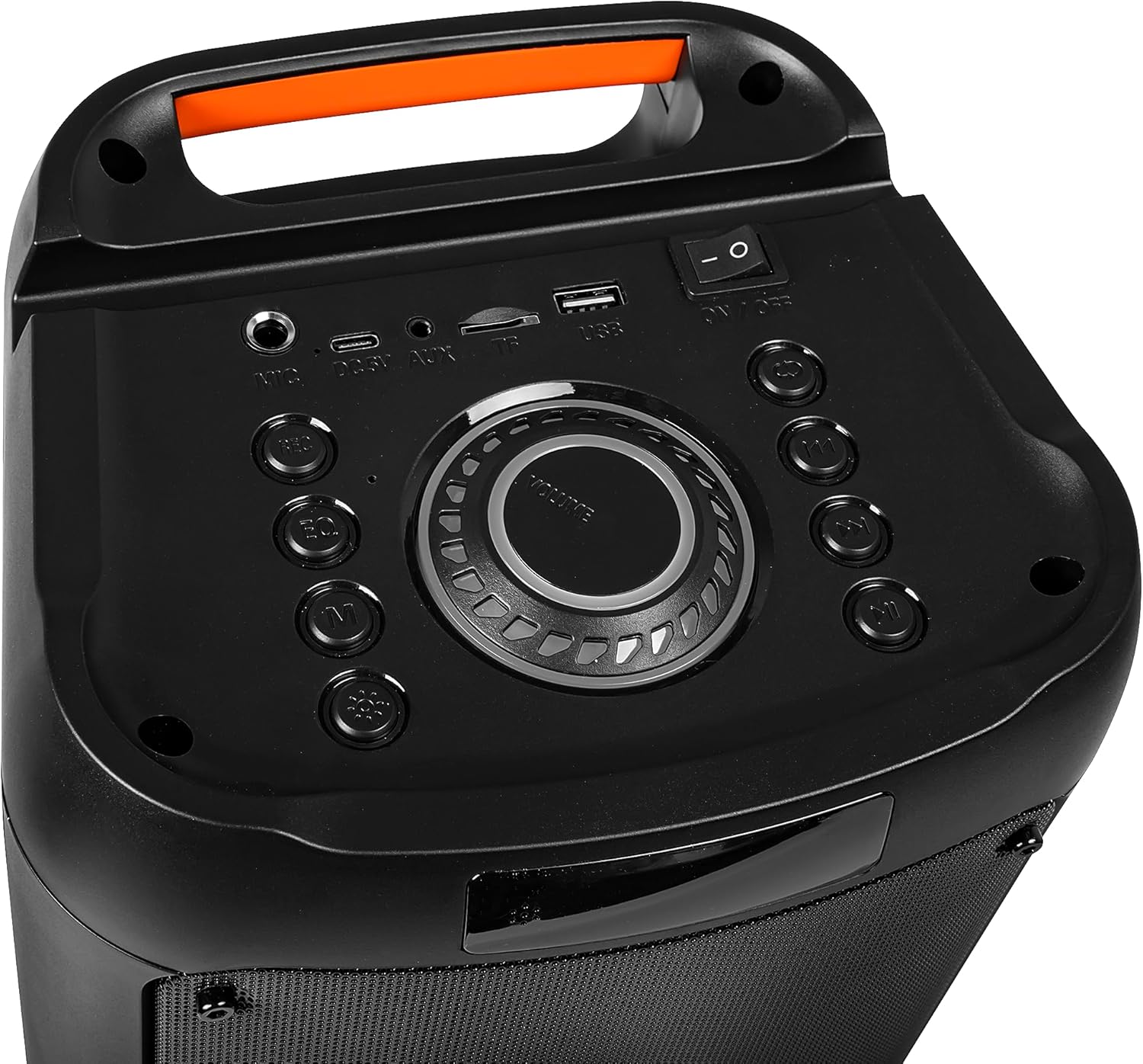
Image: Close-up of the speaker's top control panel, showing the power switch, volume knob, and various input ports.
3. Спарванне Bluetooth
- Уключыце дынамік. Ён аўтаматычна пяройдзе ў рэжым спалучэння Bluetooth, пра што будзе сведчыць мігценне святлодыёда.
- На мабільнай прыладзе (смартфоне, планшэце і г.д.) уключыце Bluetooth і знайдзіце даступныя прылады.
- Select "Blow 30-391" from the list of devices.
- Пасля спалучэння дынамік падасць гукавое пацверджанне, а святлодыёдны індыкатар перастане міргаць.
- Пры ўключэнні дынамік аўтаматычна падключыцца да апошняй спалучанай прылады, калі прылада знаходзіцца ў зоне дзеяння і Bluetooth уключаны.
4. Падключэнне AUX
To connect an external audio device via AUX, use a 3.5mm audio cable (not included). Plug one end into the AUX-in port on the speaker and the other end into the headphone jack or audio output of your device. The speaker will automatically switch to AUX mode.
5. Прайграванне з USB/MicroSD
Insert a USB flash drive or a MicroSD card (up to 32GB) containing MP3 audio files into the respective port on the speaker. The speaker will automatically detect the storage device and begin playing music. Use the control buttons to navigate tracks.
Інструкцыя па эксплуатацыі
1. Элементы кіраванняview
The speaker features a control panel on the top for easy operation. Refer to the image in the "Setup" section for button layout.
- Выключальнік сілкавання: ВКЛ/ВЫКЛ.
- Рэгулятар гучнасці: Павярніце, каб адрэгуляваць агульную гучнасць.
- Кнопка рэжыму: Press to switch between Bluetooth, AUX, USB, and MicroSD modes.
- Кнопка прайгравання/паўзы: Націсніце, каб прайграць або прыпыніць гук.
- Кнопкі папярэдняга/наступнага трэка: Націсніце, каб перайсці да папярэдняга або наступнага трэка.
- Кнопка эквалайзера: Press to cycle through equalizer presets.
- Кнопка рэжыму святла: Press to change RGB lighting effects.
- Мікрафонны ўваход: Падключыце сюды правадны мікрафон.
2. Выкарыстанне мікрафона
Connect the supplied wired microphone to the microphone input port on the speaker. Adjust the microphone volume using the dedicated control (if available) or the main volume knob. The integrated microphone allows for voice control and hands-free calling when connected via Bluetooth.
3. Эфекты RGB-асвятлення
The speaker features dynamic RGB lighting. Press the "Light Mode" button on the control panel or remote control to cycle through different lighting patterns or to turn the lights off.
Тэхнічнае абслугоўванне
- Уборка: Выкарыстоўвайце мяккую сухую тканіну для чысткі вонкавага боку дынаміка. Не выкарыстоўвайце абразіўныя ачышчальнікі або растваральнікі.
- Сыход за батарэяй: Каб падоўжыць тэрмін службы батарэі, пазбягайце частай поўнай разрадкі батарэі. Рэгулярна зараджайце дынамік, нават калі ён не выкарыстоўваецца працяглы час.
- захоўванне: Захоўвайце дынамік у прахалодным, сухім месцы, удалечыні ад прамых сонечных прамянёў і экстрэмальных тэмператур.
- Воданепранікальнасць: This speaker is NOT waterproof. Avoid exposure to water or excessive moisture.
Ліквідацыю непаладак
| праблема | Магчымае рашэнне |
|---|---|
| Дынамік не ўключаецца. | Ensure the battery is charged. Connect the speaker to a power source using the USB cable. Check the power switch position. |
| Немагчыма падключыцца праз Bluetooth. | Ensure the speaker is in pairing mode (flashing LED). Make sure your device's Bluetooth is enabled and within range (up to 10 meters). Forget previous pairings on your device and try again. |
| Няма гуку. | Check the volume level on both the speaker and your connected device. Ensure the correct input mode (Bluetooth, AUX, USB, MicroSD) is selected. Check cable connections for AUX mode. |
| Нізкая якасць гуку. | Ensure the speaker is not too far from the Bluetooth device. Avoid obstacles between the speaker and the device. Try a different audio source or file. |
| Не працуе мікрафон. | Ensure the microphone is securely connected to the input port. Check microphone volume settings. |
Тэхнічныя характарыстыкі
| Нумар мадэлі | 30-391 |
| Марка | Удар |
| Тэхналогія падлучэння | Bluetooth 5.0, Auxiliary (3.5mm), Micro USB, USB |
| Рэжым выхаду гуку | AUX, Bluetooth |
| Максімальная выходная магутнасць дынаміка | 10 ват |
| Ёмістасць батарэі | 4500 мАг |
| Max Memory Card Size | 32 GB (MicroSD) |
| Асаблівасці | Integrated Microphone, RGB Lighting, Voice Control |
| Крыніца харчавання | Харчаванне ад батарэі |
| Памеры прадукту (Д х Ш х У) | 26 х 46 х 24 см (прыблізна) |
| Вага прадукту | 3.67 кг (прыкладна) |
| Колер | Black (with multicolor RGB lighting) |

Выява: Збоку view of the Blow Portable Bluetooth Speaker 30-391, showing its vertical orientation.
Выява: Спіна view of the Blow Portable Bluetooth Speaker 30-391, highlighting the integrated carrying handle.
Выява: Падрабязная view of the top control panel, including the power switch, volume knob, and various input ports.

Image: The retail packaging for the Blow Portable Bluetooth Speaker 30-391, showing product features and accessories.
Гарантыя і падтрымка
The Blow Portable Bluetooth Speaker 30-391 comes with a limited warranty. Please refer to the warranty card included in your package for specific terms and conditions. For technical support, troubleshooting assistance, or warranty claims, please contact your retailer or the manufacturer directly. Contact information can typically be found on the product packaging or the manufacturer's official webсайт.
вытворца: Удар
ASIN: B0CDXQRT9Q


