
Morpheus 360 HS6500SBT
Morpheus 360 Advantage Stereo Wireless Headset User Manual
Model: HS6500SBT | Brand: Morpheus 360
Уводзіны
This manual provides detailed instructions for the setup, operation, and maintenance of your Morpheus 360 Advantage Stereo Wireless Headset. Designed for seamless communication and audio, this headset features Bluetooth 5.3 connectivity, a detachable noise-cancelling boom microphone, and comfortable protein leather ear cushions, making it ideal for both work and gaming environments.

The Morpheus 360 Advantage Stereo Wireless Headset, showcasing its design and included USB-A and USB-C dongles for versatile connectivity.
Асноўныя характарыстыкі:
- Seamless Multi-Device Connection: Bluetooth 5.3 technology allows connection to multiple devices, facilitating easy switching between phone calls and video conferences.
- Wear All Day Comfort: Lightweight design with protein leather ear cushions and memory foam for extended wear.
- Noise-Free Communication: Detachable noise-cancelling boom microphone with 120-degree rotation filters background noise for clear calls.
- Універсальная сумяшчальнасць: Complies with UC standard, ensuring seamless operation with communication software like Zoom, Skype, and MS Teams.
- Інтэграваныя элементы кіравання: Built-in call and volume controls for convenient management.
Змест пакета
Праверце, ці ёсць усе прадметы ў вашай упакоўцы:
- Morpheus 360 Advantage Stereo Wireless Headset
- Здымны мікрафон на штанзе
- USB-A Receiver-Dongle
- USB-C Adapter (for USB-A dongle)
- USB-кабель для зарадкі (USB-A да USB-C)
- Кіраўніцтва карыстальніка (гэты дакумент)
Прадукт скончаныview
Familiarize yourself with the components of your headset:

Left earcup with microphone port and control buttons.
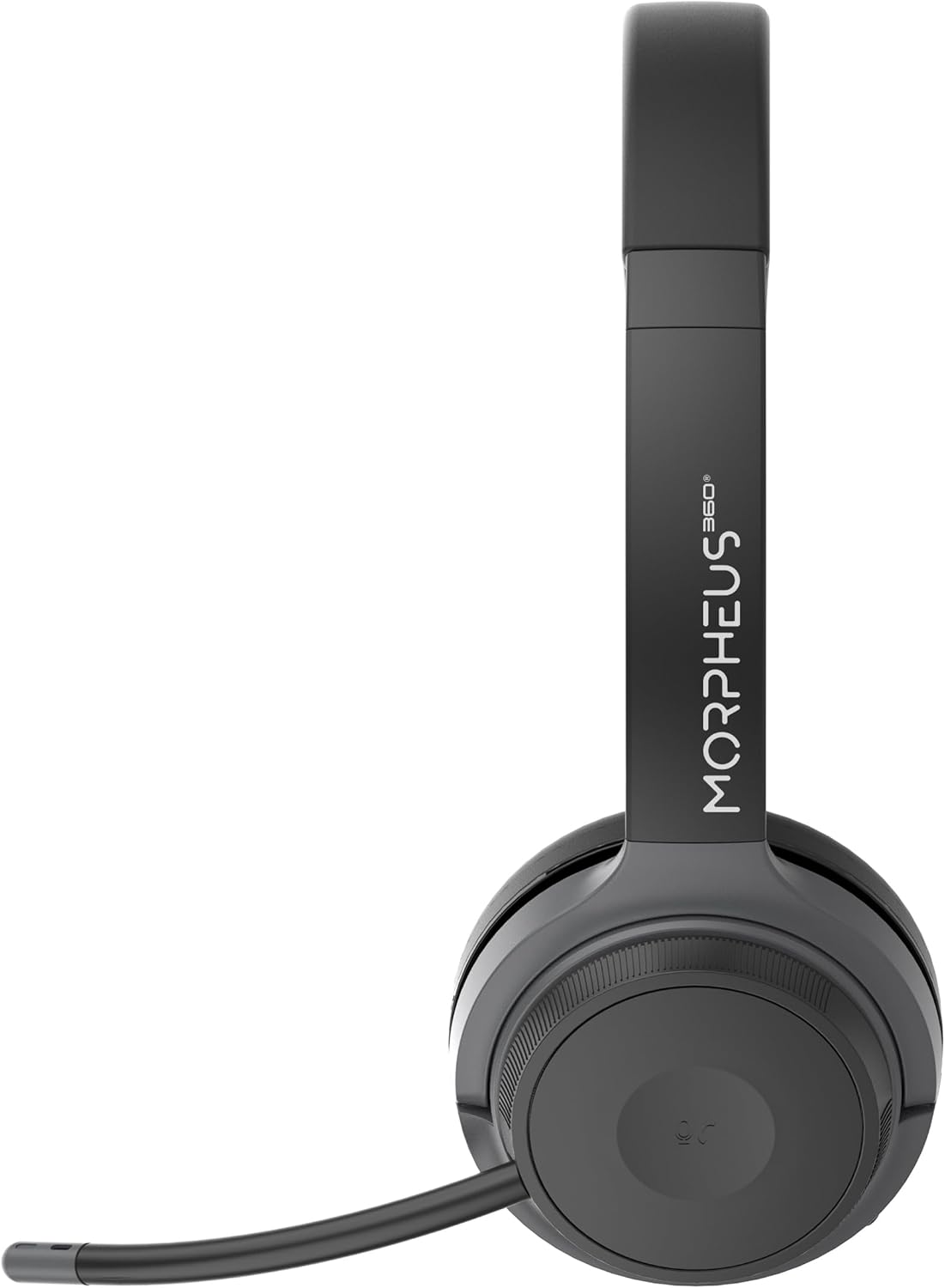
Right earcup featuring the volume control dial and USB-C charging port.
- Павязка на галаву: Рэгулюецца для камфортнай пасадкі.
- Амбушюры: Soft protein leather with memory foam for comfort.
- Порт мікрафона: Located on the left earcup for attaching the boom microphone.
- Кнопка харчавання/спалучэння: Controls power and initiates Bluetooth pairing.
- Дыск рэгулявання гучнасці: Located on the right earcup, allows for precise volume adjustments.
- Порт для зарадкі USB-C: Для зарадкі акумулятара гарнітуры.
- Кнопкі кіравання мультымедыя: Play/Pause, Next/Previous Track (functionality may vary by device).
- Кнопка кіравання выклікамі: Answer/End/Reject calls.
Настройка
1. Зарадка гарнітуры
Перад першым выкарыстаннем цалкам зарадзіце гарнітуру. Поўная зарадка займае прыблізна 2 гадзіны.
- Connect the USB charging cable to the USB-C port on the headset.
- Падключыце другі канец кабеля да крыніцы харчавання USB (напрыклад, USB-порт кампутара, насценны адаптар).
- Святлодыёдны індыкатар будзе паказваць стан зарадкі (падрабязную інфармацыю глядзіце ў раздзеле пра святлодыёдныя індыкатары).
2. Attaching the Boom Microphone
The boom microphone is detachable and can be inserted into the microphone port on the left earcup. Ensure it clicks securely into place. The microphone can be rotated 120 degrees for optimal positioning.
3. Падключэнне да прылад
Your headset offers two primary connection methods: Bluetooth and 2.4GHz Wireless (via USB dongle).
Злучэнне Bluetooth:
- Пераканайцеся, што гарнітура зараджана і выключана.
- Націсніце і ўтрымлівайце кнопку харчавання/спалучэння, пакуль святлодыёдны індыкатар не пачне міргаць сінім і чырвоным колерамі, што паказвае на рэжым спалучэння.
- На вашай прыладзе (смартфоне, планшэце, ноўтбуку) уключыце Bluetooth і пачніце пошук новых прылад.
- Select "Morpheus 360 Advantage" from the list of available devices.
- Пасля падключэння святлодыёдны індыкатар будзе гарэць сінім колерам пастаянна.

The headset supports Bluetooth 5.3 for stable connections and Universal Communication (UC) standards for broad compatibility.
2.4GHz Wireless Connection (via USB Dongle):
This method is ideal for devices without Bluetooth or for a more stable connection, particularly with PCs and Macs.
- Plug the USB-A receiver-dongle into an available USB-A port on your computer. If your computer only has USB-C ports, use the included USB-A to USB-C adapter.
- Power on the headset. It should automatically connect to the dongle.
- The LED indicator on both the headset and dongle will show a solid blue light when connected.
- Ensure the Morpheus 360 headset is selected as the default audio input and output device in your computer's sound settings.
Інструкцыя па эксплуатацыі
Уключэнне/выключэнне харчавання:
- Уключэнне: Press and hold the Power/Pairing button for approximately 3 seconds until the LED indicator lights up.
- Выключэнне: Press and hold the Power/Pairing button for approximately 5 seconds until the LED indicator turns off.
Рэгулятар гучнасці:
Rotate the volume control dial on the right earcup:
- Павярніце па гадзіннікавай стрэлцы, каб павялічыць гучнасць.
- Павярніце супраць гадзіннікавай стрэлкі, каб паменшыць гучнасць.
Кіраванне званкамі:
- Адказаць на званок: Націсніце кнопку кіравання выклікамі адзін раз.
- Завяршыць выклік: Press the Call Control button once during a call.
- Адхіліць выклік: Націсніце і ўтрымлівайце кнопку кіравання выклікамі на працягу 2 секунд.

The headset provides comfortable wear for extended periods, ideal for calls and online meetings.
Прайграванне мультымедыя:
- Прайграванне/Паўза: Націсніце кнопку Play/Pause адзін раз.
- Наступны трэк: Націсніце кнопку «Наступны трэк» адзін раз.
- Папярэдні трэк: Націсніце кнопку «Папярэдні трэк» адзін раз.
Выкарыстанне мікрафона:
- Выключыць/уключыць гук: Use the dedicated mute button on the microphone boom or the headset controls (if available).
- пазіцыянаванне: Adjust the 120-degree rotatable boom microphone for optimal voice pickup, ensuring it is close to your mouth.
Тэхнічнае абслугоўванне
Уборка:
- Працярыце гарнітуру мяккай, сухой тканінай без ворса.
- For ear cushions, use a slightly damp пры неабходнасці працярыце тканінай з мяккім мылам, а затым неадкладна вытрыце насуха.
- Не выкарыстоўвайце абразіўныя ачышчальнікі, спірт або хімічныя растваральнікі.
захоўванне:
- Захоўвайце гарнітуру ў прахалодным, сухім месцы, удалечыні ад прамых сонечных прамянёў і экстрэмальных тэмператур.
- Пазбягайце класці цяжкія прадметы на гарнітуру.
Сыход за батарэяй:
- Рэгулярна зараджайце гарнітуру, нават калі яна выкарыстоўваецца рэдка, каб падтрымліваць яе працаздольнасць.
- Пазбягайце частай поўнай разрадкі акумулятара.
Ліквідацыю непаладак
| праблема | Магчымая прычына | Рашэнне |
|---|---|---|
| Гарнітура не ўключаецца. | Нізкі акумулятар. | Цалкам зарадзіце гарнітуру. |
| Немагчыма падключыцца праз Bluetooth. | Headset not in pairing mode; Device Bluetooth off; Out of range. | Ensure headset is in pairing mode (flashing blue/red). Turn device Bluetooth on. Move headset closer to device (within 10 meters). |
| Няма гуку або дрэнная якасць гуку. | Volume too low; Incorrect audio output selected; Headset not connected properly. | Increase headset and device volume. Select "Morpheus 360 Advantage" as audio output. Reconnect headset. |
| Не працуе мікрафон. | Мікрафон адключаны; няправільна падключаны; выбрана няправільная прылада ўводу. | Unmute microphone. Ensure microphone is securely attached. Select "Morpheus 360 Advantage" as audio input in device settings. |
| Перарывістае злучэнне. | Перашкоды; Па-за зонай дзеяння; Нізкі ўзровень зарада батарэі. | Move away from other wireless devices. Stay within 10 meters of connected device. Charge headset. |
Тэхнічныя характарыстыкі
| Асаблівасць | Дэталь |
|---|---|
| Назва мадэлі | HS6500SBT |
| Тэхналогія падлучэння | Wireless (Bluetooth 5.3, 2.4GHz via USB Dongle) |
| Версія Bluetooth | 5.3 |
| Дыяпазон Bluetooth | Да 10 метраў (33 футаў) |
| Тэрмін службы батарэі | Up to 30 Hours (Talk/Playtime) |
| Час зарадкі | Прыкладна 2 гадзін |
| Кантроль шуму | Пасіўнае падаўленне шуму |
| Мікрафон | Detachable Noise Cancelling Boom Microphone (120-degree rotation) |
| Размяшчэнне вушэй | Над вухам |
| Матэрыял | Faux Leather (Protein Leather Ear Cushions) |
| Сумяшчальныя прылады | Laptops, Desktops, Tablets, Telephones, Smartphones, Communication Software (UC Standard) |
| Памеры прадукту | 8.75 х 3 х 8.5 цалі |
| Вага прадмета | 9.6 унцыі |
| Імпеданс | 30 Ом |
| UPC | 856816008538 |
Інфармацыя аб гарантыі
Morpheus 360 products are designed and manufactured to the highest quality standards. For detailed warranty information, including terms, conditions, and registration, please refer to the official Morpheus 360 webсайт або гарантыйны талон, які ўваходзіць у камплект пастаўкі вашага прадукту.
Калі ласка, захавайце доказы пакупкі для прэтэнзій па гарантыі.
Падтрымка
For further assistance, technical support, or frequently asked questions, please visit the official Morpheus 360 support webсайт:
You may also find helpful resources and contact information on the product's Amazon listing page.