
1. Уводзіны
The IHSENO ZigBee3.0 Smart Switch Mini Relay is an intelligent on-off device designed for smart home integration. Utilizing the ZigBee 3.0 protocol, this mini relay switch allows users to control lighting and other appliances through the Tuya Smart Life APP, voice commands via Alexa or Google Assistant, and custom scene modes. Its compact design ensures easy installation within existing electrical boxes.
2. Інфармацыя па бяспецы
ПАПЯРЭДЖАННЕ: Electrical installation should only be performed by qualified personnel. Always turn off power at the circuit breaker before installing or servicing the device. Failure to do so may result in serious injury or death.
- Перад устаноўкай пераканайцеся, што крыніца харчавання адключаны.
- Пераканайцеся, што працоўны томtage (AC 100-240V) and current rating (0.2 Amps) are compatible with your electrical system.
- Do not exceed the maximum load capacity of the switch.
- Гэта прылада прызначана толькі для выкарыстання ў памяшканні.
- Захоўваць у месцах, недаступных дзецям.
The device has an International Protection Rating of IP54, indicating protection against dust and splashing water. However, it is not waterproof and should not be exposed to direct water.
3. Асаблівасці прадукту
- Пратакол ZigBee 3.0: Ensures high stability, strong anti-interference ability, and low power consumption.
- Tuya Smart Life App Control: Seamless integration with the Tuya/Smart Life APP for remote control and intelligent scene linkage.
- Customizable Scene Modes: Create personalized scenes like 'Reading' or 'Movie' for specific rooms or activities.
- Галасавое кіраванне: Сумяшчальнасць з Amazon Alexa і Google Assistant для кіравання без выкарыстання рук.
- Групавы кантроль: Manage multiple smart switches simultaneously through the app.
- Intelligent Timing: Set schedules for automatic on/off operations to save energy.
- Кампактны дызайн: Mini size allows for easy installation within standard electrical boxes.
4. Тэхнічныя характарыстыкі
| Параметр | Каштоўнасць |
|---|---|
| Рэжым працы | УКЛ ВЫКЛ |
| Бягучы рэйтынг | 0.2 Amps |
| Аперацыйная Voltage | Пераменны ток 100-240 вольт |
| Тып кантакту | Звычайна адкрыты |
| Марка | IHSENO |
| Тэрмінал | Скразная дзірка |
| Тып схемы | 1-баковы |
| Кантактны матэрыял | Медзь, латунь, срэбра |
| Міжнародны рэйтынг абароны | IP54 |
| Пратакол злучэння | ZigBee |
| Метад кантролю | Прыкладанне, пульт, голас |
| Тып кантролера | Amazon Alexa, Google Assistant |
| Колер | Белы |
| Памеры | 43 мм х 43 мм х 22 мм (прыблізна 1.69 х 1.69 х 0.87 цалі) |
The IHSENO ZigBee3.0 Smart Switch Mini Relay is designed for seamless integration into your smart home ecosystem.

Выява: Падрабязная view of the IHSENO Mini Smart Switch with its dimensions and basic specifications.
5. Настройка і ўстаноўка
Before beginning installation, ensure the main power supply is turned off at the circuit breaker to prevent electrical shock.
5.1 Электронныя схемы
The input and output connections cannot be reversed. Follow the diagrams carefully based on your specific wiring setup.

Image: Wiring Method 1 shows a direct connection of the smart switch between the mains power and a lamp. L-out connects to the lamp's live wire, N-out to the lamp's neutral wire. L-in and N-in connect to the mains live and neutral respectively. S1 and S2 are not used in this configuration.

Image: Wiring Method 2 illustrates connecting the smart switch with a traditional 1-way wall switch. The mains live (L) and neutral (N) connect to L-in and N-in. The lamp connects to L-out and N-out. The 1-way switch connects to S1 and S2, allowing manual control while maintaining smart functionality.

Image: Wiring Method 3 demonstrates connecting the smart switch with a 2-way wall switch setup. Similar to Method 2, mains live (L) and neutral (N) connect to L-in and N-in, and the lamp to L-out and N-out. The 2-way switch connects to S1 and S2, enabling manual control from two locations while integrating smart features.

Image: This diagram illustrates how the smart DIY switch supports 2-way control, allowing connection with two parallel switches or one series switch. It highlights that the controller connects only to line N and L, not directly to the switch, and allows manual control of the old switch after installation.
5.2 Pairing with ZigBee Gateway
- Ensure your ZigBee gateway (hub) is powered on and connected to your network.
- Open the Tuya Smart Life APP and navigate to add a new device.
- Follow the in-app instructions to put your ZigBee gateway into pairing mode.
- Power on the IHSENO Smart Switch. It should automatically enter pairing mode. If not, refer to the device's specific reset procedure (usually involves pressing a button for a few seconds).
- Once detected, add the device in the APP and assign it to a room or group.
6. Інструкцыя па эксплуатацыі
6.1 Дыстанцыйнае кіраванне праграмай
After successful pairing, you can control the smart switch from anywhere using the Tuya Smart Life APP on your smartphone.
- Open the Tuya Smart Life APP.
- Select the IHSENO Smart Switch from your device list.
- Tap the on/off icon to toggle the connected appliance or light.
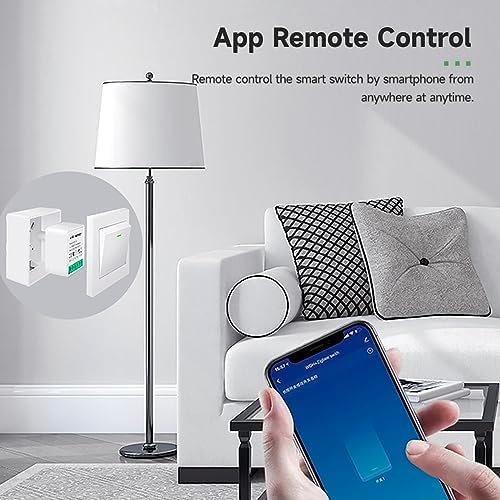
Image: A smartphone screen showing the Tuya Smart Life app interface, with a finger tapping to control a lamp, дэманструючы функцыянальнасць дыстанцыйнага кіравання.
6.2 Intelligent Timing and Scheduling
Set up schedules, countdowns, and cycling timers to automate your devices.
- In the Tuya Smart Life APP, select the smart switch.
- Tap on the 'Timer' or 'Schedule' option.
- Configure desired on/off times, countdowns, or recurring cycles.

Image: A smartphone displaying the intelligent timing features within the app, including options for setting specific on/off times, daily cycling, and countdowns for the smart switch.
6.3 Галасавое кіраванне
Integrate with Amazon Alexa or Google Assistant for convenient voice commands.
- Ensure your Alexa or Google Home device is set up and linked to your Tuya Smart Life account.
- Выкарыстоўвайце такія каманды, як:
- «Алекса, уключы [назва прылады]».
- «Гэй, Google, выключы [назва прылады]».

Image: A person relaxing on a bed, using voice commands to control a lamp via an Amazon Echo and Google Home Mini device, illustrating the voice control feature.
6.4 Group Control and Scene Modes
Organize multiple smart switches into groups or create custom scene modes for unified control.
- In the Tuya Smart Life APP, go to 'Smart' or 'Scenes' section.
- Create a new scene or group and add your IHSENO Smart Switches.
- Define actions for the scene (e.g., 'Reading Mode' turns on specific lights).
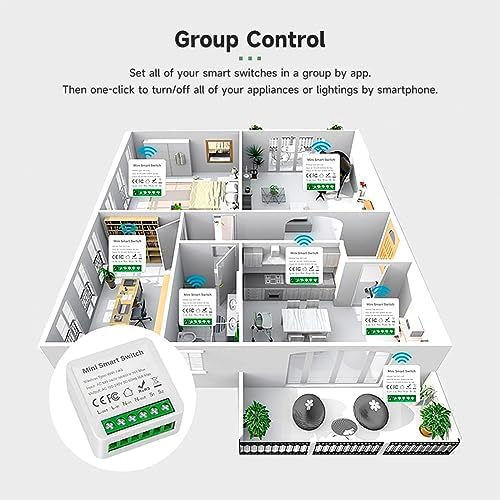
Image: A floor plan illustration depicting multiple IHSENO Mini Smart Switches installed throughout a home, demonstrating how they can be grouped and controlled via an app for whole-house automation.
7. Тэхнічнае абслугоўванне
The IHSENO Smart Switch requires minimal maintenance.
- Трымайце прыладу чыстай і без пылу. Выкарыстоўвайце для чысткі сухую мяккую тканіну.
- Не выкарыстоўвайце агрэсіўныя хімічныя рэчывы або абразіўныя мыйныя сродкі.
- Ensure the device is not exposed to excessive moisture or extreme temperatures.
- Regularly check for firmware updates through the Tuya Smart Life APP to ensure optimal performance and security.
8. Выпраўленне непаладак
- Прылада не спалучаецца:
- Ensure the ZigBee gateway is powered on and within range.
- Confirm the smart switch is in pairing mode (refer to device reset instructions if needed).
- Check your Wi-Fi network for stability and ensure it's 2.4GHz (if applicable for your hub).
- No response from app/voice control:
- Verify the smart switch has power and is connected to the ZigBee network.
- Праверце падключэнне да Інтэрнэту.
- Ensure the Tuya Smart Life APP is updated to the latest version.
- Relink your Tuya Smart Life account with Alexa/Google Assistant if necessary.
- Physical switch not working:
- Review the wiring diagrams to ensure correct connection of the physical switch to S1 and S2 terminals.
- Ensure the physical switch itself is functional.
- Device frequently disconnects:
- The ZigBee signal might be weak. Consider adding more ZigBee devices to create a stronger mesh network or repositioning your gateway.
- Праверце наяўнасць крыніц перашкод (напрыклад, іншых бесправадных прылад).
9. Гарантыя і падтрымка
IHSENO is committed to providing quality products and customer satisfaction.
- For any questions or issues regarding your IHSENO ZigBee Smart Switch, please contact our customer service team.
- Мы імкнемся адказаць на ўсе запыты на працягу 24 гадзін.
- Please retain your purchase receipt for warranty claims. Specific warranty duration may vary by region and retailer.