
1. Прадукт скончыўсяview
The SOLAKAKA SM800 is an ultra-lightweight, tri-mode wireless gaming mouse designed for high-performance gaming and versatile connectivity. It features a high-precision optical sensor, durable microswitches, and programmable buttons.

Figure 1: SOLAKAKA SM800 Wireless Gaming Mouse highlighting the PAW3395 Optical Sensor with specifications including 26000 DPI, 650 IPS, 50G ACC, and 1MM/2MM LOD.
Асноўныя характарыстыкі:
- Аптычны датчык PAW3395: High precision, low power consumption, low delay, up to 26,000 DPI.
- Трохрэжымнае падключэнне: Supports Type-C wired, Bluetooth 5.1, and 2.4GHz wireless connections.
- Звышлёгкі дызайн: Weighs approximately 58g for comfortable, extended use.
- Kailh GM8.0 Microswitches: Durable switches with 80 million click lifespan and quick response.
- Праграмуемыя кнопкі: Customize button functions, DPI settings, lighting, polling rate, and macros via dedicated software.
- Эрганамічная форма: Streamlined design for a comfortable grip across various hand positions.
Змест пакета:
- SOLAKAKA SM800 Wireless Gaming Mouse
- USB-кабель C
- USB-прыёмнік 2.4 ГГц
- Кіраўніцтва карыстальніка
- DIY Anti-slip Stickers
2. Настройка
2.1 Зарадка мышы
Connect the provided USB-C cable to the mouse's Type-C port and the other end to a USB power source (e.g., computer, wall adapter). The mouse features a Type-C fast charging port.

Малюнак 2: Буйны план view of the SOLAKAKA SM800 mouse showing the Type-C fast charging port, anti-slip wheels, and the storage slot for the 2.4GHz receiver.
2.2 Падключэнне мышы
The SM800 offers three connection modes: 2.4GHz wireless, Bluetooth 5.1, and Type-C wired.

Figure 3: The SM800 mouse illustrating its tri-mode connectivity, allowing quick switching and saving up to 4 devices.
- Уключэнне/выключэнне харчавання: Locate the toggle switch on the bottom of the mouse. Slide it to the 'ON' position to power on the mouse.
- Пераключэнне рэжымаў: Press the mode switch button on the bottom of the mouse to cycle between 2.4GHz wireless (red indicator), Bluetooth 1 (blue indicator), and Bluetooth 2 (green indicator).
- Бесправадное злучэнне 2.4 ГГц:
- Remove the 2.4GHz USB receiver from its storage slot on the bottom of the mouse.
- Падключыце прыёмнік да вольнага порта USB на вашым кампутары.
- Switch the mouse to 2.4GHz mode (red indicator). The mouse should connect automatically.
- Злучэнне Bluetooth:
- Switch the mouse to Bluetooth 1 (blue indicator) or Bluetooth 2 (green indicator) mode.
- On your device, search for Bluetooth devices and select 'SOLAKAKA SM800' to pair.
- Правадное падключэнне тыпу C:
- Connect the USB-C cable directly from the mouse to your computer. The mouse will automatically switch to wired mode and begin charging.
3. Інструкцыя па эксплуатацыі
3.1 Функцыі кнопак
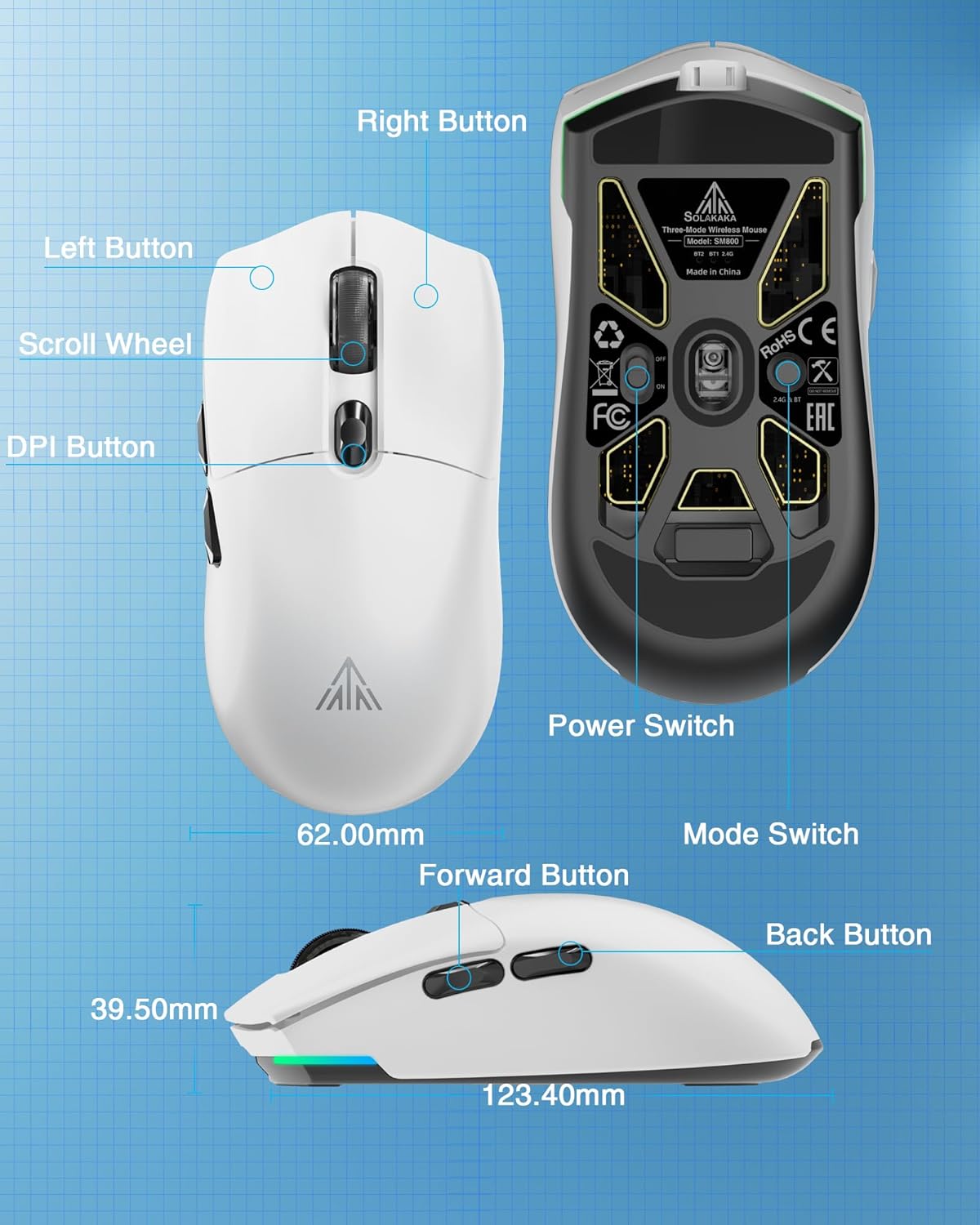
Малюнак 4: падрабязна view of the SM800 mouse, indicating the Left Button, Right Button, Scroll Wheel, DPI Button, Forward Button, Back Button, Power Switch, and Mode Switch, along with its dimensions.
- Левая кнопка: Функцыя асноўнага націску.
- Правая кнопка: Функцыя другаснага націску.
- Кола пракруткі: Scroll up/down, Middle Button click.
- Кнопка DPI: Цыклічнае пераключэнне паміж зададзенымі ўзроўнямі DPI.
- Кнопка "Наперад": Перамяшчаецца наперад web браўзеры або праграмы.
- Кнопка "Назад": Пераходзіць назад у web браўзеры або праграмы.
3.2 Рэгуляванне DPI
The mouse supports 6 levels of adjustable DPI. Press the DPI button (located behind the scroll wheel) to cycle through the preset DPI settings. The default DPI levels are 800, 1600, 3200, 4800, 8000, and 26000. The 26,000 DPI setting requires the SOLAKAKA software for activation and customization.

Figure 5: Illustration of the SM800's 6 adjustable DPI levels, ranging from 800 to 26000, with a note that 26000 DPI requires SOLAKAKA software.
3.3 Налада праграмнага забеспячэння
For advanced customization, including button remapping, macro programming, DPI fine-tuning, polling rate adjustment, and RGB lighting effects, download and install the official SOLAKAKA SM800 software.

Figure 6: The SM800 mouse displayed with its programmable software interface, allowing users to customize buttons, DPI, lighting, polling rate, and macros.
Software Installation Steps:
- Увядзіце URL: bit.ly/m/solakaka
- Click on "SM800" and download the zip file.
- Unzip the SM800 software zip file.
- Click the icon to install the SM800 software.
- Double-click the icon to enter the software settings.
4. Тэхнічнае абслугоўванне
4.1 Ачыстка
Каб падтрымліваць аптымальную прадукцыйнасць, рэгулярна працірайце мыш мяккай сухой тканінай. Пазбягайце выкарыстання агрэсіўных хімічных рэчываў або абразіўных матэрыялаў.
4.2 Applying Anti-slip Stickers
The package includes DIY anti-slip stickers for enhanced grip and personalization. Carefully peel the stickers and apply them to the desired areas on the mouse surface.
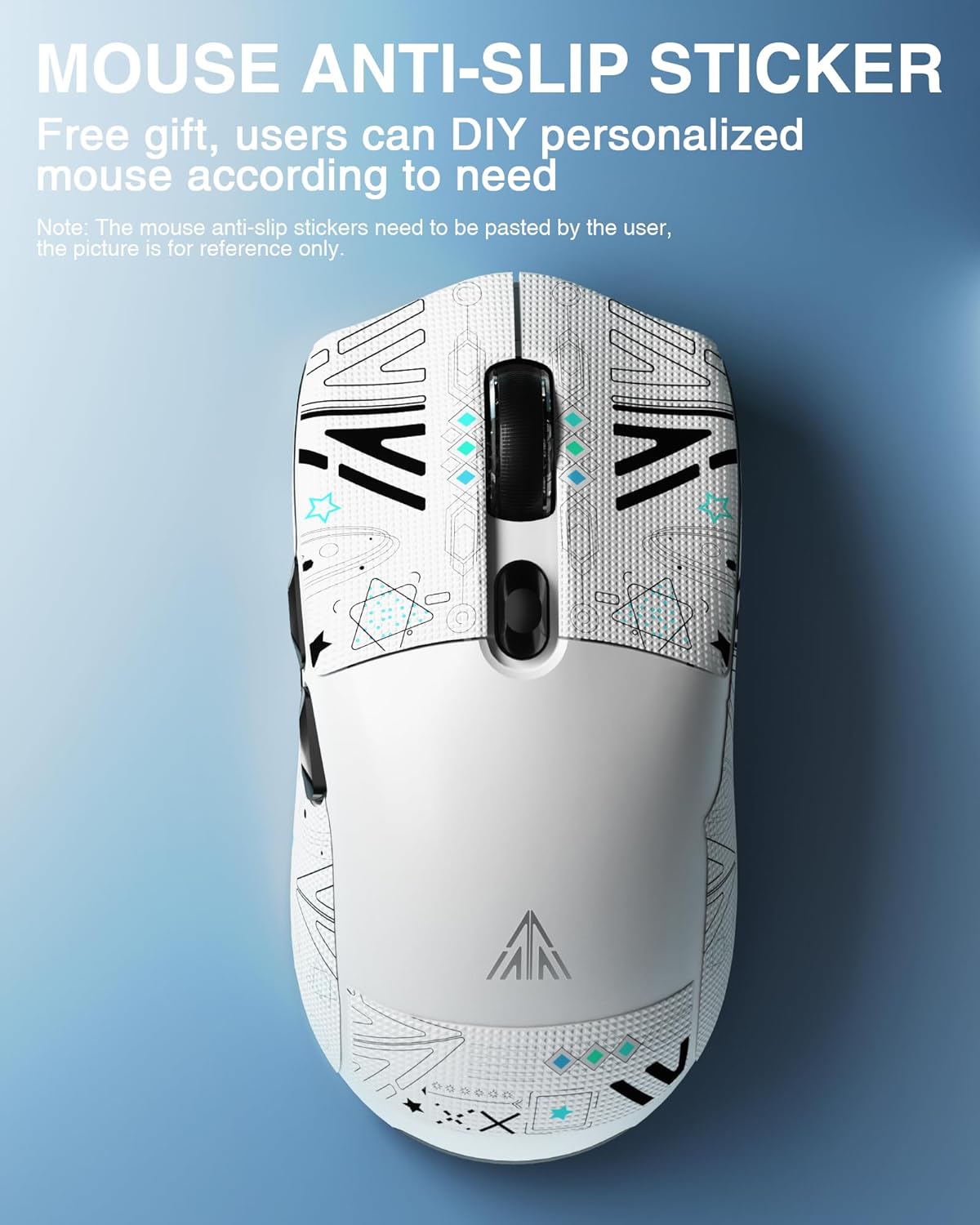
Figure 7: The SM800 mouse showcasing applied anti-slip stickers, which can be customized by the user.
5. Выпраўленне непаладак
- Мышка не рэагуе: Ensure the mouse is powered on and correctly connected via wired, 2.4GHz, or Bluetooth mode. Check battery level.
- Праблемы з падключэннем 2.4 ГГц: Ensure the USB receiver is securely plugged in and the mouse is in 2.4GHz mode. Try a different USB port.
- Праблемы з спалучэннем Bluetooth: Ensure the mouse is in Bluetooth pairing mode (flashing blue/green indicator) and your device's Bluetooth is enabled. Try re-pairing.
- DPI not changing to 26,000: The highest DPI setting requires the official SOLAKAKA software to be installed and configured.
- Software not installing/working: Ensure your operating system meets the software requirements. Temporarily disable antivirus/firewall if encountering installation issues.
6. Тэхнічныя характарыстыкі
| Асаблівасць | Спецыфікацыя |
|---|---|
| Памеры прадукту | 4.8 х 2.56 х 1.54 цалі |
| Вага прадмета | 2.05 унцый (прыблізна 58 г) |
| Тэхналогія падлучэння | Bluetooth 5.1, бесправадная сувязь 2.4 ГГц, правадны порт Type-C |
| Тэхналогія выяўлення руху | Аптычны (датчык PAW3395) |
| Макс. DPI | 26,000 DPI |
| Колькасць кнопак | 6 |
| Мікравыключальнікі | Kailh GM8.0 (80 million clicks) |
| акумулятар | 1 літый-іённы акумулятар (у камплекце, 300 мАг) |
| Колер | Белы |
7. Афіцыйныя відэа пра прадукт
Watch these official videos for a visual guide to the SOLAKAKA SM800 Wireless Gaming Mouse's features and functionality.
SOLAKAKA SM800 Ultra-lightweight 58g Tri-mode Gaming Mouse
Гэта відэа забяспечвае завяршэннеview of the SOLAKAKA SM800's ultra-lightweight design, tri-mode connectivity, and key gaming features.
SOLAKAKA SM800 26K DPI Tri-Mode Wireless Gaming Mouse
This video highlights the 26,000 DPI optical sensor and the versatile tri-mode wireless connectivity of the SM800 gaming mouse.
8. Гарантыя і падтрымка
For warranty information and customer support, please refer to the official SOLAKAKA webсайт або звярніцеся непасрэдна ў службу падтрымкі кліентаў. Захоўвайце чэк аб куплі для прэтэнзій па гарантыі.