
Уводзіны
This manual provides instructions for the installation, operation, and maintenance of your REVODATA TSEYE 5MP PIR POE IP Camera (Model IPIR-POE). Please read this manual thoroughly before using the product to ensure correct usage and optimal performance.
The IPIR-POE camera features 5-megapixel resolution, Power over Ethernet (PoE) capability, 940nm invisible infrared LEDs for night vision, and passive infrared (PIR) motion detection.
Змест пакета
Праверце, ці ўсе пералічаныя ніжэй прадметы ўваходзяць у камплект. Калі якія-небудзь прадметы адсутнічаюць або пашкоджаныя, звярніцеся ў службу падтрымкі кліентаў.

Image: Contents of the REVODATA TSEYE IPIR-POE camera package. Includes the camera unit, product packaging box, a set of mounting screws, and the user manual.
- REVODATA TSEYE IPIR-POE Camera
- Набор мантажных шруб
- Кіраўніцтва карыстальніка
Note: This product does not include a power adapter. It is designed for Power over Ethernet (PoE) or requires a separate 12V DC power supply.
Тэхнічныя характарыстыкі
| Марка | РЭВАДАТА |
| мадэль | IPIR-POE |
| дазвол | 5MP (2880x1660P) |
| Аб'ектыў | 3.7mm Pinhole Lens |
| Інфрачырвоныя святлодыёды | 940nm Invisible IR LEDs |
| Крыніца харчавання | 48V Power over Ethernet (PoE) or 12V DC (adapter not included) |
| Maximum IR Range | 15 метраў |
| Дэтэктар руху | PIR (пасіўны інфрачырвоны) |
| Сувязь | Ethernet (No Wi-Fi) |
| Вага | 10.56 унцыі |

Выява: Падрабязная view of the camera's physical features and connections, including its dimensions (4.72 in height, 2.76 in width), 940nm LEDs, 3.7mm Pinhole Lens, mounting bracket, camera cable, auxiliary power supply input, and RJ45 network cable connection.
Настройка
1. Physical Installation and Connection
The IPIR-POE camera supports Power over Ethernet (PoE), simplifying installation by delivering both power and data through a single Ethernet cable. Alternatively, it can be powered by a 12V DC adapter (not included).
- Мантаж: Secure the camera to your desired location using the provided mounting screws. Ensure the camera has a clear field of view.
- Падключэнне PoE: Connect one end of an Ethernet cable to the camera's RJ45 port and the other end to a PoE-enabled NVR (Network Video Recorder) or a PoE switch.
- Падключэнне без PoE (неабавязкова): If not using PoE, connect a 12V DC power adapter (not included) to the camera's power input and an Ethernet cable to a standard network switch or router.
- NVR/Monitor Connection: Connect your PoE NVR to a monitor for local viewing, or ensure your NVR/router is connected to your network for remote access.
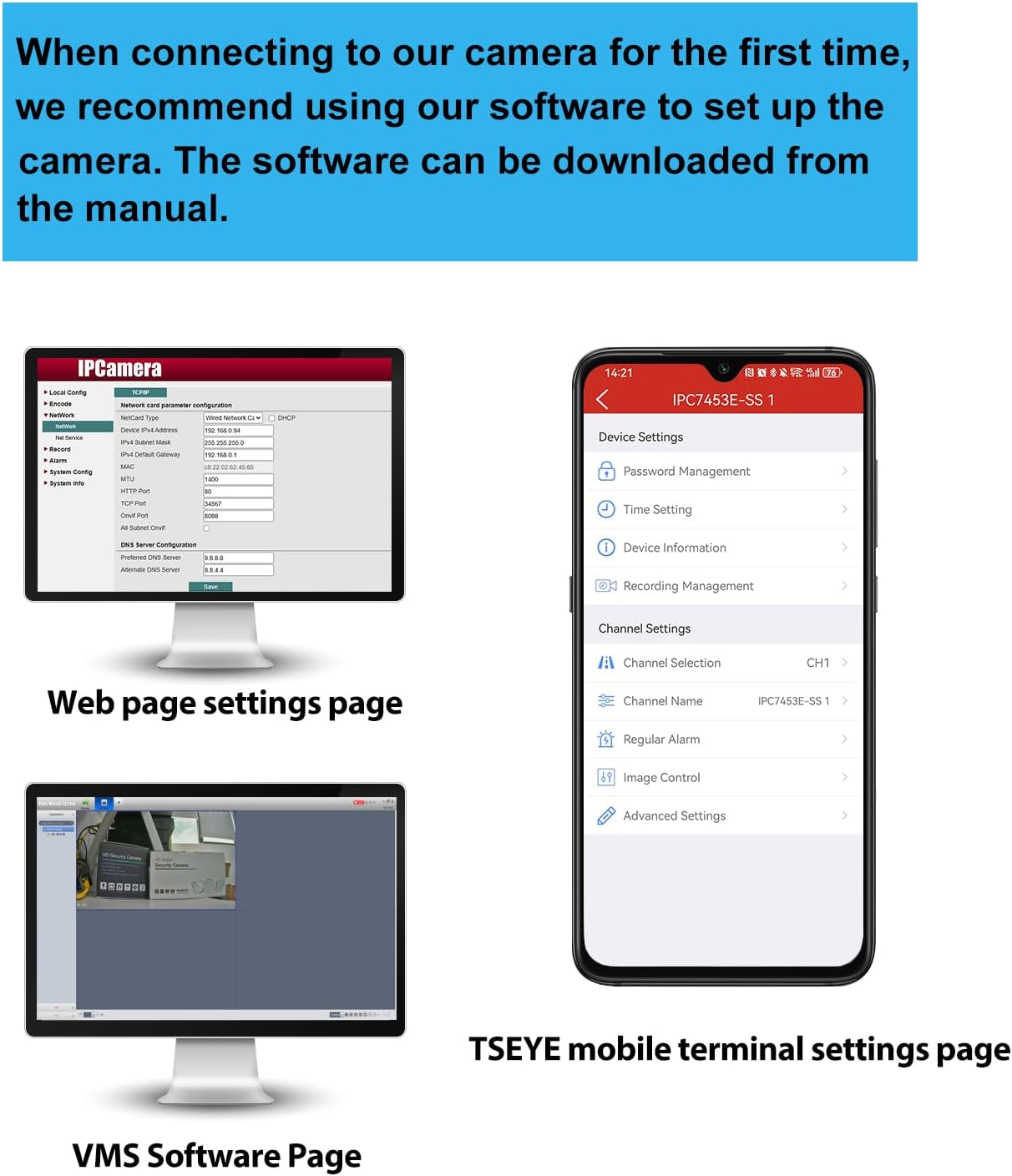
Image: Connection diagram for the PoE IP Camera. The camera connects to a PoE NVR via a network cable (power + network). The NVR connects to a monitor and a router. An optional DC 12V/2A power adapter is shown for non-PoE setups.
2. Налада праграмнага забеспячэння
For initial setup and configuration, REVODATA recommends using the "TSEYE" smartphone application or the VMS software for Windows. The manual included in the camera package contains detailed instructions for software usage.

Выява: Зверхуview of software interfaces. This includes the camera's web page settings for network configuration, the VMS software interface for Windows, and the TSEYE mobile application interface for smartphone settings.
TSEYE Smartphone Application
The "TSEYE" app is available for download on your smartphone's app store. It allows for remote viewing, configuration, and motion detection notifications.

Image: TSEYE App View. Shows the app's listing in an app store and its main interface with live video feed and control options.
VMS Software (Windows)
For Windows users, the VMS (Video Management Software) provides advanced monitoring and management capabilities. This software is not compatible with MAC OS or Linux.

Image: VMS View. A screenshot of the Video Management Software interface on a computer monitor, showing a live camera feed.
Аперацыя
1. Выяўленне руху
The camera features smart PIR motion detection. When movement is detected within the camera's field of view, an alarm notification will be sent to your smartphone via the TSEYE app.
- Канфігурацыя: Motion detection settings, including sensitivity and detection zones, can be configured through the TSEYE app or VMS software.
- Апавяшчэнні: Ensure app notifications are enabled on your smartphone to receive timely alerts.

Image: Motion Detection feature. A smartphone displays a notification from the TSEYE app indicating a device alarm due to detected movement. An illustration shows the camera detecting a person in a room.
2. Invisible IR Night Vision
Equipped with 940nm invisible infrared LEDs, the camera provides clear night vision without emitting a visible red glow, enhancing discretion and security. The camera automatically switches between day and night modes based on ambient light conditions.
- Рэжым дня: Full-color video recording in well-lit conditions.
- Начны рэжым: Black and white video recording in low-light or dark conditions, utilizing invisible IR illumination up to 15 meters.

Image: Day and Night Vision comparison. The top image shows a room in full color during the day. The bottom image shows the same room in clear black and white during the night, demonstrating the invisible IR night vision capability.
3. Аддалены доступ і маніторынг
Access your camera feed and settings remotely using the TSEYE smartphone application or the VMS software on your computer. Ensure your camera is properly connected to a network with internet access.
- жыць View: Monitor your premises in real-time from anywhere.
- Прайграванне: Review запісана footage stored on your NVR or local storage.
- Налады: Adjust camera parameters, motion detection, and notification preferences remotely.
Тэхнічнае абслугоўванне
- Уборка: Рэгулярна працірайце аб'ектыў камеры мяккай сухой тканінай, каб забяспечыць выразную якасць выявы. Пазбягайце абразіўных ачышчальнікаў.
- Абнаўленні прашыўкі: Праверце вытворцы webна сайце або ў дадатку, каб даведацца пра даступныя абнаўленні прашыўкі, каб забяспечыць аптымальную прадукцыйнасць і бяспеку.
- Праверка кабеля: Periodically inspect all cables for wear or damage, especially if installed outdoors.
- Умовы навакольнага асяроддзя: Ensure the camera operates within its specified temperature and humidity ranges.
Ліквідацыю непаладак
No Image/Video Feed
- Праверце магутнасць: Ensure the camera is receiving power. If using PoE, verify the PoE switch/NVR is functioning. If using a 12V DC adapter, ensure it's properly connected and working.
- Check Network Cable: Verify the Ethernet cable is securely connected at both ends and is not damaged.
- Падключэнне да сеткі: Confirm that your NVR/router has network access and the camera is properly configured on the network.
- праграмнае забеспячэнне: Ensure the TSEYE app or VMS software is correctly installed and configured to connect to the camera.
Дрэнная якасць выявы
- Чысты аб'ектыў: Clean the camera lens to remove dust or smudges.
- асвятленне: Ensure adequate lighting during the day. For night vision, confirm IR LEDs are functioning (though invisible, you might see a faint glow from certain angles or with another camera).
- Налады дазволу: Check the camera's resolution settings in the software to ensure it's set to 5MP (2880x1660P).
Выяўленне руху не працуе
- Enable Feature: Verify that motion detection is enabled in the camera's settings via the TSEYE app or VMS software.
- Адчувальнасць: Adjust motion detection sensitivity. Too low, and it might miss events; too high, and it might trigger false alarms.
- Зона выяўлення: Ensure the area you want to monitor is within the configured detection zone.
- Апавяшчэнні праграмы: Check your smartphone's notification settings to ensure the TSEYE app is permitted to send alerts.
Cannot Connect to TSEYE App/VMS
- Падключэнне да сеткі: Ensure your smartphone/computer and the camera are connected to the internet.
- IP-адрас камеры: Verify the camera's IP address and port settings are correct in the software.
- Брандмаўэр: Check if your network firewall is blocking communication with the camera.
- Налады маршрутызатара: For remote access, ensure port forwarding (if required by your network setup) is correctly configured on your router.
Гарантыя і падтрымка
For warranty information, please refer to the documentation provided with your purchase or contact your retailer. REVODATA provides technical support for its products.
If you encounter issues not covered in this manual, or require further assistance, please contact REVODATA customer support through their official webсайт або кантактную інфармацыю, указаную на ўпакоўцы прадукту.
Інтэрнэт-рэсурсы:
- Наведайце ст REVODATA Store on Amazon для атрымання інфармацыі аб прадуктах і абнаўленняў.