
1. Уводзіны
Thank you for choosing the ACEMAGICIAN AM07 Mini PC. This compact and powerful computer is designed for various tasks, from office work and multimedia entertainment to light gaming. This manual provides essential information for setting up, operating, and maintaining your device to ensure optimal performance and longevity. Please read this manual thoroughly before using your Mini PC.
2. Змесціва ўпакоўкі
Carefully unpack your ACEMAGICIAN AM07 Mini PC and verify that all items listed below are included:
- 1 x ACEMAGICIAN AM07 Mini PC
- 1 х адаптар сілкавання
- 1 x User Manual / Documentation
If any items are missing or damaged, please contact your retailer or ACEMAGICIAN customer support immediately.
3. Прадукт скончыўсяview
The ACEMAGICIAN AM07 Mini PC features an AMD Ryzen 5 5500U processor, 16GB DDR4 RAM, and a 512GB SSD, offering robust performance in a small form factor. It supports 4K UHD output and includes modern connectivity options like WiFi 5 and Bluetooth 4.2.

Малюнак 3.1: Закончанаview of the ACEMAGICIAN AM07 Mini PC's core components and features, including the AMD Ryzen 5 5500U processor, 16GB DDR4 RAM, 512GB SSD, WiFi 5, Bluetooth 4.2, and integrated cooling system.
3.1 Processor Details
The AM07 is powered by an AMD Ryzen 5 5500U processor, featuring 6 cores and 12 threads, with a base frequency of 2.1 GHz and a turbo frequency up to 4.0 GHz. This 7nm lithography processor ensures efficient and powerful performance for various applications.

Figure 3.2: Close-up of the AMD Ryzen 5 5500U processor, highlighting its key specifications for performance.
3.2 Падключэнне
The Mini PC supports ultra-fast wireless connectivity with WiFi 5 (dual-band 2.4GHz and 5.0GHz) and Bluetooth 4.2, ensuring stable and high-speed connections for your network and peripherals.

Figure 3.3: The AM07 Mini PC demonstrating its wireless capabilities, including WiFi 5 and Bluetooth 4.2, for seamless connectivity.
3.3 Захоўванне і памяць
Equipped with 16GB of dual-channel DDR4 RAM (2x8GB) and a 512GB M.2 2280 SSD, the AM07 provides fast data access and multitasking. The storage can be expanded up to 2TB by adding an additional hard drive.

Figure 3.4: Illustration of the AM07 Mini PC's internal storage and memory configuration, highlighting its expandability.
3.4 Display Capabilities
The Mini PC supports a triple 4K display setup (HDMI+DP+Type-C), allowing you to connect up to three monitors simultaneously for enhanced productivity and an immersive visual experience.

Figure 3.5: The AM07 Mini PC configured with a triple monitor setup, showcasing its advanced display output options.
3.5 Размяшчэнне партоў
The AM07 Mini PC offers a comprehensive set of ports for connecting various peripherals and devices:
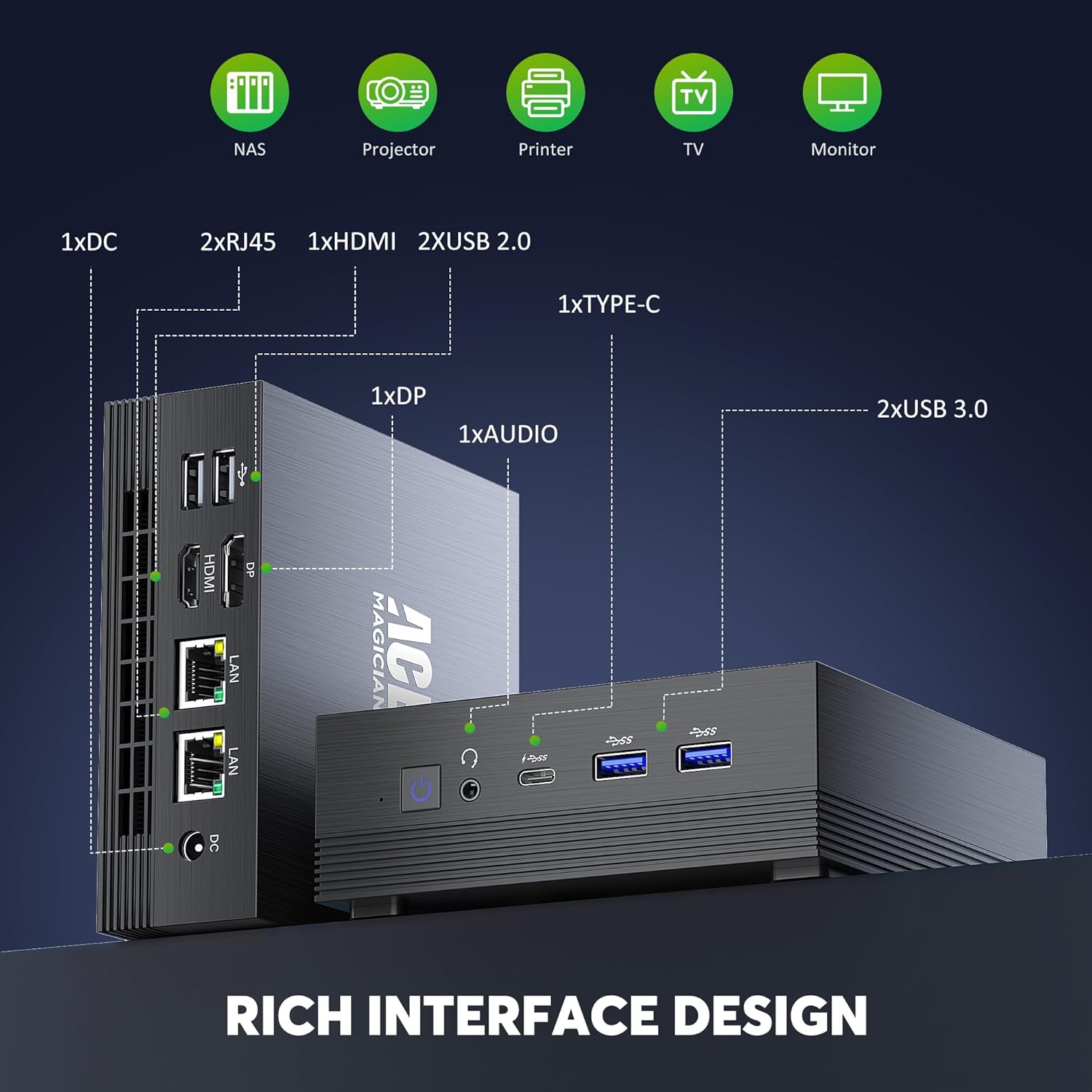
Figure 3.6: Detailed diagram of the AM07 Mini PC's front and rear ports, illustrating its connectivity options.
- Пярэднія порты: 2 x USB 3.0, 1 x Type-C, 1 x Audio Jack (Headphone/Microphone Combo), Power Button
- Заднія парты: 1 x DC Power Input, 2 x RJ45 (Gigabit LAN), 1 x HDMI, 1 x DisplayPort (DP), 2 x USB 2.0
4. Кіраўніцтва па наладцы
Follow these steps to set up your ACEMAGICIAN AM07 Mini PC:
- Падключэнне перыферыйных прылад: Connect your monitor(s) to the HDMI, DisplayPort, or Type-C ports. Connect your keyboard and mouse to the available USB ports.
- Падключыце харчаванне: Plug the power adapter into the DC input port on the Mini PC, then plug the adapter into a power outlet.
- Уключэнне: Націсніце кнопку харчавання, размешчаную на пярэдняй панэлі міні-ПК. Індыкатар харчавання загарыцца.
- Пачатковая ўстаноўка Windows: Upon first boot, follow the on-screen instructions to complete the Windows 11 Pro setup, including language, region, network connection, and user account creation.
5. Інструкцыя па эксплуатацыі
5.1 Сеткавае падключэнне
- Wi-Fi: Падчас усталёўкі Windows або праз налады Windows выберыце сетку Wi-Fi і ўвядзіце пароль.
- Ethernet: Connect an Ethernet cable from your router or modem to one of the RJ45 ports on the Mini PC. The connection will be established automatically.
5.2 Прылады Bluetooth
To connect Bluetooth devices (e.g., keyboard, mouse, headphones):
- Пераканайцеся, што прылада Bluetooth знаходзіцца ў рэжыме спалучэння.
- On your Mini PC, go to Settings > Bluetooth & devices > Add device.
- Выберыце Bluetooth and choose your device from the list to pair.
5.3 Некалькі дысплеяў
To configure multiple displays:
- Connect your monitors to the available HDMI, DisplayPort, or Type-C ports.
- Пстрыкніце правай кнопкай мышы на працоўным стале і абярыце Налады дысплея.
- Windows will detect the connected monitors. You can arrange them, set their resolution, and choose display modes (e.g., Extend, Duplicate) from this menu.
6. Тэхнічнае абслугоўванне
6.1 Ачыстка
Regularly clean the exterior of the Mini PC with a soft, dry cloth. For dust accumulation in vents, use compressed air. Ensure the device is powered off and unplugged before cleaning.
6.2 Абнаўленне праграмнага забеспячэння
Keep your Windows operating system and drivers updated to ensure optimal performance and security. Windows Update can be accessed via Налады > Цэнтр абнаўлення Windows.
6.3 Пашырэнне сховішча
The ACEMAGICIAN AM07 Mini PC supports storage expansion up to 2TB. Refer to the detailed instructions provided by ACEMAGICIAN for safely installing an additional 2.5-inch SATA SSD/HDD or upgrading the M.2 SSD.
7. Выпраўленне непаладак
Калі ў вас узніклі праблемы з вашым міні-ПК, звярніцеся да наступных распаўсюджаных рашэнняў:
- Няма харчавання: Пераканайцеся, што адаптар сілкавання надзейна падключаны як да міні-ПК, так і да спраўнай разеткі. Паспрабуйце іншую разетку.
- Няма дысплея: Verify that the monitor is powered on and correctly connected to the Mini PC. Try a different display cable or monitor. Ensure the correct input source is selected on your monitor.
- Няма падключэння да сеткі: For Wi-Fi, check your router and ensure the Wi-Fi password is correct. For Ethernet, ensure the cable is properly connected and your router is functioning.
- Нізкая прадукцыйнасць: Закрыйце непатрэбныя праграмы. Праверце фонавыя працэсы ў дыспетчары задач. Забяспечце дастаткова вольнага месца на дыску.
- Перыферыйная прылада не выяўлена: Ensure USB or Bluetooth devices are properly connected or paired. Try a different port or re-pair the Bluetooth device.
For persistent issues, consult the ACEMAGICIAN support webсайт або звярніцеся ў службу падтрымкі.
8. Тэхнічныя характарыстыкі
Below are the technical specifications for the ACEMAGICIAN AM07 Mini PC:
| Асаблівасць | Спецыфікацыя |
|---|---|
| Марка | АКЕМАГІЧНЫ |
| Нумар мадэлі | AM07 |
| Аперацыйная сістэма | Windows 11 Pro |
| Марка працэсара | AMD |
| Тып працэсара | Ryzen 5 5500U |
| Хуткасць працэсара | 4 GHz (Max Turbo) |
| Колькасць ядраў | 6 |
| АЗП | 16 ГБ DDR4 |
| Максімальная памяць | 64 ГБ |
| Памер жорсткага дыска | 512 GB SSD (Expandable to 2 TB) |
| Тэхналогія жорсткіх дыскаў | SSD |
| Марка графічнага чыпсэта | AMD |
| графічны працэсар | AMD Radeon Vega 7 |
| Аператыўная памяць відэакарты | 16 MB (Shared) |
| Тып бесправадной тэхналогіі | Bluetooth 4.2, WiFi 5 (2.4G + 5G) |
| Абсталяванне інтэрфейсу | Ethernet, HDMI, DisplayPort, USB 2.0, USB 3.0, Type-C |
| Колькасць партоў HDMI | 1 |
| Колькасць партоў USB 2.0 | 2 |
| Памеры прадукту (Д х Ш х У) | 12.9 х 13.7 х 5.5 см |
| Вага прадмета | 870 грамаў |
| Максімальнае дазвол дысплея | 3840 x 2160 (4K UHD) |
9. Гарантыя і падтрымка
ACEMAGICIAN products come with a standard warranty. For detailed warranty terms and conditions, please refer to the warranty card included with your product or visit the official ACEMAGICIAN website. If you require technical assistance or have questions not covered in this manual, please contact ACEMAGICIAN customer support through their official channels. When contacting support, please have your product model (AM07) and purchase information ready.