
1. Уводзіны
Дзякуй за пакупкуasing the RORRY D11 4-in-1 Wireless Charging Station. This versatile device is designed to simplify your charging experience by allowing you to simultaneously charge your iPhone, Apple Watch, and AirPods. It also features a detachable MagSafe-compatible power bank for convenient on-the-go charging. Please read this manual carefully before use to ensure proper operation and to maximize the lifespan of your device.
2. Змесціва ўпакоўкі
- RORRY D11 4-in-1 Wireless Charging Station
- PD20W Power Adapter
- Кабель USB-C да USB-C
- MagSafe Ring (for non-MagSafe compatible phones)
- Кіраўніцтва карыстальніка
3. Прадукт скончыўсяview
The RORRY D11 combines multiple charging functionalities into a compact and foldable design, suitable for both home and travel use.

Figure 3.1: The RORRY D11 4-in-1 Wireless Charging Station in use, showing a smartphone, Apple Watch, and AirPods being charged simultaneously. A PD20W power adapter and USB-C cable are also visible.

Figure 3.2: The RORRY D11 charger demonstrating its foldable and flexible design, with adjustable angles for optimal viewing and charging. It can fold flat for portability.
Ключавыя кампаненты:
- Main Charging Stand: Provides power to the detachable power bank and charges AirPods.
- Detachable MagSafe Charger/Power Bank: Charges MagSafe-compatible iPhones and features an integrated Apple Watch charger.
- AirPods Charging Pad: Located on the base of the main stand.
- Разумны святлодыёдны індыкатар: Displays charging status on the power bank.
4. Настройка
- Падключэнне да сілкавання: Connect the provided USB-C cable to the input port on the back of the RORRY D11 charging station. Plug the other end of the cable into the PD20W power adapter, and then plug the adapter into a wall outlet.
- Уключэнне: The LED indicator on the base will light up, indicating the station is powered on and ready for use.
- (Optional) MagSafe Ring Installation: If your phone is not MagSafe compatible, attach the included MagSafe ring to the back of your phone or phone case according to the ring's instructions to enable magnetic alignment with the charger.
5. Інструкцыя па эксплуатацыі
5.1 Адначасовая зарадка некалькіх прылад
The RORRY D11 allows you to charge up to four devices at once (iPhone, Apple Watch, AirPods, and an additional device via USB-C port on the power bank).
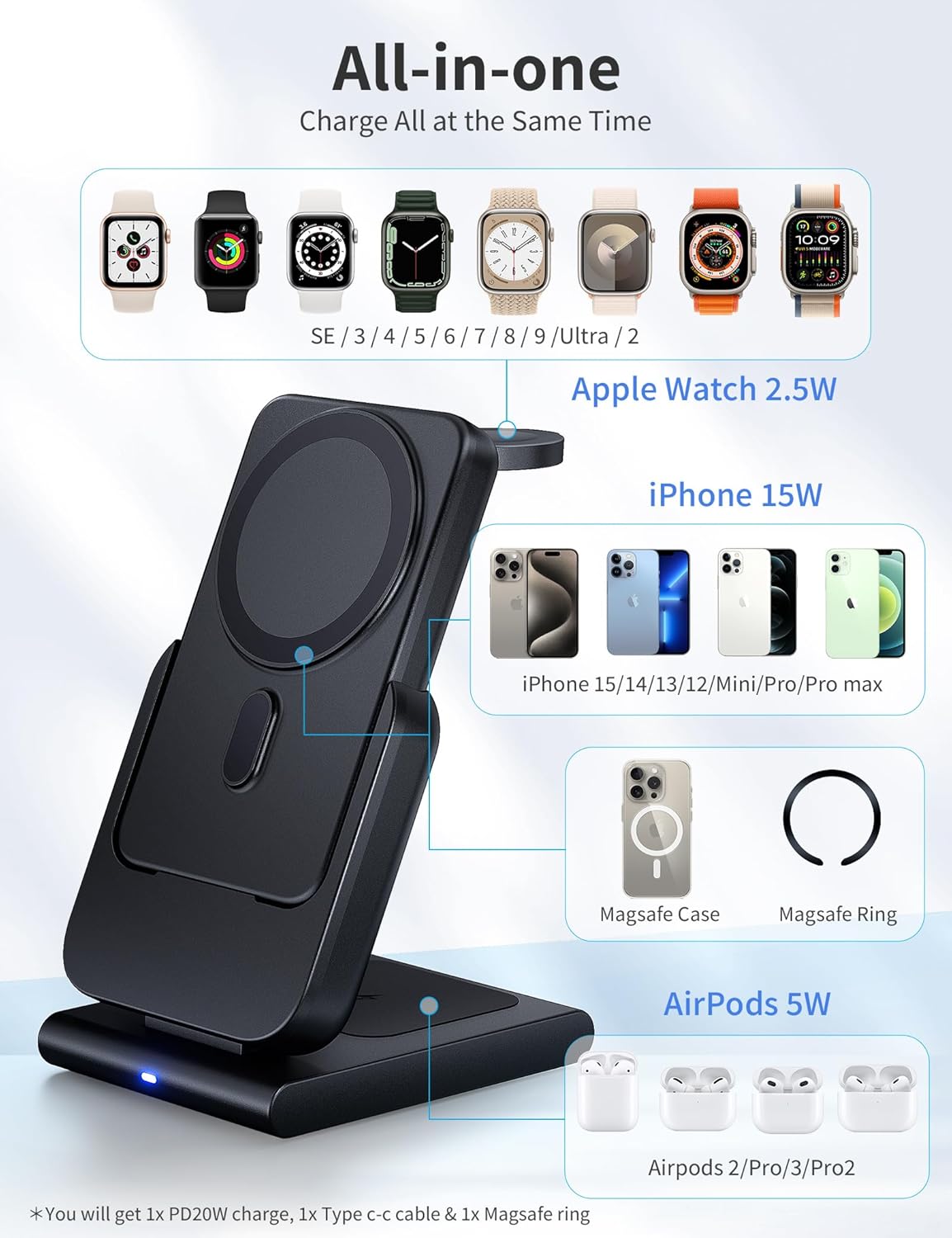
Figure 5.1: An illustration detailing the "All-in-one" charging capability of the RORRY D11, showing designated areas for iPhone (15W), Apple Watch (2.5W), and AirPods (5W), along with compatible models.
- For iPhone (MagSafe Compatible): Place your iPhone directly onto the magnetic charging surface of the detachable power bank. The magnetic connection will align your phone for optimal wireless charging.
- Для Apple Watch: Extend the Apple Watch charging module from the side of the detachable power bank. Place your Apple Watch onto the module.
- Для AirPods: Place your AirPods case (with wireless charging capability) onto the designated charging pad on the base of the main charging stand.
- For other USB-C devices: The detachable power bank also features a USB-C port for wired charging of other devices.
5.2 Using the Detachable Power Bank (On-the-Go Charging)
The MagSafe charging module is also a portable 5000mAh power bank, allowing you to charge your devices wirelessly even when away from the main charging station.

Figure 5.2: The 5000mAh removable power bank component of the RORRY D11, shown with an iPhone magnetically attached and an Apple Watch charging from its side module. It highlights super magnetic grip, Max 18W USB-C in/output, and official recognition.

Figure 5.3: The RORRY D11 power bank detached from its base, demonstrating its portability and ability to charge an iPhone and Apple Watch simultaneously while on the go. Dimensions of the base and power bank are also shown.
- Аддзяліць: Gently pull the MagSafe charging module upwards from the main charging stand to detach it.
- Charge iPhone: Attach your MagSafe-compatible iPhone to the magnetic surface of the power bank.
- Зарадзіць Apple Watch: Extend the Apple Watch charging module and place your Apple Watch on it.
- Recharge Power Bank: To recharge the power bank, simply place it back onto the main charging stand. It will automatically begin charging. Alternatively, you can charge it directly using a USB-C cable.
5.3 Складаная канструкцыя
The RORRY D11 is designed to be foldable and flexible, making it easy to adjust for optimal viewing angles or to pack for travel.
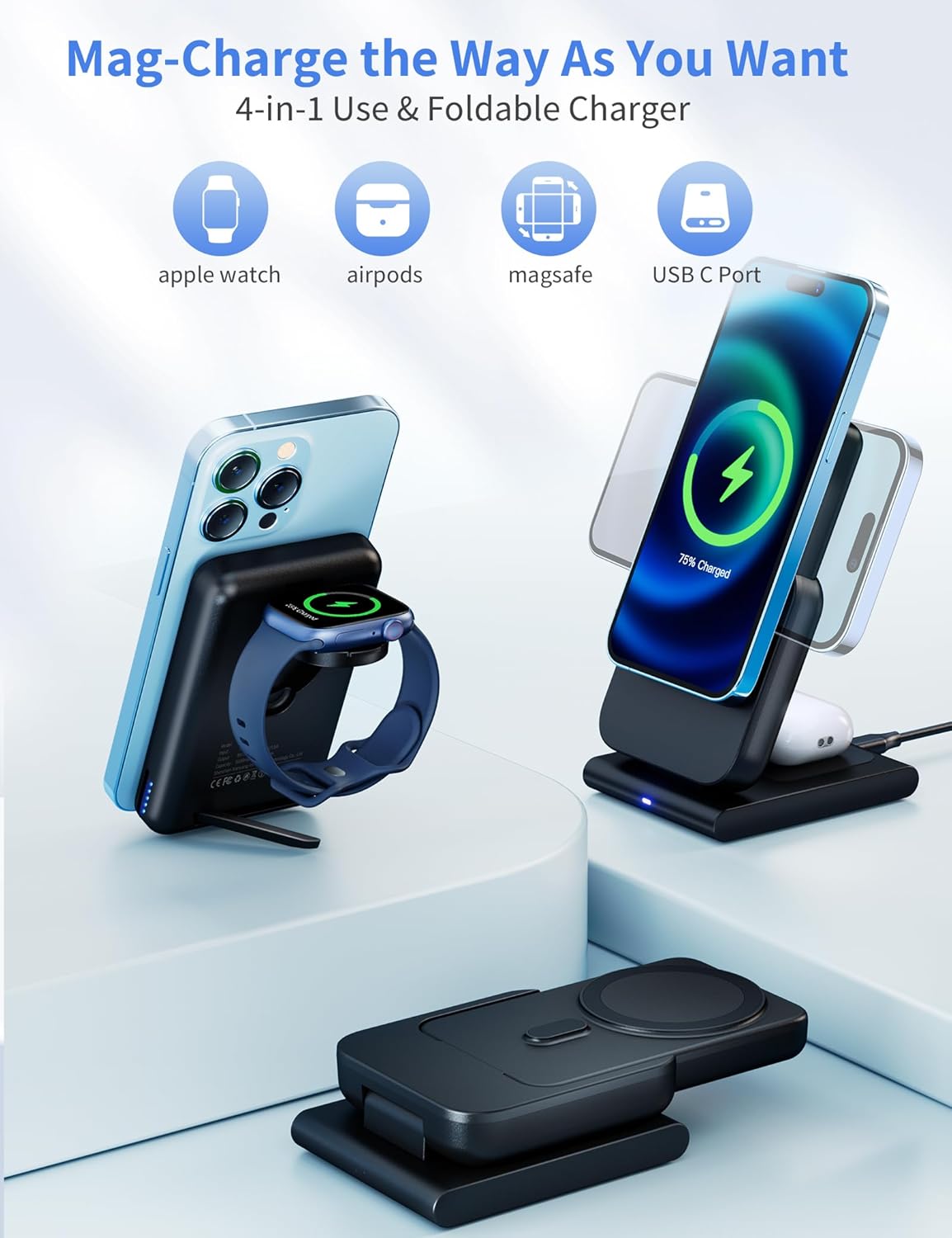
Figure 5.4: The RORRY D11 charger illustrating its "Mag-Charge the Way As You Want" feature, highlighting its 4-in-1 use (Apple Watch, AirPods, MagSafe, USB-C Port) and foldable design for versatile charging positions.
- Adjust the angle of the main charging arm to your preferred viewing or charging position.
- Fold the unit flat for compact storage or transport.
6. Тэхнічнае абслугоўванне
- Уборка: Disconnect the charger from power before cleaning. Use a soft, dry cloth to wipe the surface of the device. Do not use liquid cleaners or aerosols.
- захоўванне: Калі зарадная прылада не выкарыстоўваецца працяглы час, захоўвайце яе ў прахалодным, сухім месцы, удалечыні ад прамых сонечных прамянёў і экстрэмальных тэмператур.
- Апрацоўка: Не кідайце прыладу і не падвяргайце яе моцным ударам.
7. Выпраўленне непаладак
| праблема | Магчымая прычына | Рашэнне |
|---|---|---|
| Прылада не зараджаецца |
|
|
| Павольная зарадка |
|
|
| Святлодыёдны індыкатар не гарыць |
|
|
8. Тэхнічныя характарыстыкі
| Асаблівасць | Дэталь |
|---|---|
| Нумар мадэлі | D11 |
| Марка | РОРЫ |
| Тэхналогія падлучэння | USB |
| Асаблівасці | MagSafe Compatible, Wireless Charging, Portable |
| Уваходны кнtage | 12 вольт |
| Ampэраж | 3 Amps |
| Ватtage | 20 Вт |
| Усяго партоў USB | 1 |
| Вага прадмета | 250 грамаў |
| Памеры ўпакоўкі | 15.39 х 8 х 5.11 см |
| Акумулятар у камплекце | так |
| Выкарыстанне батарэі | так |
9. Інфармацыя па бяспецы
Калі ласка, выконвайце наступныя меры бяспекі, каб пазбегнуць пашкоджання прылады або траўмаў:
- Не падвяргайце прыладу ўздзеянню вады, вільгаці або экстрэмальных тэмператур.
- Не разбірайце, не рамантуйце і не мадыфікуйце прыладу.
- Трымайце прыладу далей ад моцных магнітных палёў.
- Do not place metal objects or credit cards between the charging surface and your device, as this may interfere with charging or damage the charger.
- Выкарыстоўвайце толькі прадастаўлены адаптар харчавання і кабель.
- Захоўваць у месцах, недаступных дзецям.
10. Гарантыя і падтрымка
RORRY products come with a standard manufacturer's warranty. For detailed warranty information, technical support, or customer service inquiries, please refer to the contact information provided on the product packaging or visit the official RORRY webсайт. Калі ласка, захавайце пацвярджэнне пакупкі для прэтэнзій па гарантыі.
Кантактная інфармацыя:
- Webсайт: RORRY Official Store on Amazon