
LED1903, LED-1903, LED2206, LED-2206
Instruction Manual for Replacement Remote Control
Compatible with Manta LED1903, LED-1903, LED2206, LED-2206 TV Models
Прадукт скончаныview
This document provides comprehensive instructions for the use and maintenance of your replacement remote control. Designed for compatibility with various Manta LED TV models, including LED1903, LED-1903, LED2206, and LED-2206, this remote offers essential functions for controlling your television.

Малюнак 1: Фронт view of the replacement remote control. The remote is black with grey buttons, featuring standard TV controls like power, number pad, volume, channel, menu, and playback buttons.
Усталёўка і ўстаноўка батарэі
To begin using your new remote control, you will need to install batteries. This remote typically requires two AAA batteries (not included).
- Знайдзіце батарэйны адсек: Turn the remote control over. The battery compartment cover is located on the back.
- Адкрыйце вокладку: Gently slide the battery compartment cover downwards or press the latch and lift, as indicated by the arrow or latch mechanism.
- Устаўце батарэі: Устаўце дзве батарэйкі тыпу AAA, пераканаўшыся, што станоўчая (+) і адмоўная (-) клемы правільна сумяшчаюцца з пазнакамі ўнутры адсека. Няправільная ўстаўка можа перашкодзіць працы пульта дыстанцыйнага кіравання.
- Зачыніце вечка: Засуньце вечка батарэйнага адсека на месца, пакуль яна надзейна не зашчоўкне.
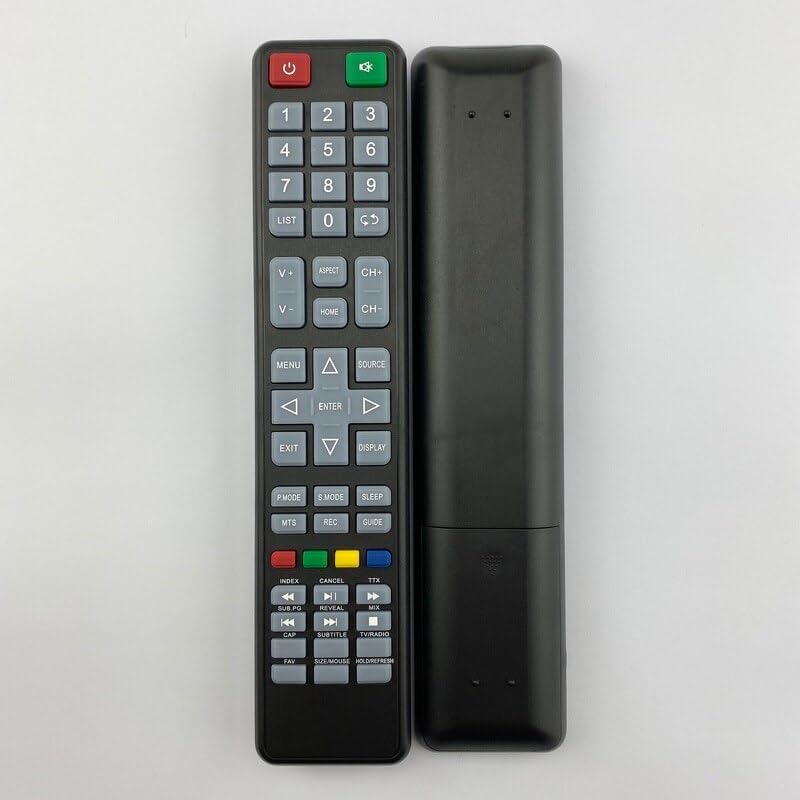
Малюнак 2: Назад view of the replacement remote control. This image shows the smooth back casing, where the battery compartment is located.
Once batteries are installed, the remote control is ready for use. Point the remote directly at your Manta TV's infrared receiver.
Інструкцыя па эксплуатацыі
У гэтым раздзеле падрабязна апісаны функцыі розных кнопак на вашым новым пульце дыстанцыйнага кіравання.
| Кнопка/Раздзел | Функцыя |
|---|---|
| Магутнасць (чырвоны) | Уключае або выключае тэлевізар (рэжым чакання). |
| Крыніца (зялёная) | Switches between input sources (e.g., HDMI, AV, TV). |
| Нумары (0-9) | Непасрэдны выбар тэлеканалаў або ўвод лікавых значэнняў. |
| СПІС | Доступ да спісу каналаў. |
| V+/V- (павелічэнне/памяншэнне гучнасці) | Рэгулюе ўзровень гучнасці. |
| CH+/CH- (Channel Up/Down) | Changes the TV channel sequentially. |
| АСПЕКТ | Змяняе суадносіны бакоў экрана. |
| ДОМ | Accesses the TV's main menu or smart features. |
| МЕНЮ | Адкрывае меню налад тэлевізара. |
| Стрэлкі навігацыі (уверх, уніз, налева, направа) | Перамяшчаецца па меню і параметрах. |
| УВОД | Пацвярджае выбар у меню. |
| ВЫХАД | Выхад з бягучага меню або функцыі. |
| ДЫСПЛЕЙ | Shows current channel information or on-screen display. |
| P.MODE (Рэжым выявы) | Цыклічнае пераключэнне паміж загадзя зададзенымі рэжымамі выявы. |
| S.MODE (гукавы рэжым) | Cycles through preset sound modes. |
| СПАЦЬ | Усталёўвае таймер сну для тэлевізара. |
| МТС | Выбірае шматканальны гук тэлебачання (напрыклад, стэрэа, SAP). |
| ЗАПІС | Initiates recording if the TV supports PVR functionality. |
| КІРАЎНІЦТВА | Доступ да электроннага праграмнага гіда (EPG). |
| Каляровыя кнопкі (чырвоны, зялёны, жоўты, сіні) | Context-sensitive functions within menus or smart TV applications. |
| Playback Controls (Rewind, Play/Pause, Fast Forward, Previous, Stop, Next) | Controls media playback for connected devices or internal media player. |
| субтытры | Уключае/выключае субтытры. |
| ТБ / РАДЫЁ | Switches between TV and Radio modes (if supported). |
| АБРАШАНАЕ | Доступ да спісу абраных каналаў. |
| SIZE/MOUSE/HOLD/FREEZE | Multi-function button, may control screen size, mouse pointer (if smart TV), or freeze frame. |
Note: Some functions may not be available or may operate differently depending on your specific Manta TV model. This remote is a replacement and may not replicate all functions of your original remote.
Тэхнічнае абслугоўванне і догляд
- Уборка: Для чысткі пульта дыстанцыйнага кіравання выкарыстоўвайце мяккую сухую тканіну. Не выкарыстоўвайце вадкія ачышчальнікі або абразіўныя матэрыялы, бо яны могуць пашкодзіць паверхню або ўнутраныя кампаненты.
- Замена батарэі: Replace batteries when the remote's response becomes sluggish or it stops working. Always replace both batteries at the same time with new ones of the same type.
- захоўванне: Калі пульт дыстанцыйнага кіравання не будзе выкарыстоўвацца працяглы час, выміце батарэйкі, каб прадухіліць іх уцечку і магчымыя пашкоджанні. Захоўвайце ў прахалодным, сухім месцы.
- Пазбягайце пашкоджанняў: Не кідайце пульт дыстанцыйнага кіравання, не падвяргайце яго ўздзеянню экстрэмальных тэмператур і не апускайце яго ў ваду.
Ліквідацыю непаладак
Калі ў вас узніклі праблемы з пультам дыстанцыйнага кіравання, паспрабуйце выканаць наступныя дзеянні па ліквідацыі непаладак:
- Пульт не адказвае:
- Праверце, ці правільна ўстаўлены батарэйкі з захаваннем палярнасці (+/-).
- Заменіце старыя батарэі на новыя.
- Пераканайцеся, што паміж пультам дыстанцыйнага кіравання і інфрачырвоным датчыкам тэлевізара няма перашкод.
- Пераканайцеся, што вы знаходзіцеся ў зоне дзеяння ІЧ-датчыка тэлевізара.
- Не працуюць пэўныя кнопкі:
- This replacement remote may not support all functions of your original TV remote. Refer to the "Operating Instructions" section for supported functions.
- Clean the button if it feels sticky or unresponsive.
- TV Not Responding to Power Button:
- Ensure the TV is plugged into a working power outlet and is not in a deep sleep mode.
- Try pressing the power button directly on the TV.
Тэхнічныя характарыстыкі
| Асаблівасць | Дэталь |
|---|---|
| Тып прадукту | Замена дыстанцыйнага кіравання |
| Марка | Радавыя |
| Сумяшчальныя мадэлі тэлевізараў | Manta LED1903, LED-1903, LED2206, LED-2206 |
| Крыніца харчавання | 2 х ААА батарэі (не ўключаны) |
| Матэрыял | АБС-пластык |
| Колер | Black or White (randomly sent) |
| Асаблівасць | Эрганамічны дызайн |
| Максімальная колькасць падтрымоўваных прылад | 5 (as per product specifications, though this remote is for one TV) |
| Сумяшчальныя прылады (агульныя) | Television, Set Top Box, DVD/Blu-ray Player, Home Theater, Stereo System (as per product specifications, though this remote is primarily for TV) |
Гарантыя і падтрымка
Information regarding specific warranty terms for this replacement remote control is not provided in the product details. For any issues or support inquiries, please refer to the seller or the platform where the purchase was made.
As this is a generic replacement product, direct manufacturer support may not be available. It is recommended to contact the seller for assistance with product defects or operational questions not covered in this manual.
Ask a question about this manual
Ask about setup, troubleshooting, compatibility, parts, safety, or missing instructions. Manuals+ will review the question and use this page’s manual context to help answer it.