
1. Уводзіны
Thank you for choosing the ALLmeter Pinless Moisture Meter Model ALL019-DEFBA. This device is designed for non-invasive measurement of moisture content in various materials such as wood, walls, drywall, and masonry. Its advanced technology ensures accurate readings without causing damage to surfaces. This manual provides detailed instructions for the proper use, maintenance, and troubleshooting of your moisture meter to ensure optimal performance and longevity.
2. Важная інфармацыя па бяспецы
- Перад эксплуатацыяй прылады ўважліва прачытайце ўсе інструкцыі.
- Не спрабуйце адкрываць або мадыфікаваць прыладу. Унутры няма дэталяў, якія можа абслугоўваць карыстальнік.
- Трымайце прыладу далей ад вады і высокай вільготнасці, каб пазбегнуць пашкоджанняў.
- Не падвяргайце прыладу ўздзеянню экстрэмальных тэмператур або прамых сонечных прамянёў на працягу доўгага часу.
- Выміце батарэйкі, калі прылада не будзе выкарыстоўвацца працяглы час, каб прадухіліць уцечку батарэек.
- Утылізуйце батарэйкі і прыладу ў адпаведнасці з мясцовымі правіламі.
3. Змесціва ўпакоўкі
Праверце, ці ўсе пералічаныя ніжэй прадметы ўваходзяць у вашу ўпакоўку:
- ALLmeter Pinless Moisture Meter (Model ALL019-DEFBA)
- Батарэйкі тыпу AAA (3 штукі)
- Кіраўніцтва карыстальніка
- Сумка для пераноскі

Image 3.1: The ALLmeter Pinless Moisture Meter package contents, showing the meter, three AAA batteries, a user manual, and a gray carry pouch.
4. Прадукт скончыўсяview
4.1 Макет прылады

Выява 4.1.1: Спераду view of the ALLmeter Pinless Moisture Meter, highlighting its ergonomic design, large LCD display, and central control panel.
4.2 кнопкі кіравання
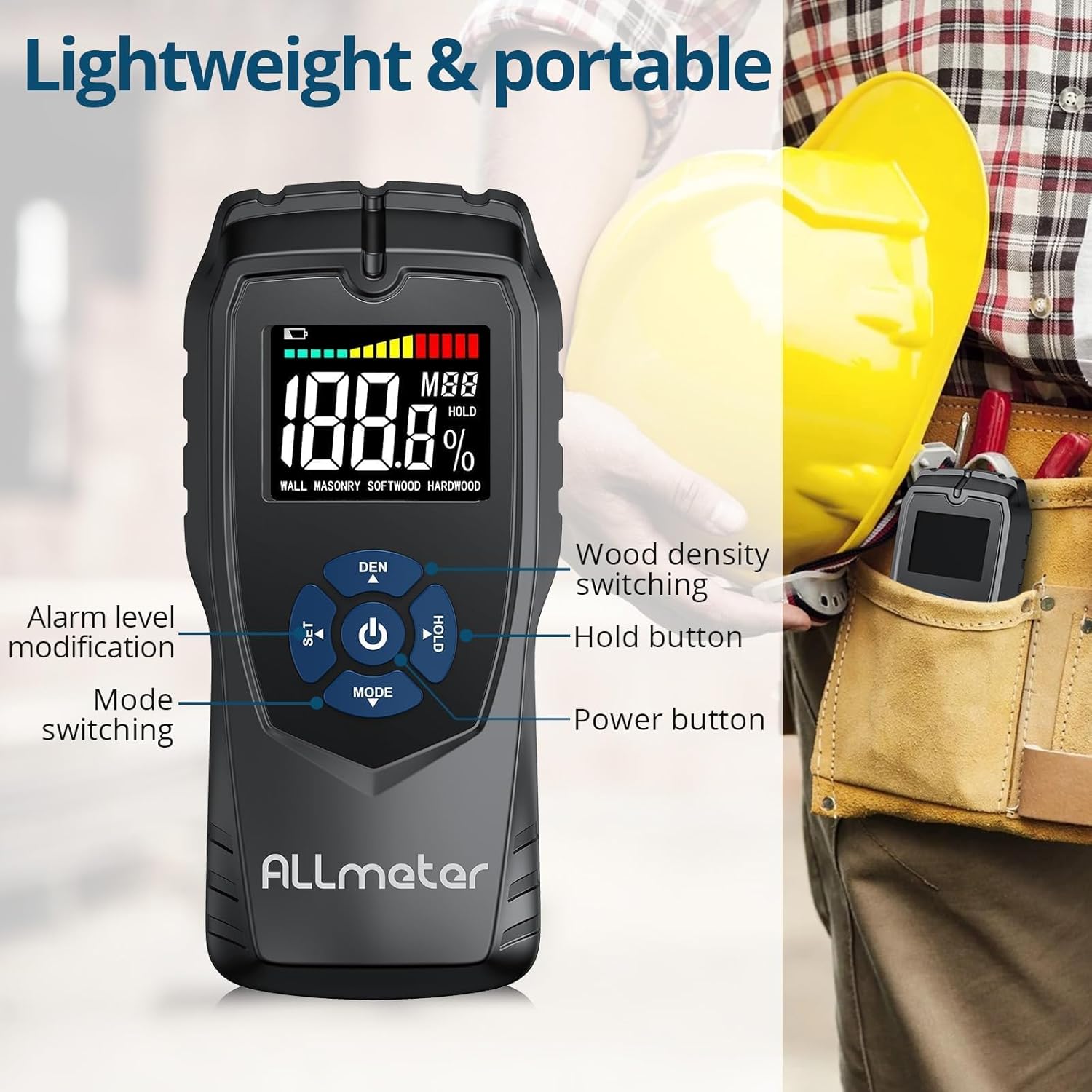
Малюнак 4.2.1: Падрабязны view of the control buttons on the ALLmeter Pinless Moisture Meter. These include SET (for alarm level modification), DEN (for wood density switching), Power, HOLD, and MODE (for switching measurement modes).
- Кнопка харчавання (⑂): Націсніце, каб уключыць або выключыць прыладу.
- MODE Button (▼): Press to cycle through different measurement modes (WALL, MASONRY, SOFTWOOD, HARDWOOD).
- SET Button (▲): Used to adjust alarm levels or other settings.
- DEN Button (▲): Used to switch between different wood density grades when in wood measurement modes.
- Кнопка HOLD: Зафіксуе бягучае паказанне на дысплеі. Націсніце яшчэ раз, каб адпусціць.
4.3 Элементы адлюстравання

Image 4.3.1: The LCD display of the ALLmeter Pinless Moisture Meter, indicating low battery, moisture bar display, moisture value, wood density grade (MBB), data hold symbol (HOLD), and current measuring mode.
- Індыкацыя разраду батарэі: Значок з'яўляецца, калі зарад батарэі нізкі.
- Moisture Bar Display: Graphical representation of moisture level.
- Moisture Value: Digital display of the measured moisture percentage.
- Wood Density Grade (MBB): Indicates the selected wood density setting.
- Data Hold Symbol (HOLD): Appears when the HOLD function is active.
- Measuring Mode Indication: Displays the currently selected material mode (e.g., WALL, MASONRY, SOFTWOOD, HARDWOOD).
5. Настройка
5.1 Устаноўка батарэі
- Знайдзіце вечка батарэйнага адсека на задняй панэлі прылады.
- Зрушыце або адшчэпіце вечка, каб адкрыць адсек.
- Устаўце тры (3) батарэйкі тыпу AAA, сочачы за правільнай палярнасцю (+/-), як паказана ўнутры адсека.
- Надзейна заменіце крышку батарэйнага адсека.
6. Інструкцыя па эксплуатацыі
6.1 Уключэнне/выключэнне сілкавання
- To turn on: Press the Power button (⑂). The display will illuminate.
- To turn off: Press and hold the Power button (⑂) for approximately 2 seconds. The device also features an auto power-off function to conserve battery life after a period of inactivity.
6.2 Выбар рэжыму вымярэння
- After powering on, press the MODE button (▼) repeatedly to cycle through the available material modes: WALL, MASONRY, SOFTWOOD, HARDWOOD.
- Select the mode that corresponds to the material you intend to measure.
6.3 Вымярэнне
- Пераканайцеся, што выбраны правільны рэжым вымярэння.
- Place the back of the meter (the sensing plate area) flat against the surface of the material you wish to measure. Ensure full contact.
- The moisture reading will be displayed instantly on the LCD screen.
- Move the meter across the surface to check for variations in moisture content.
6.4 Функцыя HOLD
- While taking a measurement, press the HOLD button to freeze the current reading on the display. This is useful for reading measurements in hard-to-reach areas.
- Press the HOLD button again to release the reading and resume live measurement.
6.5 Audible Alarm Settings
- The device features an audible alarm that activates when the measured moisture level exceeds a preset threshold for the selected material.
- To adjust the alarm threshold, press the SET button (▲). Follow the on-screen prompts to increase or decrease the alarm percentage.
6.6 Wood Density Adjustment (DEN)
- When in SOFTWOOD or HARDWOOD mode, the DEN button (▲) can be used to cycle through different wood density grades (MBB) for more accurate readings based on the specific wood type. Refer to wood density charts for your material.
7. Measurement Modes and Ranges
The ALLmeter Pinless Moisture Meter provides distinct measurement ranges and visual indicators for different moisture levels across various materials.

Image 7.1: The visual moisture alarm system and a table detailing the 'Dry', 'Mid', and 'Wet' moisture percentage ranges for Wall, Masonry, Softwood, and Hardwood materials.
7.1 Moisture Level Indicators
- Зялёны: Indicates a Dry moisture level.
- Жоўты: Indicates a Mid-range moisture level.
- Чырвоны: Indicates a Wet moisture level, potentially requiring attention.
7.2 Measurement Ranges by Material
| Рэжым вымярэння | Сушыць | Сярэдзіна | Мокры |
|---|---|---|---|
| СЦЯНА | <8% | 8-11.9% | ≥12% |
| МАДЗЕНЬ | <17% | 17-19.9% | ≥20% |
| МЯГКІХ ДРАЎНІН | <13% | 13-17.9% | ≥18% |
| ЛІСТВЕРДАЯ ДРАЎНІНА | <12% | 12-15.9% | ≥16% |
7.3 Non-Invasive Measurement Principle
The ALLmeter Pinless Moisture Meter utilizes advanced inductive surveying technology. This method allows for moisture detection without penetrating the material surface, preventing damage. Unlike destructive surveying methods that require pins or probes, the pinless meter provides quick and clean readings.

Image 7.3.1: A visual comparison between inductive (pinless) surveying, which leaves no marks, and destructive (pin-type) surveying, which creates small holes in the material.
7.4 Multiple Applications
This moisture meter is versatile and suitable for a wide range of applications in home inspection, construction, and woodworking:

Малюнак 7.4.1: Прыкладamples of the meter's application on various materials including walls, masonry, softwood, and hardwood.
8. Тэхнічнае абслугоўванне
- Уборка: Працірайце прыладу мяккай сухой тканінай. Не выкарыстоўвайце абразіўныя ачышчальнікі або растваральнікі.
- захоўванне: Store the meter in its carry pouch in a cool, dry place when not in use. Avoid areas with extreme temperatures or high humidity.
- Замена батарэі: Замяніце батарэйкі, калі на дысплеі з'явіцца індыкатар нізкага зараду батарэй.
9. Выпраўленне непаладак
| праблема | Магчымая прычына | Рашэнне |
|---|---|---|
| Прылада не ўключаецца | Разраджаныя або няправільна ўсталяваныя батарэі | Праверце палярнасць батарэек; заменіце іх новымі батарэйкамі тыпу AAA. |
| Няправільныя паказанні | Incorrect measurement mode selected; poor contact with surface; device malfunction. | Ensure correct mode is selected for the material; press the meter firmly and flat against the surface; if problem persists, contact customer support. |
| Дысплей пусты або мігціць | Нізкі зарад батарэі; няспраўнасць прылады. | Replace batteries; if problem persists, contact customer support. |
| Не працуе гукавы сігнал | Alarm disabled or volume too low; device malfunction. | Check alarm settings using the SET button; ensure moisture level exceeds threshold; if problem persists, contact customer support. |
10. Тэхнічныя характарыстыкі
| Спецыфікацыя | Каштоўнасць |
|---|---|
| Нумар мадэлі | ALL019-DEFBA |
| Марка | ALLmeter |
| Прынцып вымярэння | Pinless, Inductive |
| Глыбіня зондавання | 5 см |
| Sensing Plate Size | 5 х 6 см |
| Дакладнасць | ±4% |
| Дысплей | LCD Color Display with Analog Bar |
| Крыніца харчавання | 3 х ААА батарэі |
| Аўтаматычнае адключэнне харчавання | так |
| Гукавы сігнал | так |
| Вага прадмета | 231 г (0.23 кілаграма) |
| Памеры ўпакоўкі | 19.4 х 8.8 х 4.2 см |
11. Гарантыя і падтрымка кліентаў
For warranty information, technical assistance, or customer support, please refer to the contact details provided with your purchase documentation or visit the official ALLmeter website. Please have your model number (ALL019-DEFBA) and purchase date available when contacting support.