
1. Уводзіны
This manual provides essential information for the proper installation, operation, and maintenance of your Beetronics 12-Inch Full HD IPS Monitor, model 12HD7M. Please read this manual thoroughly before using the product to ensure optimal performance and safety.
Асноўныя характарыстыкі:
- Full HD 1920 x 1080 resolution IPS panel with 178° viewныя вуглы.
- Multiple video inputs: HDMI, VGA, BNC, and RCA.
- Durable metal housing designed for continuous 24/7 operation.
- Шырокі аб'ём уваходуtage range (9-36 Volts) and dimmable backlight.
- Flexible mounting options: Collapsible stand and 75mm VESA mount.
2. Змесціва ўпакоўкі
Verify that all items listed below are included in your product package. If any items are missing or damaged, please contact Beetronics support.
- Beetronics 12-Inch Full HD IPS Monitor (12HD7M)
- Блок харчавання і шнур
- Пульт дыстанцыйнага кіравання
- Flush Mounting Brackets
- Разборная падстаўка
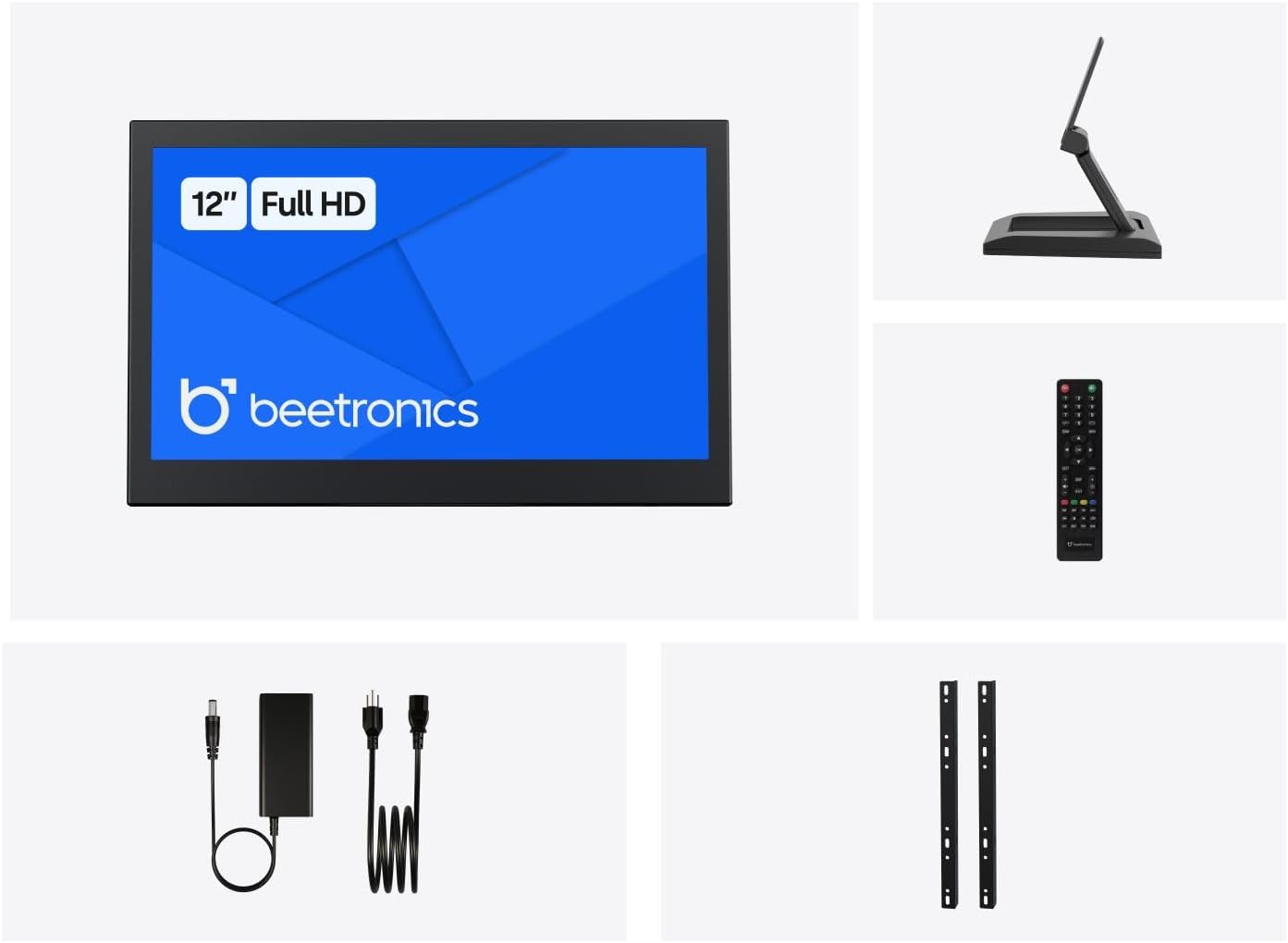
Малюнак 2.1: Package Contents. This image displays the Beetronics 12HD7M monitor along with its standard accessories, including the power adapter, remote, mounting brackets, and desktop stand.
3. Прадукт скончыўсяview
Monitor Dimensions and Design:
The Beetronics 12HD7M monitor features a robust metal housing, designed for industrial environments. Its compact form factor allows for versatile integration.

Малюнак 3.1: Monitor Dimensions. This image illustrates the physical dimensions of the 12HD7M monitor, including width (279 mm), height (179 mm), and stand height adjustment (50-64 mm).
Парты ўводу/вываду:
The monitor is equipped with a comprehensive set of rear-facing, downward-oriented input ports for easy cable management and installation.

Малюнак 3.2: Rear I/O Ports. This image provides a clear view of the monitor's rear panel, detailing the DC power input, HDMI, VGA, USB, AV, BNC, and audio input/output ports. Control buttons for power, menu, and volume are also visible.
- Уваход пастаяннага току: Для падключэння адаптара харчавання, які ўваходзіць у камплект.
- HDMI: High-Definition Multimedia Interface for digital video and audio.
- VGA: Video Graphics Array for analog video input.
- BNC: Bayonet Neill-Concelman connector, commonly used for professional video applications.
- RCA (AV): Composite video and stereo audio inputs.
- USB: For service or specific peripheral connections.
- Аўдыё ўваход/выхад: 3.5mm jacks for audio connectivity.
4. Настройка
4.1 Варыянты мантажу
The 12HD7M monitor offers flexible mounting solutions to suit various environments.
Усталёўка настольнай падстаўкі:
The included collapsible stand allows for desktop placement and angle adjustment. Ensure the stand is securely attached to the monitor and placed on a stable, flat surface.
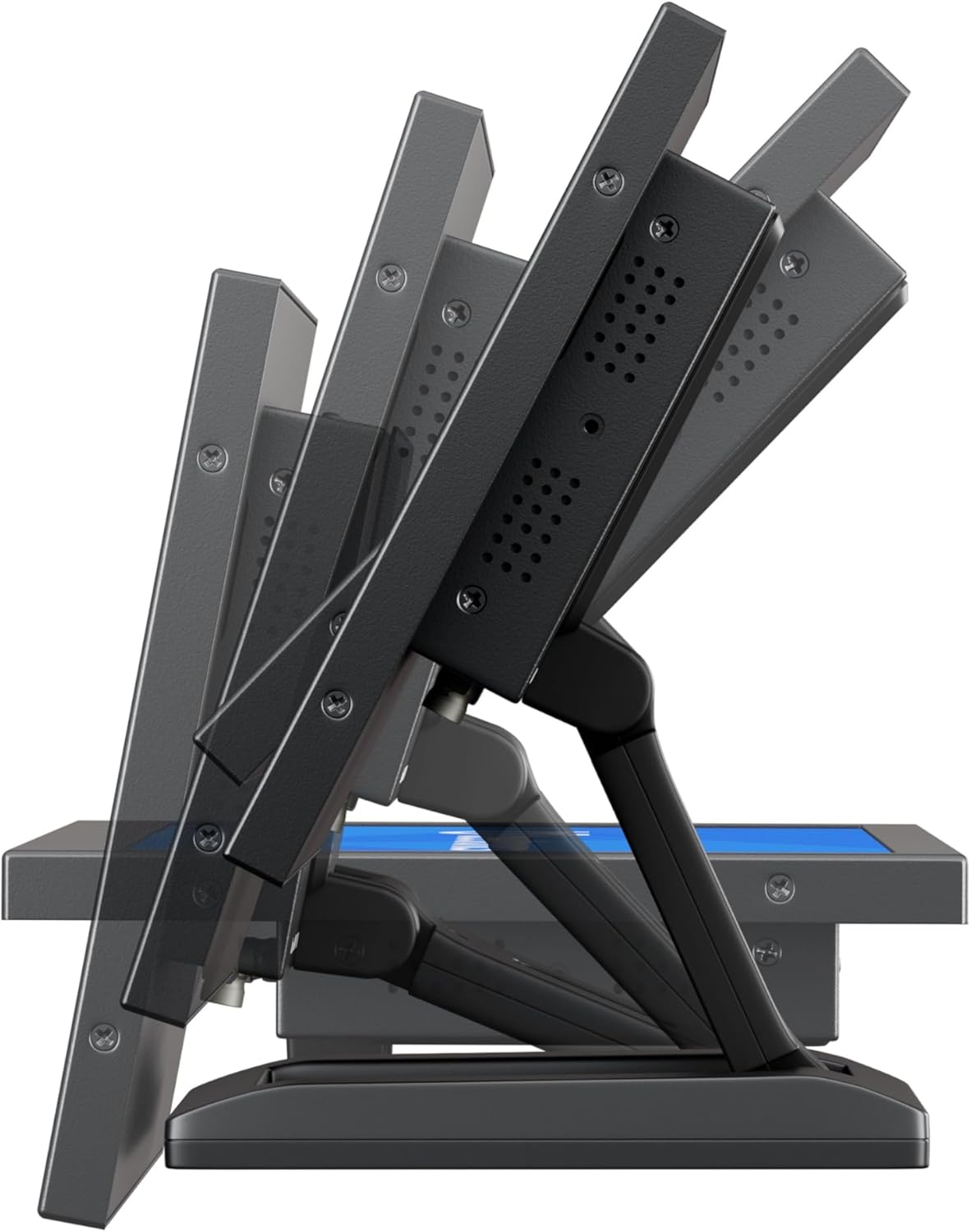
Малюнак 4.1: Adjustable Stand. This image shows the monitor's side profile, highlighting the flexibility of the collapsible stand to adjust the screen's tilt angle for optimal viewінж.
VESA Wall/Panel Mounting:
The monitor features a 75mm VESA mount pattern on the rear, allowing it to be mounted on compatible VESA arms, wall mounts, or integrated into panels using the flush mounting brackets. Ensure appropriate screws (M4) are used and tightened securely.

Малюнак 4.2: VESA Mount Points. This image displays the back of the monitor, indicating the standard VESA mounting points for secure attachment to compatible brackets or arms.
4.2 Падключэнне сілкавання
- Connect the power adapter cable to the DC input port on the rear of the monitor.
- Plug the power adapter into a suitable electrical outlet. The monitor supports a wide input voltage дыяпазон 9-36 В пастаяннага току.
4.3 Падключэнне відэакрыніц
Connect your video source (e.g., computer, camera, media player) to the desired input port on the monitor using appropriate cables.
- HDMI: For high-quality digital video and audio.
- VGA: Для падключэння аналагавага відэа.
- BNC: For professional video equipment.
- RCA (AV): For composite video and analog audio.
5. Інструкцыя па эксплуатацыі
5.1 Уключэнне/выключэнне сілкавання
Press the 'ON/OFF' button located on the rear panel or on the remote control to power the monitor on or off.
5.2 Навігацыя па меню (OSD)
The On-Screen Display (OSD) menu allows you to adjust various monitor settings. Use the 'MENU' button to access the OSD, and the '+', '-', 'AUTO' buttons to navigate and adjust settings. The remote control can also be used for easier navigation.
5.3 Выбар уводу
To switch between different video input sources, press the 'AUTO' button on the rear panel or the 'Input' button on the remote control. Cycle through HDMI, VGA, BNC, and AV inputs until the desired source is displayed.
5.4 Налады выявы
Access the OSD menu to adjust picture quality settings:
- Яркасць: Рэгулюе агульную яркасць экрана.
- Кантраст: Кантралюе розніцу паміж светлымі і цёмнымі абласцямі.
- Каляровая тэмпература: Выбірае загадзя зададзеныя каляровыя рэжымы (напрыклад, Цёплы, Халодны, Карыстальніцкі).
- Суадносіны бакоў: Adjusts the display ratio (e.g., 16:9, 4:3).
- Рэзкасць: Паляпшае выразнасць краёў.
5.5 Налады гуку
If an audio source is connected, adjust the volume using the '+' and '-' buttons on the rear panel or remote control. Further audio settings may be available in the OSD menu.
6. Тэхнічнае абслугоўванне
6.1 Чыстка манітора
- Заўсёды выключайце манітор з сеткі перад чысткай.
- Выкарыстоўвайце мяккую безворсовую тканіну, злёгку dampвадой або мяккім неабразіўным ачышчальнікам для экранаў.
- Не распыляйце вадкасць непасрэдна на экран або ў якія-небудзь адтуліны.
- Пазбягайце выкарыстання агрэсіўных хімікатаў, растваральнікаў або абразіўных матэрыялаў.
6.2 Агульны догляд
- Пазбягайце размяшчэння цяжкіх прадметаў на маніторы.
- Не падвяргайце манітор уздзеянню экстрэмальных тэмператур, вільготнасці або прамых сонечных прамянёў.
- Забяспечце дастатковую вентыляцыю вакол манітора, каб прадухіліць перагрэў.
7. Выпраўленне непаладак
Калі ў вас узніклі праблемы з маніторам, звярніцеся да наступных распаўсюджаных праблем і рашэнняў.
| праблема | Магчымая прычына | Рашэнне |
|---|---|---|
| Няма сілы | Сеткавы кабель не падключаны; няспраўны адаптар харчавання; разетка не працуе. | Check power cable connections; Test power adapter with another device; Try a different power outlet. |
| Няма сігналу | Video cable not connected; Incorrect input source selected; Video source not active. | Ensure video cable is securely connected; Select the correct input source using the 'Input' button; Verify video source is powered on and outputting a signal. |
| Выява скажоная або размытая | Incorrect resolution; Loose video cable; Monitor settings. | Set the video source to the monitor's native resolution (1920x1080); Reconnect video cable; Adjust 'Sharpness' or 'Auto' settings in the OSD. |
| Няма аўдыя | Audio cable not connected (for VGA/BNC/RCA); Volume too low; Audio source not active. | Ensure audio cable is connected (if not using HDMI); Increase monitor volume; Check audio output from the source device. |
8. Тэхнічныя характарыстыкі
Detailed technical specifications for the Beetronics 12HD7M monitor.
| Асаблівасць | Спецыфікацыя |
|---|---|
| Нумар мадэлі | 12HD7M |
| Памер экрана | 11.6 цалі (па дыяганалі) |
| дазвол | 1920 x 1080 (Full HD) |
| Тып панэлі | IPS |
| Суадносіны бакоў | 16:9 |
| Viewing кут | 178° (гарызантальны/вертыкальны) |
| Яркасць выявы | 500 Кандэла |
| Паверхня экрана | Матавы |
| Відэа ўваходы | HDMI, VGA, BNC, RCA (AV) |
| Аўдыё ўваходы / выхады | 3.5mm Audio In, 3.5mm Audio Out |
| Увод магутнасці | 9-36 вольт (пастаянны ток) |
| Памеры прадукту | 1.4 х 11 х 9.6 цалі (35.6 х 279.4 х 243.8 мм) |
| Вага прадмета | 3.7 фунта (1.68 кг) |
| Мантаж | 75mm VESA, Collapsible Stand |
9. Гарантыя і падтрымка
9.1 Інфармацыя аб гарантыі
The Beetronics 12HD7M monitor comes with a solid Гарантыя 2 год, reflecting our commitment to quality and reliability. This warranty covers defects in materials and workmanship under normal use. Please retain your proof of purchase for warranty claims.
9.2 Тэхнічная падтрымка
For technical assistance, troubleshooting beyond this manual, or warranty inquiries, please contact Beetronics customer support. Refer to the official Beetronics webсайт для атрымання найноўшай кантактнай інфармацыі і рэсурсаў падтрымкі.
Webсайт: www.beetronics.com