
1. Introduction to Quicken Classic Deluxe
Quicken Classic Deluxe personal finance software is designed to help new subscribers effectively manage their finances. This software provides tools to connect banking, credit cards, debt, investments, and property accounts, enabling a comprehensive view of your financial health. It assists in managing and growing savings, creating custom budgets, tracking spending, and projecting various debt scenarios.

Image: Quicken Classic Deluxe software packaging.
2. Настройка і ўстаноўка
To begin using Quicken Classic Deluxe, follow these steps:
- Redeem Your Online Code: Locate your 1-year online code. Visit the Quicken redemption website (usually provided with your purchase) and enter your code to activate your subscription.
- Download the Software: After successful code redemption, you will be prompted to download the Quicken Classic Deluxe software for either PC or Mac, depending on your operating system.
- Install the Software: Запусціце запампаваны ўсталёўшчык file і выконвайце інструкцыі на экране, каб завяршыць працэс усталёўкі.
- Запуск і ўваход: Open Quicken Classic Deluxe. You will be asked to log in with your Quicken ID and password. If you are a new user, you may need to create an account.
Ensure your computer meets the minimum system requirements for optimal performance.
3. Інструкцыя па эксплуатацыі
3.1 Connecting Your Accounts
Quicken allows you to connect various financial accounts to get a consolidated view of your finances. This includes banking, credit cards, investment accounts, and property accounts.
- Navigate to the 'Accounts' section within the software.
- Select the option to add a new account.
- Пошук your financial institution and follow the prompts to securely link your accounts using your online banking credentials.
- Once connected, Quicken will automatically download and categorize your transactions.
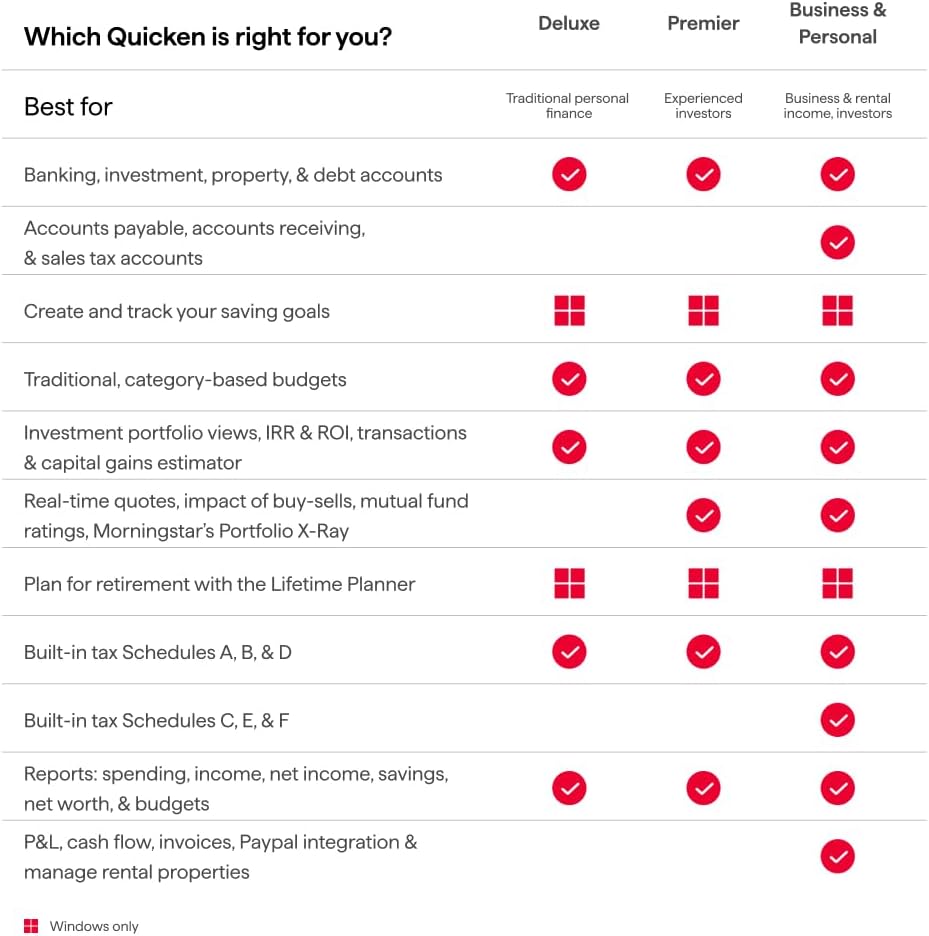
Image: A visual representation of connected accounts within Quicken Classic, displaying balances for banking, checking, savings, credit cards, investments, and property/debt.
3.2 Creating Custom Budgets and Tracking Spending
The budgeting feature helps you monitor your income and expenses to stay on track with your financial goals.
- Go to the 'Spending' or 'Budgets' tab.
- Create a new budget and define categories for your income and expenses (e.g., groceries, utilities, entertainment).
- Set spending limits for each category. Quicken will automatically track your spending against these limits based on your categorized transactions.
- Review your budget regularly to identify areas where you can save or adjust your spending habits.

Image: The 'Classic budgeting' interface in Quicken, illustrating how to build and track custom budgets with unlimited categories.
3.3 Managing and Growing Your Savings
Set specific savings goals and track your progress towards them.
- Access the 'Saving goals' section.
- Define a new goal, such as a down payment for a house or a vacation fund, and specify the target amount and date.
- Link relevant accounts to your savings goals and monitor contributions and withdrawals.
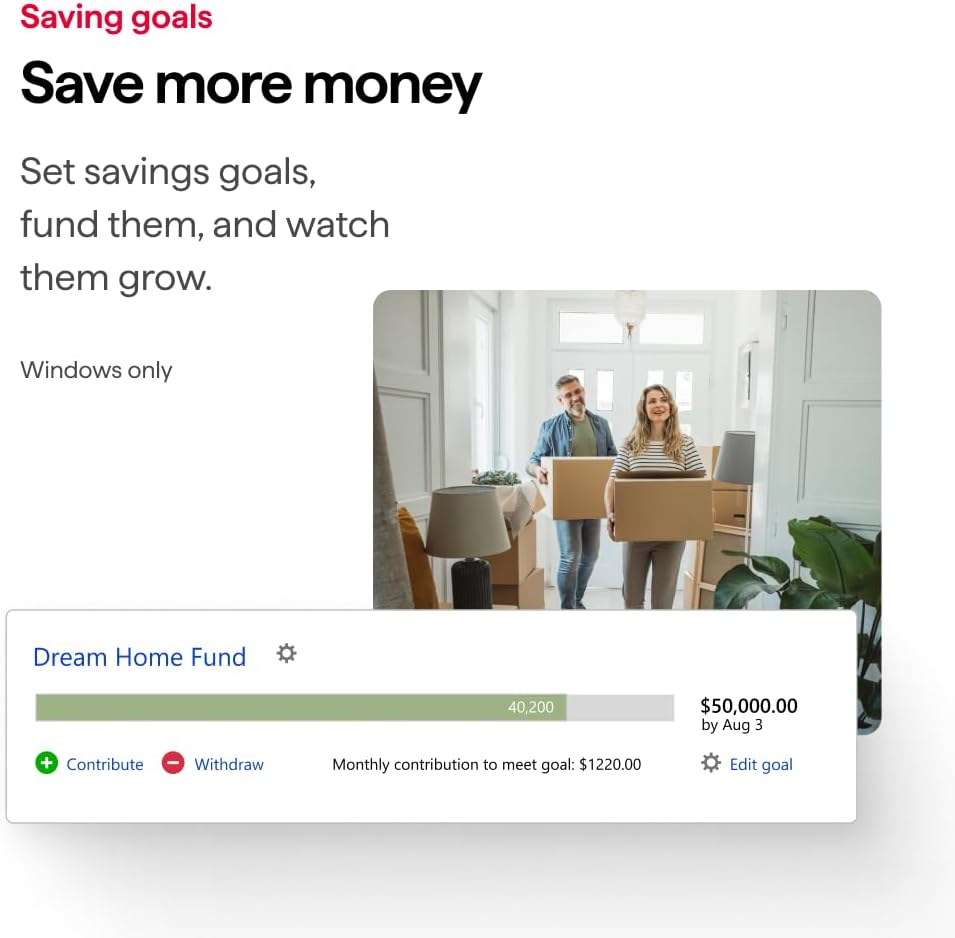
Image: The 'Saving goals' feature in Quicken, demonstrating how to set and track progress for financial objectives like a 'Dream Home Fund'.
3.4 Projecting Different Debt Scenarios
Quicken provides tools to help you visualize and plan for faster debt repayment.
- Navigate to the 'Debt Reduction' or 'Planning' section.
- Input your current debts and explore different payment strategies.
- The software can project how changes in payment amounts or interest rates affect your debt payoff timeline and total interest paid.

Image: A visual tool in Quicken to 'Project different scenarios to pay debt faster', showing a graph comparing various debt repayment plans.
3.5 Investment Tracking and Planning
Monitor your investment portfolio and plan for long-term financial goals like retirement.
- In the 'Investing' tab, view your portfolio's performance, allocations, and true returns.
- Utilize the 'Lifetime Planner' to project your retirement savings and assess if you are on track to meet your goals.
3.6 Афіцыйнае відэа прадукту скончанаview
Глядзіце гэтае афіцыйнае відэа для поўнага аглядуview of Quicken Classic's features and how it can help you manage your finances.
Відэа: Чыноўнік скончыўview of Quicken Classic, demonstrating its capabilities in managing transactions, budgeting, investments, and debt planning.
4. Тэхнічнае абслугоўванне
To ensure optimal performance and data integrity:
- Рэгулярныя абнаўленні: Keep your Quicken software updated to the latest version to benefit from new features, security enhancements, and bug fixes.
- Рэзервовае капіраванне даных: Regularly back up your Quicken data file to an external drive or cloud storage. This protects your financial information in case of data loss.
- Review транзакцыі: Перыядычна пераview your downloaded transactions to ensure they are correctly categorized and reconciled with your bank statements.
5. Выпраўленне непаладак
If you encounter issues with Quicken Classic Deluxe, consider the following:
- Інтэрнэт-злучэнне: Ensure you have a stable internet connection for account synchronization and updates.
- Software Restart: Close and restart the Quicken application.
- Праверце наяўнасць абнаўленняў: Verify that your software is up to date.
- Quicken Support: For persistent issues, visit the official Quicken support website for FAQs, forums, and direct contact options.
6. Тэхнічныя характарыстыкі
| Атрыбут | Дэталь |
|---|---|
| Назва прадукту | Quicken Classic Deluxe |
| Тэрмін падпіскі | 1 год |
| Сумяшчальнасць з платформай | PC (Windows) / Mac |
| фармат | Online Code (Digital Download) |
| ASIN | B0CFSX431Z |
| Вытворца | Quicken, Inc. |
| Першая даступная дата | 1 кастрычніка 2023 г |
For detailed system requirements, please refer to the official Quicken webсайта або ўпакоўкі прадукту.
7. Гарантыя і падтрымка
For information regarding product warranty, technical support, or customer service, please refer to the official Quicken website or contact Quicken support directly. The Quicken support team can assist with installation, account linking, feature usage, and troubleshooting.
Вы таксама можаце наведаць в Quicken Store on Amazon для атрымання дадатковай інфармацыі аб прадукце і рэсурсаў.