
1. Пачатак працы
1.1 Змест пакета
Перад пачаткам пераканайцеся, што ў вашай упакоўцы ёсць усе неабходныя рэчы:
- 2 x QCY T13X Earbuds
- 1 х чахол для зарадкі
- 3 x Pairs of Eartips (Small, Medium - pre-installed, Large)
- 1 х кабель для зарадкі USB-C
- 1 х Кіраўніцтва карыстальніка
1.2 Першапачатковая зарадка
The earbuds must be fully charged before first use. Place both earbuds into the charging case. Connect the USB-C cable to the charging case and a power source. A full charge takes approximately 120 minutes. If the earbuds are not used for more than two weeks, charge them regularly to maintain battery health.
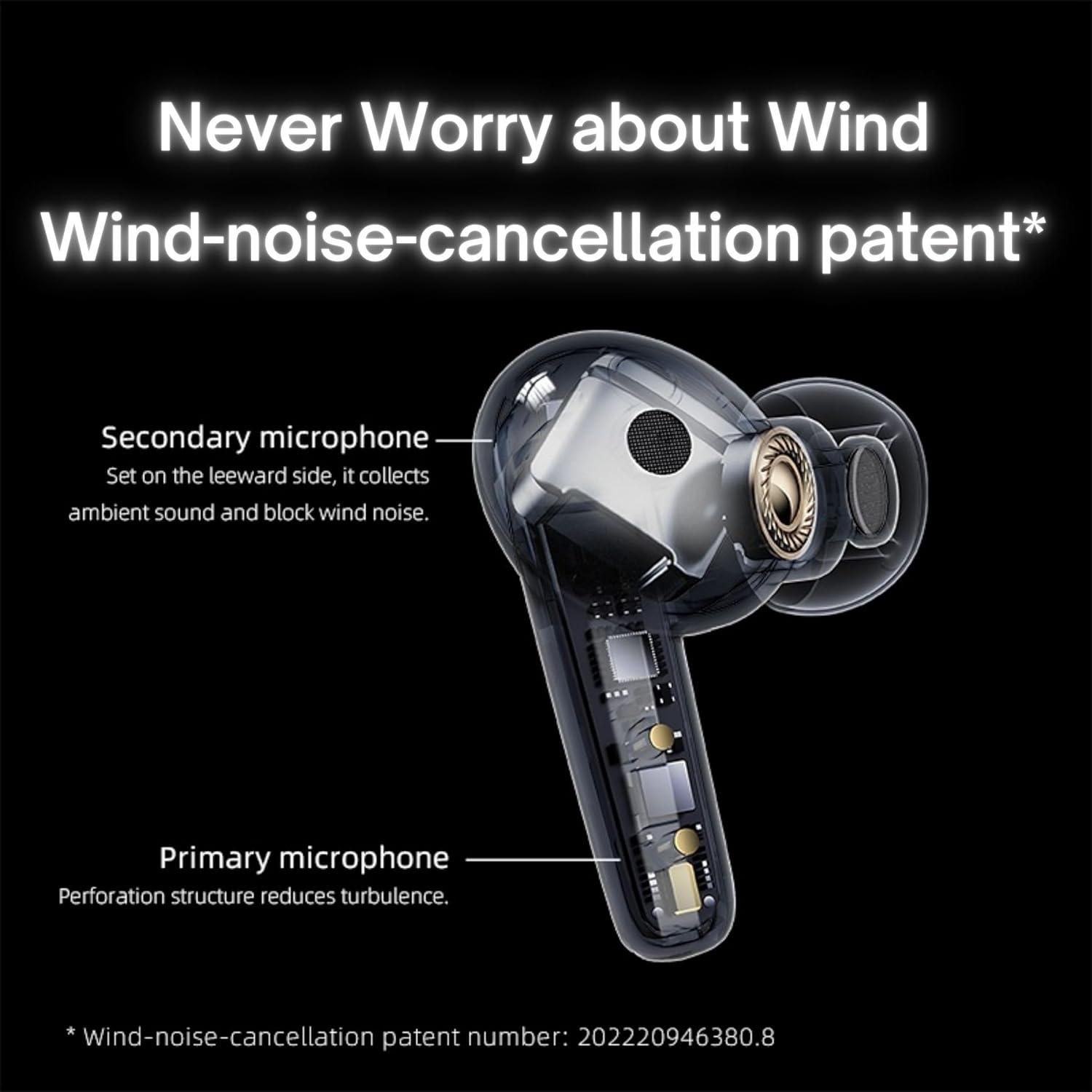
Image: QCY T13X Earbuds in their charging case, connected with a USB-C cable for charging. The image illustrates the charging process and the compact design of the case and earbuds.
1.3 Выбар вушных наканечнікаў
For optimal sound quality and comfort, choose the eartips that best fit your ears. The package includes small, medium, and large sizes. The medium size is pre-installed. A proper seal is crucial for bass response and noise isolation.
1.4 Спалучэнне з вашай прыладай
- Пераканайцеся, што навушнікі зараджаныя і змешчаныя ў зарадны кейс.
- Адкрыйце вечка зараднага футляра. Навушнікі аўтаматычна пяройдуць у рэжым спалучэння.
- На смартфоне або прыладзе з падтрымкай Bluetooth перайдзіце ў налады Bluetooth.
- Пошук available devices and select "QCY T13X" from the list.
- Пасля падключэння вы пачуеце гук пацверджання.

Image: QCY T13X Earbuds and their charging case, highlighting the Bluetooth 5.3 connectivity. This image demonstrates the wireless technology used for pairing.
2. Кіраванне навушнікамі-ўкладышамі
2.1 Уключэнне/выключэнне сілкавання
- Уключэнне: Open the charging case, and the earbuds will automatically power on. Alternatively, press and hold the touch panel on both earbuds for 1-2 seconds.
- Выключэнне: Place the earbuds back into the charging case and close the lid. They will automatically power off and begin charging. Alternatively, disconnect them from your device, and they will power off after a few minutes of inactivity.
2.2 Элементы кіравання прайграваннем музыкі
The QCY T13X earbuds feature touch controls for easy management of your audio:
- Прайграванне/Паўза: Double-tap the touch panel on either earbud.
- Наступны трэк: Тройчы націсніце на правы навушнік.
- Папярэдні трэк: Тройчы націсніце на левы навушнік.

Image: A person wearing a QCY T13X earbud, demonstrating the discreet design and the area for touch controls. This image helps visualize how the earbuds are worn and interacted with.
2.3 Кіраванне выклікамі
- Адказ/завяршэнне выкліку: Double-tap the touch panel on either earbud.
- Адхіліць выклік: Press and hold the touch panel on either earbud for 1.5 seconds.
2.4 Рэгулятар гучнасці
Volume control is managed through the QCY application on your smartphone. Download the QCY app to customize settings and adjust volume levels directly.
2.5 QCY Application
For enhanced features and customization, download the official QCY app from your device's app store. The app allows you to:
- Адрэгулюйце гучнасць.
- Наладзьце сэнсарнае кіраванне.
- Select from various EQ presets (e.g., Pure Vocals, Boosted Original, Soft and Immersive).
- Абнавіць прашыўку.

Image: QCY T13X Earbuds with a graphic indicating three default EQ settings: Pure Vocals, Boosted Original, and Soft and Immersive. This highlights the sound customization options available through the app.
2.6 Падключэнне некалькіх прылад
The QCY T13X supports seamless switching between multiple paired devices. Once paired with several devices, the earbuds can intelligently connect to the active audio source.

Image: QCY T13X Earbuds shown connected to both a smartphone and a tablet, illustrating the multi-device connectivity feature. This image demonstrates the flexibility of using the earbuds with different devices.
3. Тэхнічнае абслугоўванне і догляд
3.1 Зарадка навушнікаў і футляра
The charging case has a capacity of 350 mAh, with each earbud having a 45 mAh battery. A single charge provides up to 8 hours of playback, and the charging case extends total playback time to up to 30 hours. The earbuds support fast charging. Ensure regular charging if not used for extended periods.
3.2 Ачыстка
Regularly clean your earbuds and charging case to ensure optimal performance and hygiene. Use a soft, dry, lint-free cloth. For eartips, remove them and gently wipe with a damp тканінай, затым старанна высушыце перад тым, як зноў прымацаваць.
3.3 Захоўванне
Store your QCY T13X earbuds in their charging case when not in use. Avoid exposing them to extreme temperatures, such as below 10 degrees Celsius (50°F) or above 60 degrees Celsius (140°F), to prevent battery damage and ensure longevity.
4. Выпраўленне непаладак
4.1 Скід да заводскіх налад
If you experience persistent connection or functionality issues, a factory reset may resolve them:
- Delete the previous connection record for "QCY T13X" from your phone's Bluetooth settings.
- Place both earbuds into the charging case and ensure they are charging.
- Націсніце і ўтрымлівайце кнопку на чахле для зарадкі на працягу 10 секунд.
- The red and blue LED indicators will flash alternately 3 times, indicating a successful reset.
4.2 Праблемы з падключэннем
- Пераканайцеся, што Bluetooth уключаны на вашай прыладзе.
- Make sure the earbuds are charged and within the 10-meter Bluetooth range.
- Паспрабуйце перазагрузіць прыладу і навушнікі.
- Perform a factory reset as described above.
4.3 Праблемы з гукам
- Check the volume levels on both your device and through the QCY app.
- Ensure the eartips provide a proper seal in your ear.
- Ачысціце дынамікі навушнікаў ад смецця.
- If only one earbud is working, try placing both back in the case, closing the lid, and then reopening to re-establish the connection between them.
5. Тэхнічныя характарыстыкі
| Асаблівасць | Спецыфікацыя |
|---|---|
| Назва мадэлі | T13X (BH23QT26A) |
| Памер драйвера | 7.2 мм дынамічны драйвер |
| Мікрафоны | 4 (ENC Noise Reduction, Mic Amplification, Echo Cancellation) |
| Версія Bluetooth | 5.3 |
| Дыяпазон Bluetooth | Да 10 метраў |
| Пратаколы, якія падтрымліваюцца | HFP/A2DP/AVRCP |
| Аўдыё кодэкі | AAC, SBC |
| Ёмістасць акумулятара для навушнікаў | 45 мАг (кожны) |
| Ёмістасць батарэі зараднага кейса | 350 мАг |
| Агульны час прайгравання | Да 30 гадзін (з чахлом для зарадкі) |
| Час прайгравання пры аднаразовым выкарыстанні | Да 8 гадзін |
| Час зарадкі (чахол) | Прыбл. 120 хвілін |
| Воданепранікальнасць | IPX5 |
| Вага (навушнік) | 6.34 г |
| Total Weight (Case + Earbuds) | 48.15 г |
| Метад кантролю | Дакранацца |
| Кантроль шуму | Актыўны шумапрыглушэння (ANC) |
| АЧХ | 20000 кГц |
| Адчувальнасць | 105 дБ |
| Імпеданс | 100 Ом |

Image: An exploded diagram of a QCY T13X earbud, illustrating the internal 7.2mm dynamic driver. This image provides insight into the audio technology within the earbud.

Image: A detailed diagram of a QCY T13X earbud, highlighting the placement of its multiple microphones for Environmental Noise Cancellation (ENC) and wind noise reduction. This image explains the technology behind clear calls.
6. Гарантыя і падтрымка
6.1 Гарантыя вытворцы
The QCY T13X Bluetooth Earbuds come with a 1-гадовая гарантыя вытворцы. Please retain your proof of purchase for any warranty claims. The warranty covers defects in materials and workmanship under normal use.
6.2 Падтрымка кліентаў
For further assistance, technical support, or warranty inquiries, please visit the official QCY website or contact their customer service. You can also refer to the QCY app for additional resources and FAQs.