
1. Уводзіны
Thank you for choosing the FLEXISPOT L-Shaped Electric Standing Desk. This manual provides essential information for the safe assembly, operation, and maintenance of your new desk. Please read these instructions carefully before use and retain them for future reference. This desk is designed to provide a versatile and ergonomic workspace, allowing seamless transitions between sitting and standing positions.
2. Інструкцыі па тэхніцы бяспекі
Каб забяспечыць бяспечную працу і пазбегнуць траўмаў або пашкоджанняў, калі ласка, выконвайце наступныя правілы бяспекі:
- Перад выкарыстаннем пераканайцеся, што ўсе кампаненты надзейна замацаваны.
- Трымайце дзяцей і хатніх жывёл далей ад стала падчас працы.
- Do not place hands or other body parts near moving parts of the desk frame.
- Avoid overloading the desk. The maximum load capacity is 80 kg.
- Не сядзіце і не стойце на стале.
- Only use the desk indoors in a dry environment.
- Перад чысткай або абслугоўваннем адключыце сілкаванне.
- If any parts are damaged or missing, contact customer support immediately. Do not attempt to repair the desk yourself.
3. Змесціва ўпакоўкі
Please verify that all parts are present and undamaged before beginning assembly. Refer to the assembly diagram for a complete list of components.
- L-Shaped Desktop (2 parts)
- 4-Leg Frame (Dual Motor Mechanism)
- Інтэлектуальная панэль кіравання
- Адаптар сілкавання і кабелі
- Зборныя дэталі (шрубы, інструменты і г.д.)
- Кіраўніцтва карыстальніка
4. Налада і зборка
Звычайна зборка патрабуе двух чалавек. Уважліва выканайце наступныя дзеянні:
- Распакуйце кампаненты: Асцярожна выміце ўсе дэталі з упакоўкі і раскладзеце іх на мяккай, чыстай паверхні, каб пазбегнуць драпін.
- Assemble the 4-Leg Frame: Connect the frame components according to the included diagram. Ensure all bolts are tightened securely. The 4-leg design provides enhanced stability.
- Install Dual Motor Mechanism: The dual motor system is integrated into the frame. Ensure all motor connections are secure. This mechanism allows for smooth and precise height adjustments.
- Прымацаваць панэлі працоўнага стала: Carefully place the two desktop panels onto the assembled frame. Align the pre-drilled holes and secure the desktop to the frame using the provided screws. The L-shaped design offers ampпрацоўная прастора.
- Mount Control Panel: Attach the intelligent control panel to the underside of the desktop in an easily accessible location. Connect the control panel cable to the main control box.
- Падключыце харчаванне: Plug the power adapter into the control box, then plug the power cord into a standard electrical outlet.
- Пачатковы скід: After connecting power, perform an initial reset. Press and hold the 'Reset' button (usually marked with a circular arrow) until the desk reaches its lowest position and then slightly rises. This calibrates the desk.
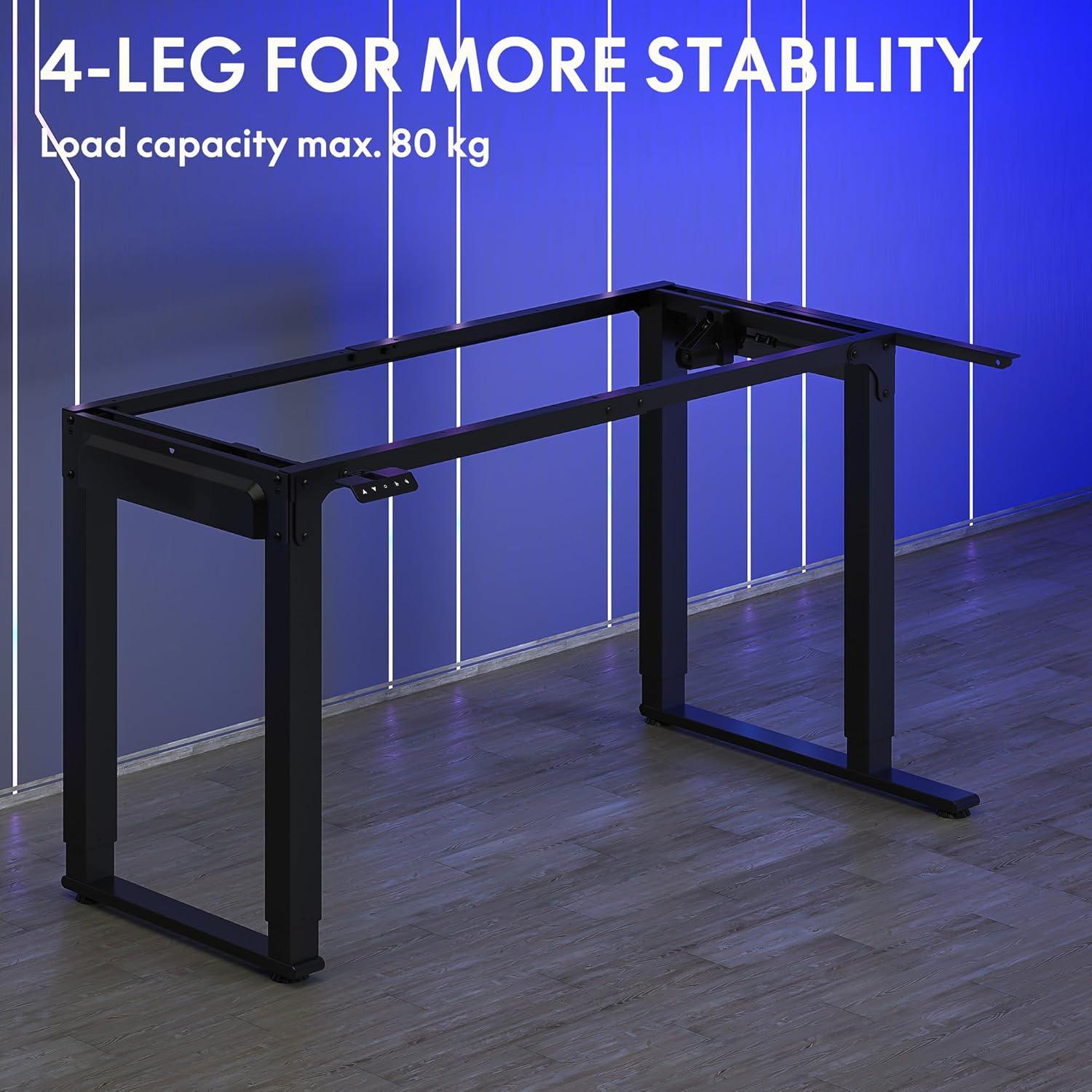
Image: The robust 4-leg frame provides superior stability for the L-shaped standing desk.

Image: Detail of the dual-motor mechanism, ensuring accurate and smooth height positioning.
5. Інструкцыя па эксплуатацыі
Your FLEXISPOT L-Shaped Electric Standing Desk features an intelligent control panel for easy height adjustment and memory presets.
5.1 Функцыі панэлі кіравання

Image: The intelligent control panel with clearly labeled buttons for desk operation.
- Кнопкі ўверх/уніз (▲ / ▼): Press and hold to continuously adjust the desk height up or down. Release to stop at the desired height.
- Reset Button (↺): Used for initial calibration or to reset the desk if an error occurs. Press and hold until the desk moves to its lowest point and slightly rises.
- Sitting Preset Button (👭): Press to automatically move the desk to your programmed sitting height.
- Standing Preset Button (👭 with upward arrow): Press to automatically move the desk to your programmed standing height.
5.2 Налада папярэдніх налад памяці
To save your preferred sitting or standing height:
- Адрэгулюйце вышыню стала на патрэбную вышыню з дапамогай кнопак «Уверх»/«Уніз».
- Press and hold the desired preset button (Sitting or Standing) for approximately 3-5 seconds until you hear a beep or see the display flash. This indicates the height has been saved.

Image: The desk can be adjusted from a minimum height of 72cm to a maximum of 117cm.

Image: The spacious L-shaped desktop (180cm x 110cm) provides ample room for multiple computers and accessories.
6. Тэхнічнае абслугоўванне
Рэгулярнае абслугоўванне забяспечвае даўгавечнасць і аптымальную прадукцыйнасць вашага стала.
- Уборка: Працярыце працоўны стол і рамку мяккай губкайamp тканінай. Пазбягайце агрэсіўных хімічных рэчываў або абразіўных ачышчальнікаў.
- агляд: Перыядычна правярайце ўсе шрубы і злучэнні, каб пераканацца ў іх зацягнутасці. Пры неабходнасці падцягвайце.
- Кабельнае кіраванне: Ensure power cables and other device cables are properly managed to prevent entanglement or damage during height adjustments.
- Сыход за рухавіком: The dual motors are designed for durability. Avoid obstructing the desk's movement or exceeding the weight limit to prevent strain on the motors.

Image: The desk features safe and stylish rounded corners.
7. Выпраўленне непаладак
If you encounter issues with your desk, refer to the following common problems and solutions:
| праблема | Магчымая прычына | Рашэнне |
|---|---|---|
| Стол не рухаецца. | Кабель харчавання адключаны; кабель панэлі кіравання аслаблены; спрацавала абарона ад перагрузкі. | Check power connections; Ensure control panel cable is secure; Reduce weight on desk and perform a reset. |
| Стол рухаецца няроўна або выдае незвычайныя гукі. | Unbalanced load; Loose connections; Obstruction. | Distribute weight evenly; Check and tighten all frame connections; Remove any obstructions. Perform a reset. |
| Папярэднія налады вышыні не працуюць. | Прэсеты захаваны няправільна. | Re-save the desired height by holding the preset button until confirmation. |
| Стол спыняецца на паўдарозе. | Overload protection; Overheating protection. | Reduce weight on the desk. Allow the desk to cool down for 20-30 minutes if it has been used continuously. |
If the problem persists after attempting these solutions, please contact FLEXISPOT customer support.
8. Тэхнічныя характарыстыкі
| Асаблівасць | Дэталь |
|---|---|
| Нумар мадэлі | QS2LB-1811 |
| Марка | ФЛЕКСІСПОТ |
| Тып пісьмовага стала | Г-вобразны электрычны стол |
| Тып рухавіка | Двайны рухавік |
| Тып рамы | 4-Leg Frame |
| Дыяпазон рэгулявання вышыні | Ад 72 см да 117 см |
| Памеры працоўнага стала (Д х Ш) | 180 см х 110 см |
| Максімальная грузападымальнасць | 80 кг |
| Узровень шуму | < 50 дБ |
| Матэрыял | Легаваная сталь (рама) |
| Колер | Чорны |
| Вага прадмета | 30 кілаграма |
9. Гарантыя і падтрымка
FLEXISPOT products are designed for quality and durability. For specific warranty information, please refer to the warranty card included with your purchase or visit the official FLEXISPOT website. If you require technical assistance, have questions about assembly, or need to report a missing/damaged part, please contact FLEXISPOT customer support directly. Ensure you have your model number (QS2LB-1811) and purchase details available when contacting support.
Кантактная інфармацыя: Please refer to the contact details provided on the FLEXISPOT official webсайт або дакументацыю па куплі, каб атрымаць найбольш актуальную інфармацыю аб каналах падтрымкі.