
1. Уводзіны
This manual provides essential information for the safe and effective operation of your HTVRONT Auto Tumbler Heat Press Machine. Designed for sublimation printing, this machine automatically applies ideal pressure for various drinkware, ensuring efficient and high-quality results. Please read these instructions thoroughly before use.

Image: HTVRONT Auto Tumbler Heat Press Machine, showcasinдзякуючы кампактнаму дызайну і ўключаным аксэсуарам.
2. Інфармацыя па бяспецы
- Аўтаматычнае адключэнне: The machine powers down after 15 minutes of inactivity to prevent overheating and conserve energy.
- Аварыйная прыпынак: Press the 'R' button to instantly halt heating and release the heat pad, ensuring user safety and preventing burns.
- Heat-Resistant Gloves: Always use the provided heat-resistant gloves when handling hot items or the heat press components.
- Вентыляцыя: Працуйце з машынай у добра вентыляваным памяшканні.
- Паверхня: Place the heat press on a stable, heat-resistant surface.
- Не дакранайцеся да гарачых паверхняў: Avoid direct contact with the heating element during and immediately after operation.
- тtage: Ensure the machine is connected to a 120V power outlet.
3. Што ўваходзіць у камплект
- Auto Tumbler Heat Press x1
- Heat-resistant Gloves x1 pair
- Heat-resistant Tape x1 roll
- Інструкцыя па эксплуатацыі x1
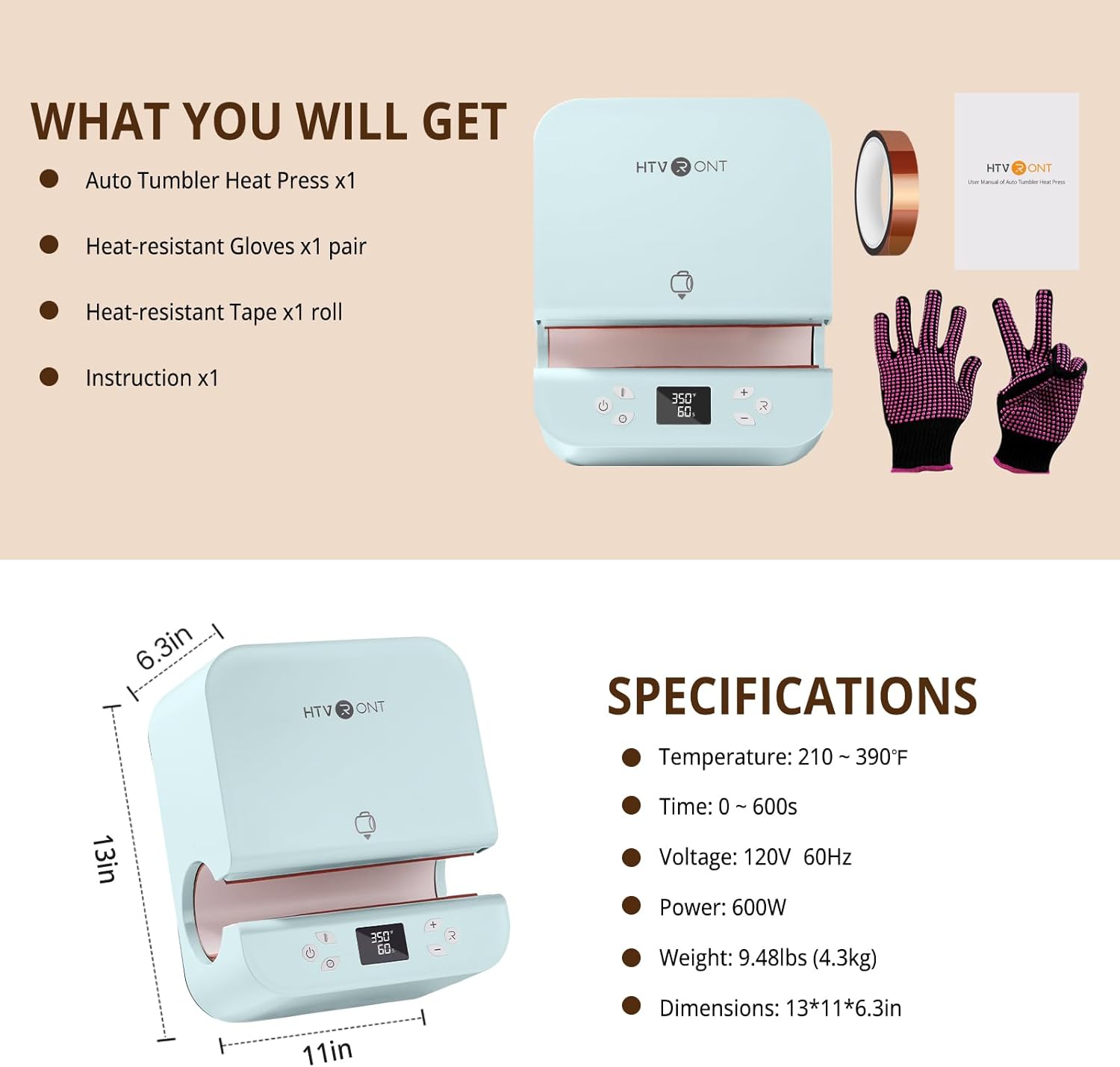
Image: The complete package contents of the HTVRONT Auto Tumbler Heat Press Machine.
4. Тэхнічныя характарыстыкі
| Асаблівасць | Каштоўнасць |
|---|---|
| Рэкамендуемае выкарыстанне | Sublimation printing on drinkware (tumblers, mugs, water bottles, sippy cups) |
| Верхняя адзнака тэмпературы | 390°F (200°C) |
| тtage | 120 вольт |
| Ватtage | 600 ват |
| Памеры прадукту | 32.7 см х 27.7 см х 16 см (12.9 цалі Д х 10.9 цалі Ш х 6.3 цалі В) |
| Вага прадмета | 10.65 фунта (4.84 кг) |
| Compatible Tumbler Diameter | ад 2.95 цаляў (7.5 см) да 3.18 цаляў (8.1 см) |
| Compatible Tumbler Volume | 280ml - 850ml (11-30oz) |
| Матэрыял | абалонка ABS |

Image: Visual guide for compatible tumbler dimensions and sizes.
5. Настройка
- Распакуйце: Асцярожна выміце ўсе кампаненты з упакоўкі. Захавайце ўпакоўку для наступнага захоўвання або транспарціроўкі.
- Размяшчэнне: Position the heat press on a flat, stable, and heat-resistant surface in a well-ventilated area.
- Падключэнне сілкавання: Connect the power cord to the machine's inlet and then to a standard 120V, 60Hz electrical outlet.
- Першапачатковае ўключэнне: Flip the power switch located at the back of the machine to the 'ON' position. The digital display will illuminate.
6. Інструкцыя па эксплуатацыі
6.1. Preparing Your Item
- Ensure your tumbler's diameter is between 2.95 and 3.18 inches.
- Wrap your sublimation design tightly around the tumbler and secure it with heat-resistant tape.
6.2. Устаноўка тэмпературы і часу
- Use the 'Mode' button to cycle through preset temperature and time settings, or manually adjust using the '+' and '-' buttons for temperature and time.
- Refer to the Quick Reference Chart below for recommended settings based on material.
6.3. Pressing Cycle
- Once settings are confirmed, carefully slide the prepared tumbler into the heating chamber. The machine will automatically detect the tumbler and apply appropriate pressure.
- Press the 'Enter' button to begin the heating cycle. The machine will automatically heat and press the design.
- The digital display will show the countdown.
6.4. Removing the Tumbler
- Upon completion of the cycle, the machine will automatically release the pressure and open.
- Wearing heat-resistant gloves, carefully remove the hot tumbler from the machine.
- Allow the tumbler to cool completely before removing the sublimation paper and tape.

Image: Control panel showing temperature and time settings.
6.5. Quick Reference Chart
| Базавыя матэрыялы | Час | тэмпература |
|---|---|---|
| Стакан з нержавеючай сталі | 130±20с | 370°F±10°F |
| Керамічны шклянку | 400±20с | 385°F±10°F |
| Шкляны шклянку | 300±20с | 370°F±10°F |
Note: These are general guidelines. Optimal settings may vary based on specific materials and sublimation paper.
7. Тэхнічнае абслугоўванне
- Уборка: Always unplug the machine and allow it to cool completely before cleaning. Wipe the exterior with a soft, damp тканінай. Не выкарыстоўвайце абразіўныя ачышчальныя сродкі і не апускайце прыладу ў ваду.
- захоўванне: Захоўвайце тэрмапрэс у сухім, чыстым ад пылу месцы, калі ён не выкарыстоўваецца.
8. Выпраўленне непаладак
- Uneven Heating/Ghosting: Ensure the sublimation paper is tightly wrapped around the tumbler with no gaps or wrinkles. Verify the tumbler diameter is within the recommended range (2.95-3.18 inches) for optimal pressure application.
- Tumbler Difficult to Remove: This may occur with mugs slightly larger than the recommended diameter. Ensure you are using heat-resistant gloves and carefully extract the item. Avoid forcing the tumbler.
- Машына не ўключаецца: Check that the power cord is securely plugged into both the machine and a functioning 120V outlet. Ensure the power switch is in the 'ON' position.
- Функцыя аўтаматычнага выключэння: If the machine powers off unexpectedly, it may be due to 15 minutes of inactivity. Simply turn it back on.
9. Гарантыя і падтрымка
HTVRONT is committed to providing excellent customer service. Should any issues arise with your Auto Tumbler Heat Press Machine, please contact HTVRONT customer support for assistance. They will work to provide a solution to ensure your satisfaction.
For support, please refer to the contact information provided in your product packaging or visit the official HTVRONT webсайт.