
1. Уводзіны
Thank you for choosing the GOYOJO FA2204E Analytical Balance. This precision instrument is designed for highly accurate weighing in laboratory, industrial, and educational settings. With a capacity of 220 grams and a readability of 0.1 mg (0.0001g), it is ideal for measuring small, delicate samples such as chemicals, jewelry, and gemstones. This manual provides essential information for the safe and efficient operation, setup, and maintenance of your analytical balance.
2. Інфармацыя па бяспецы
- Always operate the balance on a stable, level surface free from vibrations and drafts.
- Avoid exposing the balance to extreme temperatures, humidity, or direct sunlight.
- Do not overload the balance beyond its maximum capacity of 220g.
- Выкарыстоўвайце толькі адаптар сілкавання, які ўваходзіць у камплект.
- Keep the balance clean and free from dust and chemical spills.
- Do not attempt to disassemble or repair the balance yourself. Contact qualified service personnel.
- Ensure proper ventilation when weighing volatile substances.
3. Змесціва ўпакоўкі
Акуратна распакуйце скрынку і пераканайцеся, што ўсе прадметы наяўныя і непашкоджаныя:
- GOYOJO FA2204E Analytical Balance unit
- Weighing pan (80mm diameter)
- Draft shield (glass enclosure)
- Адаптар харчавання
- Calibration weight (if included)
- Кіраўніцтва карыстальніка (гэты дакумент)
4. Прадукт скончыўсяview
The FA2204E analytical balance features a robust design with a glass draft shield to protect against air currents, ensuring stable and accurate readings. It includes an easy-to-read LCD and multiple connectivity options.
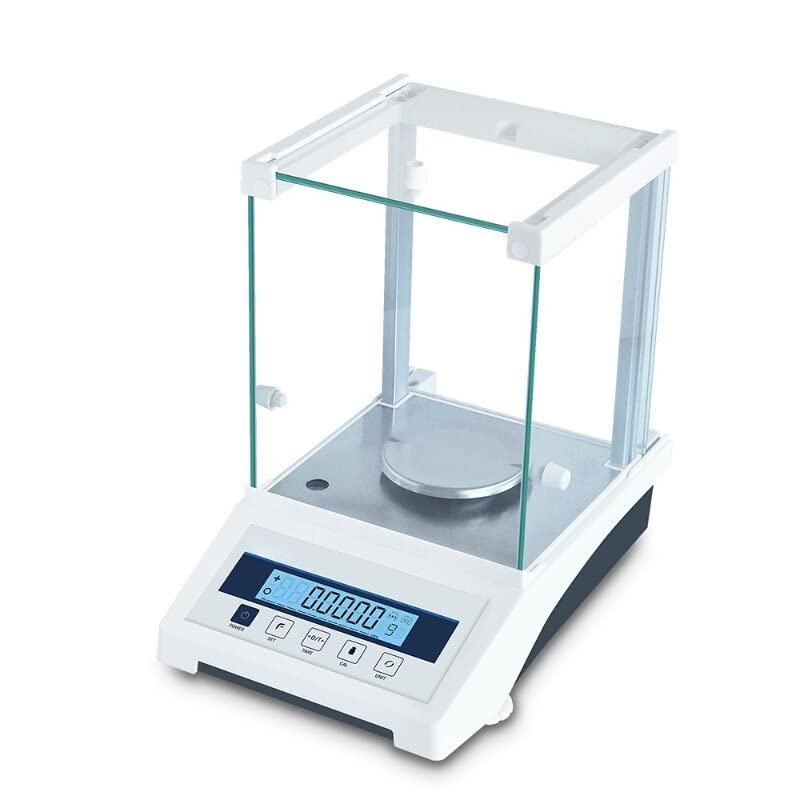
Малюнак 4.1: Спераду view of the GOYOJO FA2204E Analytical Balance with a sample beaker.
Ключавыя кампаненты:
- Плата для ўзважвання: Stainless steel platform for placing sampлес.
- Draft Shield: Glass enclosure to minimize air current interference.
- ВК-дысплей: Shows weight readings, units, and operational status.
- Панэль кіравання: Buttons for power, tare, unit selection, and calibration.
- Індыкатар узроўню: Bubble level for ensuring proper balance setup.
- Рэгуляваныя ножкі: For leveling the balance.
- RS232/USB Ports: For data communication with external devices.
5. Настройка
5.1 Распакоўка і размяшчэнне
- Carefully remove the balance from its packaging. Retain all packaging materials for future transport or storage.
- Place the balance on a sturdy, level, and vibration-free workbench. Avoid locations near air conditioning vents, windows, or heavy machinery that could cause drafts or vibrations.
- Ensure sufficient space around the balance for operation and maintenance.
5.2 Зборка
- Install the weighing pan onto the pan support. Ensure it sits securely and centrally.
- Assemble the glass draft shield around the weighing pan. The shield panels should slide smoothly into their designated slots.
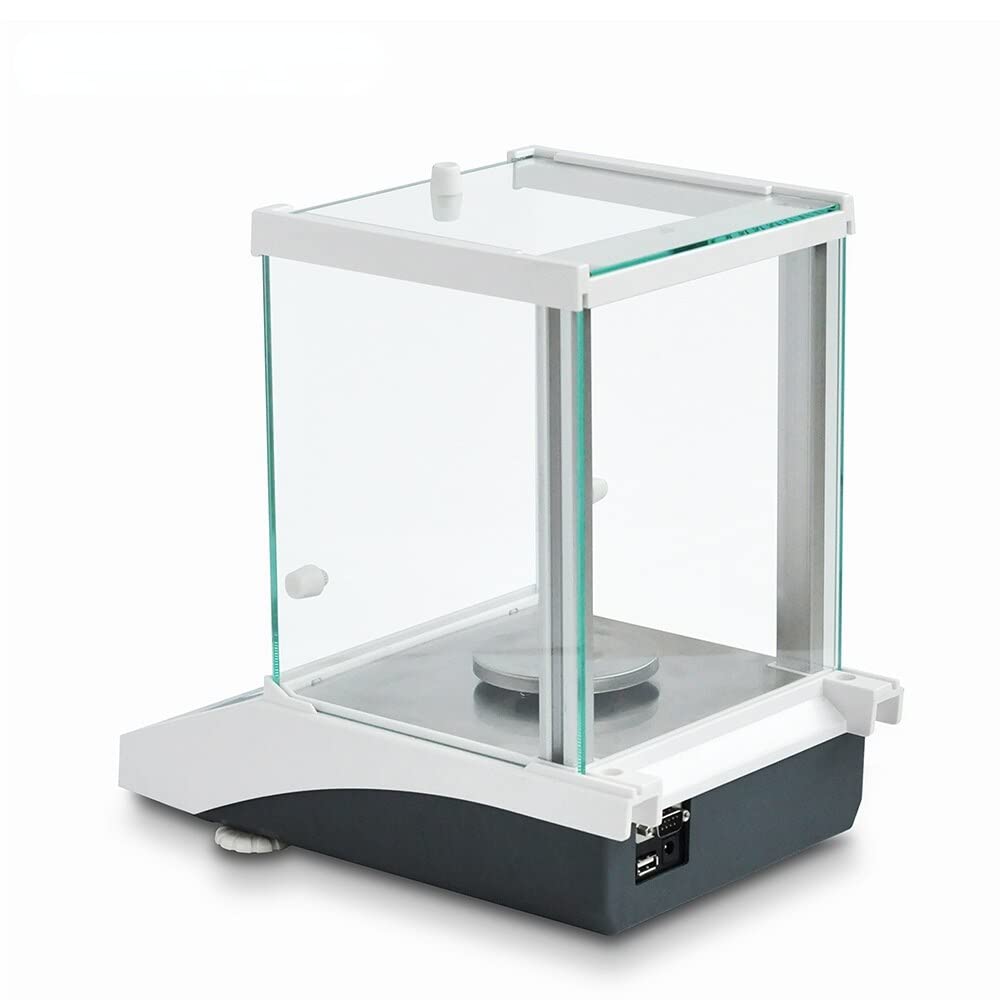
Малюнак 5.1: бок view illustrating the assembled draft shield and weighing pan.
5.3 Выраўноўванне балансу
Accurate leveling is crucial for precise measurements.
- Locate the bubble level indicator, usually at the front or side of the balance base.
- Adjust the two front adjustable feet (or all four, depending on the model) by turning them clockwise or counter-clockwise until the air bubble is centered within the indicator circle.
5.4 Падключэнне харчавання
- Connect the power adapter to the power input port on the rear of the balance.
- Plug the power adapter into a suitable electrical outlet (110V-240V).

Малюнак 5.2: Задняя частка view showing the power input, RS232, and USB ports.
6. Інструкцыя па эксплуатацыі
6.1 Уключэнне/выключэнне
- Каб уключыць: Націсніце [ВКЛ/ВЫКЛ] button. The display will show a self-test sequence and then settle at zero.
- Каб выключыць: Націсніце і ўтрымлівайце [ВКЛ/ВЫКЛ] кнопку, пакуль дысплей не выключыцца.
6.2 Initial Warm-up
Allow the balance to warm up for at least 30 minutes after powering on for the first time or after a long period of inactivity. This ensures thermal stability and optimal measurement accuracy.
6.3 Каліброўка
Regular calibration is essential for maintaining accuracy. Refer to your specific model's calibration procedure, which typically involves using a known calibration weight.
- Ensure the balance is level and warmed up.
- Clear the weighing pan.
- Access the calibration menu (often by pressing and holding a specific button like [CAL] or [РЭЖЫМ]).
- Follow the on-screen prompts to place the specified calibration weight on the pan.
- Remove the weight when prompted. The balance will then display "PASS" or similar upon successful calibration.
6.4 Basic Weighing Procedure

Малюнак 6.1: Крупны план ВК-дысплея і панэлі кіравання.
- Zeroing the Balance: With nothing on the weighing pan, press the [НОЛЬ] button to set the display to 0.0000g.
- Taring (for containers): Place an empty container on the weighing pan. Wait for the reading to stabilize, then press the [ТАРА] button. The display will return to 0.0000g, effectively subtracting the container's weight.
- Размяшчэнне Sampль: Carefully place the item or substance to be weighed onto the center of the weighing pan (or into the tared container). Close the draft shield doors.
- Чытанне вымярэнняў: Wait for the reading on the LCD to stabilize. This is your accurate weight measurement.
- Выбар адзінкі: Націсніце [БЛОК] or [РЭЖЫМ] button to cycle through available weighing units (grams, carats, ounces, etc.).
6.5 Data Transfer (RS232/USB)
The FA2204E balance is equipped with RS232 and USB interfaces for connecting to a computer or printer for data logging and analysis.
- Connect the appropriate cable (RS232 or USB) from the balance to your computer or peripheral device.
- Install any necessary drivers or software provided by GOYOJO or available online for your operating system.
- Refer to the software's instructions for configuring communication settings (e.g., baud rate, data bits, parity) to match the balance's settings.
- Data can typically be sent manually via a print button or automatically at specified intervals, depending on the balance's settings and connected software.
7. Тэхнічнае абслугоўванне
7.1 Ачыстка
- Заўсёды адключайце вагу ад сеткі харчавання перад чысткай.
- Выкарыстоўвайце мяккі, damp анучай з мяккім мыйным сродкам для чысткі вонкавых паверхняў. Пазбягайце абразіўных ачышчальнікаў або растваральнікаў.
- The stainless steel weighing pan can be removed and cleaned separately with soap and water. Ensure it is completely dry before re-installing.
- Use a soft brush or lint-free cloth to gently clean around the weighing pan and inside the draft shield.
- Do not allow liquids to enter the balance housing or ports.
7.2 Захоўванне
- When not in use for extended periods, store the balance in a clean, dry, and temperature-controlled environment.
- Cover the balance with a dust cover to prevent dust accumulation.
- If transporting the balance, use the original packaging to protect it from shock and vibration.
8. Выпраўленне непаладак
| праблема | Магчымая прычына | Рашэнне |
|---|---|---|
| Unstable readings / Drifting display | Vibrations, drafts, unlevel balance, temperature fluctuations, electromagnetic interference. | Ensure balance is on a stable, level surface. Close draft shield doors. Avoid air currents. Allow warm-up time. Relocate away from strong electromagnetic fields. |
| Balance does not power on | Няма харчавання, няспраўны адаптар харчавання, дрэннае злучэнне. | Check power cable connection. Ensure outlet has power. Try a different outlet. Verify power adapter is functioning. |
| Няправільныя паказанні | Needs calibration, pan not centered, foreign object under pan, overloaded. | Perform calibration. Ensure pan is correctly seated. Clean under the pan. Do not exceed maximum capacity. |
| Communication error (RS232/USB) | Incorrect cable, driver issues, wrong software settings. | Verify cable type and connection. Install/update drivers. Check software communication settings (baud rate, etc.). |
9. Тэхнічныя характарыстыкі
| Асаблівасць | Спецыфікацыя |
|---|---|
| мадэль | FA2204E |
| Ёмістасць | 220 грамаў |
| Readability (Precision) | 0.1 mg (0.0001g) |
| Паўтараемасць | 0.2 мг |
| Памер патэльні | 80 мм |
| Тып датчыка | Электрамагнітныя |
| Дысплей | ВК |
| Адзінкі ўзважвання | grams, pounds, ounces, grams per square meter (g/m²) |
| Інтэрфейсы | RS232, USB |
| тtage | 110В-240В |
| Material (Draft Shield) | Шкло |
10. Гарантыя і падтрымка
For warranty information, technical support, or service inquiries, please refer to the contact information provided with your purchase documentation or visit the official GOYOJO website. Please have your model number (FA2204E) and purchase date ready when contacting support.