
Уводзіны
Thank you for choosing the ROCAM Digital Projection Alarm Clock, Model CR1024. This device combines a digital alarm clock with a 270° rotatable projection feature, FM radio, dual alarm settings, and a USB charging port. Please read this manual carefully to ensure proper use and to fully enjoy all its features.

Image: The ROCAM Digital Projection Alarm Clock displaying time, date, temperature, and humidity, positioned on a bedside table next to a cup of coffee and a notebook.
Асаблівасці прадукту
- 270° Rotatable Projection: Project time onto your wall or ceiling with adjustable angle and focus.
- 5-Level Dimmable LED Display: Adjust the brightness of the main display to your preference.
- FM Radio & Sleep Timer: Enjoy your favorite radio stations and set a sleep timer for automatic shutdown.
- Dual Alarm with Weekend/Weekday Mode: Set two independent alarms with customizable schedules (Mon-Sun, Mon-Fri, Sat-Sun, One-Time).
- USB-C Power Input & USB-A Charging Output: Power the clock via USB-C and charge external devices like smartphones via USB-A.
- Рэзервовае капіраванне батарэі: Захоўвае налады часу і будзільніка падчас адключэння электраэнергііtages (batteries not included).
- Дысплей тэмпературы і вільготнасці: Shows indoor temperature (°C/°F) and humidity.
- Функцыя начнога святла: Integrated night light for soft illumination.
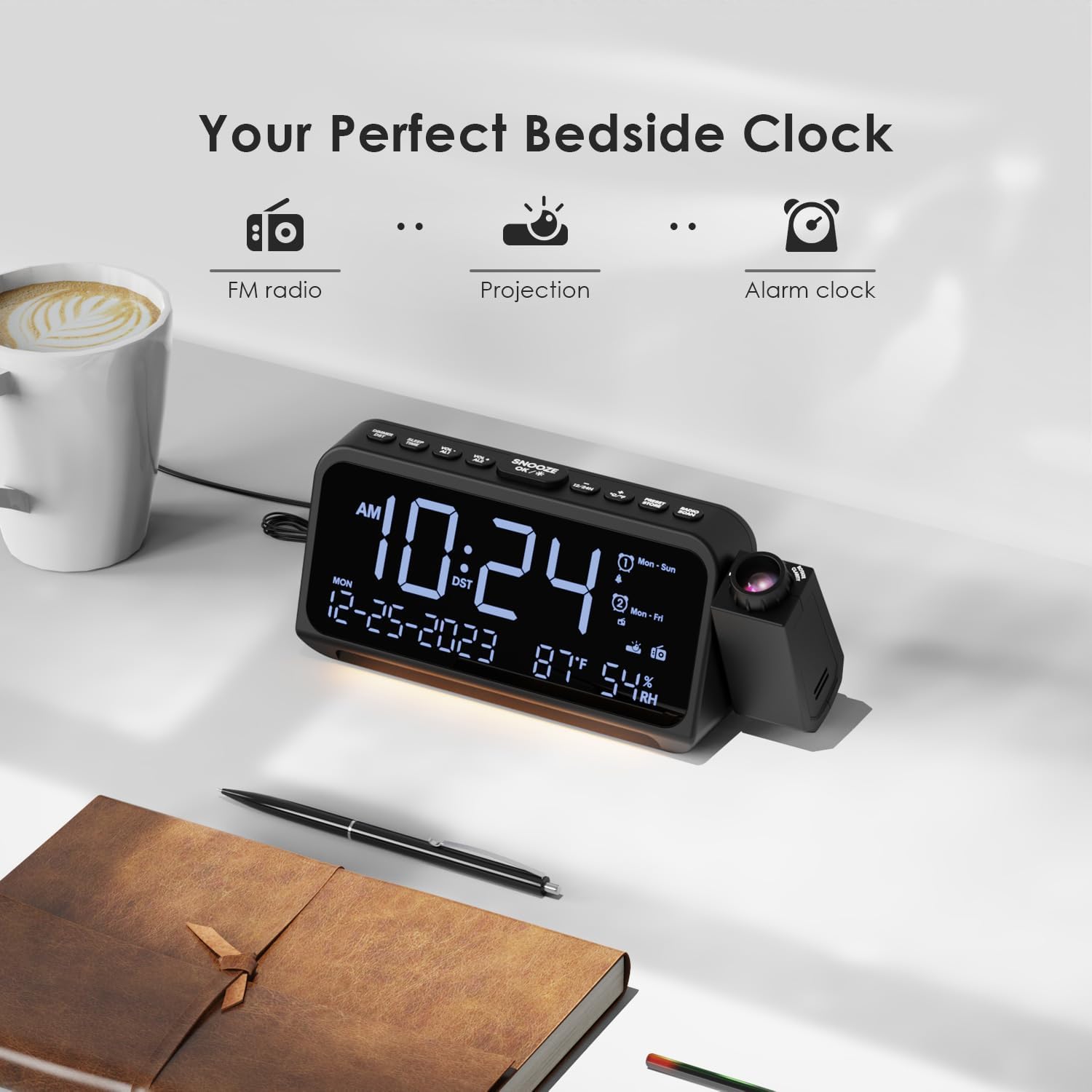
Image: Visual representation of the clock's main functions: FM radio, projection, and alarm clock.
Змест пакета
Калі ласка, праверце ўпакоўку на наяўнасць наступных прадметаў:
- ROCAM Digital Projection Alarm Clock (CR1024)
- Кабель харчавання USB Type-C
- Адаптар сілкавання
- Кіраўніцтва карыстальніка
Note: 1 CR2 battery is required for backup functionality and is not included in the package.

Image: The alarm clock, USB-C cable, power adapter, and user manual laid out, with product dimensions (20cm x 8.7cm x 3.81cm) and weight (240g) indicated.
Прадукт скончаныview
Кнопкі верхняй панэлі:
- SNOOZE/OK/*: Snooze alarm, confirm settings, or activate night light.
- VOL-/AL1: Decrease volume, set Alarm 1.
- VOL+/AL2: Increase volume, set Alarm 2.
- 12/24 гадзіны: Пераключэнне паміж 12-гадзінным і 24-гадзінным фарматам часу.
- °C/°F: Switch between Celsius and Fahrenheit temperature display.
- PRESET/STORE: Save FM radio presets.
- RADIO/SCAN: Turn FM radio on/off, scan for stations.
- НАБОР ЧАСУ: Enter time setting mode.
- НАБОР ТРЫВОГІ: Увайдзіце ў рэжым налады будзільніка.
Side Panel & Rear:
- Праекцыйны аб'ектыў: Projects time onto a surface.
- Фокуснае кола: Рэгулюе выразнасць праецыраванага малюнка.
- Паварот праекцыі: Allows 270° adjustment of the projection angle.
- Кнопка DIM: Adjusts projection brightness.
- Кнопка харчавання: Turns the projection on/off.
- Type-C Input (5V-2A): Main power connection.
- USB-A Output (5V-1A): Для зарадкі знешніх прылад.
- FM-антэна: Выцягніце для лепшага прыёму радыё.
- Батарэйны адсек: For CR2 backup batteries.

Выява: Падрабязная view of the top control buttons and the projection unit, highlighting the dual alarm settings.

Image: The back of the alarm clock, illustrating the Type-C power input and the USB-A output port for charging other devices.
Настройка
1. Падключэнне сілкавання:
- Connect the provided USB Type-C cable to the Type-C input port on the back of the alarm clock.
- Plug the other end of the USB cable into the power adapter, then plug the adapter into a standard wall outlet.
- Дысплей загарыцца, што будзе паказваць, што гадзіннік уключаны.

Image: The alarm clock is shown connected to a wall outlet via its USB-C power cable and adapter.
2. Усталёўка рэзервовага акумулятара:
- Знайдзіце батарэйны адсек у ніжняй частцы гадзінніка.
- Адкрыйце крышку адсека.
- Insert 1 CR2 battery (not included) according to the polarity markings (+/-).
- Close the battery compartment cover. This battery will preserve time and alarm settings during a power outage.

Image: The bottom of the alarm clock with the battery compartment open, showing where to insert CR2 batteries.
Інструкцыя па эксплуатацыі
1. Устаноўка часу і даты:
- Націсніце і ўтрымлівайце УСТАНОВА ЧАСУ button. The hour digits will start flashing.
- Выкарыстоўвайце ГУЧНАСЦЬ+ or ГУЧ- кнопкі для налады гадзіны. Націсніце УСТАНОВА ЧАСУ яшчэ раз для пацверджання.
- Repeat the process for minutes, year, month, and day.
- Прэса 12/24 гадзіны to switch between 12-hour and 24-hour format.
- Прэса ° C / ° F to switch between Celsius and Fahrenheit for temperature display.
2. Налада сігналаў трывогі (сігнал трывогі 1 і сігнал трывогі 2):
- Націсніце і ўтрымлівайце ТРЫВОГА кнопка. Значок будзільніка 1 і лічбы гадзін будуць міргаць.
- Выкарыстоўвайце ГУЧНАСЦЬ+ or ГУЧ- to set the desired alarm hour. Press ТРЫВОГА каб пацвердзіць.
- Паўтарайце на працягу некалькіх хвілін.
- Select alarm mode (Mon-Sun, Mon-Fri, Sat-Sun, One-Time) using ГУЧНАСЦЬ+ or ГУЧ-. Прэса ТРЫВОГА каб пацвердзіць.
- Choose alarm sound: buzzer or FM radio. Use ГУЧНАСЦЬ+ or ГУЧ- каб выбраць. Прэса ТРЫВОГА каб пацвердзіць.
- To set Alarm 2, briefly press ТРЫВОГА again and repeat the steps.
- To activate/deactivate an alarm, briefly press AL1 or AL2. The alarm icon will appear/disappear on the display.
Image: The clock display showing options for setting two alarms with different ringtone choices and day modes (Mon-Sun, Mon-Fri, Sat-Sun, One-Time).
3. Функцыя паўтору будзільніка:
Калі гучыць будзільнік, націсніце кнопку SNOOZE/OK/* button to temporarily silence it for 9 minutes. The alarm will sound again after the snooze period.
4. Display Brightness (Dimmer):
Націсніце SNOOZE/OK/* button repeatedly to cycle through 5 levels of display brightness (L-1 to L-5) or turn the display off.

Image: The clock display showing five different brightness levels (L-1 to L-5) for the main LED screen.
5. Налады праекцыі:
- Уключыць/выключыць: Націсніце Кнопка харчавання on the side of the projection unit to turn the projection on or off.
- Наладзіць яркасць: Націсніце ДЫМ button on the side of the projection unit to cycle through 5 levels of projection brightness.
- Наладзіць кут: Rotate the projection unit up to 270° to direct the time onto your desired surface (wall or ceiling).
- Адрэгуляваць фокус: Павярнуць Фокуснае кола on the projection unit to sharpen the projected image.

Image: The digital time '10:24' projected in red onto a dark wall, demonstrating the projection feature.

Image: The projection unit rotating 270 degrees, showing how the projected time can be adjusted for optimal viewінж.

Image: The projected time showing five distinct brightness levels, from level 1 (dimmest) to level 5 (brightest).
6. Праца з FM-радыё:
- Для лепшага прыёму выцягніце FM-антэну.
- Націсніце RADIO/SCAN кнопку, каб уключыць FM-радыё.
- Націсніце і ўтрымлівайце RADIO/SCAN to automatically scan and save available stations.
- Выкарыстоўвайце ГУЧНАСЦЬ+ or ГУЧ- to manually tune to a station or cycle through saved presets.
- Прэса PRESET/STORE to save the current station as a preset.
- Прэса RADIO/SCAN again to turn the FM radio off.

Image: The clock displaying an FM radio frequency (108.0 MHz) and options for a sleep timer (OFF, 15, 30, 60, 90 minutes).
7. Таймер сну:
When the FM radio is on, press the SNOOZE/OK/* button repeatedly to set a sleep timer (15, 30, 60, 90 minutes, or OFF). The radio will automatically turn off after the selected duration.

Image: A hand pressing a button on the clock, with sleep timer options (P01, P06, P12, P15, P20) displayed, indicating timed radio playback.
8. USB Charging Output:
Connect your smartphone or other USB-powered device to the USB-A output port (5V-1A) on the back of the clock to charge it. Ensure the alarm clock is powered via its USB-C input.
Тэхнічнае абслугоўванне
- Уборка: Працірайце гадзіннік мяккай сухой тканінай. Не выкарыстоўвайце абразіўныя ачышчальнікі або растваральнікі.
- Замена батарэі: Калі гадзіннік збіваецца з шляху падчас адключэння электраэнергііtage, replace the CR2 backup battery.
- Размяшчэнне: Avoid placing the clock in direct sunlight, high temperatures, or high humidity.
Ліквідацыю непаладак
| праблема | Рашэнне |
|---|---|
| Дысплей гадзінніка пусты. | Ensure the USB-C power cable is securely connected to both the clock and a working power outlet. Check if the display brightness is set to OFF. |
| Сігналізацыя не гучыць. | Verify that the alarm is activated (alarm icon visible). Check the alarm volume. Ensure the alarm mode (Mon-Sun, Mon-Fri, etc.) is correctly set for the current day. |
| Projection is blurry. | Павярнуць Фокуснае кола on the projection unit until the image is clear. Ensure the projection surface is within optimal range. |
| Слабы прыём FM-радыё. | Fully extend the FM antenna. Try repositioning the clock to improve signal. Perform an auto-scan to find stronger stations. |
| Не працуе порт зарадкі USB. | Ensure the alarm clock is powered by the USB-C input. Check the charging cable and the device being charged. |
Тэхнічныя характарыстыкі
- Нумар мадэлі: CR1024
- Памеры: 20 x 3.81 x 8.7 см (Д x Ш x У)
- Вага: 240 г
- Спажываная магутнасць: USB тыпу C, 5 В - 2 А
- Выхад USB: USB Type-A, 5V-1A
- Рэзервовае капіраванне батарэі: 1 x CR2 battery (not included)
- Частотны дыяпазон FM: 87.5 - 108 МГц
Гарантыя і падтрымка
ROCAM products are designed for reliability and performance. This product comes with a standard manufacturer's warranty. For specific warranty details, please refer to the warranty card included in your package or contact ROCAM customer support.
If you encounter any issues or have questions regarding your ROCAM Digital Projection Alarm Clock, please contact our customer support team. Contact information can typically be found on our official webсайце або на ўпакоўцы прадукту.