
Уводзіны
This manual provides detailed instructions for the installation, operation, and maintenance of your AUXBEAM 50-inch 288W Straight LED Light Bar. This light bar features 6 lighting modes, including amber, white, and strobe functions, with a memory reset capability. Please read this manual thoroughly before installation and use to ensure proper function and safety.
Інфармацыя па бяспецы
- Заўсёды адключайце акумулятар аўтамабіля перад выкананнем любых электрамантажных работ.
- Пераканайцеся, што ўсе злучэнні правадоў надзейныя і належным чынам ізаляваныя, каб пазбегнуць кароткага замыкання.
- Mount the light bar securely to prevent it from dislodging during vehicle operation.
- Do not look directly into the light bar when it is illuminated, as it can cause eye damage.
- Verify local regulations regarding auxiliary lighting before use on public roads.
- Keep children away from the product and installation area.
Змест пакета

Image: Contents of the Auxbeam 50-inch LED Light Bar package, including the light bar, mounting brackets, wrenches & screws, DT wiring harness kit, user manual, and an Auxbeam sticker.
- 1x LED Light Bar
- 2x Кранштэйны
- 2x Wrenches & Screws
- 1x DT Wiring Harness Kit
- 1x Кіраўніцтва карыстальніка
- 1x Auxbeam Sticker
Тэхнічныя характарыстыкі
| Асаблівасць | Дэталь |
|---|---|
| Нумар мадэлі | ZD000807-CA |
| Dimensions (Light Bar) | Approx. 1270mm (50.0 inches) length |
| Магутнасць | 288 Вт |
| Люмен выхад | 28800 лм |
| Святлодыёдныя чыпы | 440pcs 3030 chips |
| Каляровая тэмпература | 6000K (белы), 3500K (бурштынавы) |
| Выкрайка пучка | Spot and Flood Combo |
| тtage | 12 вольт |
| Рэйтынг воданепранікальнасці | IP68 |
| Матэрыял корпуса | 6063 Die-casting Aluminum |
| Матэрыял лінзы | Полікарбанат (ПК) |
| Mounting Bracket Material | Нержавеючая сталь |
| Працягласць жыцця | Больш за 50,000 XNUMX гадзін |
| ЭМС | Built-in (No electromagnetic interference) |
Кіраўніцтва па ўстаноўцы
1. Мантаж светлавой панэлі
Securely attach the provided mounting brackets to your vehicle. The adjustable stainless steel brackets allow for precise positioning of the light bar to direct the beam as needed. Ensure all screws are tightened to prevent vibration and movement.

Image: Close-up of the adjustable mounting bracket, demonstrating its 360-degree adjustment capability for precise light beam direction.
2. Падключэнне правадоў
Use the included DT wiring harness kit for a plug-and-play installation. Follow these steps for proper connection:
- Падключыце Чырвоная лінія (Positive Pole) of the light bar to the positive terminal of your vehicle's battery.
- Падключыце Чорная лінія (Negative Pole) of the light bar to the negative terminal or a suitable ground point on your vehicle.
- Падключыце Жоўтая лінія (Special Line for Lighting Mode) to the corresponding mode positive pole on the wiring harness. This line controls the lighting modes.
- Пераканайцеся, што ўсе злучэнні надзейныя і воданепранікальныя.
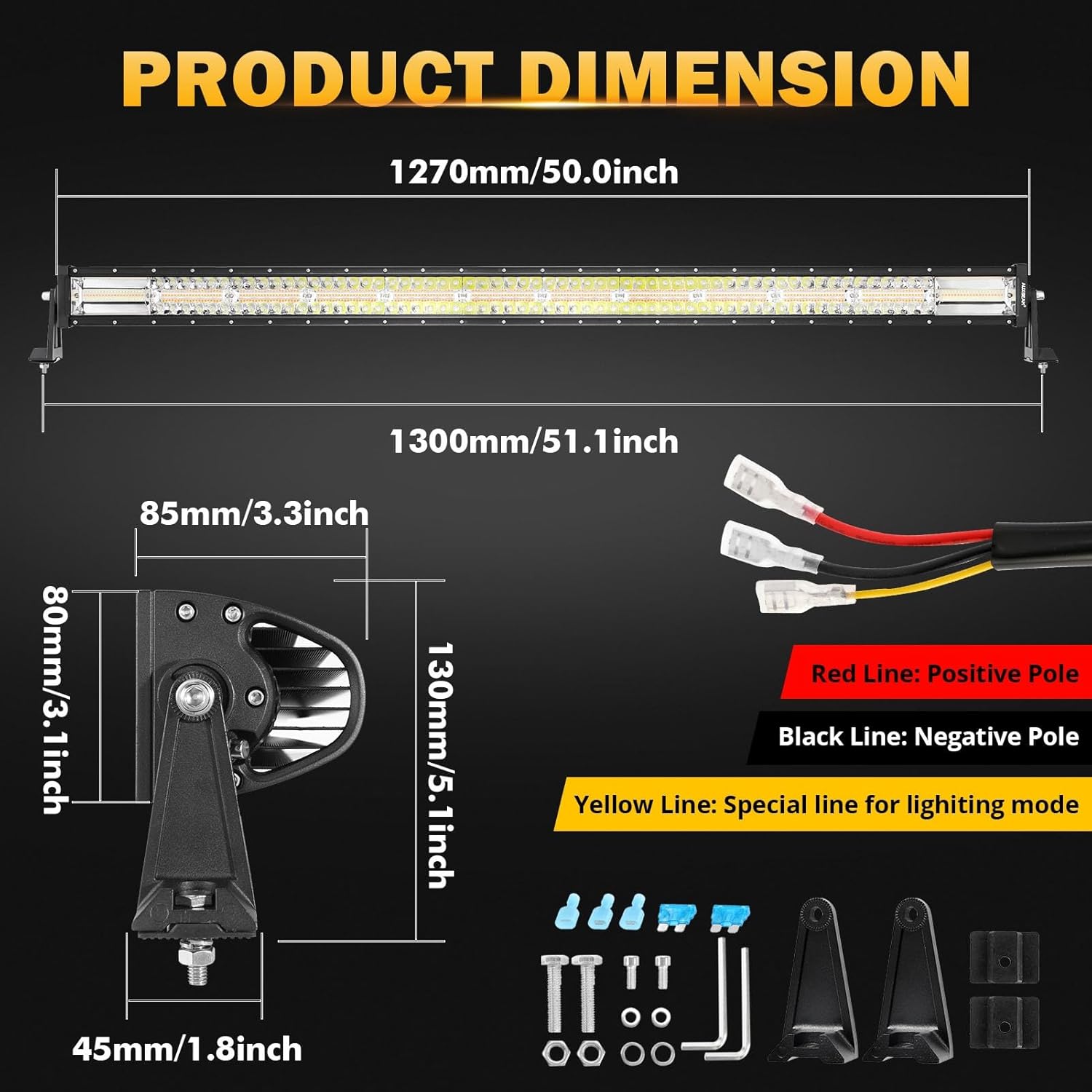
Выява: Падрабязная view of the light bar's wiring, indicating the Red (Positive), Black (Negative), and Yellow (Mode Control) lines, along with dimensions of the light bar and mounting components.
Video: This video demonstrates the plug-and-play connection process for the light bar's wiring harness, showing how to connect the male and female DT plugs securely.
Інструкцыя па эксплуатацыі
Рэжымы асвятлення
Your AUXBEAM LED Light Bar features 6 distinct lighting modes, easily switchable via the remote control on the wiring harness:
- Белае святло: Provides bright, clear illumination for general driving.
- Бурштынавае святло: Offers strong penetration, ideal for fog or dusty conditions.
- Amber & White Light: A combination for enhanced visibility.
- White Strobe: Flashing white light for warning or signaling.
- Amber Strobe: Flashing amber light for warning or signaling.
- White & Amber Strobe: Combined flashing for maximum visibility and warning.
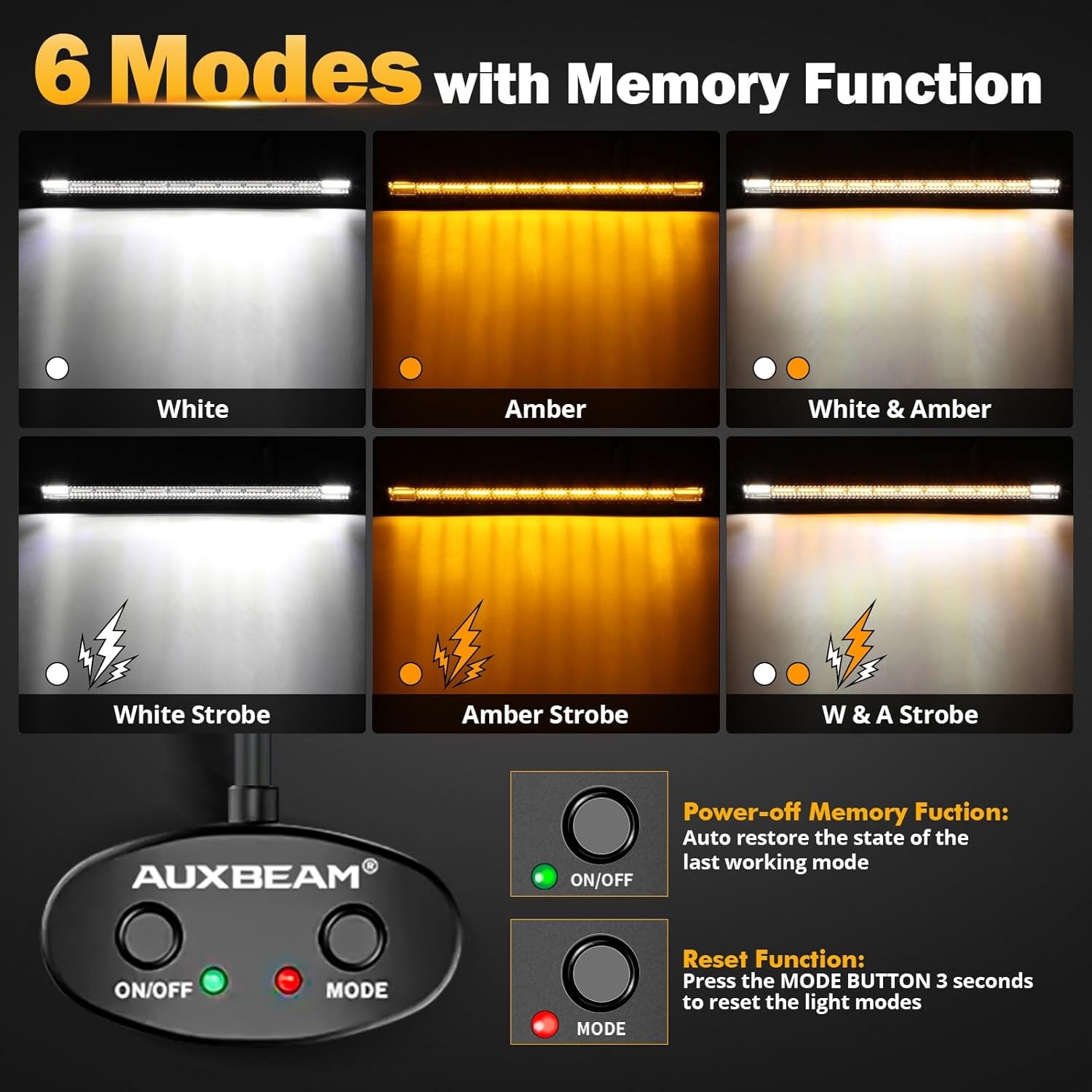
Image: Visual representation of the six distinct lighting modes available on the light bar, controlled by the included remote. Modes include solid white, solid amber, mixed white and amber, and strobe variations of each.
Memory and Reset Function
The light bar is equipped with a memory function that remembers your last used mode when the switch is turned OFF. To restore the light bar to its initial white light mode, press and hold the MODE button on the wiring harness for more than 3 seconds.
Video: This video demonstrates the various lighting modes (white, amber, mixed, and strobe functions) and the memory/reset feature of the light bar, showing how to cycle through modes and reset to white light.
Тэхнічнае абслугоўванне
- Regularly inspect the light bar and mounting hardware for any signs of damage or looseness.
- Clean the lens with a soft cloth and mild soap solution to maintain optimal light output. Avoid abrasive cleaners.
- Check wiring connections periodically for corrosion or wear.
- Ensure the breathable valve (if applicable) is clear of debris to prevent condensation buildup.
Ліквідацыю непаладак
Light Bar Not Illuminating
- Check all wiring connections for proper contact and ensure they are not loose.
- Verify the vehicle's battery has sufficient charge.
- Inspect the fuse in the wiring harness for a blown fuse. Replace if necessary.
- Пераканайцеся, што выключальнік знаходзіцца ў становішчы ON.
Incorrect Lighting Mode or Functionality Issues
- If modes are not switching correctly, ensure the yellow mode control wire is properly connected.
- Try resetting the light bar to white mode by holding the MODE button for 3 seconds.
- Калі праблемы не знікнуць, звярніцеся ў службу падтрымкі.
Condensation Inside the Lens
- Ensure the breathable valve is not obstructed. Clear any debris.
- Condensation typically dissipates with normal use. If it persists, contact customer support.
Гарантыя і падтрымка
AUXBEAM provides a Гарантыя 24 месяцаў for this product. For any installation questions, product inquiries, or warranty claims, please contact the AUXBEAM customer service team. They offer 24-hour online customer service to assist you.
For further assistance, visit the official AUXBEAM store: AUXBEAM Store