
Star Micronics MCL32CBI
Кіраўніцтва карыстальніка для прамога тэрмапрынтара Star Micronics mC-Label3 MCL32CBI
Model: MCL32CBI
Уводзіны
This manual provides essential information for the setup, operation, maintenance, and troubleshooting of your Star Micronics mC-Label3 MCL32CBI Direct Thermal Printer. Please read this manual thoroughly before using the printer to ensure proper and safe operation.
Змест пакета
Праверце, ці ўсе пералічаныя ніжэй прадметы ўваходзяць у вашу ўпакоўку:
- mC-Label3 Multifunctional Printer
- Адаптар пераменнага току
- Сілавы кабель
- USB Cables (C-C 1.0m and C-A 1.8m)
- Кабель LAN (1 м)
- Simple Setup Sheet Safety Guide

Выява: спераду view of the Star Micronics mC-Label3 printer, showcasing its compact design and label output slot.
Настройка
1. Падключэнне прынтара
The mC-Label3 MCL32CBI printer offers multiple connectivity options:
- USB-C: Connect the printer directly to your PC, Android, or iOS device using the provided USB-C to USB-C or USB-C to USB-A cables.
- Ethernet (LAN): For network connectivity, connect the printer to your router or network switch using the supplied LAN cable.
- Bluetooth: The MCL32CBI model supports Bluetooth connectivity for iOS and Android devices. Ensure Bluetooth is enabled on your device and pair with the printer.

Выява: Задняя частка view of the mC-Label3 printer, highlighting the LAN, USB, and power ports for various connection types.
2. Загрузка носьбіта
The printer supports various media types, including linerless labels, die-cut labels, continuous labels, and thermal receipt paper.
- Open the top cover of the printer by lifting the latch.
- Place the media roll into the media compartment, ensuring the leading edge feeds out from the top.
- Pull a small amount of media past the print head and close the top cover securely.
- Ensure the media is properly aligned within the guides.

Выява: зверху ўніз view of the mC-Label3 printer with its cover open, illustrating the internal mechanism for loading thermal paper or label rolls.
Інструкцыя па эксплуатацыі
1. Уключэнне / выключэнне харчавання
Connect the power cable to the printer and a power outlet. Press the power button located on the front of the printer to turn it on. The status indicator light will illuminate.
2. Printing Labels and Receipts
The mC-Label3 MCL32CBI printer is designed for efficient label and receipt printing. It supports various applications and cloud services.
- Software Compatibility: Works seamlessly with PC, Android, and iOS applications.
- Воблачныя сэрвісы: Utilize Star Micronics Cloud Services to design and manage labels.
- One Touch Label: This feature allows storing pre-made receipts and labels for quick and easy printing directly from the printer.
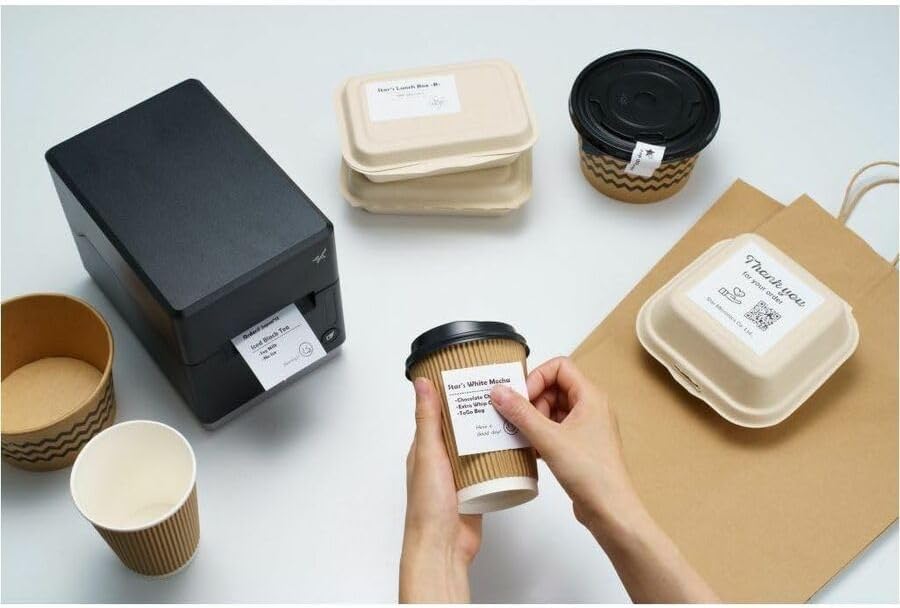
Image: A hand pressing the feed button on the mC-Label3 printer, demonstrating the printing of a 'Thank you' label.

Image: The mC-Label3 printer shown in a practical setting, printing labels for food containers and coffee cups, illustrating its versatility.
Тэхнічнае абслугоўванне
1. Чыстка прынтара
Regular cleaning ensures optimal performance and extends the life of your printer.
- Выкарыстоўвайце мяккую тканіну без ворса dampened with isopropyl alcohol to clean the print head.
- Wipe down the exterior of the printer with a soft, dry cloth.
- Пазбягайце выкарыстання абразіўных ачышчальнікаў або растваральнікаў.
2. Replacing Media
When the media roll is depleted, follow the media loading instructions in the Setup section to replace it.
3. Effortless Repairs
The mC-Label3 is designed for effortless, no-tools-required repairs with minimal upkeep, simplifying any necessary component replacements.
Ліквідацыю непаладак
У гэтым раздзеле прадстаўлены рашэнні распаўсюджаных праблем, з якімі вы можаце сутыкнуцца.
| праблема | Магчымая прычына | Рашэнне |
|---|---|---|
| Прынтар не ўключаецца | Кабель харчавання не падключаны; праблема з разеткай | Пераканайцеся, што кабель харчавання надзейна падключаны; паспрабуйце іншую разетку. |
| Няма вываду на друк | Out of media; Media loaded incorrectly; Driver issue | Load new media; Re-load media correctly; Reinstall printer drivers. |
| Дрэнная якасць друку | Dirty print head; Low quality media | Clean the print head; Use recommended thermal media. |
| Праблемы з падключэннем | Incorrect cable connection; Bluetooth not paired; Network configuration | Check USB/Ethernet cables; Re-pair Bluetooth; Verify network settings. |
Тэхнічныя характарыстыкі
| Асаблівасць | Дэталь |
|---|---|
| Назва мадэлі | mC-Label3 |
| Нумар мадэлі тавару | MCL32CBI |
| Тэхналогія друку | Прамая цеплавая |
| Вывад на прынтэр | Манахромны |
| Максімальная хуткасць друку, манахромны | 23 праміле |
| Максімальнае дазвол чорна-белай друку | 203 DPI (203 x 203 DPI) |
| Друкаваныя СМІ | Labels (Linerless, Die-Cut, Continuous), Thermal Receipt |
| Тэхналогія падлучэння | Bluetooth, Wired (USB, Ethernet) |
| Абсталяванне інтэрфейсу | USB-Ethernet |
| Сумяшчальныя прылады | ПК, Android, iOS |
| Тып кантролера | iOS, Android |
| Памеры прадукту | 6.7" Г х 5.6" Ш х 8.3" В (17.0 х 14.2 х 21.1 см) |
| Вага прадмета | 7.2 фунта (3.27 кг) |
| Ёмістасць памяці | 64 Мб |
| Колер | Чорны |
| Вытворца | STAR MICRONICS |
| Краіна паходжання | Кітай |
Інфармацыя аб гарантыі
The Star Micronics mC-Label3 MCL32CBI printer comes with a manufacturer's warranty. For specific terms and conditions, please refer to the warranty card included in your package or visit the official Star Micronics webсайт.
Тып гарантыі: Вытворца
Падтрымка
For further assistance, technical support, or to download the latest drivers and firmware, please visit the official Star Micronics support webсайт або звярніцеся ў службу падтрымкі кліентаў.
Афіцыйны прадстаўнік Star Micronics Webсайт: www.starmicronics.com
Спасылка падтрымкі: www.starmicronics.com/support