
SUNOL T16
SUNOL T16 Wireless Earbuds User Manual
Model: T16 | Brand: SUNOL
Уводзіны
The SUNOL T16 Wireless Earbuds are designed for an active lifestyle, offering high-quality audio and convenient features. These Bluetooth headphones provide up to 48 hours of total playtime with their wireless charging case, featuring an LED power display for easy monitoring. With earhooks for a secure fit and water resistance, they are ideal for workouts, running, and various sports activities. The built-in microphone with noise cancellation ensures clear calls.
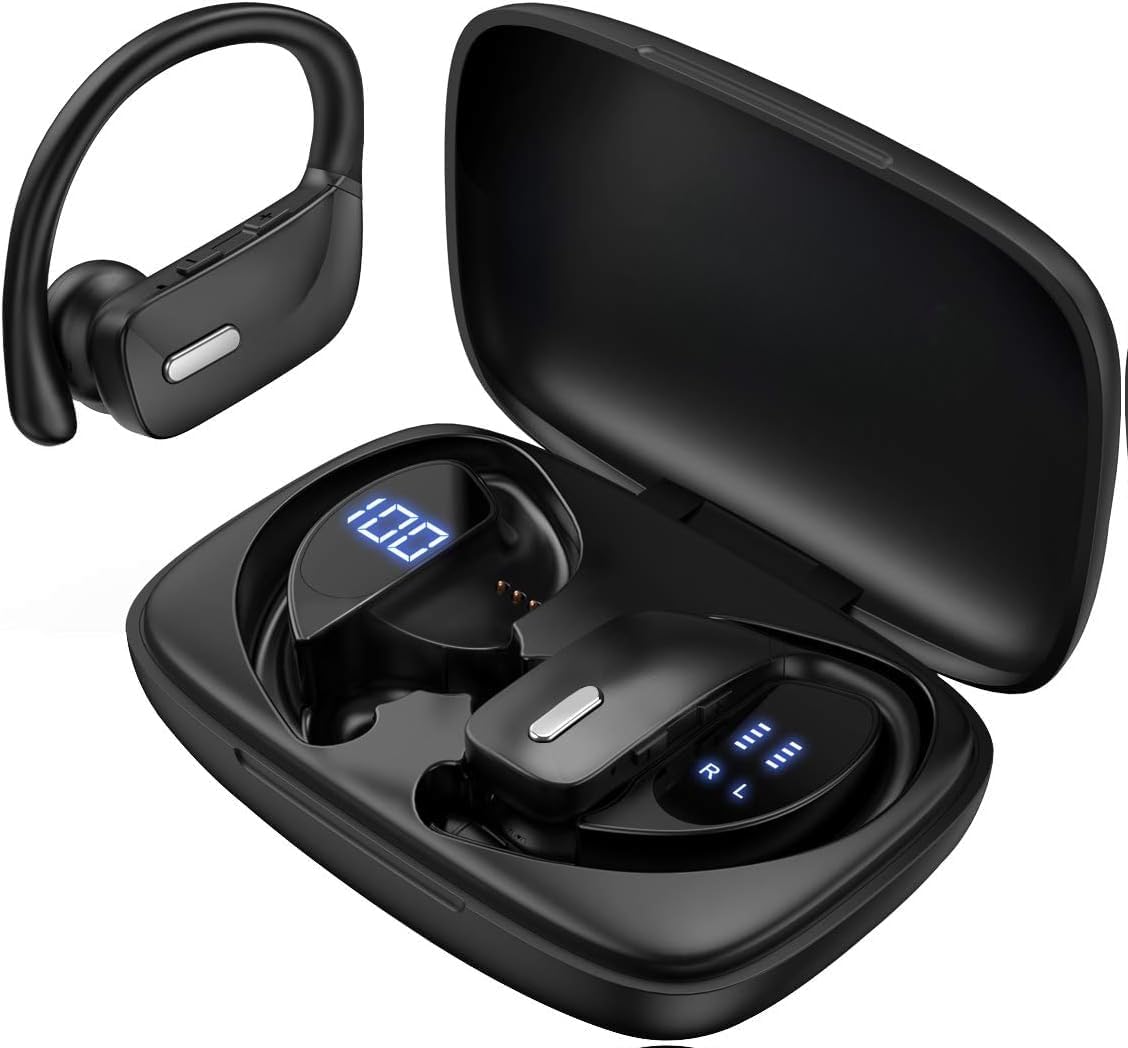
Image: The SUNOL T16 Wireless Earbuds with their charging case, showcasing the digital display.
Што ў скрынцы
- SUNOL T16 Wireless Earbuds (Left and Right)
- Чахол для бесправадной зарадкі
- Зарадны кабель USB-C
- 3 Pairs of Ear Caps (S, M, L)
Тэхнічныя характарыстыкі
| Асаблівасць | Дэталь |
|---|---|
| Назва мадэлі | Т16 |
| Тэхналогія падлучэння | Бесправадная сувязь (Bluetooth 5.0) |
| Дыяпазон Bluetooth | Да 10 метраў |
| Тэрмін службы батарэі навушнікаў | Да 9 гадзін (адной зарадкі) |
| Агульны час прайгравання (з кейсам) | Да 48 гадзін |
| Параметры зарадкі | Wireless Charging, USB-C Charging |
| Памер аўдыё драйвера | 10 мм дынамічны драйвер |
| Дыяпазон частот | 20 Гц - 20 000 Гц |
| Імпеданс | 40 Ом |
| Кантроль шуму | Актыўнае падаўленне шуму |
| Мікрафон | Built-in with Noise Cancellation |
| Узровень воданепранікальнасці | Водатрывалы |
| Тып кіравання | Touch, Siri Voice Assistant |
| Размяшчэнне вушэй | Over Ear (with earhooks) |
| Матэрыял | Акрыланітрылбутадыенстырол (АБС) |
| Вага прадмета | 6.4 унцыі |

Image: Diagram illustrating the premium stereo sound quality and Bluetooth 5.0 connectivity.
Настройка
1. Зарадка навушнікаў і чахла
The charging case supports both wireless charging and USB-C charging. The impressive 9 hours of listening time on a single charge for the sports wireless headphones are extended to a remarkable 48 hours of play time with the included charging case.
- To charge the case, connect a USB-C cable to the charging port on the back of the case, or place it on a compatible wireless charging pad.
- Place the earbuds into their respective slots in the charging case. Ensure they are properly seated to initiate charging.
- The smart LED digital power display on the case will show the remaining battery level of the charging case and the individual earbuds. The percentage in the middle indicates the case battery, while the battery icons on both sides indicate the left and right earbud charge levels.

Image: The charging case with its LED display showing battery levels for the case and individual earbuds.

Image: Diagram illustrating the battery life: 15 min charge for 1 hour playtime, 8 hours on a single charge, and 48 hours with the charging case.
2. Спалучэнне з вашай прыладай
The earbuds automatically enter pairing mode when removed from the charging case.
- Адкрыйце зарадны кейс і дастаньце абодва навушнікі. Яны аўтаматычна ўключацца і пяройдуць у рэжым спалучэння.
- На мабільнай прыладзе (смартфоне, планшэце, ноўтбуку) перайдзіце ў налады Bluetooth.
- Пошук available devices. You should see "T16" or "S8" appear in the list.
- Select "T16" or "S8" to connect. Once connected, you will hear an audio prompt, and the earbuds will be ready for use.

Image: Diagram showing the earbuds automatically pairing with mobile phones.
Video: Official product video demonstrating the unboxing, charging, and Bluetooth pairing process of the SUNOL T16 Wireless Earbuds.
Інструкцыя па эксплуатацыі
Нашэнне навушнікаў
The T16 earbuds are designed with flexible earhooks to ensure a secure and comfortable fit, especially during physical activity. Gently place the earbud into your ear canal and adjust the earhook over the top of your ear until it feels stable and comfortable. Experiment with the included ear cap sizes to find the best fit for optimal sound and comfort.

Image: A woman wearing the SUNOL T16 earbuds, demonstrating their secure fit for an active lifestyle.
Сэнсарныя элементы кіравання
The earbuds feature physical buttons for precise control of various functions:
- Прайграванне/Паўза: Адзін націск на любы навушнік.
- Адказаць/пакласці званок: Адно націсканне на любы навушнік падчас размовы.
- Папярэдняя песня: Двойчы націсніце на левы навушнік-ўкладыш.
- Наступная песня: Двойчы націсніце на правы навушнік-ўкладыш.
- Active Voice Assistant (Siri): Тройчы націсніце на любы навушнік.
- Адхіляць выклікі: Доўгае націсканне на любы навушнік падчас уваходнага званка.
- Рэгуляванне гучнасці: Use the dedicated volume buttons on the earbuds.

Image: Diagram detailing the physical buttons and their functions, including volume adjustment, play/pause, call management, and voice assistant activation.
Тэхнічнае абслугоўванне
To ensure the longevity and optimal performance of your SUNOL T16 Wireless Earbuds, follow these maintenance guidelines:
- Уборка: Regularly wipe the earbuds and charging case with a soft, dry, lint-free cloth. For ear caps, remove them and clean with mild soap and water, then dry thoroughly before reattaching.
- Воданепранікальнасць: While water-resistant, avoid submerging the earbuds in water. Dry them completely if they get wet from sweat or rain before placing them back in the charging case.
- захоўванне: Калі навушнікі не выкарыстоўваюцца, захоўвайце іх у зарадным чахле, каб абараніць і падтрымліваць зарад. Захоўвайце ў прахалодным, сухім месцы, удалечыні ад экстрэмальных тэмператур.
- Порт для зарадкі: Трымайце зарадны порт USB-C чысцінёй ад пылу і смецця.
Ліквідацыю непаладак
If you encounter any issues with your SUNOL T16 Wireless Earbuds, try the following solutions:
- Навушнікі не спалучаюцца:
- Пераканайцеся, што абодва навушнікі цалкам зараджаны.
- Place earbuds back in the case, close the lid, wait a few seconds, then open and remove them again.
- Выключыце Bluetooth на прыладзе, затым зноў уключыце яе і паспрабуйце падключыць прыладу яшчэ раз.
- Forget or remove the "T16" or "S8" device from your device's Bluetooth list and attempt to pair from scratch.
- Працуе толькі адзін навушнік:
- Пераканайцеся, што абодва навушнікі зараджаны.
- Змесціце абодва навушнікі назад у зарадны футляр, зачыніце вечка і адначасова выміце іх.
- Калі праблема не знікне, паспрабуйце перазагрузіць навушнікі.
- Дрэнная якасць гуку:
- Ensure the earbuds are properly seated in your ears and the ear caps provide a good seal.
- Check the audio source device's volume and sound settings.
- Move closer to your connected device to avoid interference or exceeding the 10-meter Bluetooth range.
- Clean the earbud speakers and ear caps.
- Чахол для зарадкі не зараджаецца:
- Пераканайцеся, што кабель USB-C надзейна падключаны як да корпуса, так і да крыніцы харчавання.
- Паспрабуйце іншы кабель USB-C або адаптар сілкавання.
- Калі выкарыстоўваецца бесправадная зарадка, пераканайцеся, што чахол правільна размешчаны на зараднай падстаўцы.
Гарантыя і падтрымка
For warranty information and technical support, please refer to the documentation included with your product or contact the manufacturer, SUNOL, directly through their official webсайт або каналы абслугоўвання кліентаў. Захоўвайце чэк аб куплі як пацвярджэнне пакупкі для любых гарантыйных прэтэнзій.