
Уводзіны
Thank you for choosing the Syncwire Bluetooth 5.3 FM Transmitter Car Adapter. This device is designed to enhance your in-car audio experience by providing seamless Bluetooth connectivity, fast charging capabilities, and ambient lighting. Please read this manual carefully to ensure proper setup and operation.
Прадукт скончаныview
The Syncwire FM Transmitter features advanced Bluetooth 5.3 technology for stable connections, dual USB ports (PD 36W and USB A 12W) for fast charging, Hi-Fi deep bass sound, and a customizable ambient light switch. It supports music streaming via Bluetooth and USB drive, and offers clear hands-free calling.

Фронт view of the Syncwire Bluetooth FM Transmitter, highlighting its USB ports, LED display, and control knob.
Кіраўніцтва па ўстаноўцы
- Падключэнне сілкавання: Insert the Syncwire FM Transmitter into your car's 12V/24V cigarette lighter socket. The LED display will light up, indicating it's powered on.
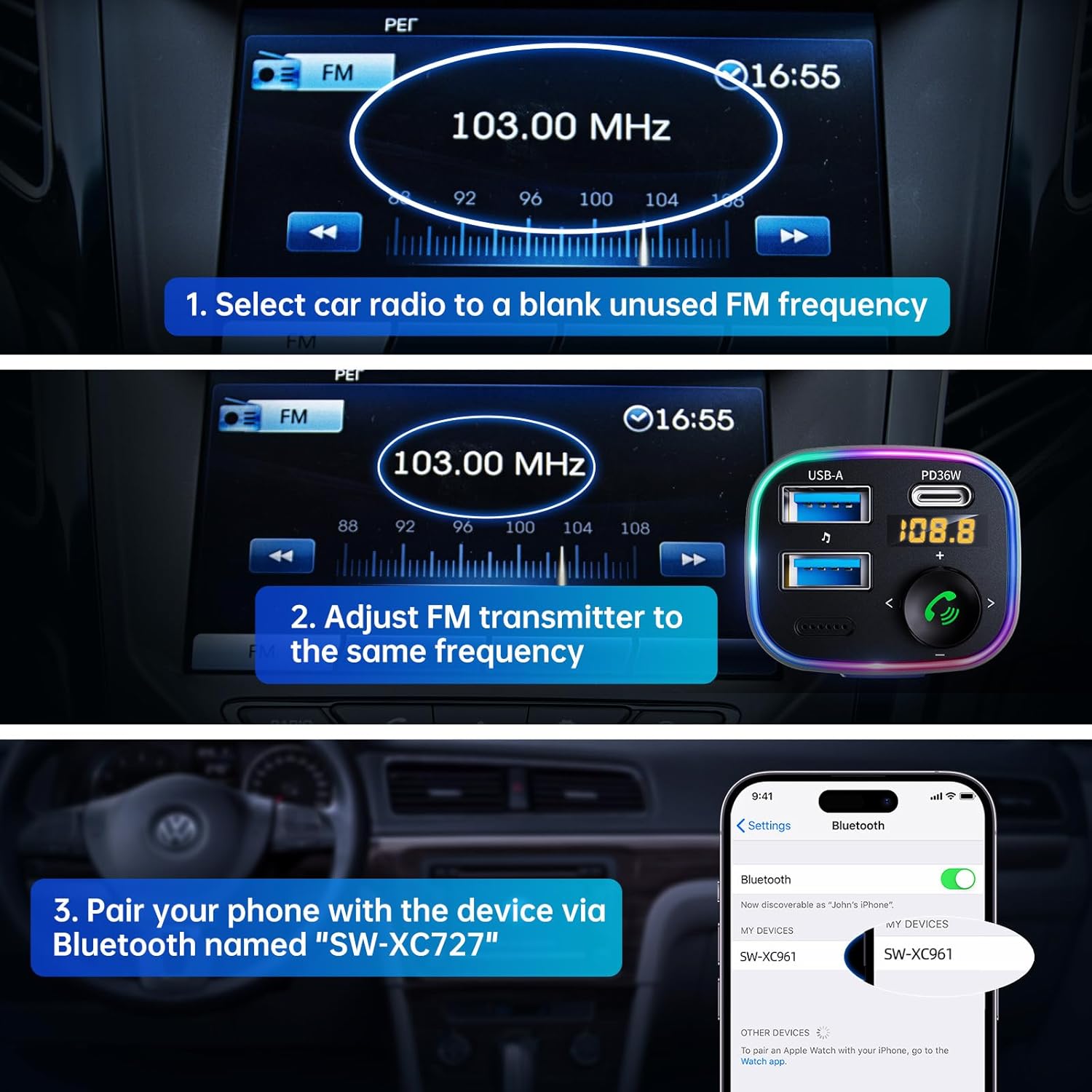
- Рэгуляванне частоты FM:

Visual guide for setting up the FM frequency and Bluetooth pairing.
- Tune your car radio to a blank, unused FM frequency (e.g., 103.00 MHz).
- Adjust the FM transmitter to the same frequency. Press and hold the multi-function button until the frequency flashes, then rotate the knob to match your car's FM frequency.
- Спалучэнне праз Bluetooth:
The transmitter supports both USB drive playback and Bluetooth 5.4 connection for audio streaming.
- На смартфоне або прыладзе з падтрымкай Bluetooth уключыце Bluetooth і знайдзіце даступныя прылады.
- Select "SW-XC961" from the list to pair. A voice prompt will confirm successful pairing.
Інструкцыя па эксплуатацыі
Струменевая музыка
- Паток Bluetooth: Once paired, music from your device will automatically stream through your car's speakers via the set FM frequency.
- Прайграванне з USB-назапашвальніка: Устаўце флэш-назапашвальнік USB (да 64 ГБ) з файламі MP3/WMA/WAV/FLAC files into the USB-A port. The device will automatically detect and play music from the drive.
Званок па гучнай сувязі
- Адказ/завяршэнне выкліку: Short press the phone button (green icon) to answer an incoming call or end an ongoing call.
- Адхіліць выклік: Long press the phone button to reject an incoming call.
- Паўторны набор: Double press the phone button to redial the last dialed number.
- Switch Call Source: During a call, long press the phone button to switch the call between the transmitter and your phone.
Хуткая зарадка

The device offers 5X faster charging than standard car chargers, with a USB-C PD 36W port and a USB-A 12W port.
- The PD 36W USB-C port provides ultra-fast charging for compatible devices.
- The 12W USB-A port provides standard charging for other devices.
- Вы можаце зараджаць дзве прылады адначасова.
Hi-Fi Deep Bass & Ambient Light
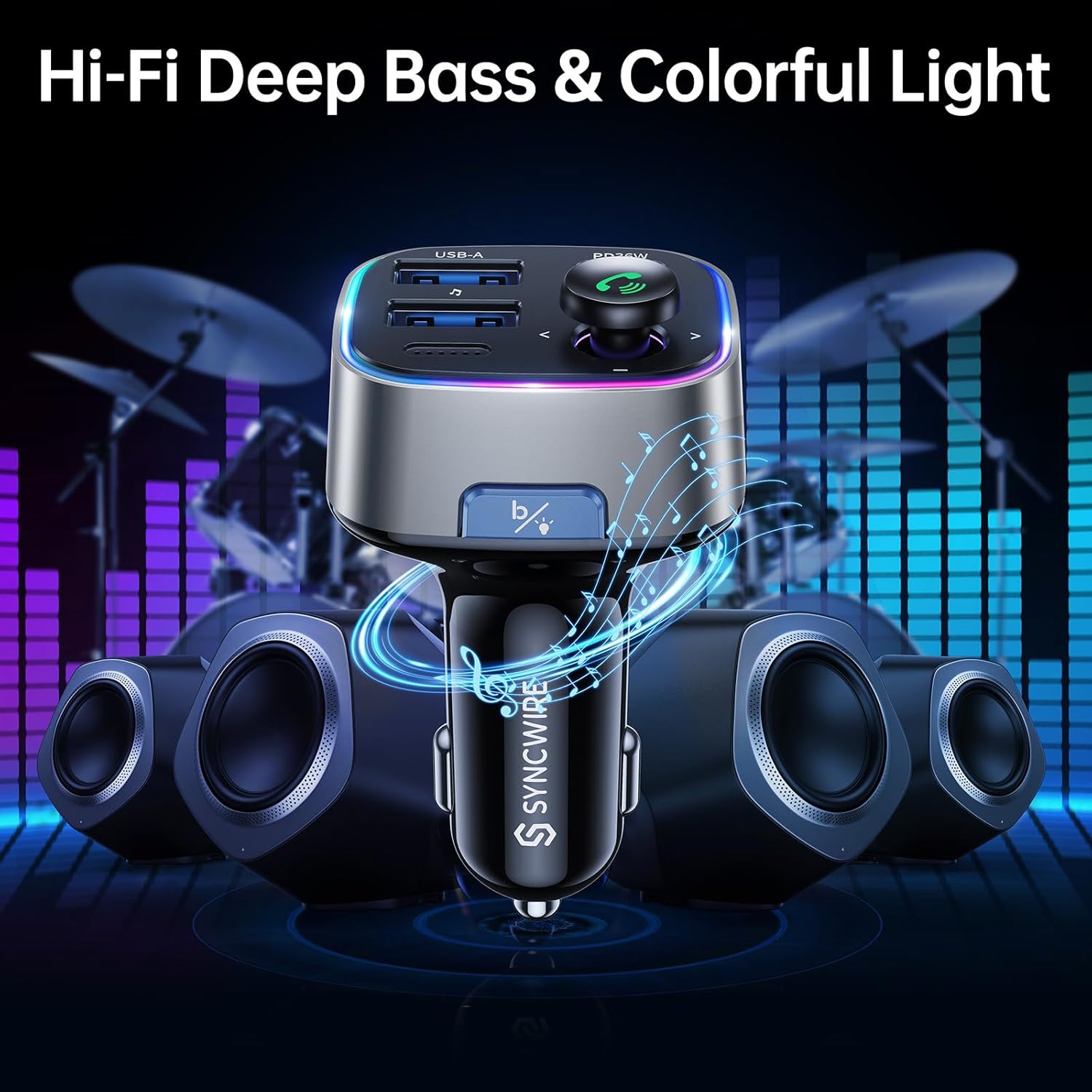
Enjoy powerful deep bass and immersive stereo sound with the Hi-Fi feature, complemented by customizable ambient lighting.
- Рэжым глыбокага баса: Press the "B" button (Light/Bass Booster Button) once to activate the Hi-Fi Deep Bass mode for enhanced audio. Press again to return to standard mode.
- Кантроль навакольнага асвятлення: Double press the "B" button to turn the rainbow ambient light ON or OFF.

The ambient light can be easily toggled on or off with a double tap of the 'B' button.
Тэхнічнае абслугоўванне
To ensure the longevity and optimal performance of your Syncwire FM Transmitter, please follow these maintenance guidelines:
- Трымайце прыладу сухім і далей ад вільгаці.
- Працірайце паверхню мяккай сухой тканінай. Не выкарыстоўвайце агрэсіўныя хімікаты або абразіўныя ачышчальнікі.
- Пазбягайце ўздзеяння на прыладу экстрэмальных тэмператур.
- Do not disassemble the device. Any repairs should be performed by qualified personnel.
Ліквідацыю непаладак
If you encounter any issues with your Syncwire FM Transmitter, please refer to the following common solutions:
- Няма харчавання: Ensure the transmitter is securely plugged into the cigarette lighter socket. Check your car's fuse for the cigarette lighter.
- Дрэнная якасць гуку/статычны шум:
- Adjust the FM frequency to a completely blank channel on your car radio and the transmitter.
- Move away from strong radio signals or other electronic interference.
- Ensure the volume on both your phone and car radio is set appropriately.
- Адключэнне Bluetooth:
- Ensure your device is within the effective range (approx. 10 meters) of the transmitter.
- Выдаліце прыладу з налад Bluetooth тэлефона і зноў падключыце яе.
- Restart both your phone and the FM transmitter.
- Праблемы з зарадкай:
- Check if the charging cable is securely connected to both the transmitter and your device.
- Ensure your device supports the fast charging protocols (PD for USB-C).
- Паспрабуйце іншы кабель або прыладу для зарадкі, каб вызначыць праблему.
If the problem persists, please contact Syncwire customer support for assistance.
Тэхнічныя характарыстыкі
| Асаблівасць | Дэталь |
|---|---|
| Марка | сінхранізацыя |
| Нумар мадэлі | SW-XC961 |
| Версія Bluetooth | 5.3 |
| Парты USB | 1 x PD 36W (USB-C), 1 x 12W (USB-A) |
| Крыніца харчавання | Corded Electric (12V/24V Car Socket) |
| Матэрыял | Прэміум матэрыял |
| Вага прадмета | 2.11 унцыі |
| Памеры ўпакоўкі | 3.39 х 3.35 х 1.54 цалі |
| Асаблівасці | Colorful Light Switch, Hi-Fi Deep Bass Sound, LED Display, Music Adapter Support USB Drive, Hands-Free Calling |
Гарантыя і падтрымка
Syncwire provides a Гарантыя 36 месяцы and lifetime support for this product. If your Syncwire FM Transmitter does not fit your car or does not work as expected, please do not hesitate to contact us for a satisfying solution. We are committed to ensuring your satisfaction.
Каб атрымаць дадатковую дапамогу, звярніцеся на афіцыйны сайт SYNCWIRE Store або звярніцеся да кантактнай інфармацыі, прадстаўленай пры куплі.