
1. Уводзіны
Дзякуй за пакупкуasing the PPLEE RGB Digital Alarm Clock, Model CR1008R. This clock is designed to provide accurate timekeeping, customizable alarm functions, and convenient charging options. Please read this manual thoroughly before use to ensure proper operation and to maximize your product experience.
2. Інфармацыя па бяспецы
- Ensure the power adapter is compatible with your local power supply (100-240V).
- Не падвяргайце прыладу ўздзеянню вады або празмернай вільготнасці.
- Avoid placing the clock near heat sources or in direct sunlight.
- Выкарыстоўвайце толькі адаптар сілкавання, які ўваходзіць у камплект.
- Захоўваць у месцах, недаступных дзецям.
- Insert AAA batteries correctly for backup function (not included).
3. Змесціва ўпакоўкі
Праверце, ці ёсць усе прадметы ў вашай упакоўцы:
- 1 x PPLEE RGB Digital Clock
- 1 х адаптар сілкавання
- 1 х Шнур харчавання
- 1 х Кіраўніцтва карыстальніка (гэты дакумент)

Image: The package includes the RGB digital clock, power adapter, power cord, and user manual.
4. Прадукт скончыўсяview
Familiarize yourself with the main components of your alarm clock.

Выява: спераду view of the PPLEE RGB Digital Alarm Clock displaying time with RGB digits and a smartphone charging via its USB port.
Пярэдняя панэль: Large LED display for time, AM/PM indicator, DST indicator, Alarm indicator.
Верхняя панэль: Snooze/Light bar, Hour button, Minute button.
Задняя панэль:
- DC IN Port: For power adapter connection.
- USB Charging Port: For charging external devices.
- Type-C Charging Port: For charging external devices.
- Alarm ON/OFF Switch.
- Alarm Volume Control (Low/Med/High).
- Dimmer Control (for display brightness).
- Time Format Switch (12H/24H).
- DST (Daylight Saving Time) Switch.
- Set Time Button.
- Set Alarm Button.
- Multi-Color Button (for display and night light).
- Battery Compartment (for 2x AAA backup batteries).

Выява: Задняя частка view of the alarm clock highlighting the various control buttons and charging ports, including dimmer, alarm volume, time/alarm set, and time format switches.
5. Настройка
5.1 Падключэнне харчавання
- Connect the power cord to the DC IN port on the back of the clock.
- Plug the power adapter into a standard electrical outlet (AC 100-240V).
- Дысплей гадзінніка загарыцца.
5.2 Усталёўка рэзервовага акумулятара
For battery backup, which saves settings during power outages and can trigger the alarm, install 2 AAA batteries (not included) into the battery compartment on the back of the clock.
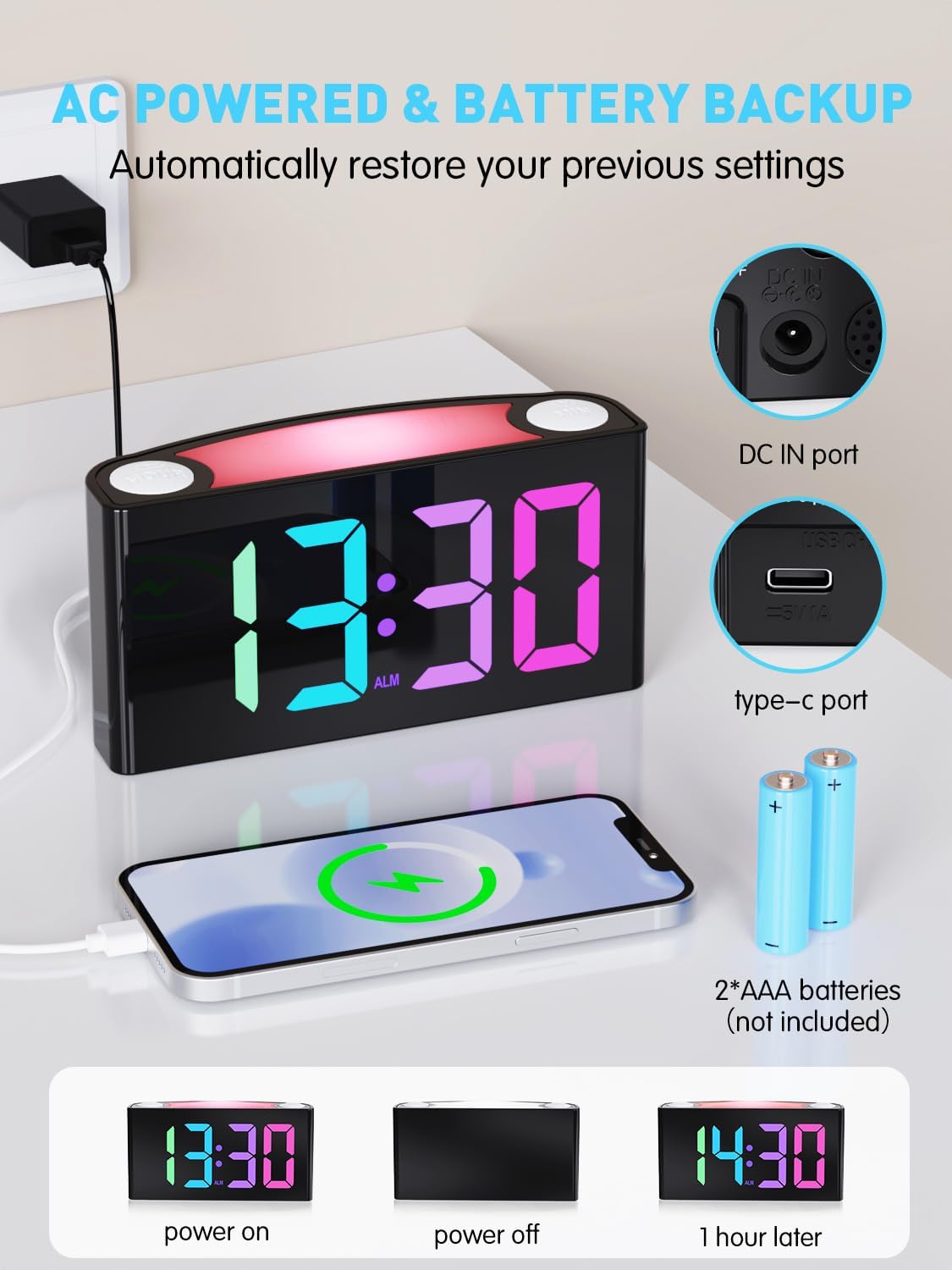
Image: The alarm clock is shown connected to AC power, with an open battery compartment indicating where to insert 2 AAA batteries for backup. The display shows "13:30" (power on), a blank screen (power off), and "14:30" (1 hour later, demonstrating time retention).
Заўвага: The clock's main functions (display, USB charging, alarm) require AC power. Batteries only provide backup for time memory and alarm trigger during power interruptions.
6. Інструкцыя па эксплуатацыі
6.1 Настройка часу
- Націсніце "SET TIME" button on the rear panel. The display will start flashing.
- Націсніце "ГАДЗІНА" button (on top) to adjust the hour.
- Націсніце "МІН" button (on top) to adjust the minute.
- Прэса "SET TIME" again to save, or wait 5 seconds for automatic confirmation.
Video: Demonstrates how to set the time on the PPLEE RGB Digital Alarm Clock, including adjusting hours and minutes and confirming the setting.
6.2 Налада будзільніка
- Ссуньце "УКЛ./ВЫКЛ. БУДЗІЛКІ" switch to the "ON" position. The alarm indicator will light up.
- Націсніце "SET ALARM" button on the rear panel. The alarm time display will start flashing.
- Націсніце "ГАДЗІНА" button (on top) to adjust the alarm hour.
- Націсніце "МІН" button (on top) to adjust the alarm minute.
- Прэса "SET ALARM" again to save, or wait 5 seconds for automatic confirmation.
To turn off the alarm, slide the "УКЛ./ВЫКЛ. БУДЗІЛКІ" switch to the "OFF" position. The alarm indicator will disappear.
6.3 Яркасць дысплея (рэгуляванне яркасці)
The clock features a 7-level dimmer for the time display (0%-100% brightness).
- Выкарыстоўвайце "DIMMER" button on the rear panel to cycle through brightness levels.

Image: The alarm clock display shows various brightness levels from 0% to 100%, illustrating the 7-level dimmer function.
6.4 рэжымаў начнога асвятлення
The clock includes an 8-mode/7-color night light with 3 adjustable brightness settings.
- Націсніце "SNOOZE/LIGHT" bar on top to turn the night light on/off and cycle through colors/modes.
- To adjust night light brightness, press and hold the "SNOOZE/LIGHT" бар.

Image: A person sleeping next to the alarm clock, which emits a soft yellow night light from its top bar. Below are icons indicating 3-level adjustable brightness for the night light.
6.5 Гучнасць будзільніка
Adjust the alarm volume to your preference (Low, Medium, High).
- Выкарыстоўвайце "ALARM VOLUME" switch on the rear panel to select the desired volume level.

Image: A person reaching for the snooze bar on the alarm clock, which displays "8:30". The image also illustrates the 3-level adjustable alarm volume (90db, 103db, 110db).
6.6 Функцыя паўтору
Калі гучыць будзільнік, націсніце вялікую кнопку "SNOOZE/LIGHT" bar on top to activate snooze for 9 extra minutes of sleep.
The alarm will sound again after 9 minutes. To completely turn off the alarm, use the "УКЛ./ВЫКЛ. БУДЗІЛКІ" перамыкач.
6.7 12/24 Hour Format and DST
- Выкарыстоўвайце "TIME FORMAT" switch on the rear panel to toggle between 12-hour and 24-hour display.
- Выкарыстоўвайце "Летні час" switch on the rear panel to enable or disable Daylight Saving Time (adjusts time by 1 hour).
6.8 Dual Charging Ports
The clock is equipped with a Type-C output port and a USB output port for charging your devices.

Image: The alarm clock with its display showing "12:00" and two smartphones connected to its USB and Type-C charging ports, indicating active charging.
Simply connect your device's charging cable to the appropriate port on the back of the clock.
7. Тэхнічнае абслугоўванне
- Працірайце гадзіннік мяккай сухой тканінай. Не выкарыстоўвайце абразіўныя ачышчальнікі або растваральнікі.
- Ensure the clock is unplugged before cleaning.
- If not in use for an extended period, remove the backup batteries.
8. Выпраўленне непаладак
| праблема | Рашэнне |
|---|---|
| Дысплей гадзінніка пусты. | Check if the power adapter is securely plugged into both the clock and the wall outlet. Ensure the outlet has power. |
| Сігналізацыя не гучыць. | Verify the "ALARM ON/OFF" switch is in the "ON" position. Check the alarm volume setting. Ensure the alarm time is correctly set. |
| Няправільны час пасля адключэння электрычнасціtage. | Ensure 2 AAA batteries are installed in the battery compartment for backup. If batteries were not present or depleted, reset the time manually. |
| Прылады не зараджаюцца праз USB/Type-C. | Confirm the clock is connected to AC power. Check the charging cable and the device being charged. |
| Начная лямпа не працуе. | Press the "SNOOZE/LIGHT" bar to cycle through modes and turn on the light. Check if the clock is powered. |
9. Тэхнічныя характарыстыкі
| Нумар мадэлі | CR1008R |
| Марка | PPLEE |
| Тып дысплея | Digital LED (RGB) |
| Памеры прадукту | 6.46"Ш х 3.39"В |
| Крыніца харчавання | Corded Electric (AC 100-240V) |
| Рэзервовы акумулятар | 2 х ААА батарэі (не ўключаны) |
| Парты для зарадкі | 1 x USB, 1 x Type-C |
| Яркасць дысплея | 7-level adjustable dimmer |
| Начнік | 8 modes / 7 colors, 3-level adjustable brightness |
| Гучнасць будзільніка | 3-level adjustable (Low, Medium, High) |
| Працягласць адкладання | 9 хвілін |
10. Гарантыя і падтрымка
For warranty information or technical support, please refer to the contact details provided with your purchase or visit the official PPLEE webсайт. Захоўвайце чэк аб пакупцы на выпадак прэтэнзій па гарантыі.
электронная пошта: support@pplec.net