
1. Уводзіны
Thank you for choosing the OMMO OM-LL14 16 Lines Green Laser Level. This precision tool is designed to provide accurate and reliable leveling for a wide range of applications, from home renovation to professional construction projects. Featuring 4x360° green laser lines, self-leveling capabilities, and a durable design, the OM-LL14 enhances efficiency and accuracy in your work. Please read this manual thoroughly before use to ensure safe and optimal operation.

Figure 1: OMMO OM-LL14 16 Lines Green Laser Level
2. Інфармацыя па бяспецы
ПАПЯРЭДЖАННЕ: This is a Class II laser product. Avoid direct eye exposure to the laser beam. Do not stare into the beam or view directly with optical instruments. Always operate the device in a safe manner.
- Не разбірайце лазерны ўзровень. Рамонт павінен выконвацца толькі аўтарызаваным сэрвісным персаналам.
- Захоўвайце прыладу ў месцах, недаступных дзецям.
- Выкарыстоўвайце толькі пазначаныя акумулятары і зарадную прыладу.
- Пераканайцеся, што ў рабочай зоне няма перашкод і патэнцыйных небяспек.
3. Змесціва ўпакоўкі
Праверце, ці ўсе пералічаныя ніжэй прадметы ўваходзяць у вашу ўпакоўку:
- 1 x OMMO OM-LL14 16 Lines Green Laser Level
- 1 х магнітны насценны кранштэйн
- 2 x 3600mAh Rechargeable Li-ion Batteries
- 1 x Adjustable Lifting Base
- 1 х Кіраўніцтва карыстальніка
- 1 х Сумка для пераноскі
- 1 x Power Adapter (Charger)
- 1 х пульт дыстанцыйнага кіравання
- 1 x Hang Up Converter (for tripod mounting)
- 1 x 1/4" Thread Adapter (for tripod mounting)
- 1 x Bracket Patch (Wall Mounting Plate)

Figure 2: OMMO Laser Level and included accessories.
4. Прадукт скончыўсяview
The OMMO OM-LL14 features a robust design with intuitive controls for various leveling tasks.
4.1 Асноўныя магчымасці
- 4x360° Green Laser Lines: Provides two horizontal and two vertical 360-degree laser planes for comprehensive coverage.
- Rotatable Laser Window: Each laser window can be rotated 360° to avoid blocked lines and vignetting, ensuring continuous laser projection.
- Рэжым самавыраўноўвання: Automatically levels within a tilt angle of ±3°. An alarm sounds if the tilt exceeds this range.
- Ручной рэжым/рэжым нахілу: Allows projection of inclined lines at any angle by locking the pendulum.
- Рэгуляваная яркасць: Three brightness levels to suit different working conditions.
- Трывалы дызайн: Shockproof, waterproof, and dustproof for reliable performance in various environments.
- Акумулятарная батарэя: Equipped with two 3600mAh Lithium-ion batteries for extended operation.
- Пульт дыстанцыйнага кіравання: Conveniently switch between laser lines and adjust brightness from a distance.
4.2 Элементы кіравання і індыкатары
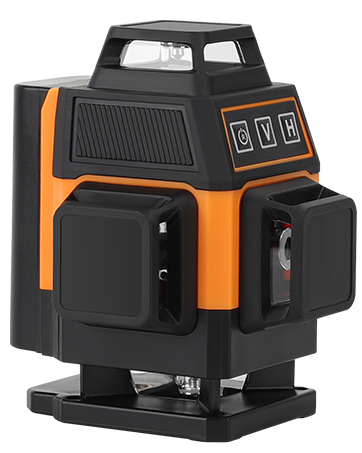
Малюнак 3: Спераду view of the OMMO OM-LL14 showing control panel.
- Індыкатар батарэі: Displays remaining battery life (4 bars = full, 1 bar = low).
- 'V' Button (Vertical Line): Уключае/выключае вертыкальныя лазерныя лініі.
- 'H' Button (Horizontal Line): Уключае/выключае гарызантальныя лазерныя лініі.
- Power Button (Brightness Adjustment): Cycles through three brightness modes.
- Mode Switch (Side Slider): Toggles between Self-leveling (unlocked pendulum) and Manual/Tilt (locked pendulum) modes.
- Power On/Off Button (Bottom): Галоўны выключальнік харчавання прылады.
Video 1: This video demonstrates the OMMO 16 Lines Laser Level's features, including its rotatable laser windows, self-leveling and manual modes, brightness adjustment, and various mounting options. It also shows the remote control functionality and charging process.
5. Настройка
5.1 Усталёўка і зарадка акумулятара
- Знайдзіце батарэйны адсек збоку лазернага ўзроўню.
- Insert a fully charged 3600mAh Li-ion battery into the compartment, ensuring correct polarity. Slide it in until it clicks securely.
- To charge the battery, connect the power adapter to the charging port on the laser level or directly to the battery. The indicator light on the charger will show charging status (e.g., red for charging, green for fully charged).
- The battery indicator on the device's control panel will also show the current charge level.
5.2 Варыянты мантажу
The OMMO OM-LL14 offers versatile mounting options for different applications:
- Adjustable Lifting Base: For precise height adjustments on flat surfaces. The base can raise the laser from 1 inch to 3 inches.

Figure 4: The laser level mounted on its adjustable lifting base.
- Магнітны насценны кранштэйн: Attach the bracket to any magnetic surface (e.g., steel beams, refrigerator) for flexible positioning. It features adjustable knobs for fine-tuning horizontal and vertical angles.

Figure 5: The laser level attached to a magnetic wall bracket.
- Wall Mounting Plate: If a magnetic surface is unavailable, screw the metal plate into a wall, then attach the magnetic bracket to the plate.
- Мацаванне штатыва: Use the 1/4" thread adapter or hang up converter to mount the laser level onto a standard tripod (not included) for elevated or specialized setups.
6. Інструкцыя па эксплуатацыі
6.1 Уключэнне/выключэнне сілкавання
- To power on, slide the main power switch (located on the side/bottom) to the 'ON' position.
- To power off, slide the main power switch to the 'OFF' position.
6.2 Switching Modes (Self-leveling / Manual)
- Рэжым самавыраўноўвання: Slide the mode switch to the unlocked pendulum icon. The device will automatically level itself. If the tilt angle exceeds ±3°, the laser lines will flash and an alarm will sound.
- Ручной рэжым/рэжым нахілу: Slide the mode switch to the locked pendulum icon. The self-leveling function is deactivated, allowing you to project inclined lines at any desired angle without an alarm.

Figure 6: Illustration of Self-leveling Mode and Manual/Tilt Mode.
6.3 Activating Laser Lines
Use the 'V' and 'H' buttons on the control panel or remote control to activate specific laser lines:
- Press 'V' to cycle through vertical laser lines (one vertical, two vertical, off).
- Press 'H' to cycle through horizontal laser lines (one horizontal, two horizontal, off).
- You can combine vertical and horizontal lines as needed.

Figure 7: Various combinations of 360° vertical and horizontal laser lines.
6.4 Рэгуляванне яркасці
Press the Power button (brightness adjustment) on the control panel or the corresponding button on the remote control to cycle through three different brightness levels for the laser lines.
6.5 Выкарыстанне пульта дыстанцыйнага кіравання
The included remote control allows for convenient operation from a distance. It has dedicated buttons for vertical lines, horizontal lines, and brightness adjustment, mirroring the functions on the device's control panel.
7. Тэхнічнае абслугоўванне
- Уборка: Рэгулярна чысціце лазерныя вокны і корпус прылады мяккай сухой тканінай. Не выкарыстоўвайце абразіўныя ачышчальнікі або растваральнікі.
- захоўванне: When not in use, store the laser level in its carry bag in a cool, dry place, away from direct sunlight and extreme temperatures. Ensure the pendulum is locked (Manual/Tilt mode) during storage and transport to prevent damage.
- Сыход за батарэяй: Charge batteries fully before long-term storage. If storing for extended periods, recharge every 3-6 months to maintain battery health.
- Каліброўка: If you suspect the laser level is out of calibration, consult a professional or contact OMMO customer support.
8. Выпраўленне непаладак
| праблема | Магчымая прычына | Рашэнне |
|---|---|---|
| Laser not turning on. | Батарэя разраджаная або няправільна ўсталяваная. | Charge the battery or ensure it is properly inserted. Check the main power switch. |
| Laser lines flashing and beeping in Self-leveling mode. | Device is tilted beyond its self-leveling range (±3°). | Place the device on a flatter surface or adjust the lifting base until it is within the self-leveling range. |
| Пульт дыстанцыйнага кіравання не рэагуе. | Remote battery is dead or out of range. | Replace the remote control battery. Ensure you are within the remote's operating range. |
| Laser lines are dim. | Налада яркасці нізкая. | Press the brightness adjustment button to cycle to a brighter setting. |
9. Тэхнічныя характарыстыкі
| Асаблівасць | Дэталь |
|---|---|
| Марка | ОММО |
| Нумар мадэлі | OM-LL14 |
| Лазерныя лініі | 16 Lines (4x360° Green Laser) |
| Дыяпазон самовыравнивания | ±3° |
| Рэжым працы | Automatic (Self-leveling) / Manual |
| Тып батарэі | 2 x Lithium Ion (3600mAh each) |
| Крыніца харчавання | Харчаванне ад батарэі |
| Матэрыял | Акрыланітрыл бутадыен стырол |
| Асаблівасці | Green-line, Self-leveling, Waterproof, Dustproof, Shockproof |
| Вага прадмета | 2.51 фунта |
| Памеры ўпакоўкі | 8.86 х 8.15 х 3.82 цалі |
| Дата першай даступнасці | 30 жніўня 2023 г |
10. Гарантыя і падтрымка
For warranty information, technical support, or any questions regarding your OMMO OM-LL14 laser level, please refer to the official OMMO brand store or contact their customer service directly.
Visit the OMMO Store: OMMO Official Store