
1. Прадукт скончыўсяview
The AOPUTTRIVER AP-5000A is a professional digital light meter designed for accurate measurement of illumination in various environments. It supports measurement of fluorescent, incandescent, and LED lamps up to 400,000 Lux (40,000 FC). Key features include a 270-degree rotatable detector, data logging capabilities, and connectivity for real-time monitoring.

Figure 1: AOPUTTRIVER AP-5000A Digital Light Meter highlighting its main features.
2. Змесціва ўпакоўкі
Пасля адкрыцця ўпакоўкі пераканайцеся, што ўсе пералічаныя ніжэй прадметы наяўныя і ў добрым стане. Калі якія-небудзь прадметы адсутнічаюць або пашкоджаныя, звярніцеся ў службу падтрымкі кліентаў.
- AP-5000A Light Meter x 1
- Сумка для пераноскі x 1
- Батарэі AAA x 2
- Адвёртка х 1
- Кіраўніцтва карыстальніка x 1

Figure 2: All items included in the AP-5000A package.
3. Кампаненты прадукту
Familiarize yourself with the different parts of your AP-5000A Digital Light Meter:
- Фотадэтэктар: Sensor for light measurement.
- Вадкакрысталічны дысплей (ВК): Displays measurement readings and settings.
- Кнопка ON/OFF: Уключае або выключае прыладу.
- Кнопка HOLD: Зафіксуе бягучае вымярэнне на дысплеі.
- Кнопка MEM: Accesses data logging memory.
- Кнопка LUX/FC: Toggles between Lux and Foot-Candle measurement units.
- Кнопка MAX/MIN: Displays maximum or minimum recorded values.
- Backlight Switch Button: Activates or deactivates the LCD backlight.

Figure 3: Labeled components of the AP-5000A Digital Light Meter.
4. Настройка
4.1 Устаноўка батарэі
- Знайдзіце батарэйны адсек на задняй панэлі прылады.
- Выкарыстоўвайце адвёртку, якая ўваходзіць у камплект, каб адкрыць вечка батарэйнага адсека.
- Устаўце дзве батарэйкі тыпу ААА, сачыце за правільнай палярнасцю (+/-).
- Замяніце крышку батарэйнага адсека і замацуеце яе шрубай.
4.2 Першапачатковае ўключэнне
Націсніце ВКЛ/ВЫКЛ button to power on the device. The LCD will illuminate and display the current light and temperature readings.
5. Інструкцыя па эксплуатацыі
5.1 Правядзенне вымярэнняў
Remove the protective cap from the photodetector. Point the photodetector towards the light source you wish to measure. The current light intensity will be displayed on the LCD.
5.2 Unit Selection (Lux/FC)
Націсніце ЛЮКС/ФК button to switch between Lux and Foot-Candle measurement units. The selected unit will be indicated on the LCD.
5.3 Выбар адзінак вымярэння тэмпературы (°C/°F)
The device also measures temperature. Refer to the manual for specific button combinations to switch between Celsius (°C) and Fahrenheit (°F) temperature units.
5.4 Утрыманне дадзеных
Націсніце ТРЫМАЦЬ button to freeze the current reading on the display. Press it again to release and resume live measurement.
5.5 Вымярэнне макс./мін.
Націсніце МАКС/МІН button to cycle through maximum, minimum, and real-time values recorded during a measurement session. This helps identify peak and lowest light levels.
5.6 Праца падсвятлення
Націсніце Перамыкач падсвятлення button to turn the LCD backlight on or off, improving readability in low-light conditions.
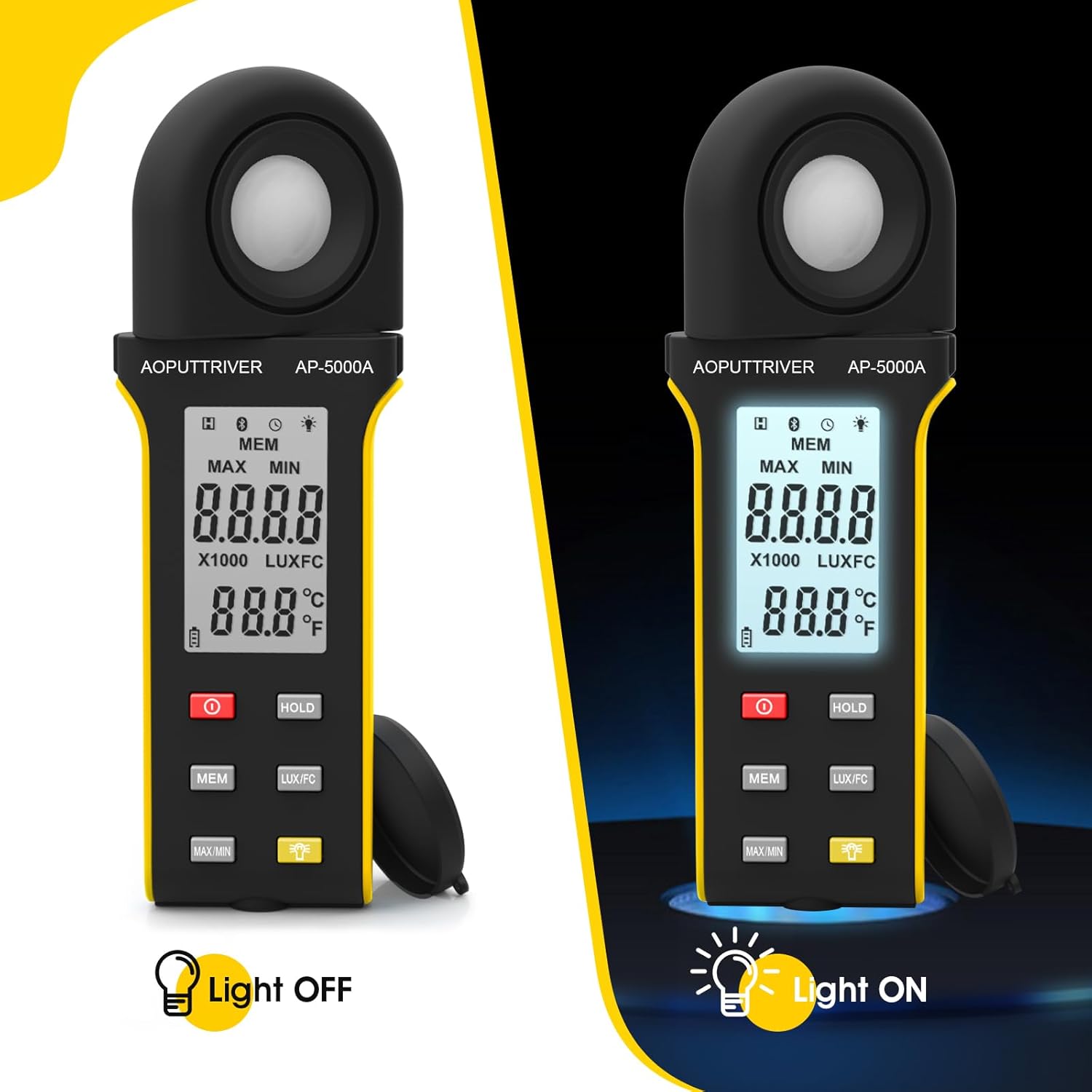
Figure 4: Comparison of the AP-5000A with backlight off and on.
6. Rotatable Detector
The AP-5000A features a 270-degree rotatable silicon filter diode sensor. This design allows you to measure photometric intensity from various angles without needing to reposition the entire meter. Simply rotate the sensor to face the light source while keeping the display visible for easy reading.
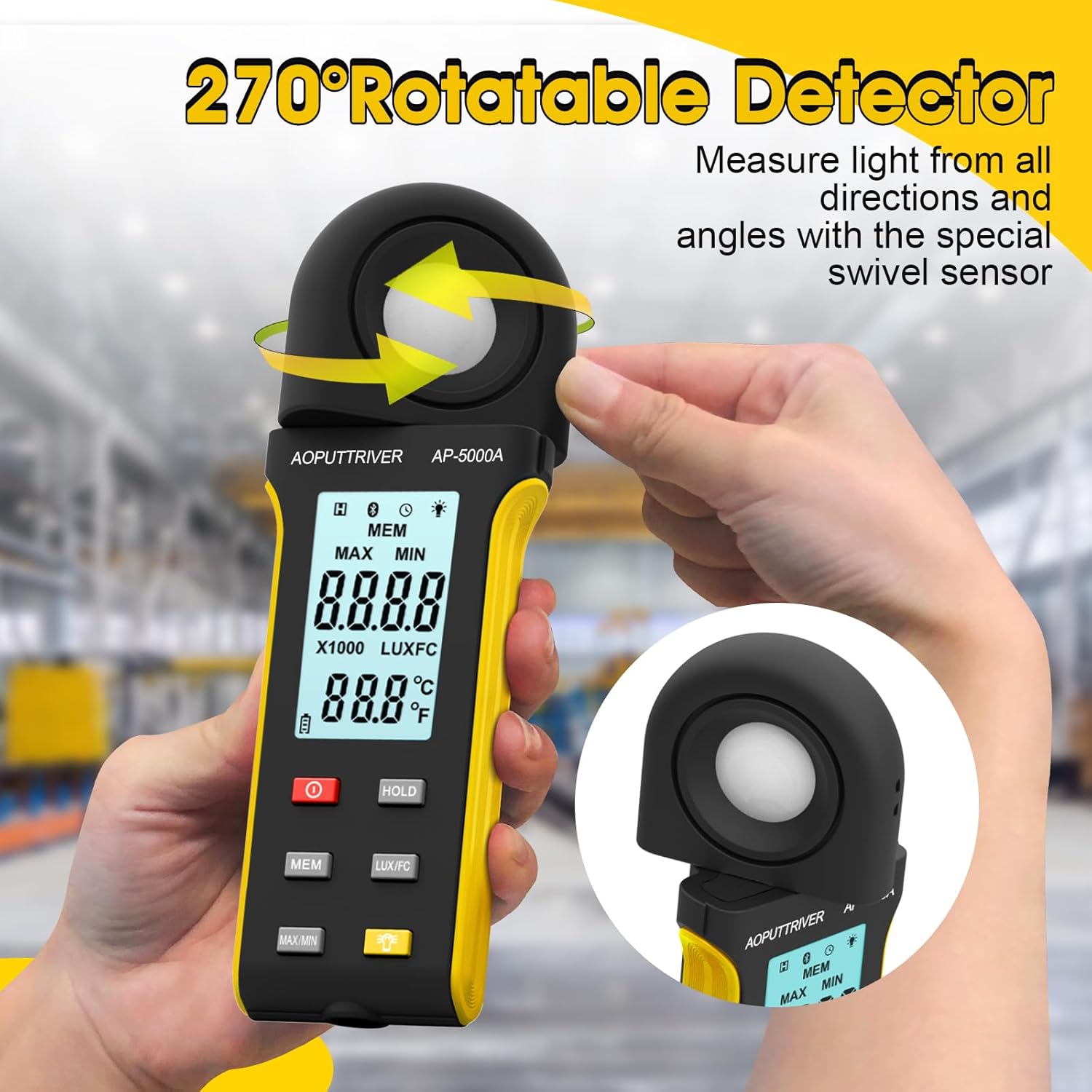
Figure 5: The 270-degree rotatable detector for flexible measurement.
7. Улік дадзеных
The meter supports data logging for up to 30 groups of measurements. This feature allows you to record and review light level data over time, which is useful for monitoring changes in lighting conditions for applications like plant growth or aquarium environments. Refer to the detailed instructions in the full user manual for specific steps on how to initiate, save, and recall data logs using the МЕМ кнопка.
8. Падключэнне прыкладання
The AP-5000A can connect to a smartphone application via Bluetooth. This allows for real-time tracking of data, remote control of certain functions, and advanced data analysis. Download the official AOPUTTRIVER app from your device's app store and follow the in-app instructions to pair your light meter.
9. Дадаткі
The AOPUTTRIVER AP-5000A is a versatile tool suitable for a wide range of applications requiring precise light measurement:
- Indoor Plant Growing: Optimizing light levels for various plant species.
- акварыумы: Ensuring appropriate lighting for aquatic life.
- Фота і відэаздымка: Setting up ideal lighting conditions.
- Workplace and School Environments: Assessing illumination for comfort and productivity.
- Грамадскія прасторы: Measuring light in libraries, stages, and street lighting.
- Прамысловыя ўмовы: Monitoring lighting in factories and warehouses.

Figure 6: Diverse applications of the AP-5000A Light Meter.
10. Тэхнічнае абслугоўванне і догляд
- Уборка: Use a soft, dry cloth to clean the device. Do not use abrasive cleaners or solvents. Ensure the photodetector is kept clean and free of dust for accurate readings.
- захоўванне: When not in use, store the meter in its carrying bag with the protective cap on the photodetector. Store in a cool, dry place away from direct sunlight and extreme temperatures.
- Замена батарэі: Replace batteries when the low battery indicator appears on the LCD to ensure continuous accurate operation.
- Аўтаматычнае адключэнне: Прылада мае функцыю аўтаматычнага адключэння пасля 15 хвілін бяздзейнасці, каб зэканоміць час працы батарэі.
11. Выпраўленне непаладак
- Няма дысплея/Уключэнне харчавання: Праверце ўстаноўку батарэек і пераканайцеся, што яны не разраджаныя. Пры неабходнасці заменіце.
- Няправільныя паказанні: Ensure the photodetector is clean and unobstructed. Verify that the correct measurement unit (Lux/FC) is selected. Avoid measuring in rapidly changing light conditions.
- Праблемы з падключэннем праграмы: Ensure Bluetooth is enabled on your smartphone and the meter. Restart both the app and the meter. Check that the app is up to date.
- Дысплей "OL": Indicates an overload, meaning the measured light intensity exceeds the meter's maximum range.
12. Тэхнічныя характарыстыкі
| Асаблівасць | Спецыфікацыя |
|---|---|
| Нумар мадэлі | АП-5000А |
| Дыяпазон вымярэння | 0.1 ~ 400,000 Lux (0.1 ~ 40,000 FC) |
| дазвол | 0.1 LUX/FC |
| Дакладнасць | ≤10000Lux: +/-4% rgd+/-1.0% f.s. ≥10,000Lux: ±5% rgd+/-1.5% f.s ≥200,000Lux: +/-8% rdg+/-2.0%f.s |
| Detector Rotation | 270 градусаў |
| Ёмістасць рэгістрацыі даных | Да 30 груп |
| Аўтаматычнае адключэнне | Пасля 15 хвілін бяздзейнасці |
| Дысплей | HD Backlight LCD |
| Крыніца харчавання | 2 х ААА батарэі |
| Вага прадмета | 7.8 унцыі |
| Памеры ўпакоўкі | 7.99 х 3.43 х 1.93 цалі |
13. Гарантыя і падтрымка
AOPUTTRIVER products are manufactured to high-quality standards. For warranty information, technical support, or service inquiries, please refer to the contact details provided on the product packaging or visit the official AOPUTTRIVER webсайт. Захоўвайце чэк аб куплі як пацвярджэнне пакупкі для гарантыйных прэтэнзій.