
1. Уводзіны
This manual provides detailed instructions for the safe and efficient use of your Vimorg 66Ft 200 LED Christmas Tree Ribbon Lights. Please read this manual thoroughly before operation and retain it for future reference.
2. Інфармацыя па бяспецы
- Толькі для выкарыстання ў памяшканнях.
- Do not expose the battery box to water or extreme moisture.
- Пераканайцеся, што батарэйкі ўстаўлены з правільнай палярнасцю.
- Не змешвайце старыя і новыя батарэі або розныя тыпы батарэй.
- Выміце батарэйкі, калі выраб не выкарыстоўваецца працяглы час.
- Keep out of reach of children to prevent choking hazards from small parts.
- Не спрабуйце мадыфікаваць або рамантаваць прадукт. Звярніцеся па дапамогу ў службу падтрымкі кліентаў.
3. Змесціва ўпакоўкі
Праверце наяўнасць усіх прадметаў у камплекце:
- 1 x Vimorg 66Ft 200 LED Christmas Tree Ribbon Light (Silver/White)
- 1 x Battery Box (requires 3 AA batteries, not included)
- 1 x USB кабель харчавання
- 1 х пульт дыстанцыйнага кіравання
- 1 х Кіраўніцтва карыстальніка
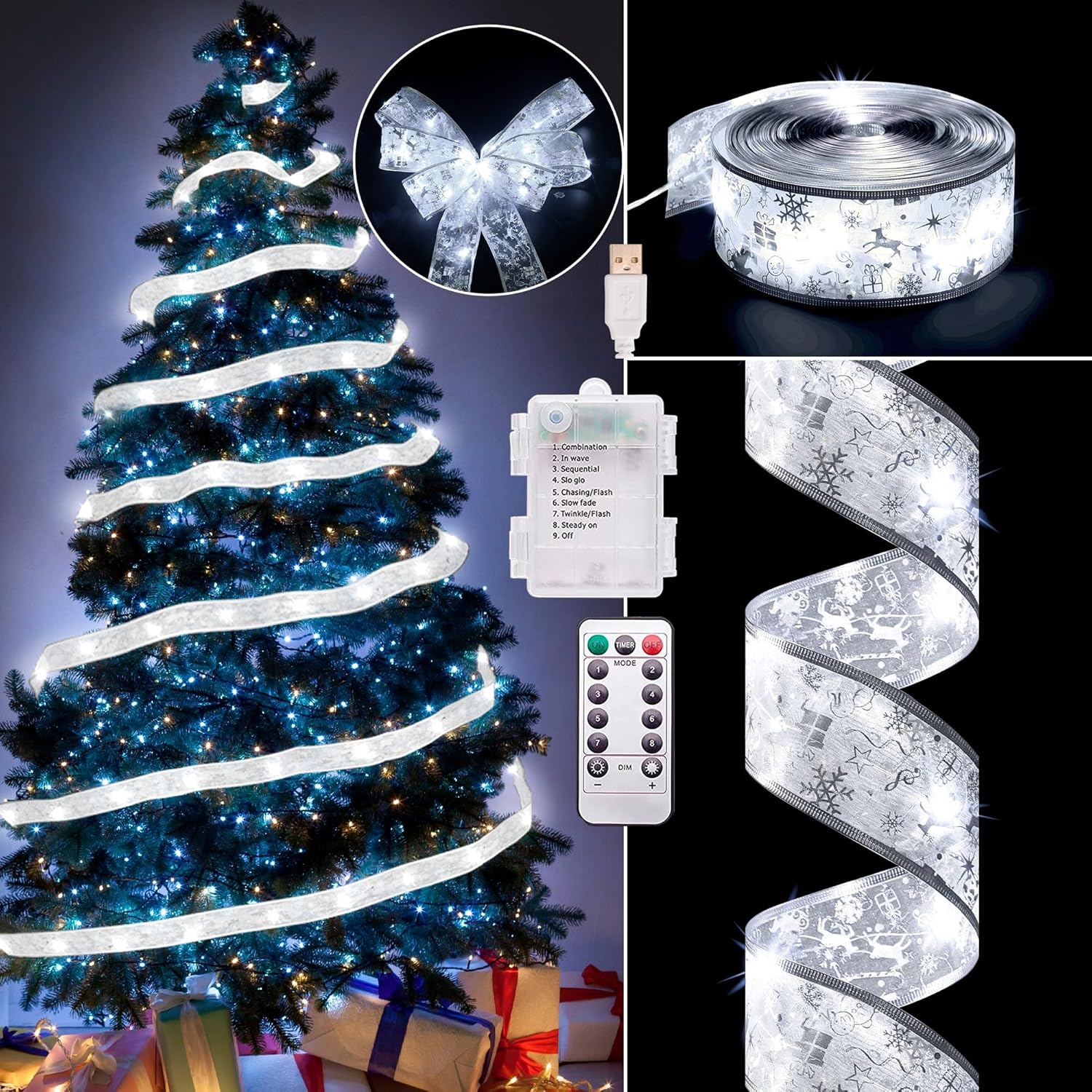
Надview of the Vimorg 66Ft 200 LED Christmas Tree Ribbon Lights, showing the ribbon lights wrapped around a Christmas tree, the remote control, and the battery box with USB connection.
An official product video from Vimorg showcasing the 'Ultra Long Christmas Ribbon Lights' in various decorative settings, highlighting their length and visual appeal.
4. Настройка
4.1. Устаноўка батарэі
- Locate the battery box.
- Адкрыйце крышку батарэйнага адсека.
- Устаўце 3 батарэйкі тыпу АА (не ўваходзяць у камплект) у адсек, сачыце за правільнай палярнасцю (+/-).
- Надзейна зачыніце крышку батарэйнага адсека.
4.2. USB Power Connection
- Alternatively, connect the provided USB cable to the battery box.
- Plug the other end of the USB cable into a compatible USB power source (e.g., USB adapter, power bank, computer USB port).
- The USB lead length is approximately 16.5 feet.
4.3. размяшчэнне
- Unroll the ribbon lights carefully to avoid tangling.
- The copper wire within the ribbon is bendable, allowing you to shape it as desired for decoration.
- Suitable for decorating Christmas trees between 6ft and 8ft in height.
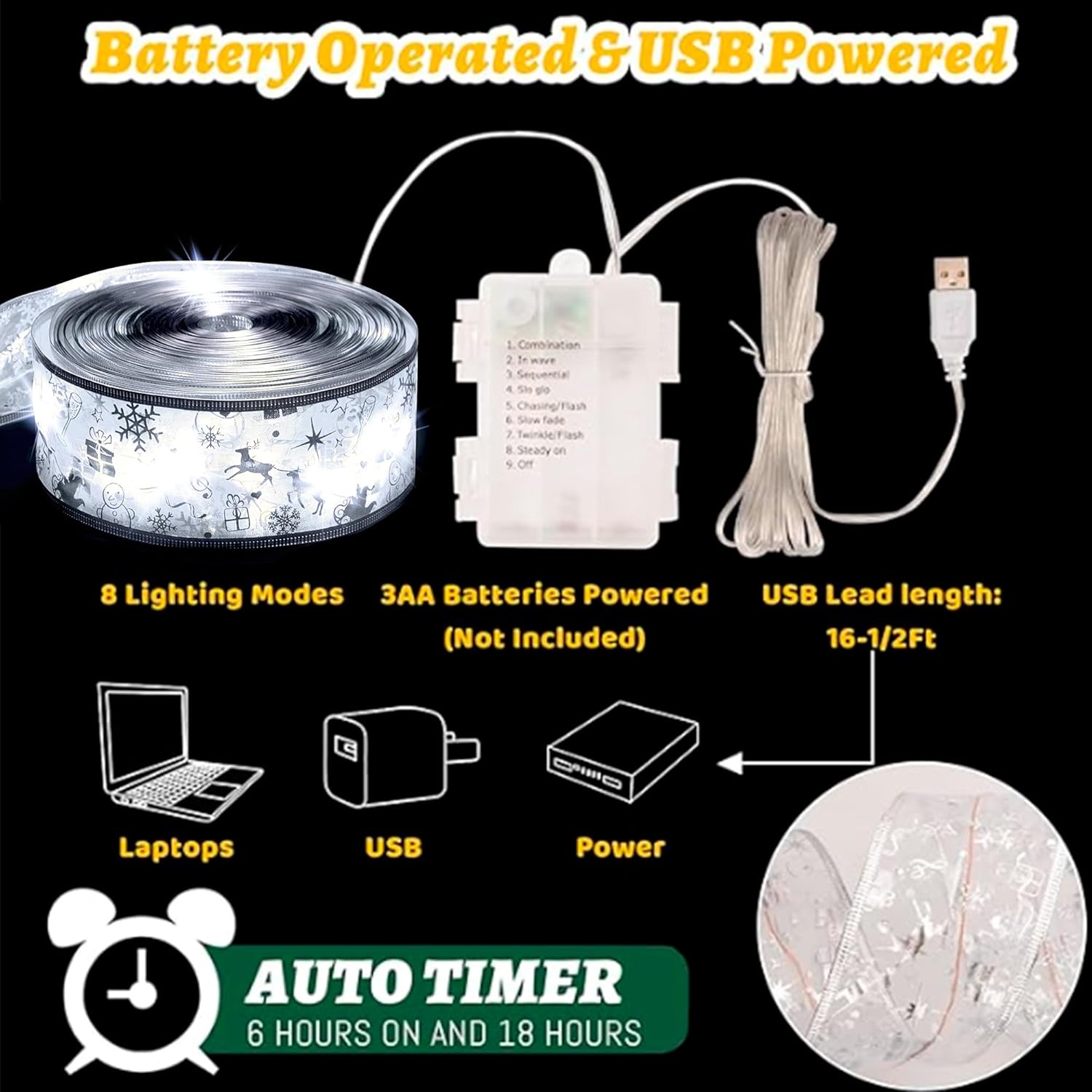
A close-up of the battery box for the ribbon lights, illustrating both the battery compartment (for 3 AA batteries) and the USB power input. The image also highlights the 8 lighting modes and the auto-timer function.
5. Інструкцыя па эксплуатацыі
5.1. Уключэнне/выключэнне харчавання
- Using the Battery Box: Press the button on the battery box to cycle through lighting modes and turn the lights on/off.
- Выкарыстанне пульта дыстанцыйнага кіравання: Press the "ON" button to turn on the lights and the "OFF" button to turn them off.
5.2. Рэжымы асвятлення
The lights feature 8 different lighting modes. Cycle through them using the button on the battery box or the "MODE" button on the remote control:
- Камбінацыя
- У хвалях
- Паслядоўны
- Сло-Гло
- Chasing/Успышка
- Павольнае згасанне
- Мігценне/Успышка
- Пастаянна ўключана
5.3. Функцыя таймера
- The lights have a built-in auto timer function: 6 hours ON, 18 hours OFF.
- To activate the timer, turn on the lights at the desired time using the button on the battery box. The timer will automatically activate and repeat daily.
- The timer function is not affected by using the remote control for initial activation.
- To deactivate the timer, simply turn off the lights manually.
5.4. Brightness Adjustment (Remote Control Only)
- Use the "DIM -" button on the remote control to decrease brightness.
- Use the "DIM +" button on the remote control to increase brightness.
6. Тэхнічнае абслугоўванне
- Уборка: Gently wipe the ribbon and lights with a soft, dry cloth. Do not use harsh chemicals or abrasive cleaners.
- захоўванне: When not in use, carefully roll the ribbon lights back onto their spool or store them in a way that prevents tangling. Store in a cool, dry place away from direct sunlight.
- Замена батарэі: Replace all 3 AA batteries simultaneously when they run low to ensure optimal performance.

Падрабязны view of the 2.5-inch wide ribbon lights, showcasing the integrated LED bulbs and the decorative pattern on the sheer organza fabric.
7. Выпраўленне непаладак
| праблема | Магчымая прычына | Рашэнне |
|---|---|---|
| Святло не гарыць. | Batteries are dead or incorrectly inserted. USB cable is not connected or power source is off. | Replace batteries, ensuring correct polarity. Check USB connection and power source. |
| Пульт дыстанцыйнага кіравання не працуе. | Remote battery is dead. Obstruction between remote and receiver. | Replace the remote control battery. Ensure a clear line of sight to the battery box. |
| Lights turn off unexpectedly. | Timer function is active. Batteries are low. | Check if the timer is set (6 hours ON, 18 hours OFF). Replace batteries. |
8. Тэхнічныя характарыстыкі
| Асаблівасць | Дэталь |
|---|---|
| Нумар мадэлі | Vi23090803 |
| Ribbon Lights Length | 66 фута (20 метраў) |
| Шырыня стужкі | 2.5 цаляў |
| Колькасць святлодыёдаў | 200 святлодыёда |
| Светлы колер | Белы |
| Крыніца харчавання | 3 x AA Batteries (not included) or USB Powered |
| USB Lead Length | 16.5 футаў |
| Рэжымы асвятлення | 8 розных рэжымаў |
| Функцыя таймера | 6 гадзін уключана / 18 гадзін выключана |
| Метад кантролю | Button Control on Battery Box, Remote Control |
| Матэрыял | Copper Wire, Organza Sheer Ribbon |
| Выкарыстанне ў памяшканні/на вуліцы | У памяшканні |
9. Гарантыя і падтрымка
For warranty information or technical support, please contact Vimorg customer service through your original purchase platform or refer to the contact details provided with your product packaging.