
1. Уводзіны
The EPOS Impact 1061T is a double-sided Active Noise Cancelling (ANC) headset designed for modern open office environments. It integrates EPOS BrainAdapt™ technology to minimize brain fatigue, features industry-leading voice pickup powered by EPOS AI™, and adaptive ANC for clear communication. This headset offers all-day wearing comfort with its lightweight design, soft cushions, headband padding, and Super Wideband for natural listening. Enjoy total ease of use with a contactless charging stand, intuitive on-headset controls, and a suite of smart features.
2. Што ў скрынцы
- IMPACT 1061T Headset
- Амбушюры IMPACT 1000
- IMPACT 1000 ANC ear pads
- акумулятар
- Contactless charging stand (CH 40)
- USB-C кабель
3. Настройка
3.1 Першапачатковая зарадка
Before first use, fully charge your headset using the provided USB-C cable or the contactless charging stand (CH 40). Connect the USB-C cable to the headset and a power source, or place the headset on the charging stand ensuring proper alignment.
3.2 Падключэнне да прылад
The EPOS Impact 1061T Headset offers versatile connectivity:
- Бесправаднае падключэнне: The headset utilizes Bluetooth technology (Bluetooth Version 5.0) for wireless connection. Power on the headset and put it into pairing mode. Пошук "EPOS Impact 1061T" on your device's Bluetooth settings and select to pair.
- PC Connection via Dongle: For optimal performance with PCs and UC softphones, use the dedicated USB-C dongle. Plug the dongle into an available USB-C port on your computer. The headset will automatically connect to the dongle. If your PC only has USB-A ports, an adapter may be required (not included unless specified in the box contents).
- Падключэнне некалькіх прылад: Stay connected wirelessly with up to three devices simultaneously, allowing seamless switching between your laptop, tablet, and smartphone.
3.3 Hot Desking Environments
This headset is designed to operate without a base station, making it ideal for hot desking. Simply connect your headset to the available device via Bluetooth or the USB dongle for immediate use.
4. Інструкцыя па эксплуатацыі
4.1 Асноўныя элементы кіравання
The headset features intuitive on-headset controls for managing calls and audio:
- Адказ/завяршэнне выклікаў: Use the dedicated call button on the earcup or simply move the boom arm down to answer and up to end calls.
- Выключыць мікрафон: Mute calls by moving the boom arm up or using the mute button.
- Рэгулятар гучнасці: Adjust audio volume using the dedicated buttons on the earcup.
- Святло занятасці: An intuitive busylight clearly signals when you are on a call and not to be disturbed.
4.2 Дадатковыя магчымасці
- Актыўнае падаўленне шуму (ANC): Activate adaptive ANC to reduce background noise and enhance focus for both sides of the conversation.
- EPOS AI™ and BrainAdapt™ Technology: Benefit from industry-leading voice pickup and technology designed to reduce brain fatigue, ensuring clear speech in noisy environments.
- Talk-Through: Communicate easily with in-office colleagues without removing the headset, maintaining environmental awareness during calls.
- Super Wideband Audio: Enjoy clear speech and natural listening experience with super wideband audio and stereo sound.
5. СМІ
5.1 Выявы прадуктаў
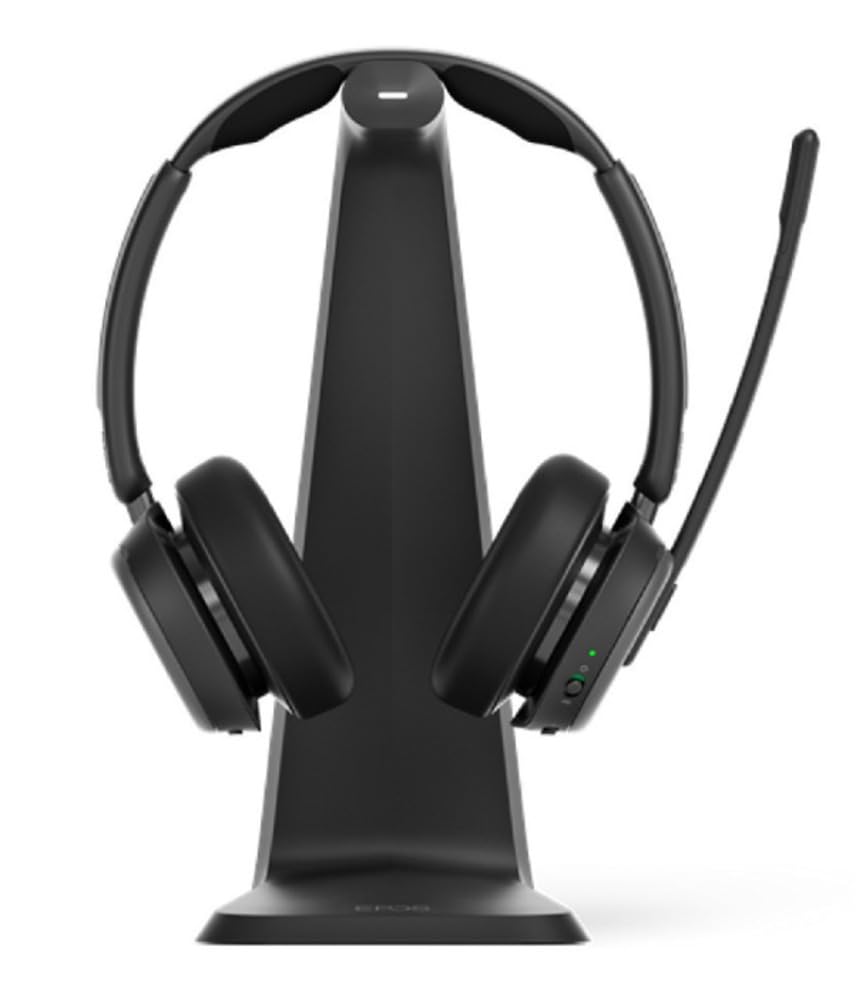
Малюнак 1: The EPOS Impact 1061T Headset, shown in black, featuring its over-ear design with a flexible microphone boom arm. The headset is designed for comfort and clear communication in professional settings.
6. Тэхнічныя характарыстыкі
| Асаблівасць | Дэталь |
|---|---|
| Назва мадэлі | УДАР 1000 |
| Тэхналогія падлучэння | Бесправадная сувязь (Bluetooth 5.0) |
| Кантроль шуму | Актыўнае падаўленне шуму |
| Форма навушніка | На вушах |
| Вага прадмета | 6 унцыі (0.17 кілаграма) |
| Памеры прадукту | 9.5 х 9.25 х 4.5 цалі |
| акумулятар | 1 літый-іённы акумулятар (у камплекце) |
| Асаблівасці | Ambient Noise, Breathable, Comfortable, Lightweight, Microphone Included, Mute Light Indicator, Noise Cancellation, Padded Headband, Talk-Through, USB Charging, Wideband Audio |
| Сумяшчальныя прылады | Laptops, Desktops, Tablets, Smartphones, Smart Speakers, Gaming Consoles, Telephones |
7. Тэхнічнае абслугоўванне
7.1 Ачыстка
Regularly clean your headset to ensure hygiene and longevity. Use a soft, dry cloth to wipe the earcups and headband. For stubborn dirt, a slightly damp cloth with mild soap can be used, ensuring no moisture enters the electronic components. Do not use harsh chemicals or abrasive materials.
7.2 Захоўванне
When not in use, store the headset in its soft carry pouch to protect it from dust and damage. Avoid storing in extreme temperatures or high humidity.
7.3 Замена амбушур
The IMPACT 1000 ear pads and IMPACT 1000 ANC ear pads are replaceable. Refer to the EPOS support website for instructions on how to replace them if they become worn or damaged.
8. Выпраўленне непаладак
- Няма гуку/нізкая якасць гуку:
- Пераканайцеся, што гарнітура цалкам зараджана.
- Verify the headset is correctly paired and connected to your device.
- Праверце ўзровень гучнасці як на гарнітуры, так і на падлучанай прыладзе.
- If using a dongle, ensure it is securely plugged into the PC.
- Мікрафон не працуе:
- Ensure the microphone boom arm is lowered and not muted.
- Check microphone settings on your connected device/application.
- Праблемы з падключэннем:
- Падыдзіце бліжэй да падключанай прылады, каб пераканацца, што вы знаходзіцеся ў зоне дасяжнасці.
- Адключыце і зноў падключыце гарнітуру да прылады.
- Перазагрузіце падключаную прыладу.
- ANC Not Functioning:
- Ensure ANC is activated via the headset controls.
- Check for any obstructions around the external microphones.
9. Гарантыя і падтрымка
The EPOS Impact 1061T Headset comes with a manufacturer's warranty. For detailed warranty information, product support, or to access additional resources, please visit the official EPOS webсайт або звярніцеся ў службу падтрымкі кліентаў. Захоўвайце пацвярджэнне пакупкі для прэтэнзій па гарантыі.