
Cleyver ODHCAM360
Cleyver ODHCAM 360° WebКіраўніцтва карыстальніка cam
Model: ODHCAM360
1. Уводзіны
Thank you for choosing the Cleyver ODHCAM 360° Webcam. This device is designed to enhance your video conferencing experience with its panoramic view, intelligent features, and high-quality audio-visual capabilities. Please read this manual carefully to ensure proper setup and operation.
2. Прадукт скончыўсяview
The Cleyver ODHCAM 360° Webcam integrates a 5 MP Full HD CMOS sensor, omnidirectional microphones, and a 3W HD speaker into a single, compact unit. It offers a 360° field of view and intelligent features like voice tracking and automatic framing to keep participants engaged.
2.1 Змест пакета
- Cleyver ODHCAM 360° Webкамера
- Кабель USB
- (Potentially) Driver/Software CD
- (Potentially) Lens Cap
2.2 Кампаненты прылады
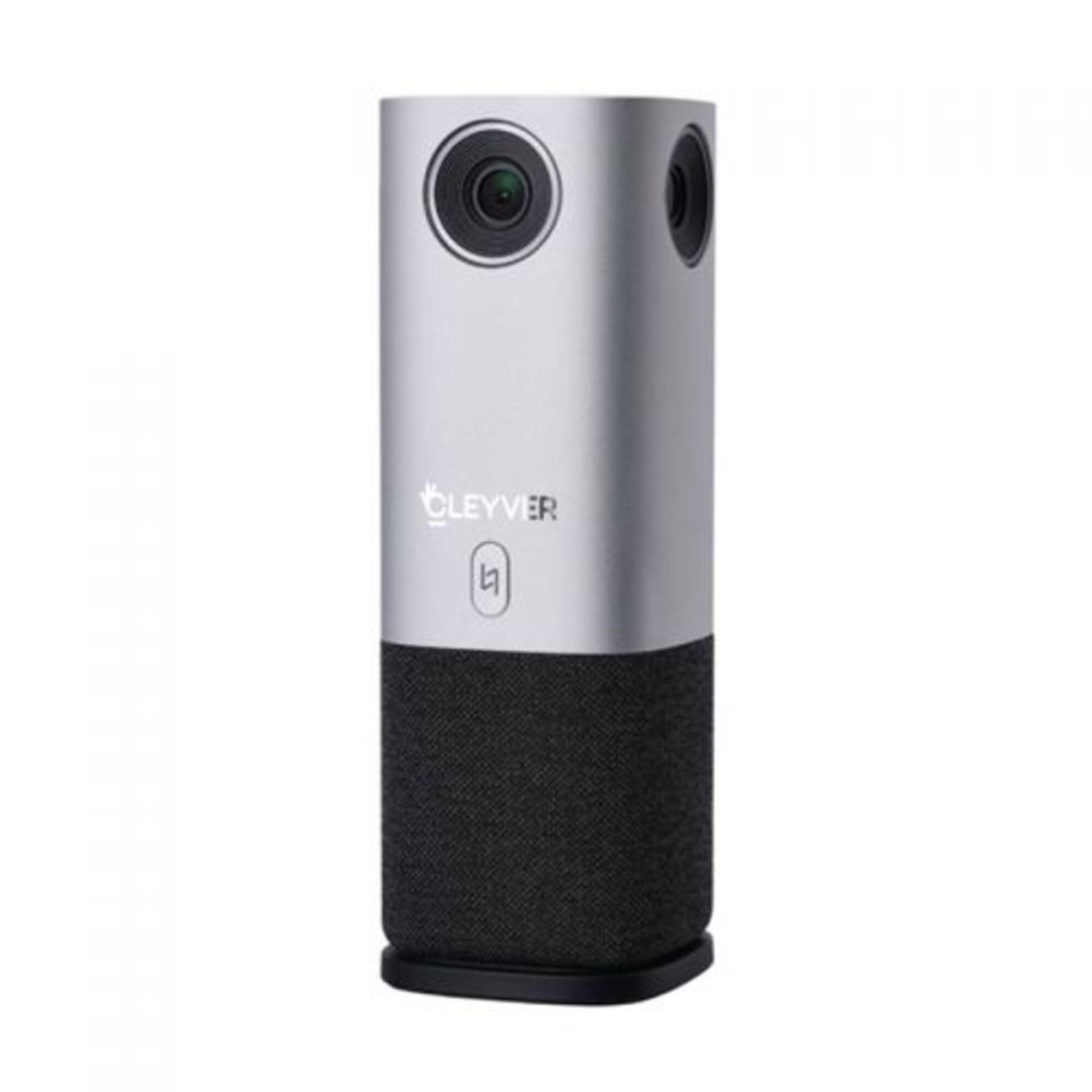
Малюнак 1: Спераду view of the Cleyver ODHCAM 360° Webcam. Shows the main camera lens, Cleyver logo, and a button.

Малюнак 2: Задняя частка view of the Cleyver ODHCAM 360° Webcam, highlighting the USB and power ports.

Figure 3: A hand pressing the mode selection button on the Cleyver ODHCAM 360° Webкулачок.
3. Настройка
The Cleyver ODHCAM 360° Webcam is designed for Plug & Play operation, requiring minimal setup.
3.1 Падключэнне прылады
- Месца webcam on a stable surface in the center of your meeting area.
- Connect the provided USB cable to the USB port on the webкулачок.
- Падключыце іншы канец кабеля USB да вольнага порта USB на вашым кампутары.
- Падключыце адаптар сілкавання да webcam's power input and then to a wall outlet. The device requires external power for full functionality.
- Your computer should automatically detect and install the necessary drivers. If not, refer to the (potentially) included driver CD or download drivers from the official Cleyver webсайт.

Figure 4: USB and power cables connected to the Cleyver ODHCAM 360° Webкулачок.
4. Інструкцыя па эксплуатацыі
Пасля падлучэння, the webcam is ready for use with your preferred video conferencing software.
4.1 Selecting a Presentation Mode
The Cleyver ODHCAM 360° offers 6 distinct presentation modes to suit various meeting scenarios. Press the mode selection button on the device to cycle through the available modes.
- Full Screen 360°: Displays a complete panoramic view пакоя.
- Усё вакол View: Presents a split view with a panoramic top section and individual speaker views ніжэй.
- Host Mode: Focuses on the primary speaker while showing a panoramic view.
- Dual Host Mode: Highlights two main speakers simultaneously.
- Халасты View 90°: Provides a standard 90-degree field of view, focusing on a specific area.
- Шырокі кут View 120°: Offers a broader 120-degree field of view.
The device uses AI voice tracking and automatic framing to dynamically adjust the view based on who is speaking, ensuring optimal visibility for all participants.
4.2 Функцыі гуку
- Усенакіраваныя мікрафоны: The integrated microphones capture clear audio from all directions.
- 3W HD Speaker: Provides clear sound output for incoming audio.
- Функцыя адключэння гуку: A dedicated button on the device allows you to quickly mute/unmute the microphones. An indicator light will show the mute status (e.g., red for muted, green for active).
4.3 Сумяшчальнасць
The Cleyver ODHCAM 360° Webcam is compatible with most popular video conferencing platforms and operating systems, including Windows and macOS. It is designed to work seamlessly with applications such as Zoom, Microsoft Teams, Skype, Google Meet, and others.
Video 1: Demonstration of the Nuroum C50 Webcam (similar to Cleyver ODHCAM 360°) features, including panoramic view and voice tracking. This video illustrates how the camera automatically focuses on the active speaker during a meeting.
Video 2: Unboxing and initial setup of a CZUR Halo webcam (similar to Cleyver ODHCAM 360°). This video demonstrates the physical components and how to connect the device.
Відэа 3: Скончанаview of the j5create 360-degree meeting webcam (similar to Cleyver ODHCAM 360°), showcasing its various display modes and omnidirectional microphone capabilities.
Video 4: Promotional video for Nuroum C20 (similar to Cleyver ODHCAM 360°), highlighting its all-in-one conference camera features, AI noise cancellation, and effective voice capture.
Video 5: Instructions on how to use the CZUR Halo webcam (similar to Cleyver ODHCAM 360°) with Zoom, demonstrating camera selection within the application.
5. Тэхнічнае абслугоўванне і догляд
- Трымайце прыладу ў чысціні, праціраючы яе мяккай сухой тканінай.
- Пазбягайце выкарыстання агрэсіўных хімікатаў або абразіўных ачышчальнікаў.
- Ensure the lens is free from dust and smudges for optimal image quality.
- Захоўваць webcam in a cool, dry place when not in use.
- Не падвяргайце прыладу ўздзеянню экстрэмальных тэмператур або вільготнасці.
6. Выпраўленне непаладак
| праблема | Магчымая прычына | Рашэнне |
|---|---|---|
| Няма вываду выявы/відэа |
|
|
| No audio input/output |
|
|
| Дрэнная якасць выявы |
|
|
7. Тэхнічныя характарыстыкі
| Асаблівасць | Дэталь |
|---|---|
| Марка | Cleyver |
| мадэль | ODHCAM360 |
| Колер | Серабро |
| Асаблівасці | 360° Video Conferencing, Voice Tracking, Automatic Framing |
| Sensor Technology | CMOS |
| Эфектыўнае рашэнне | 5 мегапікселяў |
| Дазвол відэа | 1080p |
| Тэхналогія падлучэння | USB |
| Мікрафоны | Усенакіраваны |
| Дакладчык | 3W HD Speaker |
| Памеры (Д х Ш х У) | 6.76 х 6.75 х 18.2 см |
| Сумяшчальныя прылады | Laptop, Personal Computer, (potentially) Tablet, (potentially) Smartphone |
| Тып фокусу | Аўтаматычны фокус, ручны фокус |
| Узровень воданепранікальнасці | Не воданепранікальны |
8. Гарантыя і падтрымка
For warranty information and technical support, please refer to the documentation included with your product or visit the official Cleyver webсайт. Захоўвайце чэк аб куплі як пацвярджэнне пакупкі для гарантыйных прэтэнзій.