
SUNOL K8
GM20 True Wireless Earbuds User Manual
Мадэль: K8
Уводзіны
Thank you for choosing the SUNOL GM20 True Wireless Earbuds. This manual provides detailed instructions on how to set up, operate, and maintain your earbuds to ensure optimal performance and longevity. Please read this manual thoroughly before using the product.
Прадукт скончаныview

Image: The GM20 True Wireless Earbuds in orange, shown with their matching charging case. The charging case features an LED display indicating battery percentage.
The GM20 True Wireless Earbuds are designed for a superior audio experience with advanced features:
- Тэхналогія Bluetooth 5.3: Ensures faster pairing, more stable connection, and lower power consumption with an effective range of up to 10 meters.
- Убудаваны мікрафон: High-quality microphone with environmental noise reduction for clear hands-free calls.
- Пашыранае прайграванне: Up to 48 hours of total playback time with the 600mAh charging case, which can recharge the earbuds four times.
- Святлодыёдны дысплей: The charging case features an LED display to show the power levels of both the earbuds and the charging case.
- Воданепранікальны дызайн: IPX8 waterproof nano-coating makes the earbuds suitable for various activities, including sports.
- Зручная пасадка: Ergonomic in-ear design with multiple ear tip sizes for prolonged comfortable wear.
Што ў скрынцы
Upon opening your GM20 True Wireless Earbuds package, you should find the following items:
- GM20 True Wireless Earbuds (Left and Right)
- Чахол для зарадкі
- Зарадны кабель
- Розныя памеры вушных насадак
- Кіраўніцтва карыстальніка (гэты дакумент)
Настройка
1. Зарадка навушнікаў і чахла
Перад першым выкарыстаннем пераканайцеся, што і навушнікі, і зарадны футляр цалкам зараджаны.
- Place the earbuds into the charging case. Ensure they are correctly seated; the LED display on the case will show charging status.
- Connect the charging cable to the charging port on the case and to a USB power source. The LED display will indicate the charging progress of the case.
- A full charge for the case typically takes a few hours. The earbuds will charge automatically when placed inside the powered case.

Image: The GM20 charging case displaying "100" on its LED screen, indicating a full charge. An earbud is shown next to it, ready for use.
2. Спалучэнне з прыладай (аднаэтапнае спалучэнне)
The GM20 earbuds feature automatic pairing for convenience.
- Першапачатковае спалучэнне:
- Адкрыйце зарадны кейс і дастаньце абодва навушнікі. Яны аўтаматычна ўключацца і пяройдуць у рэжым спалучэння.
- На вашай прыладзе (смартфоне, планшэце і г.д.) уключыце Bluetooth.
- Пошук Bluetooth devices and select "GM20 TWS" from the list.
- Пасля падключэння вы пачуеце гук пацверджання, і навушнікі будуць гатовыя да выкарыстання.
- Паўторнае спалучэнне: The earbuds will automatically connect to the last paired device when taken out of the charging case.
- If the earbuds do not connect automatically, ensure Bluetooth is enabled on your device and select "GM20 TWS" from your Bluetooth settings.
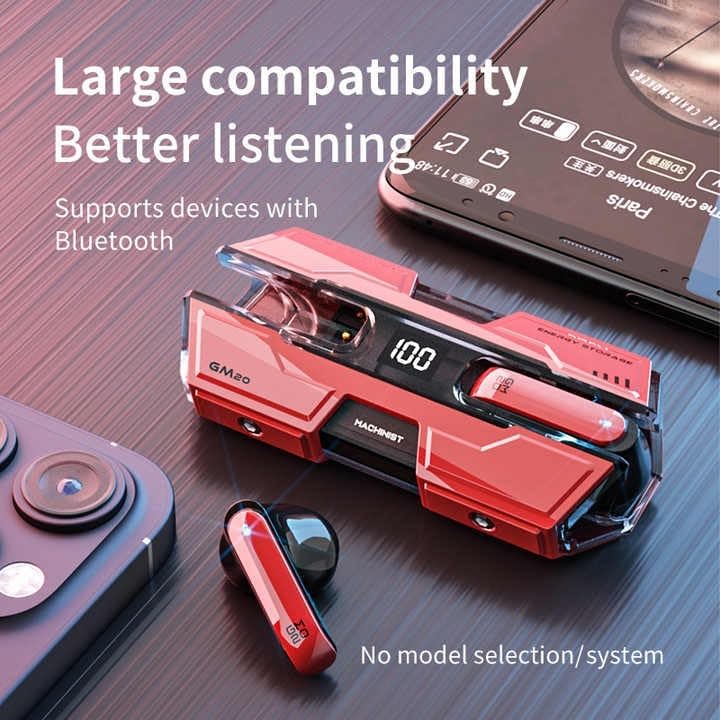
Image: The GM20 earbuds and charging case positioned near a smartphone, emphasizing their broad compatibility with Bluetooth-enabled devices.
Інструкцыя па эксплуатацыі
Элементы кіравання навушнікамі
The GM20 earbuds feature a multifunction button on each earbud for easy control of audio playback and calls.
| Дзеянне | Функцыя |
|---|---|
| Single Press (Left/Right Earbud) | Прайграванне/прыпыненне музыкі, адказ/завяршэнне выкліку |
| Двойчы націск (левы навушнік) | Папярэдняя песня |
| Двайны націск (правы навушнік) | Наступная песня |
| Доўгі націск (2 секунд) | Адхіліць выклік, актываваць галасавы памочнік |
| Доўгі націск (5 секунд) | Уключэнне/выключэнне харчавання |
Нашэнне навушнікаў
For optimal sound quality and comfort, ensure the earbuds are properly seated in your ears. Experiment with the different sizes of ear tips provided to find the best fit for your ears.

Выява: Выбухнула view diagram of an earbud, illustrating its internal components such as the 13mm moving coil and composite diaphragm, which contribute to high-resolution sound.
Тэхнічнае абслугоўванне
Proper maintenance will extend the life of your GM20 earbuds.
- Уборка: Рэгулярна працірайце навушнікі і зарадны футляр мяккай, сухой тканінай без ворса. Не выкарыстоўвайце абразіўныя ачышчальнікі або растваральнікі.
- Воданепранікальнасць: The earbuds are IPX8 waterproof, meaning they are protected against prolonged immersion in water. However, the charging case is not waterproof. Avoid exposing the charging case to liquids. Always ensure earbuds are dry before placing them back in the charging case.
- захоўванне: Калі навушнікі не выкарыстоўваюцца, захоўвайце іх у зарадным чахле, каб абараніць і падтрымліваць зарад. Захоўвайце ў прахалодным, сухім месцы, удалечыні ад экстрэмальных тэмператур.
- Сыход за батарэяй: Каб падоўжыць тэрмін службы батарэі, не разраджайце навушнікі і зарадны футляр часта цалкам. Рэгулярна зараджайце іх, нават калі яны не выкарыстоўваюцца пастаянна.
Ліквідацыю непаладак
If you encounter issues with your GM20 earbuds, try the following solutions:
- Навушнікі не спалучаюцца:
- Пераканайцеся, што абодва навушнікі цалкам зараджаны.
- Выключыце Bluetooth на прыладзе, а затым зноў уключыце яго.
- Forget "GM20 TWS" from your device's Bluetooth settings and attempt to re-pair.
- Змясціце навушнікі назад у чахол, зачыніце вечка, пачакайце некалькі секунд, затым адкрыйце і паспрабуйце зноў.
- Няма гуку або нізкі гук:
- Праверце ўзровень гучнасці як на прыладзе, так і ў навушніках.
- Пераканайцеся, што навушнікі правільна падключаны да вашай прылады.
- Ачысціце сетку дынаміка навушнікаў ад смецця.
- Sound distortion or crackling:
- Пераканайцеся, што навушнікі знаходзяцца ў радыусе дзеяння Bluetooth вашай прылады — 10 метраў.
- Reduce interference by moving away from other wireless devices or strong electromagnetic fields.
- Паспрабуйце зноў спалучыць навушнікі.
- Навушнікі не зараджаюцца:
- Пераканайцеся, што зарадны кабель надзейна падключаны як да корпуса, так і да крыніцы харчавання.
- Праверце, ці чысты і без смецця зарадны порт на чахле.
- Паспрабуйце іншы кабель для зарадкі або адаптар харчавання.
Тэхнічныя характарыстыкі
| Асаблівасць | Дэталь |
|---|---|
| Назва мадэлі | K8 |
| Версія Bluetooth | 5.3 |
| Дыяпазон Bluetooth | 10 метраў |
| Тэрмін службы батарэі (навушнікі) | Прыблізна 8-10 гадзін (адной зарадкі) |
| Тэрмін службы батарэі (з зарадным футлярам) | Да 48 гадзін |
| Ёмістасць батарэі зараднага кейса | 600 мАг |
| Узровень воданепранікальнасці | IPX8 (толькі навушнікі) |
| АЧХ | 20 Гц - 20 кГц |
| Імпеданс | 32 Ом |
| Метад кантролю | Сэнсар/Кнопка |
| Матэрыял | Акрыланітрылбутадыенстырол (АБС) |
| Вага прадмета | 14.4 унцыі (уся ўпакоўка) |
Гарантыя і падтрымка
For warranty information and customer support, please refer to the documentation included with your purchase or visit the official SUNOL website. If you experience any issues not covered in this manual, please contact SUNOL customer service for assistance.
Калі ласка, захавайце доказы пакупкі для прэтэнзій па гарантыі.