
Уводзіны
This manual provides detailed instructions for the SUNOL GM20 True Wireless Earbuds. Please read this manual carefully before using the product to ensure proper operation and to maximize your listening experience. These earbuds feature Bluetooth 5.3 connectivity, a waterproof design, and a charging case with an LED display.
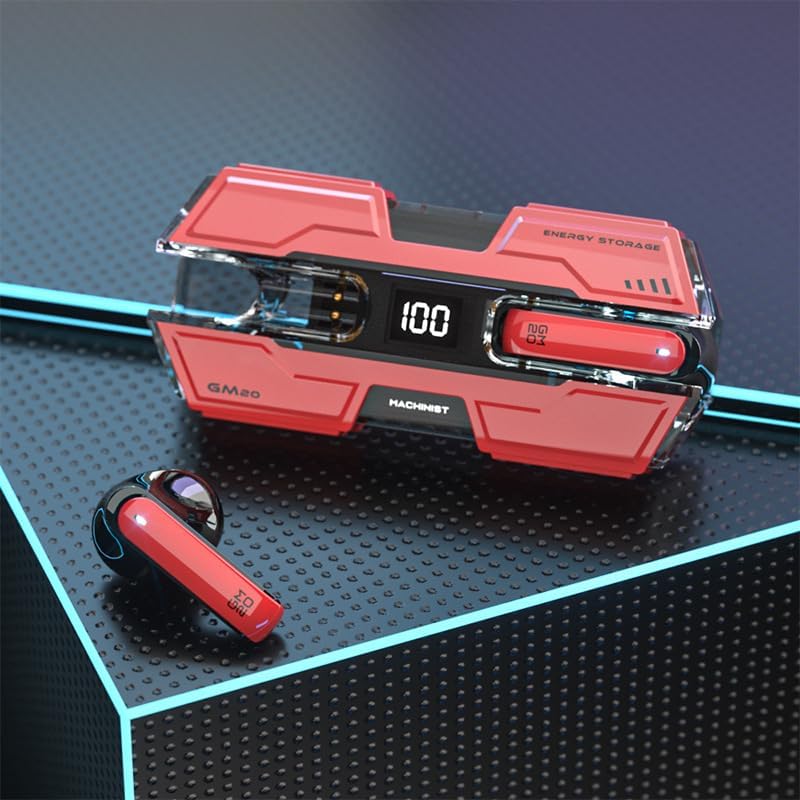
Image: The SUNOL GM20 True Wireless Earbuds with their charging case, showcasing the design and LED display.
Змест пакета
Пераканайцеся, што ўсе прадметы прысутнічаюць у пасылцы:
- GM20 True Wireless Earbuds (Left and Right)
- Чахол для зарадкі
- Зарадны кабель
- Кіраўніцтва карыстальніка
- Розныя памеры амбушюр
Асаблівасці прадукту
- Тэхналогія Bluetooth 5.3: Offers faster pairing, stable connection, and lower power consumption with an effective range of up to 10 meters.
- 48 гадзін прайгравання: The charging case provides multiple charges, extending total listening time.
- IPX8 воданепранікальны: Designed to withstand water exposure, suitable for sports and outdoor activities.
- Святлодыёдны дысплей: The charging case features an LED display to show battery life.
- Deep Bass Audio: Equipped with a 14mm dynamic bass unit for enhanced sound quality.
- Убудаваны мікрафон: Supports hands-free calls with environmental noise reduction.
- Эрганамічны дызайн: Lightweight and comfortable for extended wear.

Image: The GM20 earbuds and charging case, emphasizing Bluetooth 5.3 and high-definition sound quality.

Выява: Выбухнула view diagram illustrating the internal components of the earbud, highlighting the 13mm moving coil and composite diaphragm for high-fidelity sound.
Настройка
1. Зарадка навушнікаў і зараднага футляра
Before first use, fully charge the earbuds and the charging case. Connect the provided charging cable to the charging case and a USB power source. The LED display on the charging case will indicate the charging status and battery level. When charging the earbuds inside the case, the display will show their individual battery life.
2. Уключэнне / выключэнне харчавання
- Уключэнне: Навушнікі аўтаматычна ўключаюцца, калі іх выняць з чахла для зарадкі.
- Выключэнне: Змясціце навушнікі назад у зарадны футляр, каб яны аўтаматычна выключыліся і пачалі зараджацца.
3. Спалучэнне з прыладай
Навушнікі падтрымліваюць аднаэтапнае спалучэнне для зручнасці.
- Пераканайцеся, што навушнікі зараджаны.
- Адкрыйце зарадны кейс і дастаньце абодва навушнікі. Яны аўтаматычна ўключацца і паспрабуюць падключыцца адзін да аднаго.
- After approximately 10 seconds, the earbuds will enter pairing mode.
- На вашай прыладзе (смартфоне, планшэце і г.д.) уключыце Bluetooth і знайдзіце даступныя прылады.
- Select "GM20 TWS" from the list of found devices to complete the pairing process.
- Once paired, the earbuds will automatically connect to the last paired device when removed from the charging case.

Image: The GM20 earbuds and charging case, illustrating the quick connect and pairing process with a smartphone.
Інструкцыя па эксплуатацыі
1. Нашэнне навушнікаў-ўкладышаў
Select the ear tips that provide the most comfortable and secure fit. Insert the earbuds gently into your ear canal and rotate slightly until they feel snug. A proper fit ensures optimal sound quality and noise isolation.
2. Асноўныя элементы кіравання
The earbuds feature a multifunction button for various controls:
- Прайграванне/прыпыненне музыкі: Single press the multifunction button on either earbud.
- Наступная песня: Double press the multifunction button on the right earbud.
- Папярэдняя песня: Double press the multifunction button on the left earbud.
- Адказ/завяршэнне выкліку: Single press the multifunction button on either earbud during an incoming call or active call.
- Адхіліць выклік: Падчас уваходнага званка націсніце і ўтрымлівайце шматфункцыянальную кнопку на любым навушніку.
- Рэгулятар гучнасці: (Note: Specific volume control via earbuds is not detailed in product information. Adjust volume via your connected device.)
3. Waterproof Functionality
The GM20 earbuds are designed with an IPX8 waterproof nano-coating, making them resistant to water. This feature makes them suitable for activities such as running, cycling, and other sports where exposure to sweat or light rain may occur. Avoid prolonged submersion in water.

Image: The GM20 earbuds and charging case in a gaming context, highlighting fast transmission and no delay for an enhanced experience.
Тэхнічнае абслугоўванне
1. Уборка
Regularly clean your earbuds and charging case to maintain optimal performance and hygiene. Use a soft, dry, lint-free cloth. For stubborn dirt, a slightly damp cloth can be used, but ensure no moisture enters the earbud openings or charging ports. Do not use harsh chemicals or abrasive materials.
2. Захоўванне
When not in use, store the earbuds in their charging case to protect them from dust, damage, and to keep them charged. Store the case in a cool, dry place away from direct sunlight and extreme temperatures.
3. Сыход за батарэяй
To prolong battery life, avoid fully discharging the earbuds and charging case frequently. Charge them regularly, even if not in constant use. Do not expose batteries to excessive heat.
Ліквідацыю непаладак
- Навушнікі не спалучаюцца паміж сабой: Place both earbuds back into the charging case, close the lid, wait a few seconds, then remove them again. They should automatically connect.
- Навушнікі не падключаюцца да прылады: Ensure Bluetooth is enabled on your device and the earbuds are in pairing mode. Forget "GM20 TWS" from your device's Bluetooth list and try pairing again.
- Няма гуку з аднаго навушніка: Check if both earbuds are charged. Try resetting them by placing them in the case and then removing them.
- Праблемы з зарадкай: Ensure the charging cable is securely connected and the power source is functional. Clean the charging contacts on both the earbuds and the case.
- Дрэнная якасць гуку: Ensure the earbuds are properly seated in your ears. Try different sized ear tips for a better seal. Check the audio source device for any issues.
Тэхнічныя характарыстыкі
| Назва мадэлі | GM20 (K8) |
| Версія Bluetooth | 5.3 |
| Дыяпазон Bluetooth | Да 10 метраў |
| Тэрмін службы батарэі (навушнікі) | Approximately 48 hours with charging case |
| Зарадная батарэя | 600 мАг |
| Узровень воданепранікальнасці | IPX8 |
| Тып аўдыё драйвера | Дынамічны драйвер 14 мм |
| Дыяпазон частот | 20 Гц - 20 кГц |
| Метад кантролю | Сэнсар/Кнопка |
| Матэрыял | Акрыланітрылбутадыенстырол (АБС) |
Інфармацыя аб гарантыі
The SUNOL GM20 True Wireless Earbuds come with a standard manufacturer's warranty. Please refer to the warranty card included in your package or contact customer support for specific details regarding warranty coverage and duration. Keep your proof of purchase for warranty claims.
Падтрымка кліентаў
If you encounter any issues not covered in this manual or require further assistance, please contact SUNOL customer support. Contact information can typically be found on the product packaging or the official SUNOL webсайт.