
1. Уводзіны
The Abestop AT312G is a versatile 3-in-1 handheld device integrating a digital oscilloscope, a digital multimeter, and a signal generator. Designed for various electrical testing and measurement applications, it offers portability and multiple functionalities for hobbyists, DIY enthusiasts, and professionals in fields such as appliance repair, automotive maintenance, and experimental teaching.
Асноўныя характарыстыкі:
- Функцыянальнасць 3-у-1: Combines a 12 MHz bandwidth oscilloscope, a 6000-count digital multimeter, and a waveform generator.
- Кампактны і партатыўны: Lightweight design with a 240x320 color screen and integrated battery for convenient use on the go.
- Генератар сігналаў: Outputs sine, triangle, and square waves with adjustable frequency, duty cycle, and voltagе параметры.
- Аўтаматычнае вымярэнне: Features Vp-p, Vavg, Vrms, and Hz auto-measurement functions.
- Захоўванне дадзеных: Capable of storing 100 sets of data and 10 waveforms for later analysis.
- Зручны інтэрфейс: Includes automatic/manual switching and real-time data display.
2. Прадукт скончыўсяview
У гэтым раздзеле ёсць надview of the Abestop AT312G's physical components and controls.

Figure 2.1: Abestop AT312G device with included test leads, carrying case, and USB cable.

Figure 2.2: Front panel and port description of the Abestop AT312G.
2.1 Элементы кіравання і парты
- Індыкатар зарадкі: Located at the top, indicates charging status.
- Інтэрфейс зарадкі: USB port for device charging.
- Multi-Function Buttons (F1-F4): Context-sensitive buttons for various settings and selections.
- Кнопка AUTO: Used for auto-ranging in multimeter mode, auto-scaling in oscilloscope mode, and turning signal generator output on/off. Long-press to switch between DMM and Oscilloscope modes.
- Red Brightness/Signal Generator Button: Short press for backlight brightness, long press to activate the signal generator.
- Кнопка ЗАХАВАЦЬ: Used to save measurement data or waveforms.
- Functional Range Knob: Central rotary dial to select measurement functions (Voltage, Current, Resistance, Capacitance, Frequency, Diode, Oscilloscope, OFF).
- Уваходны ток 10A: For high current measurements (up to 10A).
- Signal Output/Current Input Terminal (Out mA): Used for signal generator output and low current measurements (up to 600mA).
- COM-уваход: Common ground terminal for all measurements.
- Oscillographic/Voltage/Resistance/Current Input Port (VΩCX): Main input for voltage, resistance, capacitance, frequency, diode, and oscilloscope measurements.
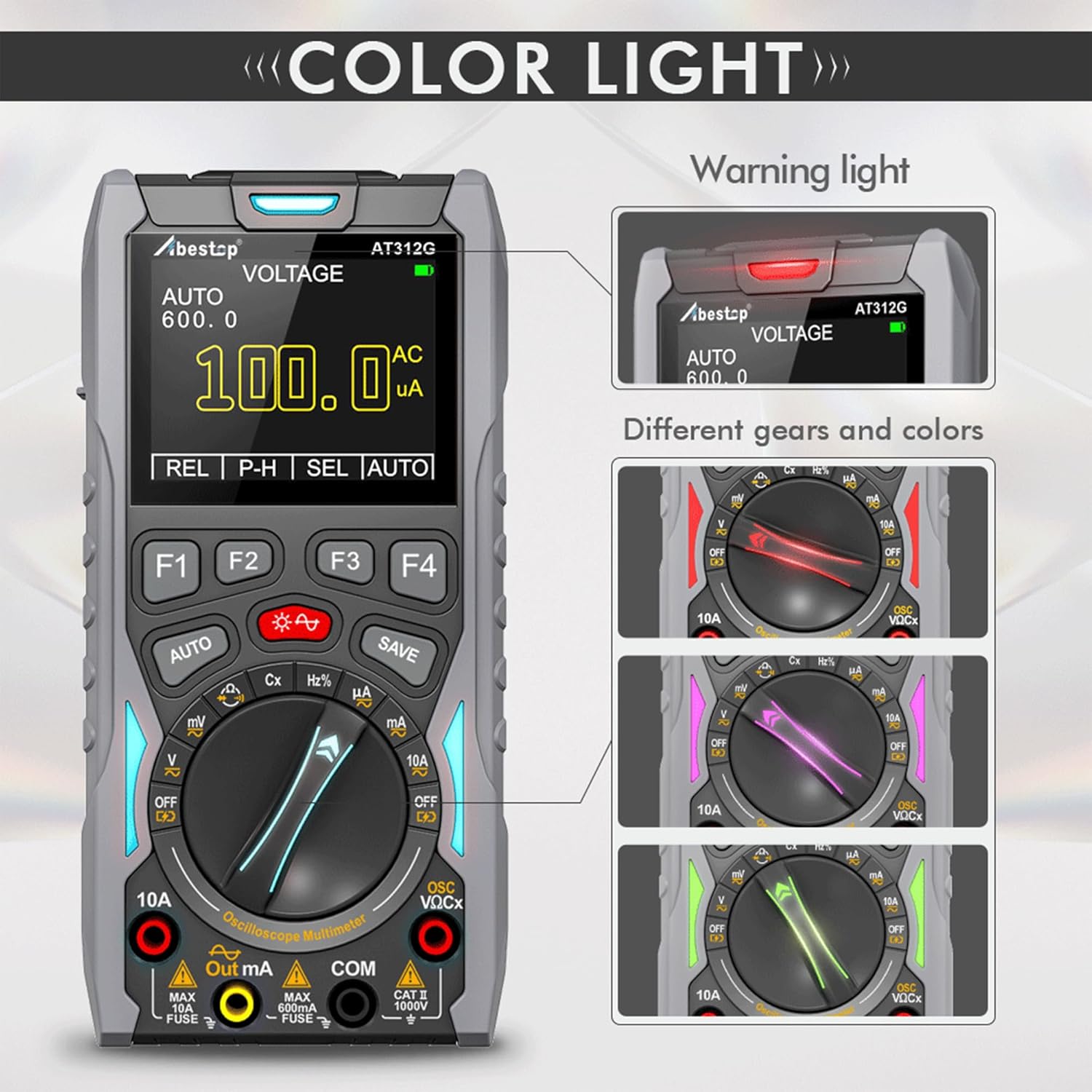
Figure 2.3: The device features color-coded warning lights that change based on the selected function, enhancing safety and usability.

Figure 2.4: Additional features include a soft rubber sheath for protection, an audible beep alarm, and an integrated kickstand for hands-free operation.
3. Настройка
3.1 Першапачатковая зарадка
Before first use, ensure the device is fully charged. Connect the provided USB cable to the charging interface on the device and to a suitable USB power adapter. The charging indicator light will show the charging status.
3.2 Падключэнне вымяральных правадоў
For most measurements, connect the red test lead to the VΩCX input and the black test lead to the COM input. For current measurements, refer to the specific instructions in the operating section.
4. Інструкцыя па эксплуатацыі
The Abestop AT312G offers three primary modes of operation: Multimeter, Oscilloscope, and Signal Generator.
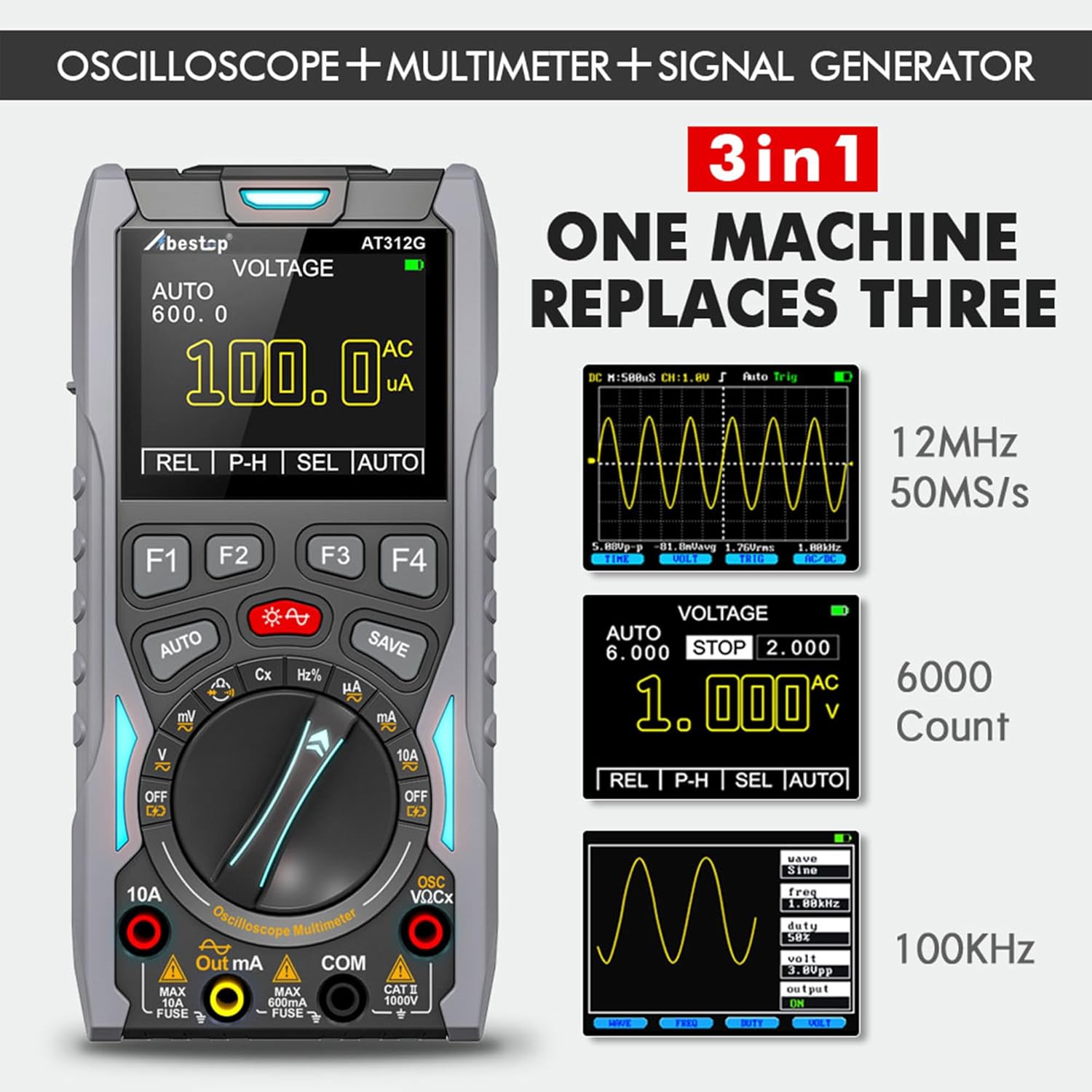
Figure 4.1: The 3-in-1 functionality of the Abestop AT312G, showing examples of oscilloscope waveforms, multimeter readings, and signal generator settings.
4.1 Рэжым мультыметра
To use the device as a multimeter, turn the functional range knob to the desired measurement function (e.g., V for Voltage, Ω for Resistance, A for Current, Cx for Capacitance, Hz for Frequency, Diode for Diode Test).
- тtage Measurement (DC/AC): Select 'V'. Use the F3 button (labeled 'SEL') to switch between DC and AC voltage measurement. The device will auto-range, or you can manually adjust the range using F4 ('RNG').
- Current Measurement (DC/AC): Select 'A'. For high currents (up to 10A), connect the red lead to the 10A input. For low currents (up to 600mA), connect the red lead to the Out mA input. Use F3 ('SEL') to switch between DC and AC current.
- Вымярэнне супраціву: Select 'Ω'.
- Вымярэнне ёмістасці: Select 'Cx'.
- Вымярэнне частоты: Select 'Hz'.
- Дыёдны тэст: Select 'Diode'.
- Тэст бесперапыннасці: Select 'Continuity' (often combined with resistance or diode function).
The 'AUTO' button can be pressed briefly to enable auto-ranging for most functions. The 'REL' (F1) button is for relative measurements, setting the current reading as a zero reference. The 'P-H' (F2) button activates peak hold mode, capturing maximum and minimum values.
4.2 Рэжым асцылографа
To enter oscilloscope mode, turn the functional range knob to 'OSC' or long-press the 'AUTO' button while in a multimeter voltagэлектронны рэжым.
- Дысплей формы хвалі: The screen will display the input waveform.
- Auto-Scaling: Briefly press the 'AUTO' button to automatically adjust the vertical scale and time base for optimal waveform display.
- Рэжымы запуску: The device supports automatic, conventional, and single-shot trigger modes for capturing stable waveforms.
- Waveform Hold: During measurement, you can hold the waveform on the screen.
4.3 Рэжым генератара сігналаў
The signal generator function allows you to output various waveforms for testing circuits.
- Актывацыя: First, turn the functional range knob to 'V' (Voltage measuring mode). Then, long-press the red brightness/signal generator button. The device will start outputting a default 1 kHz, 3.0V peak-to-peak, 50% duty cycle square wave.
- Тыпы формаў хвалі: Use the F-buttons to select between sine wave (100 Hz ~ 100 KHz), triangle wave (100 Hz ~ 50 KHz), and square wave (100 Hz ~ 20 KHz).
- Рэгуляванне параметраў: Use the F-buttons to adjust frequency, duty cycle, and voltage parameters of the output waveform.
- Кантроль выхаду: Briefly press the 'AUTO' button to toggle the signal generator output on or off.
- падключэнне: To measure the output, insert the pointy end of the red test lead into the 'Out mA' jack.
4.4 Захоўванне дадзеных
The Abestop AT312G can store measurement data and waveforms.

Figure 4.2: The device's data storage capability, showing multiple screens with saved measurement data and waveforms.
- Захаванне дадзеных: Press the 'SAVE' button to store the current measurement data or waveform. The device can store up to 100 sets of data and 10 waveforms.
- Вызваленне дадзеных: Refer to the on-screen menu options (accessed via F-buttons) to recall stored data or waveforms for review.
5. Тэхнічнае абслугоўванне
- Уборка: Для чысткі прылады выкарыстоўвайце мяккую сухую тканіну. Не выкарыстоўвайце абразіўныя ачышчальнікі або растваральнікі.
- захоўванне: Захоўвайце прыладу ў прахалодным, сухім месцы, удалечыні ад прамых сонечных прамянёў і экстрэмальных тэмператур.
- Сыход за батарэяй: To prolong battery life, avoid fully discharging the battery frequently. Charge the device regularly, even if not in use for extended periods. The internal rechargeable battery is replaceable.
- Замена засцерагальніка: The device uses fuses for protection. If current measurement functions fail, check and replace the fuses (750mA/250V and 10A/250V) as needed. Ensure the device is off and disconnected from all circuits before attempting fuse replacement.
6. Выпраўленне непаладак
- Прылада не ўключаецца: Пераканайцеся, што акумулятар зараджаны. Падключыце прыладу да зараднай прылады і паспрабуйце яшчэ раз.
- No Reading in Multimeter Mode: Check if the test leads are correctly connected to the appropriate input jacks and the functional range knob is set to the correct measurement. Verify the circuit under test is active.
- Unstable Oscilloscope Waveform: Ensure proper trigger settings. Use the 'AUTO' button for auto-scaling. Check probe connections.
- Signal Generator Not Outputting: Ensure the signal generator is activated (long-press red button) and the output is turned on (briefly press 'AUTO'). Verify the red lead is connected to the 'Out mA' jack.
- Няправільныя паказанні: Ensure proper calibration (if applicable, refer to manufacturer for service) and correct measurement technique. Check battery level.
7. Тэхнічныя характарыстыкі
| Асаблівасць | Спецыфікацыя |
|---|---|
| Нумар мадэлі | AT312G |
| Прапускная здольнасць асцылографа | 12 МГц |
| Колькасць мультыметраў | 6000 графаў |
| DC Voltagе далёкасць | 0 ~ 1000 В. |
| Пераменнага токуtagе далёкасць | 0 ~ 750 В. |
| Дыяпазон пастаяннага/пераменнага току | 0 ~ 10 А |
| Дыяпазон супраціву | 0 ~ 60 МОм |
| Дыяпазон ёмістасці | 10 нФ ~ 100 мФ |
| Дыяпазон частот | 1 ~ 20 МГц |
| Дыёдны тэст | Адкрыты контур выпtagе 2.8 В. |
| Тэст бесперапыннасці | Evaluation resistance 50 Ω |
| Спецыфікацыя засцерагальніка | 750 mA/250 V, 10 A/250 V |
| Выхад генератара сігналаў | Sine (100 Hz ~ 100 KHz), Triangle (100 Hz ~ 50 KHz), Square (100 Hz ~ 20 KHz) |
| Дысплей | 240x320 Color Screen |
| Крыніца харчавання | Працуе ад батарэі (1 літый-іённая, у камплекце) |
| Памеры прадукту (Д х Ш х У) | 14 х 20 х 6 см |
| Вага прадукту | 570 grams (approx. 0.6 lb for device only) |
| Працоўная тэмпература | Да 40 градусаў Цэльсія |
| мова | англійская |
| Краіна паходжання | Кітай |
8. Гарантыя і падтрымка
Warranty information for the Abestop AT312G is typically provided at the time of purchase or can be obtained directly from the manufacturer. Please retain your proof of purchase for warranty claims.
For technical support or service inquiries, please contact Abestop customer service through their official channels or the retailer from whom the product was purchased.