
1. Уводзіны
This manual provides comprehensive instructions for the installation, operation, and maintenance of your CORN 1300Mbps USB Wifi Adapter. This device offers high-speed dual-band wireless connectivity for your computer, supporting both 2.4GHz and 5.8GHz frequencies.

Image: The CORN 1300Mbps USB Wifi Adapter featuring its rotatable 5dBi antenna, capable of 90 and 360-degree adjustments for optimal signal reception.
2. Змесціва ўпакоўкі
Калі ласка, пераканайцеся, што ўсе пералічаныя ніжэй прадметы ўваходзяць у ваш пакет:
- USB WiFi-адаптар 1300 Мбіт/с
- One Detachable 5dBi Antenna
- Кіраўніцтва карыстальніка
- CD драйвер
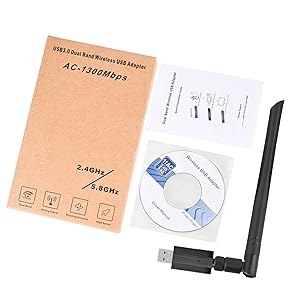
Image: Contents of the product package, showing the USB WiFi adapter, detachable antenna, user manual, and driver CD.
3. Асноўныя магчымасці
- Dual Band 802.11ac: Supports up to 1300Mbps Wi-Fi speeds (867Mbps on 5GHz and 400Mbps on 2.4GHz) for reduced latency during streaming and gaming.
- Detachable 5dBi Antenna with Beamforming+ Technology: High-gain, long-range antenna designed to improve connectivity even in areas with weak signals.
- Super Speed USB 3.0: Offers data transfer rates up to 5.8Gbps, which is 10 times faster than USB 2.0, ensuring maximum throughput and a stable internet connection. It is also backward compatible with USB 2.0 and 1.1 devices.
- Шырокая сумяшчальнасць: Compatible with Windows 11/10/8/8.1/7/Vista/XP/2000 and Mac OS 10.9-10.15. (Note: Not compatible with Mac OS 11.1 or newer versions, Linux, or TV operating systems).
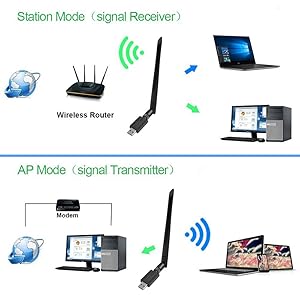
Image: Illustration of the 5dBi high gain antenna's enhanced signal penetration and coverage, demonstrating its ability to transmit through obstacles.

Image: Details on the secure technology, highlighting the 5dBi oxygen-free copper antenna for stable signal and WPS (Wi-Fi Protected Setup) for one-key encryption.

Image: A visual comparison demonstrating the superior speed of USB 3.0 (5120Mbps) compared to USB 2.0 (480Mbps).
4. Кіраўніцтва па наладцы
4.1 Устаноўка абсталявання
- Gently attach the 5dBi antenna to the USB Wifi Adapter by screwing it into the connector.
- Plug the USB Wifi Adapter into an available USB 3.0 port on your computer. For optimal performance, use a USB 3.0 port if available.

Image: The USB Wifi Adapter connected to a laptop, illustrating its compact design and antenna.
4.2 Ўстаноўка драйвера
The installation process varies depending on your operating system:
- Для Windows 11/10: No drivers are required. The adapter is plug-and-play. Your system should automatically detect and install the necessary drivers.
- For Windows 8/8.1/7/Vista/XP/2000 and Mac OS 10.9-10.15:
- Insert the provided CD Driver into your computer's CD-ROM drive.
- Выконвайце інструкцыі на экране, каб усталяваць драйверы.
- If your computer does not have a CD-ROM drive, please visit the CORN support website (if available) to download the latest drivers.
- Пасля ўсталёўкі перазагрузіце кампутар, калі будзе прапанавана.
5. Інструкцыя па эксплуатацыі
5.1 Падключэнне да сеткі Wi-Fi
- Once the adapter is installed and drivers are recognized, open your computer's network settings.
- Locate the list of available wireless networks.
- Select your desired Wi-Fi network (SSID) and click 'Connect'.
- Увядзіце ключ бяспекі сеткі (пароль), калі будзе прапанавана.
- The adapter will connect to the network, and you should have internet access.
5.2 Праца ў двух дыяпазонах
The adapter supports both 2.4GHz and 5.8GHz (often displayed as 5GHz) frequency bands. You can choose the band that best suits your needs:
- Дыяпазон 2.4 ГГц: Offers wider coverage and better penetration through walls, suitable for general browsing and devices further from the router.
- Дыяпазон 5.8 ГГц: Provides faster speeds and less interference, ideal for high-bandwidth activities like online gaming and HD video streaming, especially when closer to the router.
5.3 Operating Modes (Station Mode & AP Mode)
The adapter can function in two primary modes:
- Station Mode (Signal Receiver): The adapter acts as a client, connecting your computer to an existing wireless router to access the internet. This is the most common use case.
- AP Mode (Signal Transmitter): The adapter can create a Wi-Fi hotspot, allowing other devices to connect to your computer's internet connection. This requires specific software configuration on your computer.
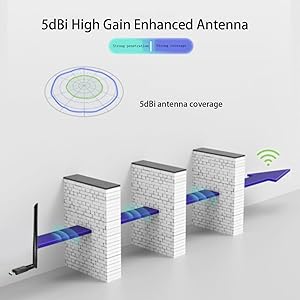
Image: A diagram illustrating the two operational modes: Station Mode, where the adapter receives Wi-Fi from a router, and AP Mode, where it transmits Wi-Fi from a modem-connected computer.
6. Тэхнічнае абслугоўванне
To ensure the longevity and optimal performance of your CORN USB Wifi Adapter, follow these maintenance guidelines:
- Трымайце адаптар чыстым і без пылу. Выкарыстоўвайце для чысткі мяккую сухую тканіну.
- Пазбягайце ўздзеяння на адаптар экстрэмальных тэмператур, вільготнасці або прамых сонечных прамянёў.
- Не кідайце адаптар і не падвяргайце яго ўдарам.
- Пераканайцеся, што антэна надзейна прымацаваная, але не перацягвайце яе.
- When not in use for extended periods, consider unplugging the adapter.
7. Выпраўленне непаладак
If you encounter issues with your CORN USB Wifi Adapter, please refer to the following common solutions:
- Няма падключэння да Wi-Fi:
- Пераканайцеся, што адаптар надзейна падключаны да порта USB.
- Verify that the drivers are correctly installed (refer to Section 4.2).
- Check if your computer's Wi-Fi is enabled.
- Перазагрузіце камп'ютар і бесправадны маршрутызатар.
- Павольная хуткасць Інтэрнэту:
- Ensure you are connected to the appropriate Wi-Fi band (5GHz for faster speeds, if available).
- Падыдзіце бліжэй да бесправаднога маршрутызатара, каб палепшыць узровень сігналу.
- Праверце наяўнасць перашкод ад іншых электронных прылад.
- Абнавіце прашыўку вашага маршрутызатара.
- Adapter Not Recognized / Driver Issues:
- Try plugging the adapter into a different USB port, preferably a USB 3.0 port.
- Reinstall the drivers from the provided CD or the manufacturer's webсайт.
- Ensure your operating system is supported (Mac OS 11.1+ and Linux are not supported).
- Check Device Manager (Windows) or System Information (Mac) to see if the adapter is listed without errors.
- Перарывістае злучэнне:
- Adjust the antenna's position for better signal reception.
- Пераканайцеся, што паміж адаптарам і маршрутызатарам няма фізічных перашкод.
- Check for conflicting network adapters or software.
8. Тэхнічныя характарыстыкі
| Нумар мадэлі | 5Bdi-1200Mbps USB wifi adapter |
| Абсталяванне інтэрфейсу | USB 3.0 |
| Хуткасць перадачы даных | 1300 мегабіт у секунду (Мбіт/с) |
| Пратакол перадачы дадзеных | IEEE 802.11ac |
| Дыяпазоны частот | 2.4 ГГц, 5.8 ГГц |
| Каэфіцыент узмацнення антэны | 5dBi |
| Сумяшчальныя прылады | Laptop, Desktop, PC |
| Падтрымліваюцца АС | Windows 11/10/8/8.1/7/Vista/XP/2000, Mac OS 10.9-10.15 |
| Памеры прадукту | 0.75 x 0.49 x 0.06 inches (Adapter body) |
| Вага прадмета | 2.4 унцыі |
| Колер | Чорны |
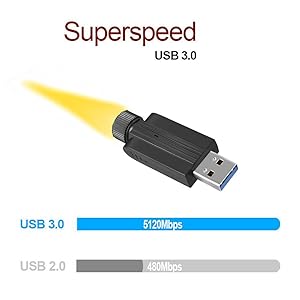
Image: Detailed dimensions of the USB Wifi Adapter, including the USB connector width, adapter body length, and total length with the antenna.
9. Інфармацыя аб гарантыі
Specific warranty details for this product may vary by region and retailer. Please refer to the warranty card included in your package or contact your point of purchase for detailed warranty terms and conditions.
10. Падтрымка кліентаў
For further assistance, technical support, or inquiries regarding your CORN 1300Mbps USB Wifi Adapter, please contact the retailer or manufacturer directly. Refer to the product packaging or the manufacturer's official webсайт для кантактнай інфармацыі.