
Праметэй UST-P1
Promethean UST-P1 DLP Projector User Manual
Model: UST-P1 | Brand: Promethean
1. Уводзіны
This manual provides essential information for the safe and efficient operation of your Promethean UST-P1 DLP Projector. The Promethean UST-P1 is a WXGA Ultra Short Throw (UST) Projector designed for various applications, capable of displaying 3,300 Lumens at its brightest setting with a native resolution of 1280x800. It features DLP technology for higher contrast and reduced pixel visibility, and is 3D capable.
Што ў скрынцы
Пасля распакавання пераканайцеся, што ўсе пералічаныя ніжэй прадметы наяўныя і знаходзяцца ў добрым стане:
- Promethean UST-P1 DLP Projector
- Кабель HDMI
- Пульт дыстанцыйнага кіравання
- Шнур харчавання
- Кіраўніцтва карыстальніка (гэты дакумент)

Figure 1.1: Promethean UST-P1 Projector with its bundled accessories, including the projector unit, HDMI cable, remote control, and power cord.

Малюнак 1.2: Верх view of the Promethean UST-P1 Projector, showing the lens assembly and control panel area.
2. Настройка
2.1 Размяшчэнне праектара
The Promethean UST-P1 is an Ultra Short Throw (UST) projector, designed to project a large image from a very short distance. Place the projector on a stable, flat surface directly in front of the projection screen or wall. Ensure there are no obstructions between the projector lens and the projection surface.
2.2 Падключэнне да сілкавання
- Падключыце шнур сілкавання з камплекта да порта AC IN на задняй панэлі праектара.
- Падключыце другі канец шнура сілкавання да заземленай электрычнай разеткі.
2.3 Падключэнне відэакрыніц
The projector offers multiple connectivity options. Refer to the rear panel diagram for port locations.
- HDMI: Connect an HDMI cable from your video source (e.g., laptop, Blu-ray player) to the HDMI port on the projector. The projector supports HDMI 1.4a.
- VGA: Connect a VGA cable from your computer to one of the VGA In ports (VGA In 1 or VGA In 2).
- Кампазітнае відэа: Use an RCA cable to connect to the Composite Video port for standard definition video sources.
- Сетка (RJ-45): For network control and monitoring, connect an Ethernet cable to the RJ-45 port.
- RS232 (DB-9pin): For serial control, connect a DB-9pin cable to the RS232 port.
- USB B: For service or specific control functions.
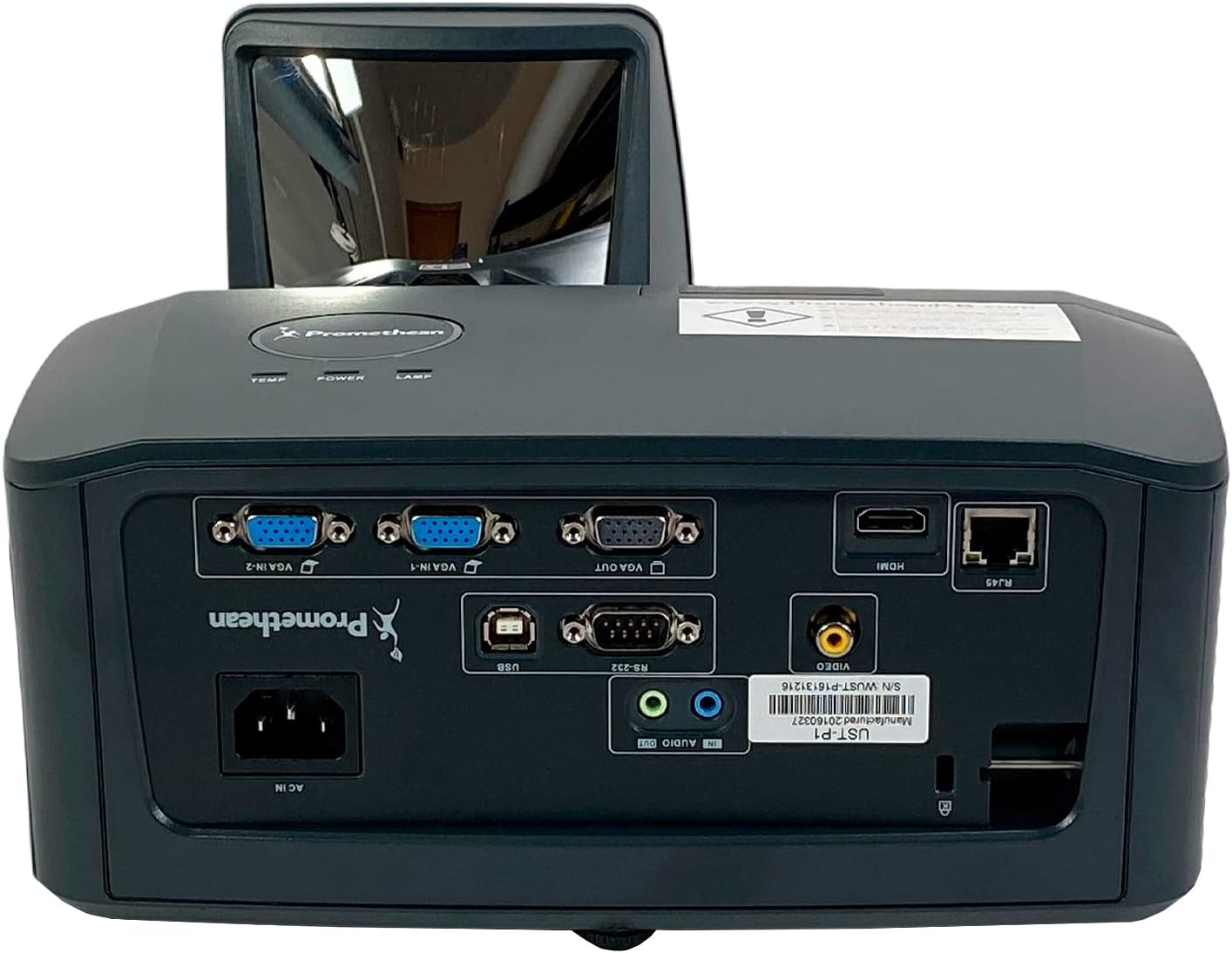
Малюнак 2.1: падрабязна view of the Promethean UST-P1 projector's rear panel, highlighting the HDMI, VGA, Composite, Network (RJ-45), RS232, and USB B connectivity options.
3. Інструкцыя па эксплуатацыі
3.1 Уключэнне/выключэнне
- Уключэнне: Press the Power button on the projector's control panel or the remote control. The power indicator light will illuminate.
- Выключэнне: Press the Power button again. A confirmation message may appear; press Power again to confirm shutdown. Allow the projector to cool down completely before unplugging it.
3.2 Выбар крыніцы ўваходнага сігналу
To switch between connected video sources, use the "Source" or "Input" button on the remote control or the projector's control panel. Cycle through the available inputs (HDMI, VGA1, VGA2, Video) until your desired source is displayed.
3.3 Налада відарыса
- Фокус: Adjust the focus ring on the projector lens until the image is sharp and clear.
- Карэкцыя трапецеідальных скажэнняў: If the image appears trapezoidal, use the keystone correction function (usually found in the projector's OSD menu or via dedicated buttons on the remote) to square the image.
- Суадносіны бакоў: The projector has a native aspect ratio of 16:10 (WXGA). You can adjust the aspect ratio settings in the menu to match your content (e.g., 4:3, 16:9) if necessary.
3.4 Supported Video Modes
The Promethean UST-P1 supports various video modes, including 720p, 1080i, 1035i, 575i, 576i, 480p, and 480i.
4. Тэхнічнае абслугоўванне
Рэгулярнае тэхнічнае абслугоўванне забяспечвае аптымальную прадукцыйнасць і падаўжае тэрмін службы вашага праектара.
4.1 Чыстка праектара
- Знешні выгляд: Выкарыстоўвайце мяккую безворсовую тканіну, злёгку dampened with water to clean the projector's casinг. Пазбягайце абразіўных ачышчальнікаў або растваральнікаў.
- Аб'ектыў: Gently wipe the projector lens with a lens cleaning cloth or lens paper. Do not use abrasive materials or excessive force, as this can scratch the lens.
- Вентыляцыйныя адтуліны: Periodically check and clean the air vents to prevent dust buildup, which can impede airflow and cause overheating. Use a soft brush or compressed air to remove dust.
4.2 лamp Замена
The Promethean UST-P1 is a lamp-based projector. The lamp has a finite lifespan and will eventually need replacement. The projector will typically display a warning message when the lamp is nearing the end of its life. Refer to the projector's on-screen display (OSD) menu for lamp hour information.
Увага: Lamp replacement should only be performed when the projector is completely cool and unplugged from the power source. Consult a qualified technician if you are unsure about the replacement procedure.
5. Выпраўленне непаладак
This section addresses common issues you might encounter with your projector. If the problem persists after trying these solutions, please contact customer support.
| праблема | Магчымая прычына | Рашэнне |
|---|---|---|
| Няма выявы на экране |
|
|
| Выява размытая або не ў фокусе |
|
|
| Image is trapezoidal (not square) |
|
|
| Пульт дыстанцыйнага кіравання не працуе |
|
|
6. Тэхнічныя характарыстыкі
| Асаблівасць | Дэталь |
|---|---|
| мадэль | УСТ-П1 |
| Тэхналогія адлюстравання | DLP |
| Яркасць | 3,300 прасветаў ANSI |
| Роднае дазвол | 1280x800 (WXGA) |
| Суадносіны бакоў | 16:10 (родны) |
| Каэфіцыент кантраснасці | 10,000:1 |
| Магчымасць 3D | так |
| Connectivity Inputs | HDMI 1.4a, Composite (RCA), Network (RJ-45), RS232 (DB-9pin), VGA In (Dsub-15pin x 2), USB B |
| Падтрымліваюцца відэарэжымы | 720p, 1080i, 1035i, 575i, 576i, 480p, 480i |
| Асаблівасці | Нумар CrestronView™ |
| Памеры прадукту | 14.5 х 11.4 х 6.3 цалі |
| Вага прадмета | 10.6 фунта |
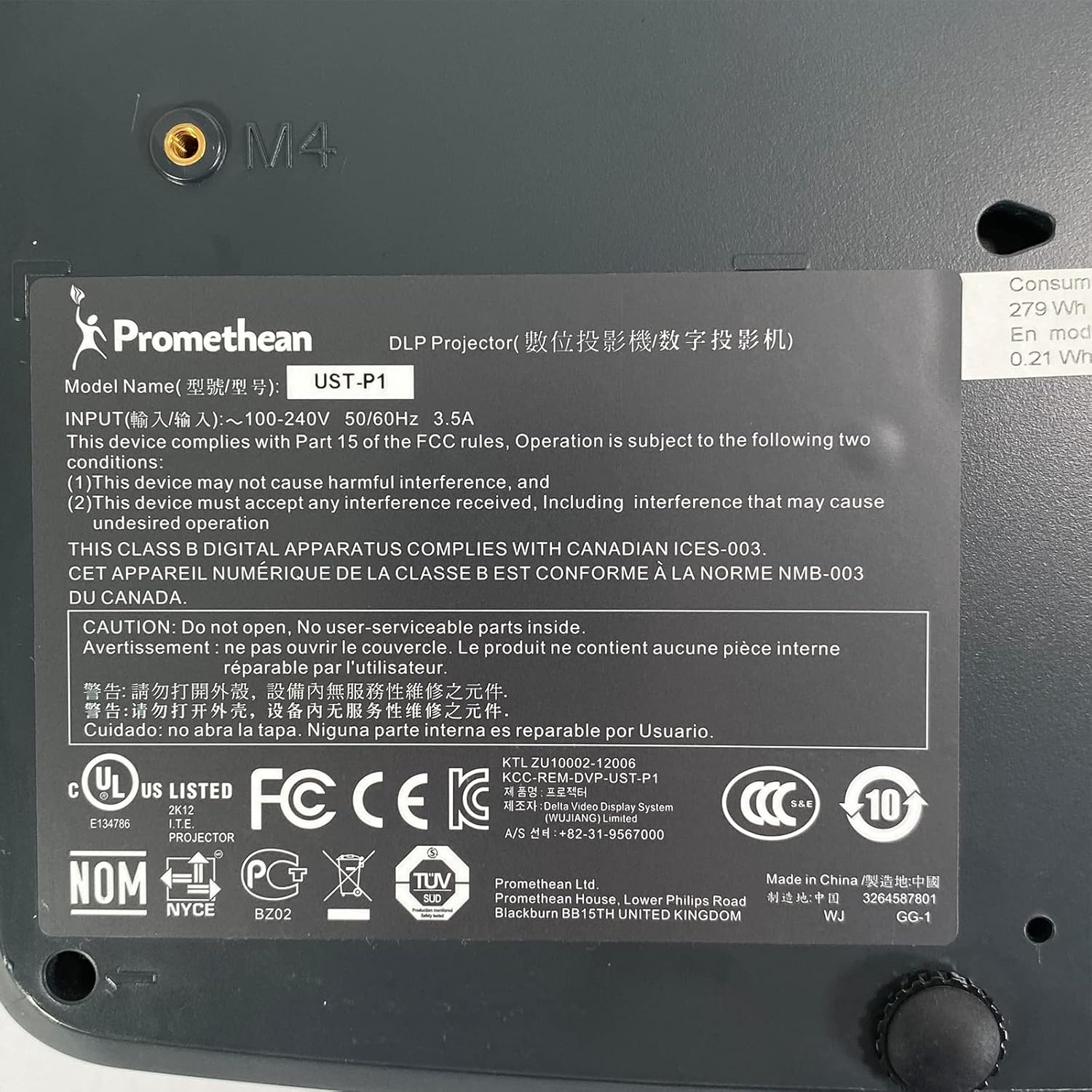
Figure 6.1: The bottom label of the Promethean UST-P1 projector, displaying the model number, input power requirements, and various regulatory compliance marks.
7. Гарантыя і падтрымка
For specific warranty information regarding your Promethean UST-P1 DLP Projector, please refer to the documentation provided at the time of purchase or contact the seller directly. Warranty terms and conditions may vary.
For technical support, troubleshooting assistance beyond this manual, or inquiries about replacement parts (such as lamps), please contact the seller, Tekswamp, or the official Promethean support channels.
Вы можаце наведаць Тэксвamp Крама на Amazon for more information or to contact their support.