
Baseus P80015804213-00
Baseus Smooth Writing Series 2 Dual Charging Pencil for iPad User Manual
Model: P80015804213-00 | Brand: Baseus
1. Уводзіны
This manual provides detailed instructions for the proper use and maintenance of your Baseus Smooth Writing Series 2 Dual Charging Pencil for iPad. Please read this manual thoroughly before using the product to ensure optimal performance and longevity.
The Baseus Smooth Writing Series 2 Pencil is designed to enhance your iPad experience with features like palm rejection, high precision, and versatile dual charging capabilities (both wired and wireless).

Image: The Baseus Smooth Writing Series 2 Pencil, showcasinг яго мінімалістычны белы дызайн.
2. Змесціва ўпакоўкі
Калі ласка, пераканайцеся, што ўсе пералічаныя ніжэй прадметы прысутнічаюць у камплекце з вашым прадуктам:
- Baseus Smooth Writing Series 2 Dual Charging Pencil
- Replacement Pen Tip(s) (quantity may vary)
- Зарадны кабель USB-C
- Кіраўніцтва карыстальніка (гэты дакумент)

Image: The Baseus Pencil, its USB-C charging cable, and the product packaging, illustrating the typical contents.
3. Настройка
3.1 Першапачатковая зарадка
Before first use, it is recommended to fully charge the pencil. The Baseus Smooth Writing Series 2 supports two charging methods:
- Правадная зарадка: Connect the provided USB-C cable to the pencil's charging port and to a USB power adapter (not included).
- Бесправадная зарадка: Attach the pencil magnetically to the side of a compatible iPad model. The pencil will begin charging automatically.

Image: The Baseus Pencil attached to the side of an iPad, demonstrating its wireless charging capability.
3.2 Pairing with iPad
The Baseus Smooth Writing Series 2 Pencil typically connects automatically to compatible iPad models when powered on and placed near the device. No manual Bluetooth pairing is usually required for basic functionality.
- Ensure your iPad's Bluetooth is enabled.
- Turn on the pencil by pressing the power button (if applicable, refer to Operating section).
- The pencil should connect automatically. If not, try restarting both the pencil and your iPad.
4. Інструкцыя па эксплуатацыі
4.1 Уключэнне/выключэнне сілкавання
Locate the power button on the pencil (refer to image below). Press and hold the button for a few seconds to turn the pencil on or off. An indicator light will typically show the power status.
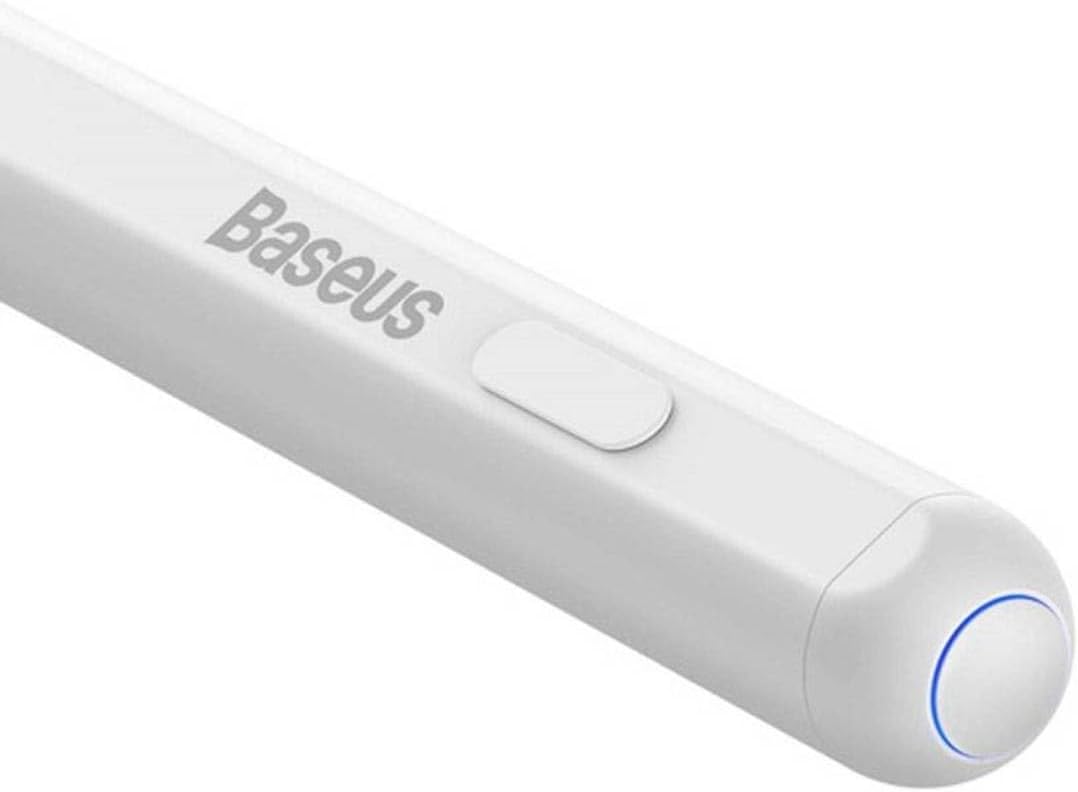
Выява: Падрабязны view of the Baseus Pencil's power button and the blue indicator light, which signals operational status.
4.2 Пісьмо і маляванне
The pencil is designed for smooth and precise input on your iPad screen. Its high-precision tip allows for detailed work, while palm rejection ensures that only the pencil's input is registered, even if your hand rests on the screen.

Image: A close-up of the Baseus Pencil's fine tip, highlighting its design for precise writing and drawing.
Simply touch the tip to the iPad screen to begin writing, drawing, or navigating. Pressure sensitivity and tilt support may vary depending on the iPad model and the application used.
4.3 Charging the Pencil
Monitor the pencil's battery level through your iPad's battery widget or the pencil's indicator light. Recharge the pencil using either the wired USB-C connection or by attaching it magnetically to a compatible iPad for wireless charging.
5. Тэхнічнае абслугоўванне
5.1 Ачыстка
To clean the pencil, gently wipe its surface with a soft, dry, lint-free cloth. Do not use abrasive cleaners, alcohol, or solvents, as these can damage the finish.
5.2 Replacing the Tip
Over time, the pencil tip may wear down. To replace it:
- Gently twist the old tip counter-clockwise to remove it.
- Align the new tip with the pencil's thread and twist clockwise until it is securely fastened. Do not overtighten.

Image: An illustration demonstrating the process of twisting off the old tip and screwing on a new replacement tip for the Baseus Pencil.
5.3 Сыход за акумулятарам
To prolong battery life, avoid fully discharging the pencil frequently. Store the pencil in a cool, dry place when not in use for extended periods.
6. Выпраўленне непаладак
| праблема | Магчымая прычына | Рашэнне |
|---|---|---|
| Pencil not connecting to iPad. | Pencil is off, low battery, Bluetooth off on iPad, or compatibility issue. | Ensure pencil is charged and powered on. Check iPad's Bluetooth settings. Restart both devices. Verify iPad model compatibility. |
| Pencil not charging. | Cable issue, power source issue, incorrect wireless charging position, or iPad model incompatibility for wireless charging. | Try a different USB-C cable or power adapter. Ensure the pencil is correctly aligned for wireless charging. Note that wireless charging may not be compatible with all iPad models (e.g., iPad 10th Gen). |
| Tip not responding or inaccurate. | Worn tip, loose tip, or software glitch. | Replace the tip if worn. Ensure the tip is securely tightened. Restart the iPad and the pencil. |
| Адхіленне далоні не працуе. | Application specific issue or iPad settings. | Ensure the application supports palm rejection. Check iPad settings for stylus input. |
7. Тэхнічныя характарыстыкі
| Асаблівасць | Дэталь |
|---|---|
| Марка | Басейс |
| Нумар мадэлі | П80015804213-00 |
| Колер | Белы |
| Матэрыял | Copper (as per product specifications, likely internal components) |
| Вага прадукту | 60 г |
| Памеры ўпакоўкі | 21 х 6.8 х 2.9 см |
| Зарадка | Wired (USB-C) & Wireless (Magnetic) |
| Асаблівасці | Palm Rejection, High Precision Tip |
8. Гарантыя і падтрымка
Baseus products are manufactured to high quality standards. For information regarding warranty coverage, please refer to the warranty card included with your product or visit the official Baseus webсайт.
For technical support, troubleshooting assistance, or inquiries about replacement parts, please contact the seller or the official Baseus customer service. Contact details can typically be found on the product packaging or the brand's official webсайт.
Больш падрабязную інфармацыю можна знайсці ў афіцыйнай краме Baseus на Amazon: Афіцыйная крама Baseus
Звязаныя дакументы - П80015804213-00
 |
Кіраўніцтва карыстальніка для стылуса Baseus Smooth Writing 2 Series Stylus iP Active Version Інструкцыя карыстальніка для стылуса Baseus Smooth Writing 2 Series Plug-Type (версія iP Active) з падрабязным апісаннем функцый, працы, зарадкі, спецыфікацый і сумяшчальных мадэляў iPad. |
 |
Кіраўніцтва карыстальніка для актыўнага стылуса Baseus Smooth Writing (бесправадная версія) BS-PS001 Інструкцыя па выкарыстанні стылуса Baseus Smooth Writing Active Stylus (бесправадная версія) BS-PS001 з падрабязным апісаннем падключэння Bluetooth, інтэграцыі праграм, выкарыстання без Bluetooth, зарадкі акумулятара і характарыстык прадукту. Уключае інфармацыю аб сумяшчальнасці з рознымі мадэлямі iPad. |
 |
Baseus Smooth Writing 2 Series Stylus Lite User Manual User manual for the Baseus Smooth Writing 2 Series Stylus Lite (BS-PS025), featuring usage instructions, charging guidelines, and compatibility information for various iPad models. |
 |
Інструкцыя па выкарыстанні стылуса Baseus Smooth Writing 3 User manual for the Baseus Smooth Writing 3 Wired Charging Stylus Active Bluetooth Version (Model BS-PS052), detailing product features, usage guide, Bluetooth and app connection, battery maintenance, and specifications. |
 |
Кіраўніцтва карыстальніка для стылуса Baseus Smooth Writing 2 Series з падвойнай зарадкай (актыўная версія, бесправадная) Інструкцыя карыстальніка для стылуса Baseus Smooth Writing 2 Series з падвойнай зарадкай (актыўная версія, бесправадная), у якой падрабязна апісаны яго функцыі, характарыстыкі і спосабы выкарыстання. |
 |
Кіраўніцтва карыстальніка стылуса Baseus Smooth Writing серыі 2 Афіцыйнае кіраўніцтва карыстальніка для стылуса Baseus Smooth Writing 2 Series Plug-Type. Даведайцеся пра яго актыўныя бесправадныя функцыі USB-C і спосабы выкарыстання. |
Ask a question about this manual
Ask about setup, troubleshooting, compatibility, parts, safety, or missing instructions. Manuals+ will review the question and use this page’s manual context to help answer it.