
1. Прадукт скончыўсяview
The Pulido Fingerprint Door Knob offers a modern and secure keyless entry solution for your home or office. This smart door knob provides two primary methods of unlocking: fingerprint recognition and mobile application control. It is designed for ease of use and enhanced security, storing all user data locally on the device.

Image: The Pulido Fingerprint Door Knob highlighting its fingerprint sensor, app management capability, and power interface.
2. Змесціва ўпакоўкі
Перад пачаткам усталёўкі пераканайцеся, што ўсе кампаненты наяўныя:
- Fingerprint Door Knob (Interior and Exterior Handles)
- Механізм зашчапкі
- Страйк пліты
- Крапежныя шрубы
- Шаблон ўстаноўкі
- Кіраўніцтва карыстальніка
3. Ідэнтыфікацыя кампанентаў
Familiarize yourself with the different parts of your Pulido Fingerprint Door Knob:
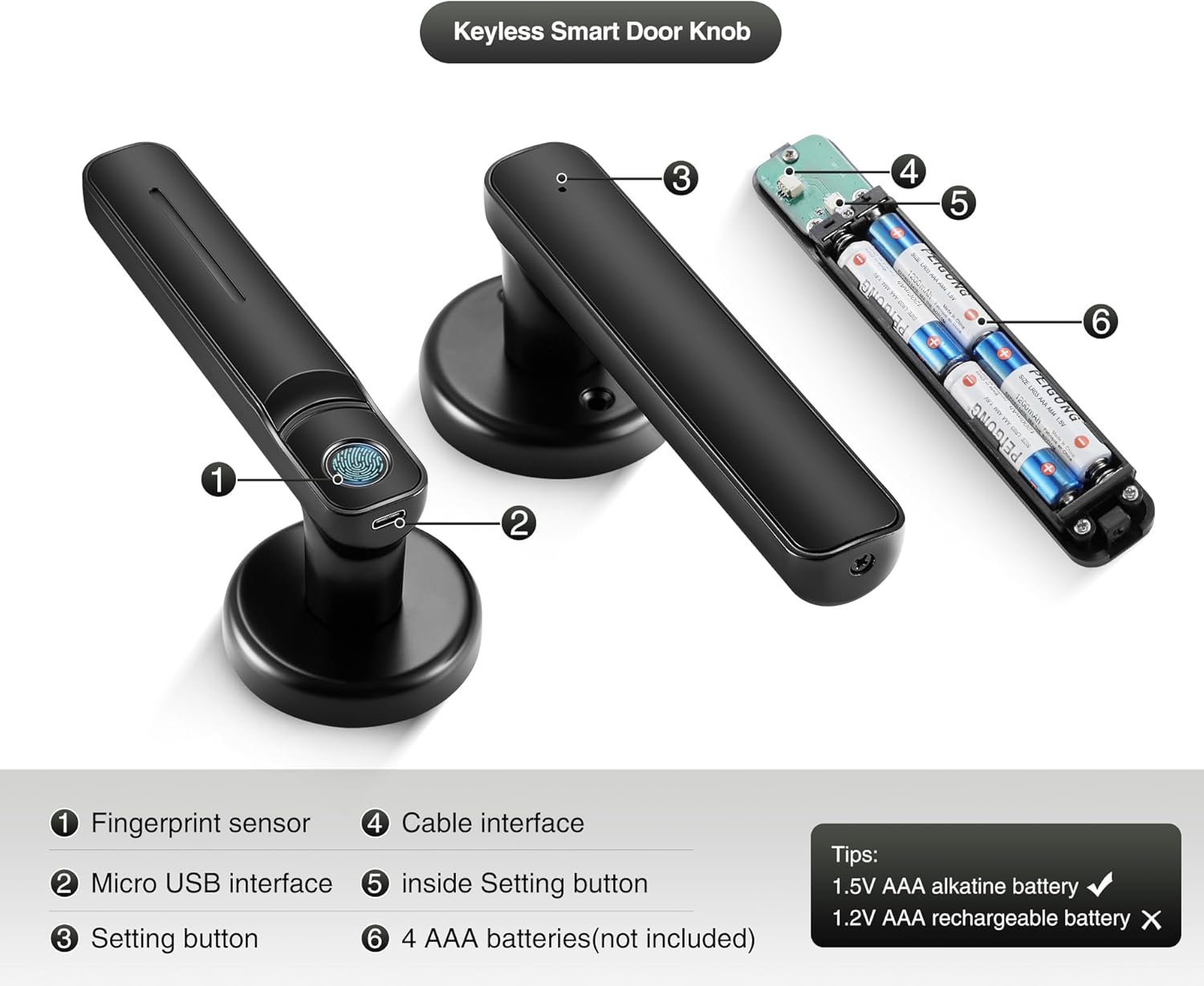
Выява: Падрабязная view of the door knob's internal and external components.
- Датчык адбіткаў пальцаў: Used for biometric unlocking.
- Інтэрфейс Micro USB: For emergency power supply.
- Setting Button (Exterior): Used for initial setup and pairing.
- Кабельны інтэрфейс: Connects the exterior and interior components.
- Inside Setting Button: Used for internal settings and resets.
- AAA Batteries Compartment: Holds 4 AAA batteries (not included).
4. Кіраўніцтва па ўстаноўцы
This section provides instructions for installing your new Pulido Fingerprint Door Knob. It is designed to replace standard mechanical door knobs.

Image: Visual representation of replacing a mechanical lock with the smart door knob.
4.1 Падрыхтоўка
- Ensure your door thickness is compatible with the lock.
- Remove any existing door hardware.
- Verify the door bore hole and backset dimensions match the installation template.
4.2 Этапы ўстаноўкі
- Усталюйце зашчапку: Insert the latch into the door edge and secure it with screws. Ensure the latch bolt faces the correct direction for your door swing.
- Усталюйце запорную пласціну: Усталюйце запорную пласціну на дзвярную раму, сумясціўшы яе з рыгелем зашчапкі.
- Усталюйце знешнюю ручку: Feed the cable and spindle through the door bore hole from the exterior side.
- Усталюйце ўнутраную ручку: Connect the cable from the exterior handle to the interior handle. Align the interior handle with the spindle and mounting posts.
- Secure the Handles: Use the provided screws to firmly attach the interior handle to the exterior handle, ensuring the lock is flush with the door surface.
- Устаўце батарэі: Open the battery compartment on the interior handle and insert 4 new AAA alkaline batteries.
- Тэставая аперацыя: After installation, test the mechanical function of the knob to ensure smooth rotation and latch engagement.
5. Initial Setup & App Configuration
To fully utilize your smart door knob, you will need to set it up with the mobile application and register fingerprints.
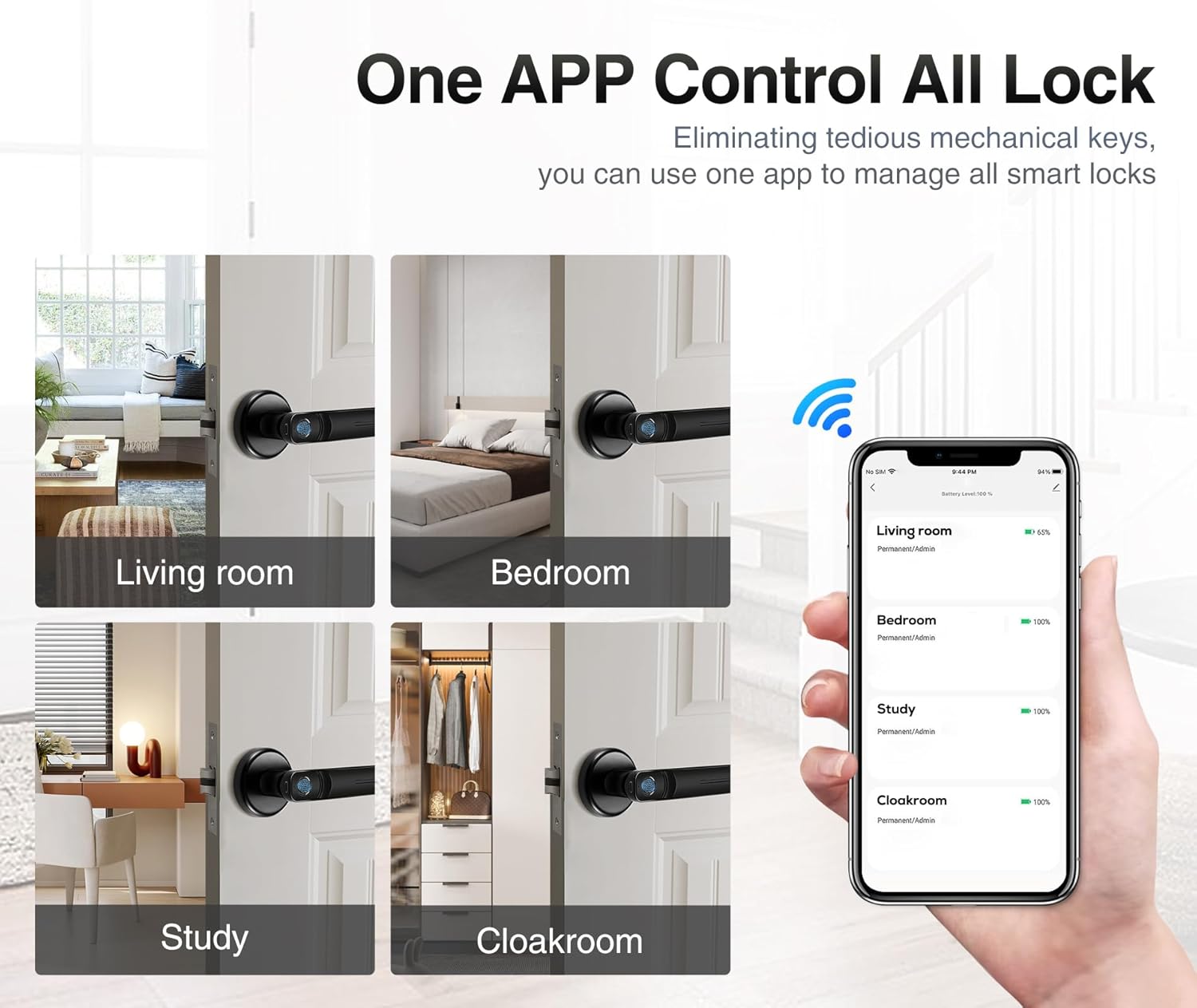
Image: The mobile application interface demonstrating control over multiple locks.
5.1 Загрузка праграмы і спалучэнне
- Спампаваць прыкладанне: Пошук the 'Tuya Smart' or 'Smart Life' app in your smartphone's app store (iOS or Android) and install it.
- Стварыць уліковы запіс: Адкрыйце праграму і зарэгіструйце новы ўліковы запіс або ўвайдзіце ў сістэму, калі ён у вас ужо ёсць.
- Дадаць прыладу: In the app, tap '+' to add a new device. Select 'Door Lock' or 'Smart Lock' from the device categories.
- Падключыце замок: Follow the in-app instructions to put the door knob into pairing mode (usually by pressing and holding the setting button on the exterior handle until an indicator light flashes). The app will detect and connect to the lock via Bluetooth.
5.2 Fingerprint Registration
The lock supports up to 100 user fingerprints. Fingerprint information is stored locally on the lock for security.
- Access Fingerprint Management: In the app, navigate to the settings for your connected door lock and find the 'Fingerprint Management' section.
- Дадаць адбітак пальца: Select 'Add Fingerprint' and follow the on-screen prompts.
- Scan Fingerprint: Place your finger on the fingerprint sensor multiple times, adjusting the position slightly with each scan, until the app confirms successful registration.
- Repeat for Additional Users: Repeat the process for any other users who require fingerprint access.
6. Аперацыя
Your Pulido Fingerprint Door Knob offers convenient and secure unlocking methods.
6.1 Разблакіроўка адбіткам пальца

Image: Demonstrating the quick fingerprint unlock feature.
- Моцна прыкладзеце зарэгістраваны палец да сканера адбіткаў пальцаў.
- The lock will unlock within 0.5 seconds if the fingerprint is recognized.
- Rotate the door knob to open the door.
6.2 Unlocking with the App
- Open the 'Tuya Smart' or 'Smart Life' app on your smartphone.
- Select the desired door lock from your device list.
- Tap the 'Unlock' button within the app interface.
- The app also allows you to view unlocking records and manage user access.
6.3 Рэжым праходжання

Image: The door knob in a hallway, illustrating the Passage Mode feature.
- Passage Mode allows the door to remain unlocked for continuous access without requiring fingerprint or app authentication.
- To activate Passage Mode, open the app, select your door lock, and find the 'Passage Mode' setting.
- Enable Passage Mode as needed. Remember to disable it when you require the door to be locked.
7. Кіраванне батарэяй
The Pulido Fingerprint Door Knob is powered by 4 AAA batteries.
7.1 Устаноўка/замена батарэі
- Locate the battery compartment on the interior handle (refer to Section 3, Component 6).
- Адкрыйце крышку адсека.
- Insert 4 new 1.5V AAA alkaline batteries, ensuring correct polarity. Do not use 1.2V rechargeable batteries.
- Надзейна зачыніце крышку батарэйнага адсека.
7.2 Папярэджанне пра нізкі зарад батарэі
- The lock will provide an audible or visual indicator when battery power is low.
- Replace batteries promptly to ensure continuous operation.
7.3 Аварыйнае электразабеспячэнне
- In case of complete battery depletion, the lock can be temporarily powered via the Micro USB interface (refer to Section 3, Component 2) using a standard power bank or USB charger.
- This allows you to unlock the door and replace the batteries.
8. Выпраўленне непаладак
This section addresses common issues you might encounter with your Pulido Fingerprint Door Knob.
8.1 Адбітак пальца не распазнаны
- Чысты датчык: Пераканайцеся, што датчык адбіткаў пальцаў чысты і не мае бруду або вільгаці.
- Правільнае размяшчэнне: Place your finger firmly and completely on the sensor. Try different angles if necessary.
- Паўторна зарэгістраваць адбітак пальца: If issues persist, delete the existing fingerprint in the app and re-register it, ensuring a thorough scanning process.
- Multiple Attempts: The lock allows multiple attempts. If still unsuccessful, use the app to unlock.
8.2 Праблемы з падключэннем да праграм
- Bluetooth уключаны: Пераканайцеся, што Bluetooth уключаны на вашым смартфоне.
- Блізкасць: Be within Bluetooth range of the door knob.
- Перазапуск праграмы: Зачыніце і зноў адкрыйце праграму.
- Рамонт прылады: If the app consistently fails to connect, try removing the device from the app and re-pairing it.
- Праверце батарэі: Low batteries can affect Bluetooth connectivity.
8.3 Lock Does Not Engage/Disengage
- Праверце батарэі: Пераканайцеся, што батарэйкі не разраджаныя. Пры неабходнасці заменіце.
- Праверка ўстаноўкі: Verify that the lock was installed correctly and that the spindle and latch mechanism are properly aligned.
- Перашкоды: Check for any physical obstructions preventing the latch from extending or retracting fully.
9. Тэхнічныя характарыстыкі
| Асаблівасць | Спецыфікацыя |
|---|---|
| Нумар мадэлі | door konb 140 |
| Матэрыял | Алюміній, нержавеючая сталь |
| Памеры прадукту | 5.7"Д х 2.5"Ш |
| Вага прадмета | 1.61 фунта |
| Метады разблакоўкі | Fingerprint, Mobile App |
| Хуткасць распазнавання адбіткаў пальцаў | да 99% |
| Разблакіраваць хуткасць | На працягу 0.5 секунд |
| Ёмістасць карыстальніка | Да 100 адбіткаў пальцаў |
| Электразабеспячэнне | 4 шчолачныя батарэйкі тыпу AAA 1.5 В (не ўключаны) |
| Аварыйнае харчаванне | Micro USB |
10. Гарантыя і падтрымка
Pulido is committed to providing reliable products and customer satisfaction.
10.1 Інфармацыя аб гарантыі
This product includes a free replacement service for 12 месяцаў from the date of purchase for non-human caused damage. Please retain your proof of purchase for warranty claims.
10.2 Тэхнічная падтрымка
Lifelong technical support is provided for the Pulido Fingerprint Door Knob. If you have any questions, require assistance with installation, setup, or troubleshooting, please contact our customer service team.
For support, please refer to the contact information provided on the product packaging or our official webсайт.