
1. Уводзіны
Thank you for choosing the techno line WT2600 Digital Calendar. This device provides accurate time, date, indoor temperature, and humidity readings, along with alarm functions. This manual will guide you through the setup, operation, and maintenance of your new digital calendar.
2. Інфармацыя па бяспецы
- Не падвяргайце прыладу ўздзеянню экстрэмальных тэмператур, прамых сонечных прамянёў або высокай вільготнасці.
- Не кідайце прыладу і не падвяргайце яе моцным ударам.
- Не спрабуйце разбіраць або рамантаваць прыладу самастойна. Звярніцеся да кваліфікаванага абслугоўваючага персаналу.
- Утылізуйце выкарыстаныя батарэі адказна ў адпаведнасці з мясцовымі правіламі.
- Захоўвайце прыладу ў месцах, недаступных дзецям.
3. Змесціва ўпакоўкі
Калі ласка, праверце наяўнасць усіх прадметаў у вашай упакоўцы:
- techno line WT2600 Digital Calendar Unit
- Кіраўніцтва карыстальніка (гэты дакумент)
- Batteries (may be included depending on region)
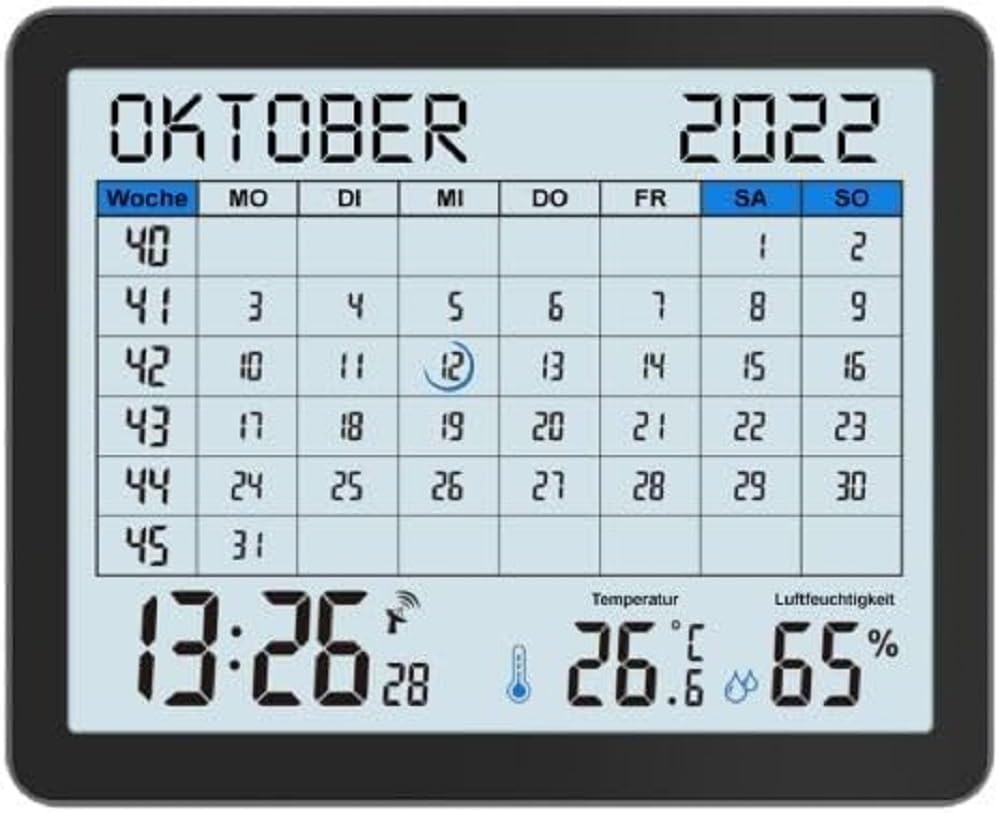
Image of the techno line WT2600 Digital Calendar packaging, showing the device and its key features.
4. Асаблівасці прадукту
The techno line WT2600 Digital Calendar offers the following key features:
- DCF-77 Radio-Controlled Clock: Automatic time synchronization for precise timekeeping, with an option for manual setting.
- 12/24 Hour Time Display: Select your preferred time format.
- Дысплей календара: Паказвае бягучую дату, дзень тыдня і месяц.
- 7-Language Month Display: Choose from seven languages for the month display.
- Дысплей тэмпературы ў памяшканні: Shows indoor temperature in Celsius (°C) or Fahrenheit (°F).
- Indoor Humidity Display: Displays the current indoor humidity level.
- MIN/MAX Display: Records and displays the minimum and maximum temperature and humidity values.
- Двайны будзільнік з функцыяй паўтору: Усталюйце два незалежныя будзільнікі з зручнай функцыяй паўтору.
- Індыкатар разраду батарэі: Папярэджвае вас, калі батарэйкі патрабуюць замены.
- Універсальнае размяшчэнне: Designed for both wall mounting and table standing.

Фронт view of the techno line WT2600 Digital Calendar display, showing the calendar grid, current time, temperature, and humidity.
5. Настройка
5.1 Устаноўка батарэі
- Знайдзіце батарэйны адсек на задняй частцы прылады.
- Адкрыйце крышку батарэйнага адсека.
- Insert the required batteries (e.g., 2 x AAA, not specified in data, common for such devices) according to the polarity markings (+ and -).
- Надзейна зачыніце крышку батарэйнага адсека.
5.2 Initial Power On and DCF-77 Signal Reception
Upon battery insertion, the device will power on and automatically begin searching for the DCF-77 radio signal. This process may take several minutes. For optimal reception, place the unit near a window and away from electronic interference.
- A signal icon (e.g., an antenna symbol) will flash during signal search.
- Once the signal is received, the time and date will be set automatically, and the signal icon will become solid.
- If no signal is received after 10-15 minutes, try repositioning the unit.
5.3 Ручная ўстаноўка часу і даты
If automatic synchronization is not desired or unsuccessful, you can set the time and date manually.
- Press and hold the 'SET' button (or similar, refer to device buttons) for a few seconds to enter manual setting mode.
- Выкарыстоўвайце кнопкі «+» або «-», каб адрэгуляваць мігаючае значэнне (напрыклад, гадзіна, хвіліна, год, месяц, дзень).
- Press 'SET' again to confirm the current setting and move to the next adjustable parameter.
- Паўтарайце, пакуль не будуць завершаны ўсе налады.
5.4 Налада мовы
To change the display language for the month:
- Enter the setting mode (e.g., by pressing 'SET').
- Navigate through the settings until the language option appears.
- Use the '+' or '-' buttons to cycle through the available 7 languages.
- Пацвердзіце свой выбар.
6. Аперацыйная
6.1 Viewing Time, Date, Temperature, and Humidity
The main display continuously shows the current time, date, indoor temperature, and indoor humidity. You can switch between 12-hour and 24-hour time formats by pressing a dedicated button (e.g., '12/24H' or 'MODE').
6.2 Налада будзільнікаў
The device features two independent alarms.
- Press the 'ALARM' button (or similar) to view Будзільнік 1 разы.
- Press and hold 'ALARM' to enter Alarm 1 setting mode.
- Use '+' or '-' to adjust the hour and minute, pressing 'ALARM' to confirm each.
- Repeat for Alarm 2.
- To activate/deactivate an alarm, press 'ALARM' repeatedly until the alarm icon appears/disappears.
6.3 Выкарыстанне функцыі адтэрміноўкі
When an alarm sounds, press the 'SNOOZE' button (or similar, often a large button on top) to temporarily silence the alarm. The alarm will sound again after a few minutes (typically 5-10 minutes). To stop the alarm completely, press any other button.
6.4 MIN/MAX Display Function
The device records the minimum and maximum temperature and humidity values since the last reset.
- Press the 'MIN/MAX' button (or similar) once to view the maximum recorded values.
- Press it again to view the minimum recorded values.
- To reset the MIN/MAX records, press and hold the 'MIN/MAX' button while viewзапісы.

Close-up of the techno line WT2600 Digital Calendar display, highlighting the time, temperature, and humidity readings.
7. Тэхнічнае абслугоўванне
7.1 Ачыстка
Працярыце прыладу мяккай, damp тканінай. Не выкарыстоўвайце абразіўныя ачышчальнікі або растваральнікі, бо яны могуць пашкодзіць дысплей абоasing.
7.2 Замена батарэі
When the low battery indicator appears on the display, replace all batteries with new ones of the same type. Follow the battery installation steps in Section 5.1.
8. Выпраўленне непаладак
- Няма дысплея: Праверце палярнасць батарэек і пераканайцеся, што батарэйкі свежыя.
- Няправільны час/дата: Ensure the DCF-77 signal icon is solid. If not, reposition the unit or set the time manually (Section 5.3). Check your time zone setting if applicable (not explicitly mentioned in data, but common).
- Temperature/Humidity Readings Seem Inaccurate: Ensure the unit is placed in a location with good air circulation, away from direct heat sources or drafts. Allow some time for readings to stabilize after initial setup or relocation.
- Будзільнік не гучыць: Verify that the alarm is activated (alarm icon displayed) and the alarm time is set correctly.
9. Тэхнічныя характарыстыкі
| Асаблівасць | Спецыфікацыя |
|---|---|
| Нумар мадэлі | WT2600 |
| Памеры (Д х Ш х У) | 17.3 х 3.81 х 14 см |
| Вага | 380 г |
| Колер | Чорны |
| Матэрыял | Пластыкавыя |
| Крыніца харчавання | Харчаванне ад батарэі |
| Тып дысплея | Лічбавы |
| Выкарыстанне ў памяшканні/на вуліцы | У памяшканні |
10. Гарантыя і падтрымка
Information regarding product warranty and customer support was not available in the provided product data. Please refer to the retailer or manufacturer's official webсайт для атрымання падрабязнай інфармацыі аб гарантыйным пакрыцці і варыянтах падтрымкі.