
1. Уводзіны
This manual provides detailed instructions for the operation and maintenance of the LAUNCH CRP129E Plus OBD2 Scanner. Please read this manual thoroughly before using the device to ensure proper and safe operation. The CRP129E Plus is a comprehensive diagnostic tool designed for automotive professionals and enthusiasts, offering full system diagnostics and various service reset functions.
2. Прадукт скончыўсяview
2.1. Кампаненты прылады
The LAUNCH CRP129E Plus features a user-friendly interface with a 5-inch touchscreen and physical buttons for navigation.

Малюнак 2.1: The LAUNCH CRP129E Plus OBD2 Scanner and its protective carrying case.
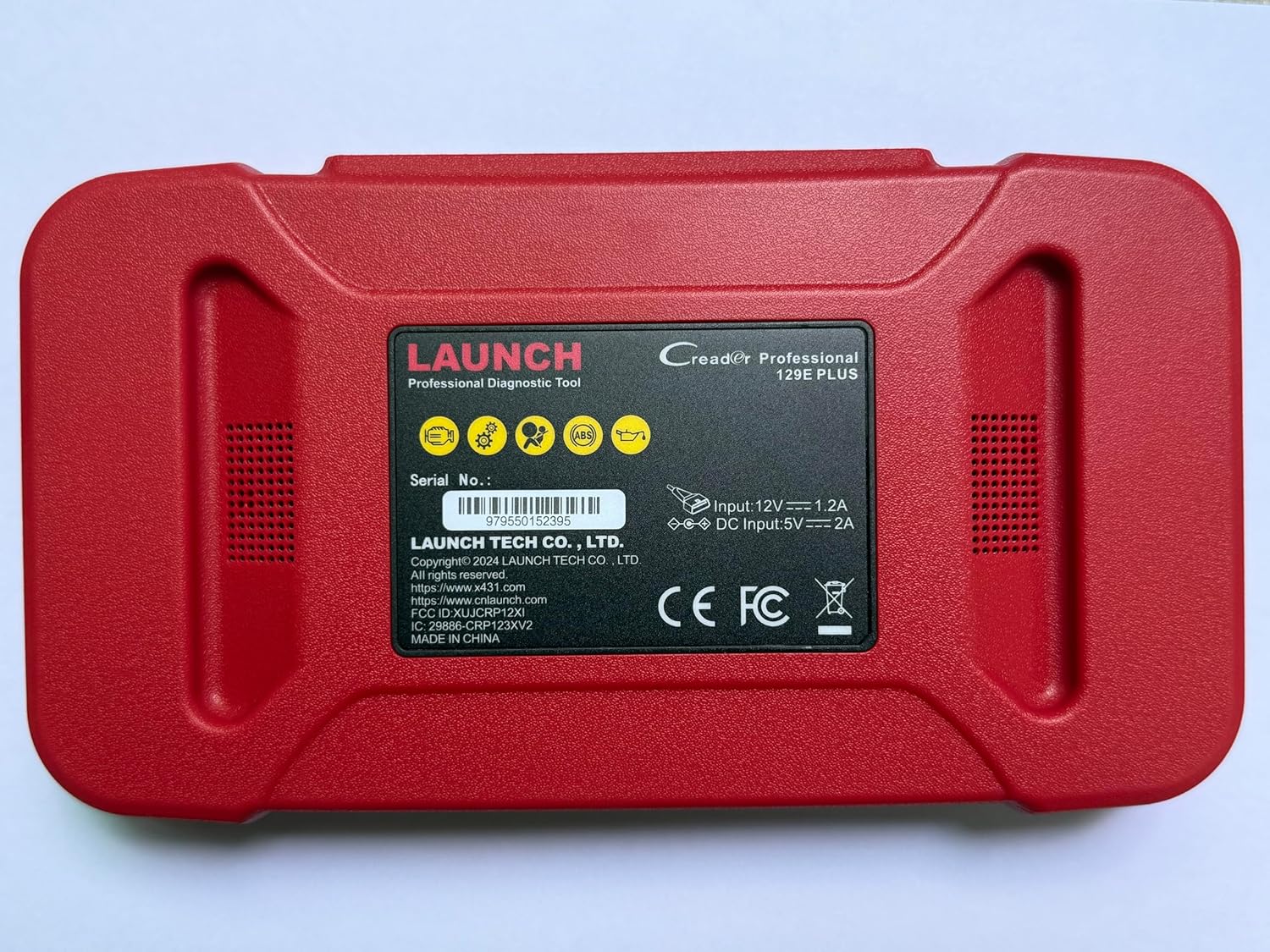
Малюнак 2.2: Тыл view of the CRP129E Plus, displaying input voltage, current specifications, and serial number (e.g., 979550152395).
2.2. Змесціва ўпакоўкі
Пасля распакавання пераканайцеся, што ўсе пералічаныя ніжэй элементы наяўныя:
- CRP129E PLUS OBD2 Scanner (x1)
- OBDII Cable (x1)
- 5V DC Charging Cable (x1)
- Кіраўніцтва карыстальніка (x1)
- Кароткае кіраўніцтва (x1)
- Сумка для пераноскі (x1)

Малюнак 2.3: Visual representation of the CRP129E Plus package contents.
3. Усталёўка і першае выкарыстанне
3.1. Зарадка прылады
Before first use, ensure the device is fully charged using the provided 5V DC charging cable. Connect the cable to the device and a suitable power source.
3.2. Уключэнне / выключэнне харчавання
- Уключэнне: Націсніце і ўтрымлівайце кнопку харчавання, пакуль не падсвеціцца экран.
- Выключэнне: Press and hold the power button, then select "Power Off" from the options.
3.3. Падключэнне да аўтамабіля
Locate the vehicle's OBDII port, typically under the dashboard on the driver's side. Connect the provided OBDII cable from the CRP129E Plus to the vehicle's OBDII port. Ensure the vehicle's ignition is in the ON position (engine off or running, depending on the diagnostic task).
3.4. Wi-Fi Connection and Updates
The CRP129E Plus supports one-click Wi-Fi updates. Connect the device to a stable Wi-Fi network to download the latest software and vehicle data. Regular updates ensure compatibility with new vehicle models and improved diagnostic functions.
- From the main menu, tap "Settings".
- Select "WLAN" and connect to an available network.
- Return to the main menu and tap "Upgrade".
- Select the desired software updates and tap "Update".

Малюнак 3.1: The device interface showing options for updates, DTC lookup, live data stream, and battery test.
4. Інструкцыя па эксплуатацыі
4.1. Аўтаматычнае сканаванне VIN
The device can automatically identify vehicle information. After connecting to the vehicle, select "Diagnose" and the device will attempt an Auto VIN scan to quickly identify the vehicle's make, model, and year.

Малюнак 4.1: Visual representation of the Auto VIN scan process and systems covered by diagnosis.
4.2. Поўная дыягностыка сістэмы
The CRP129E Plus can access and diagnose all available vehicle systems. This includes, but is not limited to, Engine, ABS, SRS, SAS, TCM, TPMS, Body, Chassis, Powertrain, Fuel System, and Lighting System.
- From the main menu, select "Diagnose".
- Choose "Health Report" or select specific systems for diagnosis.
- The device will scan for Diagnostic Trouble Codes (DTCs) and display results.
- You can read fault codes, clear fault codes, and view жывыя патокі дадзеных.

Малюнак 4.2: Скончанаview of the comprehensive system diagnostic capabilities.
4.3. OBD2 Functions
The device supports all 10 modes of OBDII testing for emissions-related issues.
- Зчытаць/ачысціць коды няспраўнасці: Атрымаць і сціраць дыягнастычныя коды няспраўнасцей.
- Жывы паток дадзеных: View real-time data from the vehicle's sensors.
- I/M гатоўнасць: Праверце стан манітораў, звязаных з выкідамі.
- Даныя стоп-кадра: View здымак стану аўтамабіля на момант усталявання кода памылкі.
- Тэст датчыка O2: Атрымаць вынікі тэсту манітора датчыка кіслароду.
- Тэст бартавога манітора: Атрымаць вынікі пошуку кампанентаў сілавога агрэгата, звязаных з выкідамі.
- Праверка сістэмы EVAP: Initiate a test of the evaporative emission system.
- Інфармацыя аб аўтамабілі: Атрымаць ідэнтыфікацыйны нумар транспартнага сродку (VIN), ідэнтыфікацыйны нумар каліброўкі і нумар праверкі каліброўкі (CVN).
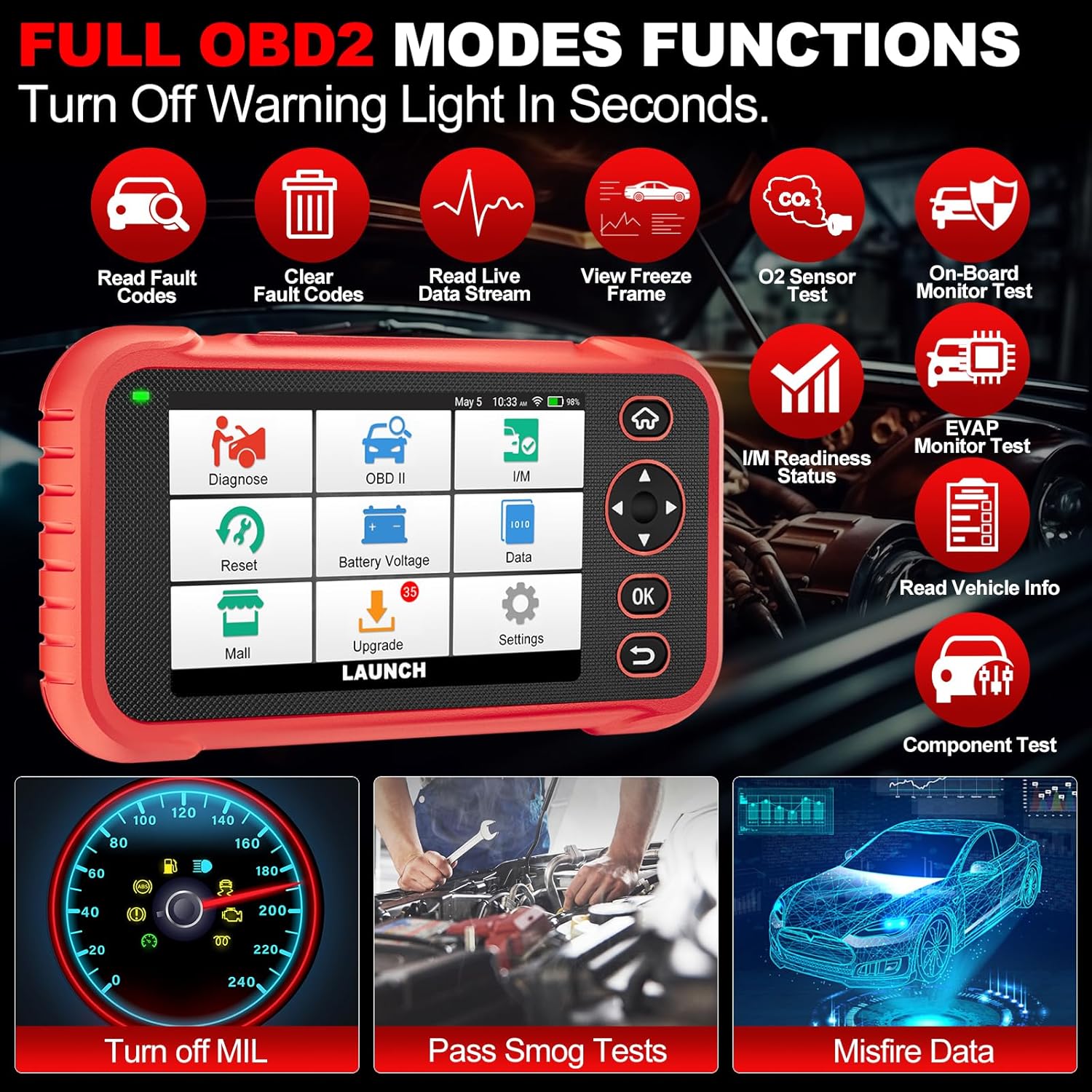
Малюнак 4.3: Main menu options for OBD2 functions.
4.4. Service Reset Functions
The CRP129E Plus offers 12+ essential service reset functions for common maintenance tasks.
- Скід алею: Скідае сістэму тэрміну службы алею пасля замены алею.
- Адаптацыя дросельнай засланкі: Initializes the throttle actuators to the default state.
- Скід AdBlue: Resets the urea after the diesel exhaust fluid (AdBlue) is replaced or refilled.
- Хэдлamp Супадзенне: Calibrates the adaptive front lighting system.
- Скід TPMS: Resets tire pressure monitoring system sensors.
- Скід SAS: Калібруе датчык вугла павароту руля.
- Battery Matching (BMS Reset): Registers new battery replacement.
- Скід паветранага фільтра: Adjusts air/fuel ratio parameters.
- Рэгенерацыя DPF: Ачышчае DPF-фільтр ад цвёрдых часціц.
- Кадаванне інжэктараў: Кадуе новыя нумары фарсунак у ЭБУ.
- Скід EPB: Resets the electronic parking brake pads after replacement.
- Крывацёк з АБС: Performs bleeding of the brake system.

Малюнак 4.4: Скончанаview of available service reset functions.
4.5. Live Data Graphing and Recording
The device can display live data streams in merged quadrant graphs, allowing for comprehensive analysis of up to four parameters simultaneously. Data can also be recorded and played back for further review.

Малюнак 4.5: Example of 4-in-1 live data graphing and diagnostic report generation.
4.6. Батарэя Voltagе тэст
Кантралюйце ўзровень зарада акумулятара аўтамабіляtage in real-time to assess its status and identify potential issues.

Малюнак 4.6: Акумулятар абtage test interface and other diagnostic support features.
5. Тэхнічнае абслугоўванне
- Уборка: Для чысткі прылады выкарыстоўвайце мяккую сухую тканіну. Пазбягайце выкарыстання абразіўных ачышчальнікаў або растваральнікаў.
- захоўванне: Захоўвайце прыладу ў чахле для пераноскі ў прахалодным, сухім месцы, калі яна не выкарыстоўваецца.
- Абнаўленні праграмнага забеспячэння: Regularly check for and install software updates via Wi-Fi to ensure optimal performance and vehicle compatibility.
- Сыход за батарэяй: Пазбягайце частай поўнай разрадкі акумулятара. Рэгулярна зараджайце прыладу, нават калі яна не выкарыстоўваецца актыўна, каб падтрымліваць яго ў працоўным стане.
6. Выпраўленне непаладак
| праблема | Магчымая прычына | Рашэнне |
|---|---|---|
| Прылада не ўключаецца. | Low battery; faulty power button. | Charge the device for at least 30 minutes. If issue persists, contact support. |
| Памылка сувязі з транспартным сродкам. | Loose OBDII connection; vehicle ignition off; incompatible vehicle protocol. | Ensure cable is securely connected. Turn ignition to ON. Verify vehicle compatibility. |
| Unable to update software. | No Wi-Fi connection; unstable internet; insufficient storage. | Check Wi-Fi connection. Ensure stable internet. Free up storage if necessary. |
| Экран не рэагуе. | Праграмны збой; фізічнае пашкоджанне. | Restart the device. If issue persists, contact support. |
7. Тэхнічныя характарыстыкі
- мадэль: CRP129E PLUS
- Аперацыйная сістэма: Android 7.0
- Дысплей: 5-цалевы сэнсарны экран
- Памяць: 16 ГБ
- акумулятар: 6100 мАг
- Падключэнне: Wi-Fi
- Памеры: 7.09 х 6.3 х 2.36 цалі
- Вага прадмета: 2.27 фунта
- Падтрымліваюцца пратаколы: OBDII/EOBD
- Пакрыццё аўтамабіля: Over 85 brands (1996-2025)
- UPC: 884508007774

Малюнак 7.1: Summary of key hardware and software specifications.

Малюнак 7.2: Extensive vehicle brand coverage and multi-language support.
8. Гарантыя і падтрымка
The LAUNCH CRP129E Plus comes with a manufacturer's warranty. Please refer to the official LAUNCH webна сайце або ў дакументацыі па куплі, каб даведацца пра канкрэтныя гарантыйныя ўмовы.
- Гарантыя: 5 Years (as per product information)
- Return/Replace Policy: 90 Days (as per product information)
- Тэхнічная падтрымка: 24/7 technical support is available. For assistance, please contact LAUNCH customer service.
- Інтэрнэт-зваротная сувязь: The device supports online feedback for quick resolution of diagnostic issues.
For further assistance or to provide feedback, please visit the official LAUNCH support channels.