
1. Уводзіны
Thank you for choosing the ODK Reversible L-Shaped Computer Desk. This manual provides essential information for the safe assembly, operation, and maintenance of your new desk. Please read these instructions carefully before beginning assembly and retain them for future reference.

Image 1.1: The ODK L-Shaped Computer Desk in a typical home office environment, showcasinяго дызайн і функцыянальнасць.
2. Інфармацыя па бяспецы
- Прачытайце ўсе інструкцыі: Перад тым, як працягваць, пераканайцеся, што вы разумееце ўсе этапы зборкі і меры бяспекі.
- Трымайце дзяцей і хатніх жывёл далей: Дробныя дэталі могуць выклікаць удушша. Трымайце іх у месцах, недаступных для дзяцей падчас зборкі.
- Збярыце на мяккай паверхні: To prevent scratches, assemble the desk on a clean, soft surface like a carpet.
- Two-person assembly recommended: Some steps may require assistance for safety and ease.
- Не перацягвайце шрубы: Overtightening can damage the material. Tighten until snug.
- Праверка стабільнасці: Before use, ensure the desk is stable and all connections are secure.
- Максімальная грузападымальнасць: Do not exceed the desk's weight capacity to prevent damage or injury.
3. Налада і зборка
This section guides you through the assembly process of your ODK L-Shaped Computer Desk. All necessary tools are typically included, but a powered screwdriver (with appropriate torque settings) can expedite the process.
3.1 Распакоўка і ідэнтыфікацыя дэталяў
Carefully unpack all components and lay them out on a clean, soft surface. Verify that all parts listed in the included hardware pack are present. Each component is typically labeled with a sticker for easy identification.
3.2 Reversible L-Shape Configuration
The ODK L-Shaped desk is designed for flexibility, allowing you to configure the L-shape to either the left or right side to best suit your space. This decision should be made early in the assembly process as it affects the orientation of certain frame components.

Image 3.1: Illustration demonstrating the two possible configurations for the reversible L-shaped desk, allowing the longer section to be on either the left or right side.
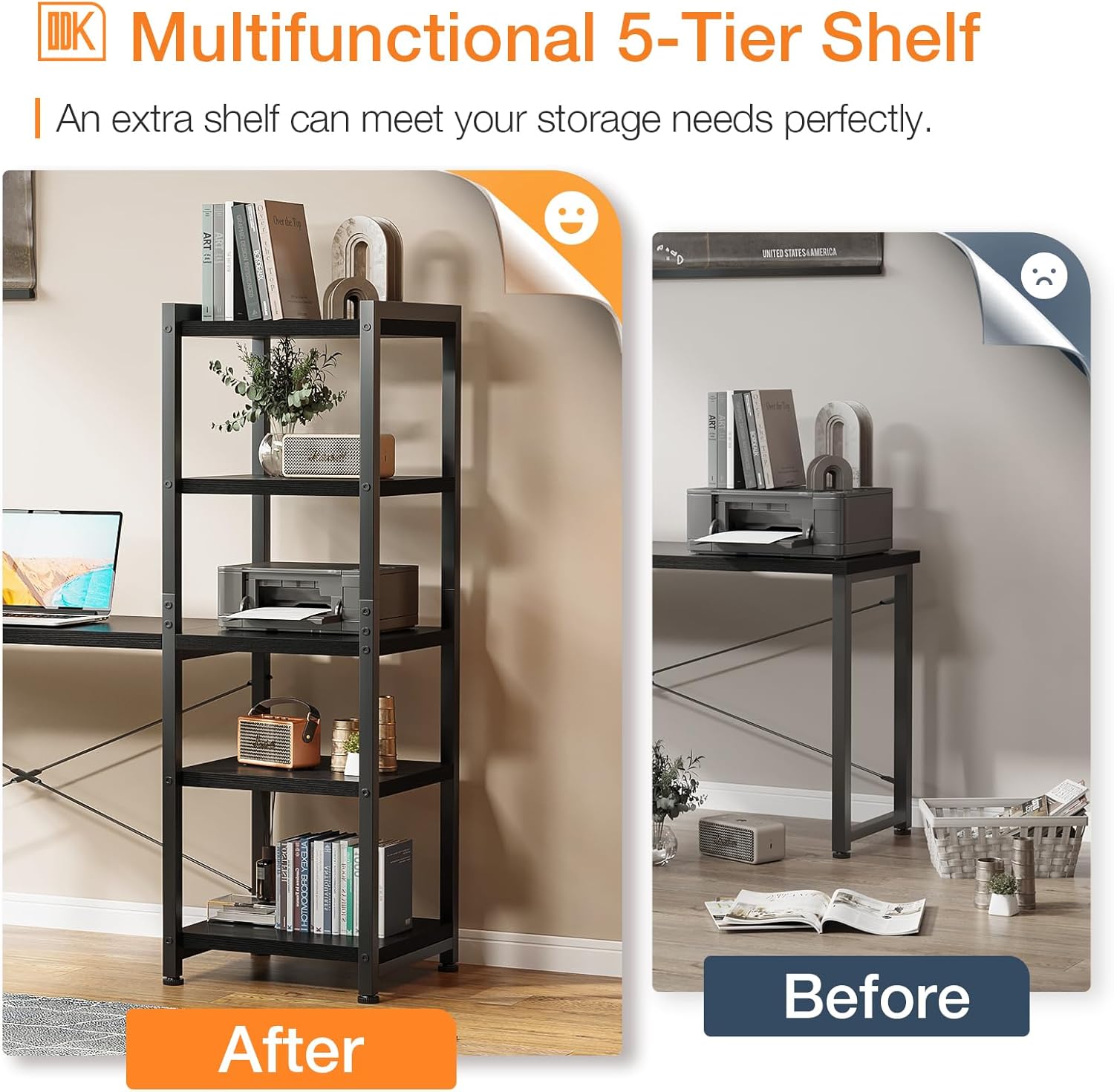
Image 3.2: A different perspective on the reversible L-shaped desk, highlighting how the shelving unit can be positioned on either end.
3.3 Зборка рамы
Follow the step-by-step instructions provided in your physical manual to connect the metal frame components. Ensure all screws are tightened securely but do not overtighten. The desk's stability relies on a properly assembled frame.
3.4 Attaching the Desktop Panels
Once the frame is stable, carefully place the desktop panels onto the frame and secure them using the designated screws. Pay attention to the alignment of the panels to ensure a flush and even surface.
3.5 Installing the Monitor Stand
The desk includes an adjustable monitor stand. You can choose from three different heights (10cm, 13cm, or 16cm) to optimize your viewing angle and posture. Select the desired height and attach the stand using the provided hardware.

Image 3.3: This diagram illustrates the three adjustable height options (A: 10cm, B: 13cm, C: 16cm) for the monitor stand, allowing users to customize their screen elevation.
3.6 Assembling the Storage Shelves
The desk features integrated storage shelves. Assemble these according to the instructions, ensuring they are securely attached to the main frame. The 5-tier shelf can be positioned on either side of the L-shape, and there are also 2-tier shelves under the main desk surface.

Image 3.4: Detail of the 2-tier shelves located beneath the main desk surface, designed to accommodate a computer tower or other storage items.
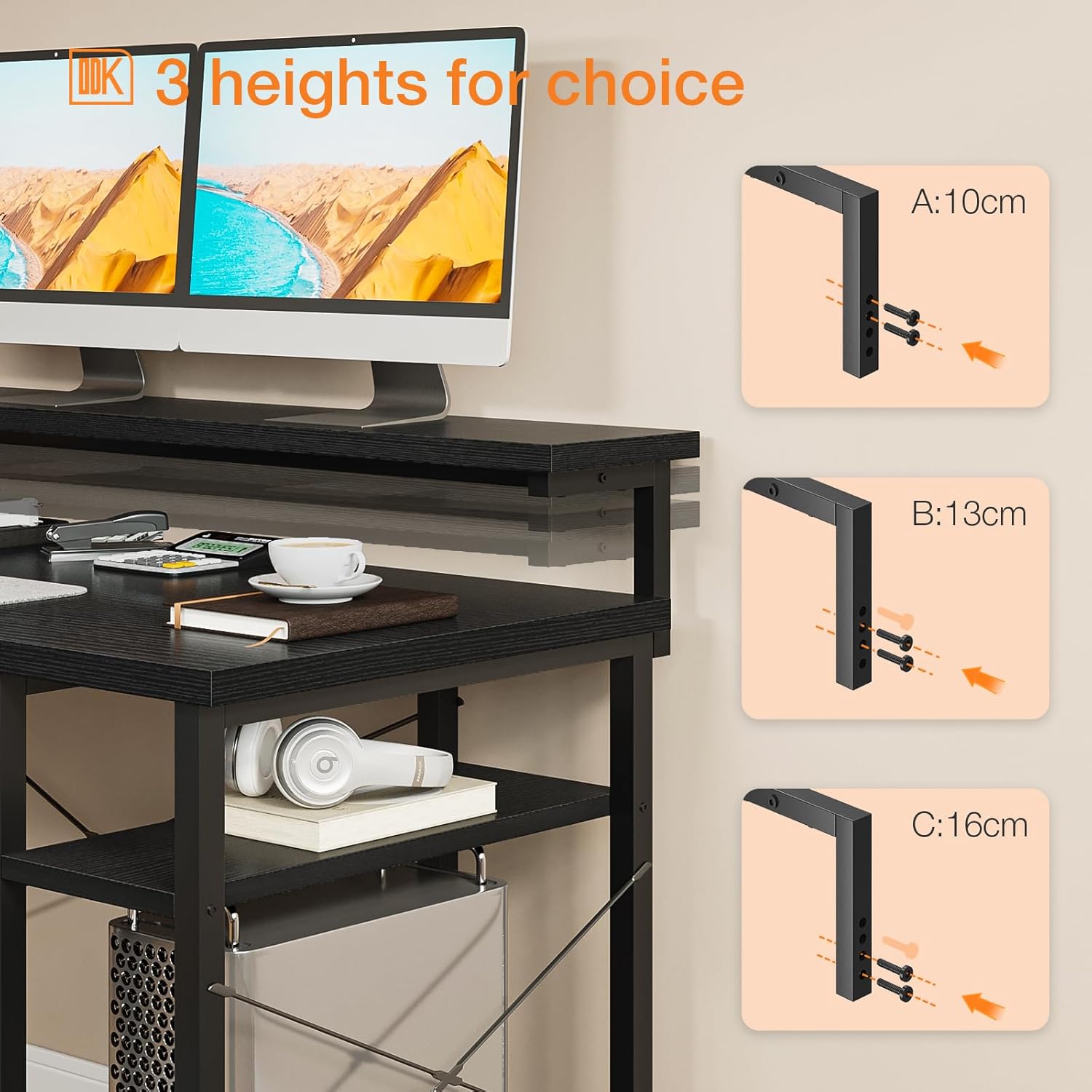
Image 3.5: A visual comparison illustrating the addition of the multifunctional 5-tier shelf, demonstrating how it enhances storage capacity.
4. Эксплуатацыя і выкарыстанне
The ODK L-Shaped Computer Desk is designed to provide a spacious and organized workspace for various activities, including studying, gaming, and office work.
- Utilizing the L-Shape: The L-shaped design maximizes corner space, offering ample surface area for multiple monitors, laptops, and other equipment.
- Падстаўка для манітора: Use the adjustable monitor stand to elevate your screen(s) to an ergonomic height, reducing neck and eye strain. The space underneath the monitor stand can be used for keyboard storage or small accessories.
- Паліцы для захоўвання: The integrated 2-tier and 5-tier shelves provide convenient storage for books, printers, computer towers, office supplies, and decorative items, helping to keep your workspace tidy.
- Кабельнае кіраванне: While not explicitly included, consider using adhesive cable clips or ties (not provided) to manage cables and maintain a clean aesthetic.
5. Тэхнічнае абслугоўванне
- Уборка: Працірайце паверхні стала мяккай губкайamp тканінай. Пазбягайце выкарыстання агрэсіўных хімічных рэчываў або абразіўных ачышчальнікаў, якія могуць пашкодзіць пакрыццё.
- Разлівы: Неадкладна выцірайце любыя разлівы, каб прадухіліць афарбоўванне або пашкоджанне драўнянага матэрыялу.
- Праверка абсталявання: Перыядычна правярайце ўсе шрубы і крапежныя элементы, каб пераканацца, што яны зацягнуты. Пры неабходнасці падцягвайце іх для падтрымання ўстойлівасці.
- Avoid excessive weight: Do not place excessively heavy items on the desk or shelves beyond their intended capacity.
- Protect from direct sunlight and moisture: Працяглы ўздзеянне можа прывесці да выцвітання або дэфармацыі.
6. Выпраўленне непаладак
| праблема | Магчымая прычына | Рашэнне |
|---|---|---|
| Стол хістаецца | Аслабленыя шрубы або няроўная падлога. | Check and tighten all assembly screws. Ensure the desk is on a level surface; use the adjustable feet (if present) to stabilize. |
| Parts do not align | Няправільная арыентацыя дэталяў або празмерна зацягнутыя шрубы. | Review the assembly instructions carefully, especially for reversible components. Loosen screws slightly, adjust alignment, then retighten. |
| Missing hardware/parts | Памылка ўпакоўкі. | Contact ODK customer support with your purchase details and a list of missing items. |
| Драпіны на паверхні | Нядбайнае абыходжанне падчас зборкі або выкарыстання. | Use furniture polish or touch-up pens for minor scratches. Always use coasters or desk pads to protect the surface. |
7. Тэхнічныя характарыстыкі

Image 7.1: A comprehensive diagram illustrating the dimensions of the ODK L-Shaped Computer Desk, including the main desk, monitor stand, and shelving unit.
- Нумар мадэлі: ZJZ-DCZWJ
- Марка: ОДК
- Overall Footprint (L-shape): Прыкладна 137 см х 140 см
- Main Desk Depth: 55 см
- Рост: 76 см
- матэрыял: Wood (desktop), Iron (frame)
- колер: Чорны
- Дызайн стала: L-Shape, Reversible
- Асаблівасці: Reversible configuration, Integrated adjustable monitor stand, 5-tier storage shelf, 2-tier under-desk shelves.
- Вага прадукту: Прыкладна 30.5 кг
- Рэкамендаванае выкарыстанне: Study room, Bedroom, Home office, Gaming, Writing.
8. Гарантыя і падтрымка
ODK is committed to providing high-quality products. For any questions regarding assembly, missing parts, or product defects, please contact ODK customer support. Please have your purchase information and model number (ZJZ-DCZWJ) ready when contacting support.
Specific warranty terms may vary by region and retailer. Please refer to your purchase documentation for detailed warranty information.