1. Уводзіны
This manual provides essential instructions for the safe operation, setup, maintenance, and troubleshooting of your CREATE THERA MATIC TOUCH automatic coffee machine. Please read this manual thoroughly before first use and retain it for future reference.
Інфармацыя па бяспецы
Always observe basic safety precautions when using electrical appliances to reduce the risk of fire, electric shock, and injury. Ensure the appliance is placed on a stable, level surface. Do not immerse the appliance, power cord, or plug in water or other liquids. Keep out of reach of children. Unplug the machine before cleaning or when not in use for extended periods.
2. Прадукт скончыўсяview
The CREATE THERA MATIC TOUCH is a fully automatic coffee machine designed to deliver fresh coffee from whole beans. It features a 20-bar pressure system, an integrated grinder, a 1.5-liter water tank, and a steam wand for milk frothing and hot water dispensing. The touch control panel allows for easy operation and customization of coffee intensity and volume.
Асноўныя кампаненты
- Coffee Bean Hopper with integrated grinder
- Water Tank (1.5 L capacity)
- Націсніце Панэль кіравання
- Носік кавы
- Steam Wand / Hot Water Dispenser
- Паддон для збору кропель і кантэйнер для кававай гушчы

Малюнак 2.1: Спераду view of the coffee machine, showing the coffee spout, drip tray, and touch control panel.

Малюнак 2.2: Пад вуглом view of the coffee machine, illustrating the removable water tank.

Малюнак 2.3: Закончанаview of the machine's removable parts for cleaning and maintenance.
3. Настройка
3.1 Распакоўка і першапачатковая чыстка
- Асцярожна выдаліце ўсе ўпаковачныя матэрыялы з кававаркі.
- Wash the water tank, drip tray, and coffee grounds container with warm soapy water, then rinse thoroughly and dry.
- Працярыце знешні выгляд машыны рэкламайamp тканіна.
3.2 Напаўненне рэзервуара для вады
- Зніміце рэзервуар для вады з бакавой часткі машыны.
- Напоўніце рэзервуар свежай халоднай пітной вадой да адзнакі MAX.
- Устаўце рэзервуар для вады на месца, пераканаўшыся, што ён надзейна замацаваны.
3.3 Даданне кававых зерняў
- Адкрыйце вечка бункера для кававых зерняў, размешчанага ў верхняй частцы машыны.
- Pour whole coffee beans into the hopper. The hopper has a capacity of 180g.
- Шчыльна зачыніце вечка, каб захаваць свежасць зерняў.

Figure 3.1: Adding coffee beans to the integrated hopper.
3.4 Першае выкарыстанне / Грунтоўка
- Падключыце машыну да заземленай разеткі.
- Press the power button on the touch control panel. The machine will perform an initial rinse cycle.
- Place a container under the coffee spout and steam wand to collect the water.
- Once the rinse cycle is complete, the machine is ready for use.
4. Інструкцыя па эксплуатацыі
4.1 Дакраніцеся да панэлі кіравання
The touch control panel provides access to all machine functions. Indicators will illuminate to show status or warnings such as 'no beans', 'no water', 'cleaning required', or 'drip tray full'.
4.2 Прыгатаванне кавы
- Ensure the water tank is filled and the bean hopper contains enough coffee beans.
- Пастаўце кубак пад носік кавы.
- Select your desired coffee type (e.g., Espresso, Lungo) from the touch panel.
- You can adjust the coffee intensity and volume via the touch panel before brewing.
- Націсніце кнопку «Пуск». Машына змеле зерні, заварыць і выдасць каву.
4.3 Using the Steam Wand
The steam wand can be adjusted between 0° and 42° for optimal milk frothing or hot water dispensing.
4.3.1 Узбіванне малака
- Напоўніце збан халодным малаком.
- Апусціце паравую трубку ў малако, крыху ніжэй за паверхню.
- Select the steam function on the touch panel.
- Паварушвайце збан уверх і ўніз, каб стварыць пену.
- Пасля таго, як будзе дасягнута патрэбная пена, выключыце функцыю пары.
- Immediately clean the steam wand after use.
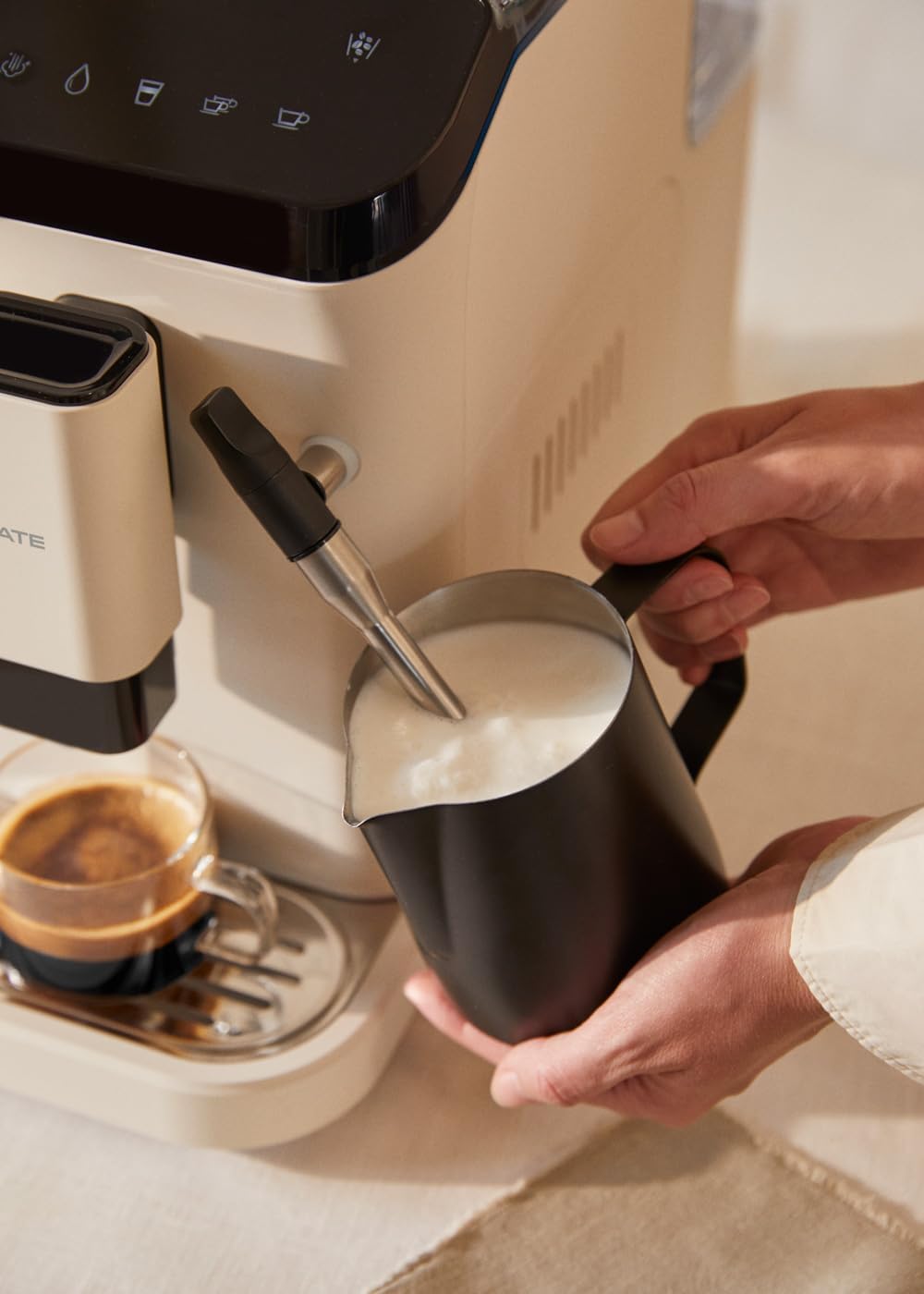
Figure 4.1: Frothing milk using the adjustable steam wand.
4.3.2 Падача гарачай вады
- Пастаўце кубак пад паравую трубку.
- Select the hot water function on the touch panel.
- The machine will dispense hot water for teas or other infusions.

Figure 4.2: Dispensing hot water for beverages.
5. Тэхнічнае абслугоўванне і ачыстка
Рэгулярная чыстка і абслугоўванне забяспечваюць аптымальную прадукцыйнасць і даўгавечнасць вашай кававаркі.
5.1 Функцыя самаачышчэння
The machine is equipped with a self-cleaning function. Follow the prompts on the touch control panel when the cleaning indicator illuminates. This cycle helps maintain internal hygiene.
5.2 Паддон для кропель і кантэйнер для кававай гушчы
- When the 'drip tray full' indicator appears, carefully remove the drip tray.
- Empty the liquid from the drip tray and the used coffee grounds from the container.
- Wash both components with warm soapy water, rinse, and dry before reinserting.
5.3 Cleaning the Steam Wand
Пасля кожнага выкарыстання працірайце паравую трубку вадойamp cloth to remove any milk residue. Periodically, remove the outer nozzle and rinse it under running water to prevent blockages.
5.4 Накіп
Over time, mineral deposits can build up in the machine. The machine will indicate when descaling is required. Use a suitable descaling solution designed for coffee machines and follow the instructions provided with the descaling product and the machine's display prompts.
6. Выпраўленне непаладак
Звярніцеся да гэтага раздзела, каб даведацца пра распаўсюджаныя праблемы і іх рашэнні. Калі праблема не знікне, звярніцеся ў службу падтрымкі кліентаў.
| праблема | Магчымая прычына | Рашэнне |
|---|---|---|
| Кава не выдаецца | Water tank empty / No coffee beans / Clogged coffee spout | Refill water tank / Add coffee beans / Clean coffee spout |
| Нямоцная кава | Insufficient coffee quantity / Coarse grind setting | Adjust coffee intensity setting / Adjust grinder to a finer setting |
| Машына не ўключаецца | Not plugged in / Power outage | Check power connection / Check circuit breaker |
| 'No water' indicator | Water tank empty or not properly inserted | Refill water tank and ensure it is correctly seated |
| 'No beans' indicator | Бункер для фасолі пусты | Refill coffee bean hopper |
| 'Cleaning' indicator | Self-cleaning cycle required | Initiate the self-cleaning program as per display instructions |
| 'Drip tray full' indicator | Drip tray or coffee grounds container is full | Empty and clean the drip tray and coffee grounds container |
7. Тэхнічныя характарыстыкі
| Асаблівасць | Спецыфікацыя |
|---|---|
| Марка | СТВАРЫЦЬ |
| Назва мадэлі | THERA MATIC TOUCH |
| Нумар мадэлі | 161966_361774 |
| Колер | Cream-white |
| Памеры прадукту (Д х Ш х У) | 32.5 х 19 х 44 см |
| Вага | 9.05 кг |
| Ёмістасць бака для вады | 1.5 літра |
| Ёмістасць бункера для кававых зерняў | 180 грамаў |
| Ціск | 20 бар |
| Магутнасць/Ватtage | 1350 ват |
| тtage | 240 вольт |
| Матэрыял | AS + ABS |
| Асаблівасці | Removable tank, Milk frother, Integrated grinder, Self-cleaning function, Touch control panel |
8. Гарантыя і падтрымка
8.1 Інфармацыя аб гарантыі
Your CREATE THERA MATIC TOUCH coffee machine is covered by a manufacturer's warranty. Please refer to the warranty card included with your purchase for specific terms, conditions, and duration. Retain your proof of purchase for warranty claims.
8.2 Падтрымка кліентаў
For technical assistance, spare parts, or any questions regarding your product, please contact CREATE customer support. Contact details can typically be found on the manufacturer's webсайце або на ўпакоўцы прадукту.
Note: Specific contact information is not provided in this manual. Please refer to your product packaging or the official CREATE webсайт для падрабязнай інфармацыі аб падтрымцы.