
1. Уводзіны
The THRONMAX Space C2 Wireless AIR 2.4 Microphone Kit provides exceptional audio capture through its signature Series IV 2.4GHz digital wireless transmission. This manual will guide you through the setup, operation, and maintenance of your new wireless microphone system.
2. Змесціва ўпакоўкі
Upon opening your THRONMAX Space C2 kit, you should find the following items:
- 2 x THRONMAX Space C2 Wireless Microphones (Transmitters)
- 1 x THRONMAX Space C2 Wireless Receiver
- 2 x Furry Windshields (Dead Cats)
- 1 х зарадны кабель USB Type-C
- 1 x 3.5mm TRS to TRS Cable (for cameras)
- 1 x 3.5mm TRS to TRRS Cable (for smartphones)
- 1 x USB Type-C to 3.5mm TRRS Adapter (for smartphones with USB-C)
- 1 x Lightning to 3.5mm TRRS Adapter (for iPhones)
- 1 х футляр для пераноскі
- Кіраўніцтва карыстальніка (гэты дакумент)
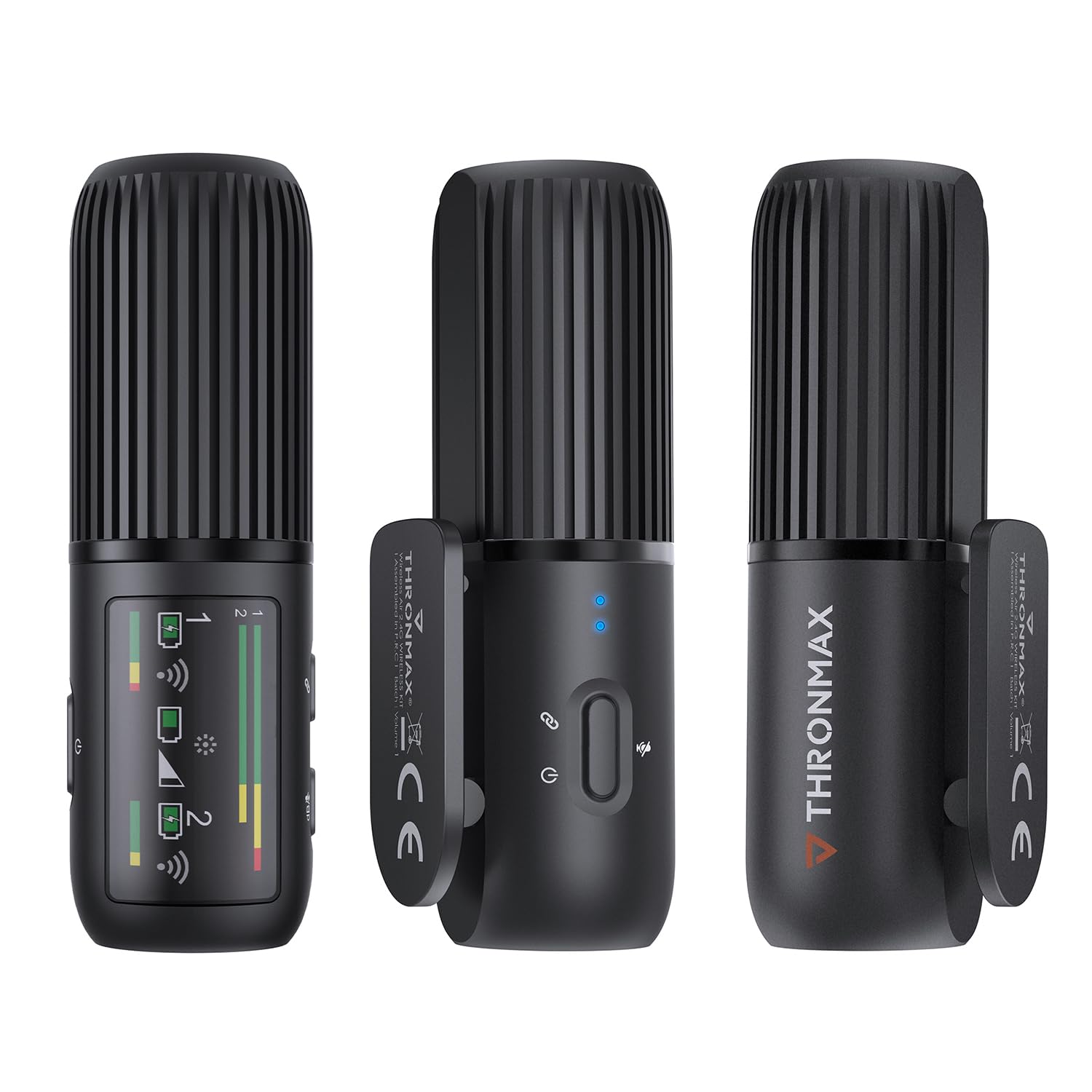
3. Прадукт скончыўсяview
The THRONMAX Space C2 system consists of two compact wireless transmitters (microphones) and one receiver. All units share a similar cylindrical design, making them discreet and easy to handle.
3.1. Transmitters (Microphones)
- Рашотка мікрафона: Located at the top for audio input.
- Кнопка харчавання/выключэння гуку: Кіруе харчаваннем і адключае гук мікрафона.
- Індыкатар стану: Provide visual feedback on power and connection status.
- Порт USB Type-C: For charging and direct connection to devices.
- Гняздо для навушнікаў 3.5 мм: Для маніторынгу гуку ў рэжыме рэальнага часу.
- Інтэграваны кліп: Для мацавання да адзення.

3.2. Прыёмнік
- OLED -дысплей: Shows battery levels, audio levels (dB), connection status for both transmitters, and gain settings.
- Кнопкі кіравання: For power, pairing, and adjusting gain levels.
- Порт USB Type-C: For charging and output to devices.
- 3.5mm Output Jack: Connects to cameras or smartphones.
- Інтэграванае мацаванне халоднага башмака: For attaching to camera hot shoes or other accessories.
4. Настройка
The THRONMAX Space C2 system is designed for quick and easy setup, offering plug-and-play functionality with most compatible devices.
- Адзінкі зарадкі: Ensure both transmitters and the receiver are fully charged using the provided USB Type-C cable.
- Уключэнне: Press and hold the power button on each transmitter and the receiver until the status indicators light up.
- Спалучэнне: The units should automatically pair. If not, refer to the "Troubleshooting" section for manual pairing instructions. The receiver's OLED display will show connection status for each transmitter.
- Connect Receiver to Recording Device:
- For Cameras (e.g., DSLR, Mirrorless): Mount the receiver onto your camera's hot shoe using its integrated mount. Connect the receiver's 3.5mm output to your camera's microphone input using the 3.5mm TRS to TRS cable.
- For Smartphones (TRRS input): Connect the receiver's 3.5mm output to your smartphone's 3.5mm jack using the 3.5mm TRS to TRRS cable.
- For Smartphones (USB-C input): Connect the receiver's USB Type-C port to your smartphone's USB-C port using the USB Type-C to 3.5mm TRRS adapter (if needed, or direct USB-C to USB-C cable if supported by your phone for audio input).
- For iPhones (Lightning input): Connect the receiver's 3.5mm output to the Lightning to 3.5mm TRRS adapter, then plug the adapter into your iPhone.
- Падключыце перадатчыкі: Clip the transmitters onto your clothing, ensuring the microphone grille is facing towards your mouth for optimal sound capture.
5. Інструкцыя па эксплуатацыі
5.1. Уключэнне/выключэнне харчавання
- Каб уключыць: Press and hold the power button on each unit for approximately 2 seconds.
- Каб выключыць: Press and hold the power button on each unit for approximately 3 seconds.
5.2. Функцыя адключэння гуку
- To Mute Transmitter: Briefly press the power button on the transmitter. The status indicator will change to indicate mute status.
- To Unmute Transmitter: Briefly press the power button again.
5.3. Gain Control (Receiver)
Use the control buttons on the receiver to adjust the audio gain (dB levels) for each microphone independently. Monitor the OLED display to ensure optimal audio levels without clipping.
5.4. Аўдыёманіторынг
Plug headphones into the 3.5mm headphone jack on the receiver or either transmitter to monitor audio in real-time. This allows you to check sound quality and levels during recording.
6. Аўдыёфункцыі
- 2.4GHz Digital Wireless Transmission: Provides a stable and reliable connection for clear audio.
- Усенакіраваны ўзор здымкі: Captures sound equally from all directions, ideal for lavalier use.
- Dual Mono Recording: Each microphone records to a separate mono track (left and right channels), allowing for individual level adjustments in post-production. This is distinct from a stereo recording where both microphones are mixed into a single stereo track.
- АЧХ: 50Hz to 20kHz, ensuring a wide range of sound capture.
7. Тэрмін службы батарэі і зарадка
- Тып батарэі: 3 Lithium Ion batteries are required and included (one in each transmitter, one in the receiver).
- Час працы: Each unit provides up to 8 hours of continuous operation on a full charge.
- Зарадка: Use the provided USB Type-C cable to charge the units. The status indicators on the transmitters and the OLED display on the receiver will show charging progress and battery status.
- Пашыранае выкарыстанне: If using only one microphone, you can swap to the second fully charged microphone to extend recording time without interruption.
8. Сумяшчальнасць
The THRONMAX Space C2 is highly versatile and compatible with a wide range of devices:
- Cameras (DSLR, Mirrorless, Video Cameras)
- Ноўтбукі і ПК
- Smartphones (iPhone, Android devices like Samsung Galaxy, Google Pixel)
The kit includes various adapter cables (USB Type-C, Lightning, 3.5mm TRS/TRRS) to ensure broad compatibility.
9. Тэхнічнае абслугоўванне
- Уборка: Для чысткі прылад выкарыстоўвайце мяккую сухую тканіну. Пазбягайце выкарыстання агрэсіўных хімічных рэчываў або абразіўных матэрыялаў.
- захоўванне: Store the microphone kit in its provided carrying case when not in use to protect it from dust, moisture, and physical damage.
- Сыход за батарэяй: For long-term storage, ensure batteries are charged to approximately 50% to prolong their lifespan. Avoid fully discharging or overcharging for extended periods.
- Пухнатыя лабавыя шклы: Gently clean the furry windshields as needed. Replace if they become worn or damaged to maintain optimal wind noise reduction.
10. Выпраўленне непаладак
- Няма гуку/нізкая якасць гуку:
- Ensure all units (transmitters and receiver) are powered on and paired.
- Праверце ўзровень зарада батарэй на ўсіх прыладах.
- Verify cable connections between the receiver and your recording device are secure and correct for your device type (TRS for cameras, TRRS for smartphones).
- Adjust gain levels on the receiver to an appropriate range (monitor the dB levels on the OLED display).
- Ensure transmitters are clipped correctly, with the microphone grille facing the sound source.
- Test with headphones to monitor the audio directly from the receiver or transmitters.
- Прылады не спалучаюцца:
- Power cycle all units (turn off, then turn back on).
- Ensure units are within the effective operating range (typically several feet for optimal performance).
- Check for potential 2.4GHz interference from other wireless devices.
- Buttons Not Responding (Mushy Buttons):
- This may indicate a manufacturing defect. If buttons do not spring back after pressing, contact THRONMAX customer support for assistance.
11. Тэхнічныя характарыстыкі
| Асаблівасць | Дэталь |
|---|---|
| Марка | ТРОНМАКС |
| Нумар мадэлі | SPACE C2 |
| Тэхналогія падлучэння | Wireless (2.4GHz Digital Transmission) |
| Тып раздыма | USB Type-C, раздым 3.5 мм |
| Палярны ўзор | Unidirectional (Omnidirectional for lavalier use) |
| АЧХ | 50 Гц - 20 кГц |
| Колькасць каналаў | 1 (supports dual mono recording from 2 transmitters) |
| Тып батарэі | Літый-іённы акумулятар (3 у камплекце) |
| Тэрмін службы батарэі | Up to 8 hours per unit |
| Вага прадмета | 77 грам (2.72 унцый) |
| Памеры ўпакоўкі | 6.3 х 3.94 х 2.36 цалі |
| Колер | Чорны |
| Вытворца | THRONMAX LLC |
12. Гарантыя і падтрымка
For warranty information, technical support, or service inquiries, please refer to the official THRONMAX webсайт або звярніцеся непасрэдна ў службу падтрымкі кліентаў. Канкрэтныя гарантыйныя ўмовы могуць адрознівацца ў залежнасці ад рэгіёна і прадаўца.
Visit the official THRONMAX Store: THRONMAX Store on Amazon