
Уводзіны
The THRONMAX Space C2 Wireless AIR 2.4 Microphone Kit provides exceptional audio capture through its Series IV 2.4GHz digital wireless transmission. This kit is designed for clear and reliable sound recording across various platforms, including cameras and mobile devices. This manual will guide you through the setup, operation, and maintenance of your microphone kit.
Змест пакета
Upon opening your THRONMAX Space C2 Wireless AIR 2.4 Microphone Kit, you should find the following items:
- Two (2) Wireless Microphones (Transmitters)
- One (1) Wireless Receiver
- Кабель для перадачы дадзеных (USB тыпу C)
- Кіраўніцтва карыстальніка
- Windshields (Furry)
- Various adapter cables for different devices (e.g., 3.5mm jack, USB-C, Lightning)
- Сумка для пераноскі
Кампаненты прадукту
The THRONMAX Space C2 kit includes two transmitters (microphones) and one receiver, all featuring a uniform, compact design. The receiver is distinguishable by its display screen.
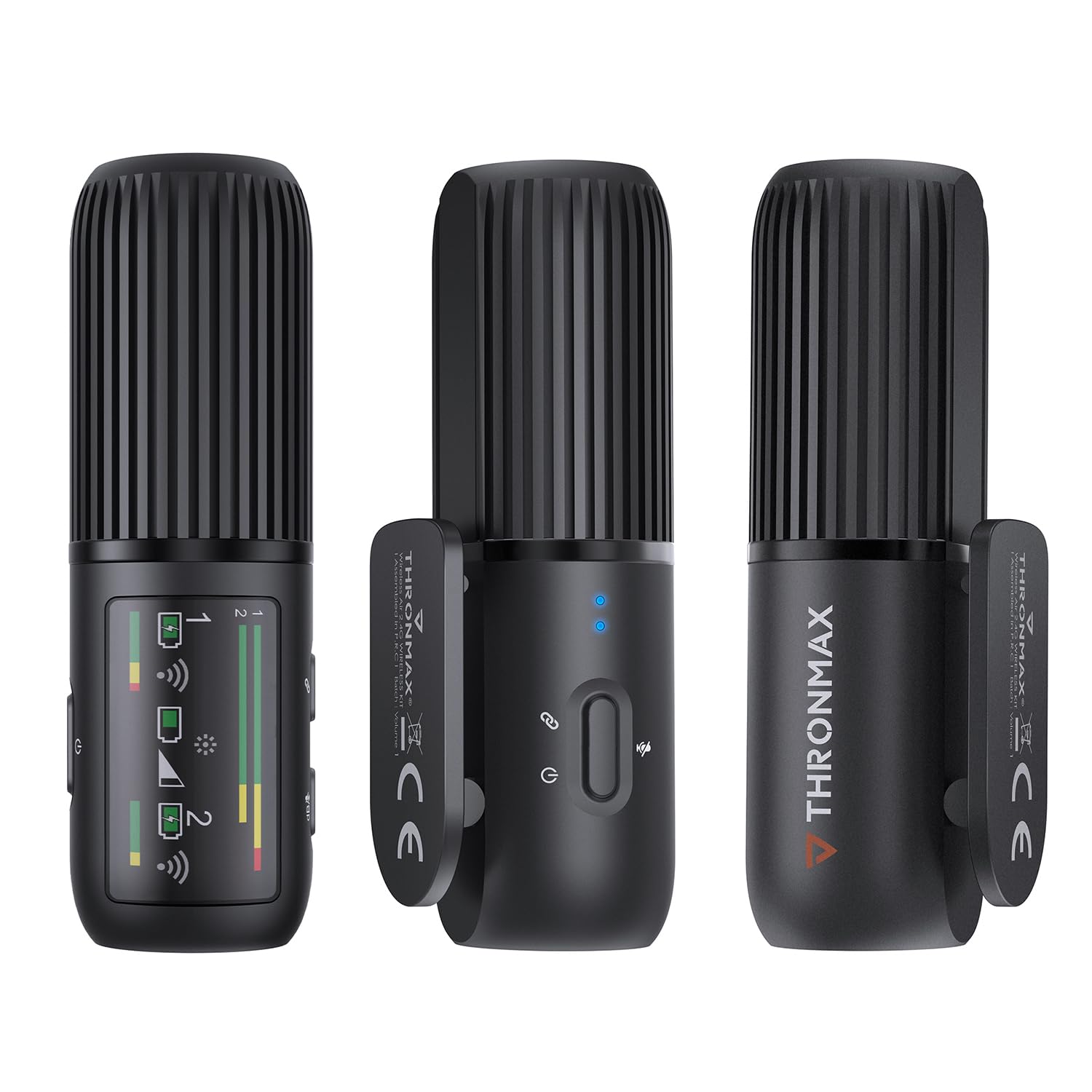
Image: The THRONMAX Space C2 Wireless Microphone Kit, showing two transmitters and one receiver. The units are black, cylindrical, and feature a ribbed top section. The receiver has a small display screen.
Transmitters (Microphones)
Each transmitter is equipped with a microphone, a power button, and a USB Type-C port for charging. They are designed to be discreetly clipped onto clothing.

Image: A close-up of one of the THRONMAX Space C2 transmitters clipped to the collar of a dark blue shirt, demonstrating its compact and wearable design. Blue indicator lights are visible.
Прыёмнік
The receiver unit features a small display screen that shows important information such as DB levels, connection status, and battery life for both connected microphones. It also has control buttons for adjusting settings and a USB Type-C port for connectivity and charging.
Image: The THRONMAX Space C2 Wireless Microphone Kit, highlighting the receiver unit with its active display showing signal strength and battery indicators for two channels.
Кіраўніцтва па ўстаноўцы
The THRONMAX Space C2 is designed for plug-and-play simplicity with minimal setup required.
1. Зарадка
Before first use, ensure all units (transmitters and receiver) are fully charged using the provided USB Type-C data cable. The USB Type-C port is located at the bottom of each unit.
2. Падключэнне рэсівера
The receiver can be connected to various recording devices:
- To Cameras (DSLRs, Mirrorless): Mount the receiver onto your camera's hot shoe. Connect the receiver to your camera's microphone input (typically a 3.5mm jack) using the appropriate adapter cable.
- To Mobile Devices (Smartphones, Tablets): Connect the receiver to your device's port (USB-C for Android/newer iPhones, Lightning for older iPhones) using the relevant adapter cable.
3. Powering On & Pairing
Press and hold the power button on each transmitter and the receiver to turn them on. The units are designed to automatically pair. The receiver's screen will display connection status and audio levels for each active microphone.
Інструкцыя па эксплуатацыі
1. Wearing the Microphones
Clip the transmitters onto your clothing, ensuring the microphone grille is facing towards your mouth for optimal sound capture. The compact design allows for discreet placement.
2. Audio Monitoring and Adjustment
The receiver's display provides real-time monitoring of audio levels (DB levels) for both channels. Use the control buttons on the receiver to adjust gain or toggle connections as needed. Each microphone records on a single mono track, which can be processed as dual mono or stereo in post-production.
3. Omnidirectional Pickup Pattern
The microphones feature an omnidirectional pickup pattern, meaning they capture sound equally from all directions. This is ideal for lavalier use where the microphone's exact orientation might vary.
4. Кіраванне батарэяй
The THRONMAX Space C2 offers approximately 8 hours of battery life per transmitter. If one microphone runs out of battery during a long recording session, you can swap it with the second fully charged microphone to extend your recording time without interruption.
Тэхнічныя характарыстыкі
| Асаблівасць | Дэталь |
|---|---|
| Марка | ТРОНМАКС |
| Нумар мадэлі | SPACE C2 |
| Тэхналогія падлучэння | UHF (2.4GHz Digital Wireless) |
| Тып раздыма | USB Type-C |
| Асаблівасць | Рэгулятар гучнасці |
| Сумяшчальныя прылады | Camera, Smartphones (via adapters) |
| Колер | Белы |
| Палярны ўзор | Unidirectional (Omnidirectional for lavalier use) |
| Вага прадмета | 77 грам |
| Формаў-фактар мікрафона | Лавальер |
| Крыніца харчавання | Corded Electric (Rechargeable Lithium Ion batteries included) |
| Колькасць батарэек | Патрабуецца 3 літый-іённыя батарэі (у камплекце) |
| Колькасць каналаў | 1 (Dual mono recording supported) |
| Рэкамендуемае выкарыстанне | Video Conference, Video Recording, Voice Recording |
| UPC | 850025244664 |
Тэхнічнае абслугоўванне
To ensure the longevity and optimal performance of your THRONMAX Space C2 Wireless Microphone Kit:
- Keep the units clean and free from dust and moisture. Use a soft, dry cloth for cleaning.
- Store the kit in its provided carrying case when not in use to protect it from physical damage.
- Avoid exposing the units to extreme temperatures or direct sunlight.
- Regularly charge the units to maintain battery health, even if not used frequently.
Ліквідацыю непаладак
If you encounter issues with your THRONMAX Space C2 Wireless Microphone Kit, consider the following:
- Няма гуку/нізкая якасць гуку: Ensure all units are fully charged and powered on. Verify that the receiver is correctly connected to your recording device's microphone input. Check the DB levels on the receiver's screen. Ensure microphones are positioned correctly.
- Праблемы з падключэннем: Confirm that both transmitters and the receiver are within range (2.4GHz digital wireless). Power cycle all units (turn off and on again) to re-establish pairing.
- Кнопкі не рэагуюць: If buttons feel 'mushy' or do not pop back out, gently press them multiple times. If the issue persists, contact customer support.
Гарантыя і падтрымка
The THRONMAX Space C2 Wireless AIR 2.4 Microphone Kit comes with a 1-year manufacturer warranty. For further support, product information, or to explore other THRONMAX products, please visit the THRONMAX Official Store.