
1. Уводзіны
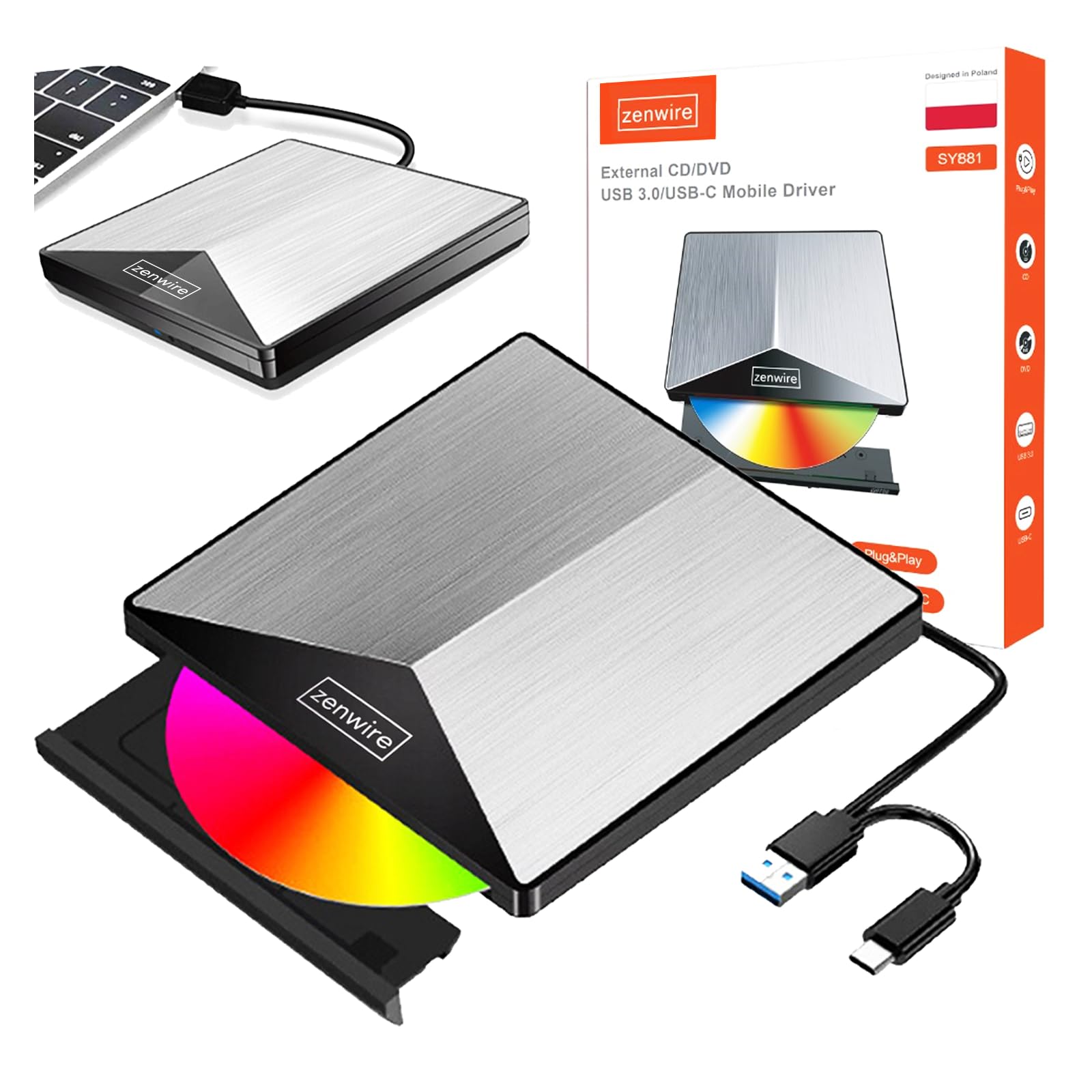
Thank you for choosing the Zenwire External CD/DVD Drive. This device is a versatile and portable solution for both reading and writing optical discs, designed for use with laptops and desktop computers. It features modern USB 3.0 and USB-C 3.1 interfaces, ensuring rapid data transfer speeds up to 5 Gb/s. Its durable aluminum casing provides efficient heat dissipation and a sleek design. This drive is compatible with various operating systems, including Windows, Mac OS, and Linux, offering broad utility for a wide range of users.
Асноўныя функцыі ўключаюць у сябе:
- USB 3.0 and USB-C 3.1 Support: Offers very high data transfer speeds up to 5 Gb/s, enhancing efficiency for large files and multimedia.
- Алюміній Сasing: Durable and elegant, effectively dissipates heat for long-lasting and safe use.
- Сумяшчальнасць з аперацыйнай сістэмай: Seamless operation across multiple platforms, including Windows, Mac OS, and Linux.
- Пераноснасць: Slim design and low weight allow for easy transport, ideal for users on the go.
- Plug and Play: Simple installation without the need for additional drivers, enabling quick use immediately after connection.
2. Інфармацыя па бяспецы
Калі ласка, прачытайце і выконвайце гэтыя рэкамендацыі па бяспецы, каб забяспечыць належную працу і пазбегнуць пашкоджання прылады або траўмаў:
- Не падвяргайце прыладу ўздзеянню вады, вільгаці або экстрэмальных тэмператур.
- Не кідайце прыладу і не падвяргайце яе моцным ударам.
- Не спрабуйце разбіраць або рамантаваць прыладу самастойна. Звярніцеся да кваліфікаванага абслугоўваючага персаналу.
- Use only compatible discs and cables.
- Трымайце прыладу далей ад моцных магнітных палёў.
3. Змесціва ўпакоўкі
Праверце, ці ёсць усе прадметы ў вашай упакоўцы:
- Zenwire External CD/DVD Drive
- Integrated USB 3.0 / USB-C 3.1 Cable
- Кіраўніцтва карыстальніка (гэты дакумент)
4. Прадукт скончыўсяview
Familiarize yourself with the components and dimensions of your Zenwire External CD/DVD Drive.

выява: Буйны план views of the Zenwire External CD/DVD Drive, highlighting the integrated USB cable, the disc eject button, and the anti-slip feet on the bottom. These details illustrate the device's connectivity and stable design.

выява: The Zenwire External CD/DVD Drive displayed with its approximate dimensions: 5.9 inches (148mm) in length, 5.9 inches (149mm) in width, and 0.6 inches in thickness. This illustrates the compact and slim profile прылады.
5. Настройка
The Zenwire External CD/DVD Drive is designed for simple plug-and-play operation. No additional drivers are typically required for most operating systems.
- Locate an available USB 3.0 or USB-C port on your computer (laptop or desktop).
- Connect the integrated USB cable from the Zenwire drive directly into the chosen port on your computer.
- The operating system should automatically detect and install the necessary drivers. This process may take a few moments.
- Once installed, the drive will appear as a removable storage device in your computer's file Правадыр або працоўны стол.
выява: The Zenwire External CD/DVD Drive shown connected to a laptop via its integrated USB cable. This illustrates the simple plug-and-play connection process.
6. Інструкцыя па эксплуатацыі
6.1 Устаўка дыска
- Press the eject button located on the front of the drive. The disc tray will slide out.
- Carefully place the disc onto the tray with the label side facing up. Ensure the disc is seated correctly in the center.
- Gently push the tray back into the drive until it clicks into place. Do not force the tray.

выява: A hand carefully inserting a CD into the open disc tray of the Zenwire External CD/DVD Drive. This demonstrates the correct method for disc placement.
6.2 Reading and Writing Discs
Once a disc is inserted and recognized by your computer, you can perform various operations:
- Чытанне: For data discs, open 'This PC' or 'My Computer' (Windows) or 'Finder' (Mac) and click on the drive icon to access its contents. For movie DVDs or audio CDs, your operating system may prompt you to open a media player.
- Writing (Burning): To burn data to a blank CD or DVD, insert a blank disc. Your operating system or third-party burning software will guide you through the process of selecting files and initiating the burn.
6.3 Падтрымліваемыя фарматы дыскаў
The drive supports a variety of optical disc formats:
- CD-ROM, CD-R, CD-RW
- DVD-ROM, DVD-R, DVD+R, DVD-RW, DVD+RW
- VCD

выява: The Zenwire External CD/DVD Drive displayed alongside icons representing VCD, CD, and DVD, clearly indicating the range of optical disc formats supported by the device.
6.4 Сумяшчальнасць аперацыйнай сістэмы
Дыск сумяшчальны з наступнымі аперацыйнымі сістэмамі:
- Windows (XP, Vista, 7, 8, 10, 11)
- Mac OS
- Linux

выява: The Zenwire External CD/DVD Drive depicted in a setup demonstrating its compatibility with multiple operating systems, including various versions of Windows, Mac OS, and Linux. This highlights its universal usability.
7. Тэхнічнае абслугоўванне
Proper maintenance ensures the longevity and optimal performance of your drive.
- Ачыстка дыскавода: Use a soft, dry, lint-free cloth to wipe the exterior of the drive. Do not use liquid cleaners or abrasive materials. For the optical lens, use a specialized CD/DVD lens cleaning kit if necessary, following its instructions carefully.
- Ачышчальныя дыскі: Always handle discs by their edges. If a disc is dirty, gently wipe it from the center outwards with a soft, lint-free cloth.
- захоўванне: Store the drive in a cool, dry place away from direct sunlight and extreme temperatures when not in use. Keep discs in their cases to prevent scratches and dust accumulation.
- Ахоўная плёнка: Upon first use, you may need to remove any protective film from the device's surface.

выява: A hand demonstrating the removal of a protective film from the surface of the Zenwire External CD/DVD Drive. This step is often performed during the initial setup or maintenance to ensure optimal appearance and function.
8. Выпраўленне непаладак
If you encounter issues with your Zenwire External CD/DVD Drive, refer to the following common problems and solutions:
- Drive not recognized by the computer:
- Пераканайцеся, што USB-кабель надзейна падключаны як да дыскавода, так і да кампутара.
- Паспрабуйце падключыць дыск да іншага USB-порта на вашым кампутары.
- Праверце дыск на іншым кампутары, каб выключыць праблему, характэрную для кампутара.
- Перазагрузіце кампутар.
- Disc not reading or writing:
- Праверце дыск на наяўнасць драпін, бруду або пашкоджанняў. Паспрабуйце іншы дыск.
- Пераканайцеся, што дыск устаўлены правільна, этыкеткай уверх.
- For writing, ensure you are using a blank, compatible disc (CD-R/RW, DVD-R/RW, DVD+R/RW).
- Clean the drive's optical lens using a specialized cleaning disc.
- Slow data transfer speed:
- Ensure the drive is connected to a USB 3.0 or USB-C 3.1 port on your computer for optimal speed. USB 2.0 ports will result in slower performance.
- Avoid using USB hubs if possible, or ensure the hub is powered and supports USB 3.0/USB-C speeds.
- Drive makes unusual noises:
- This can sometimes occur with unbalanced or damaged discs. Try a different disc.
- Пераканайцеся, што дыск размешчаны на ўстойлівай, роўнай паверхні.
9. Тэхнічныя характарыстыкі
| Асаблівасць | Апісанне |
|---|---|
| Марка | Zenwire |
| Нумар мадэлі | 5904507529123 |
| Інтэрфейс | USB 3.0, USB Type C |
| Хуткасць перадачы даных | Up to 5 Gb/s (via USB 3.0 / USB-C 3.1) |
| Optical Write Speed | 10x |
| Падтрымліваюцца аперацыйныя сістэмы | Windows, Mac OS, Linux |
| Асаблівасць | Plug & Play |
| Матэрыял | Алюміній Сasing |
| Памеры (прыбл.) | 148mm (L) x 149mm (W) x 15mm (H) / 5.9in (L) x 5.9in (W) x 0.6in (H) |
10. Інфармацыя аб гарантыі
Warranty terms and conditions are typically provided with your purchase documentation. Please refer to the specific warranty information included with your product or contact the retailer/manufacturer for details regarding warranty coverage and claims.
11. Падтрымка
If you require further assistance or have questions not covered in this manual, please contact Zenwire customer support or your product retailer. Please have your model number (5904507529123) and purchase details ready when contacting support.


