
1. Уводзіны
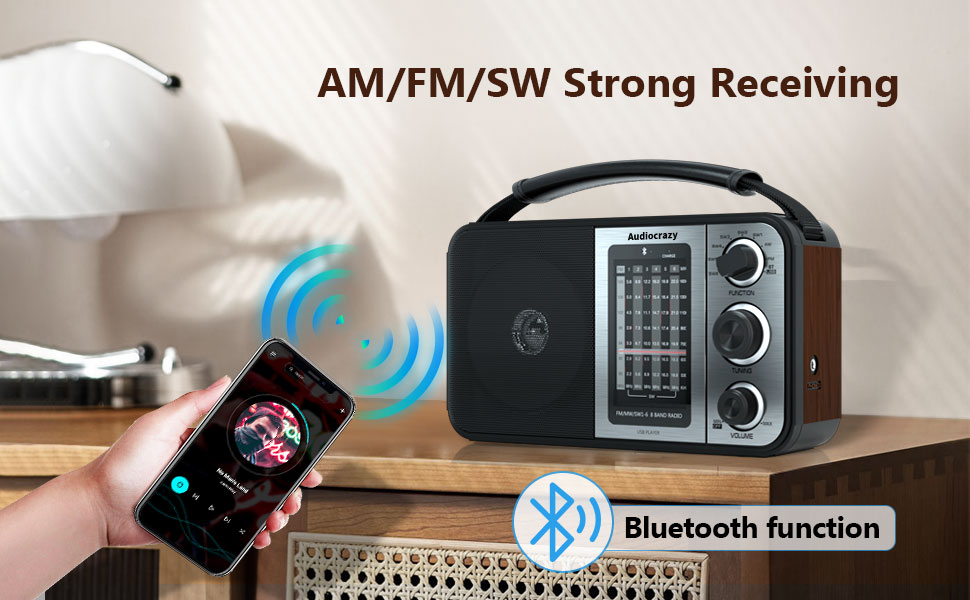
Thank you for choosing the Audiocrazy Portable AM FM Shortwave Radio with Bluetooth, Model AC-1705R. This radio is designed to provide versatile audio entertainment with its multi-band radio reception (AM, FM, Shortwave), Bluetooth connectivity, and media playback options via SD card and USB. It features a classic retro design, clear sound, and multiple power options for convenience at home or on the go.
2. Інфармацыя па бяспецы
- Крыніца харчавання: Выкарыстоўвайце толькі пазначаны адаптар сілкавання або батарэйкі. Пераканайцеся, што гучнасцьtage адпавядае патрабаванням прылады.
- Бяспека акумулятара: When using D cell batteries, ensure correct polarity. Remove batteries if the radio will not be used for an extended period to prevent leakage. Do not mix old and new batteries or different types of batteries.
- Воданепранікальнасць: Гэты прадукт не воданепранікальныПазбягайце ўздзеяння вады, дажджу або высокай вільготнасці, каб пазбегнуць пашкоджанняў.
- Вентыляцыя: Не блакуйце вентыляцыйныя адтуліны. Забяспечце дастатковую цыркуляцыю паветра вакол прылады.
- Уборка: Disconnect from power before cleaning. Use a soft, dry cloth. Do not use liquid cleaners or aerosol sprays.
- тэмпература: Avoid extreme temperatures. Do not place near heat sources or in direct sunlight for prolonged periods.
- Абслугоўванне: Не спрабуйце самастойна абслугоўваць гэты прадукт. Звярніцеся да ўсіх абслугоўванняў кваліфікаванага абслуговага персаналу.
3. Прадукт скончыўсяview
Familiarize yourself with the main components and controls of your Audiocrazy radio.
Элементы кіравання на пярэдняй панэлі

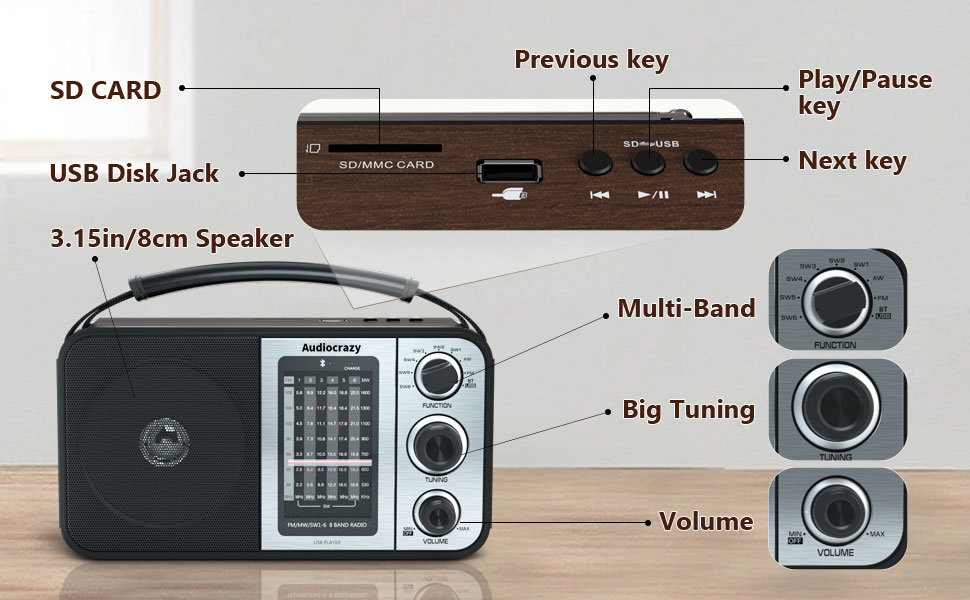
- Пераключальнік функцый: Selects between AM, FM, SW1-6, Bluetooth (BT), and other modes.
- Ручка налады: Used to precisely tune into radio stations across all bands.
- Рэгулятар гучнасці: Controls the audio output level and also serves as the power ON/OFF switch.
- Дакладчык: Front-facing speaker for audio output.
Top Panel Controls and Ports
- Слот для SD-карты: Insert an SD card for playing stored audio files.
- USB Disk Jack: Insert a USB flash drive for playing stored audio files.
- Папярэдні ключ: Пераход да папярэдняй дарожкі падчас прайгравання мультымедыя.
- Клавіша прайгравання/паўзы: Starts or pauses playback of media files.
- Наступны ключ: Пераход да наступнай дарожкі падчас прайгравання мультымедыя.
Side and Rear Panel

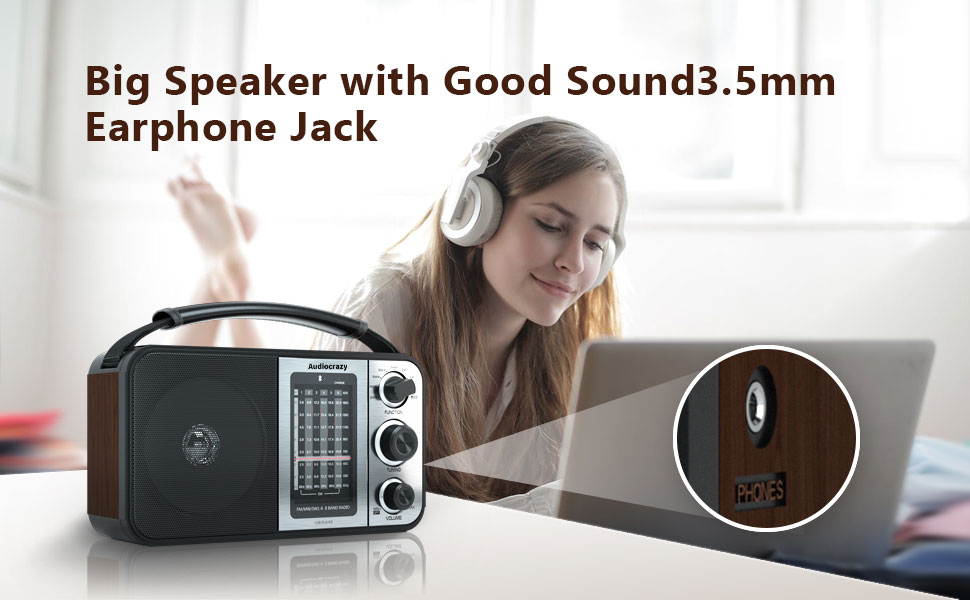
- Гняздо для навушнікаў 3.5 мм: Для прыватнага праслухоўвання з навушнікамі.
- Улада пераменнага току: Connect the supplied power adapter for wall power.
- Батарэйны адсек: Located on the rear, for D cell batteries.
- Тэлескапічная антэна: Extend for improved radio reception.
4. Настройка
4.1 Уключэнне радыё
Your Audiocrazy radio offers three power options:
- AC Power (Wall Outlet): Insert the supplied power adapter cable into the AC power input on the radio and plug the other end into a standard wall outlet.
- DC Power (D Cell Batteries): Open the battery compartment cover on the rear of the radio. Insert two (2) D cell batteries, ensuring correct polarity (+/-) as indicated inside the compartment. Close the cover securely.
- Унутраная акумулятарная батарэя: The radio has a built-in rechargeable lithium battery. It charges automatically when the radio is connected to AC power.
4.2 Рэгуляванне антэны
For optimal radio reception, extend the telescopic antenna fully. For AM and Shortwave bands, you may need to adjust the radio's position or direction for clearer reception.

5. Інструкцыя па эксплуатацыі
5.1 Уключэнне/выключэнне і рэгуляванне гучнасці
Павярнуць Ручка гучнасці clockwise to turn the radio ON and increase the volume. Rotate it counter-clockwise to decrease the volume and turn the radio OFF.
5.2 Selecting Radio Bands
Выкарыстоўвайце Перамыкач функцый to select your desired radio band:
- AM: Amplitude Modulation band (520-1710 KHz).
- FM: Frequency Modulation band (87.5-108 MHz).
- SW1-6: Shortwave bands (3.5-23 MHz).
5.3 Настройка на станцыю
Once a band is selected, slowly rotate the Ручка налады to scan for stations. The frequency display will show the current frequency. Stop rotating when you find a clear signal.
5.4 Рэжым Bluetooth
Каб падключыць прыладу Bluetooth:
- Пераключыць Перамыкач функцый to the 'BT' position. The radio will enter Bluetooth pairing mode.
- На вашым смартфоне або іншай прыладзе Bluetooth уключыце Bluetooth і знайдзіце даступныя прылады.
- Select 'Audiocrazy' (or similar name) from the list of devices to pair.
- Пасля спалучэння вы можаце прайграваць аўдыё з прылады праз дынамік радыё.
5.5 SD Card / USB Playback
To play audio from an SD card or USB drive:
- Insert a formatted SD card into the Слот для SD-карты or a USB flash drive into the USB Disk Jack.
- Пераключыць Перамыкач функцый to the appropriate media playback mode (usually indicated by 'USB' or 'SD' or automatically detected).
- Выкарыстоўвайце Папярэдні ключ, Клавіша прайгравання/паўзы, і Наступны ключ каб кіраваць прайграваннем.
5.6 Выкарыстанне навушнікаў
For private listening, plug any standard 3.5mm headphones into the Гняздо для навушнікаў 3.5 мм on the side of the radio. The main speaker will automatically mute.

6. Тэхнічнае абслугоўванне
- Уборка: Wipe the radio's exterior with a soft, dry, lint-free cloth. Do not use abrasive cleaners, waxes, or solvents.
- захоўванне: If storing the radio for an extended period, especially if using D cell batteries, remove the batteries to prevent potential leakage and damage. Store in a cool, dry place.
- Сыход за антэнай: Акуратна звяртайцеся з тэлескапічнай антэнай, каб пазбегнуць згінання або паломкі.
7. Выпраўленне непаладак
| праблема | Магчымая прычына | Рашэнне |
|---|---|---|
| Радыё не ўключаецца. | No power, batteries drained or incorrectly inserted, AC adapter not connected. | Check AC power connection. If using batteries, ensure they are fresh and inserted with correct polarity. Recharge internal battery if using AC power. |
| Дрэнны прыём радыё. | Antenna not extended, weak signal, interference. | Extend the telescopic antenna fully. Try repositioning the radio. For AM/SW, rotate the radio for better signal. |
| Няма гуку з дынаміка. | Volume too low, headphones connected, incorrect mode. | Increase volume. Disconnect headphones. Ensure correct function mode (AM/FM/SW/BT/USB/SD) is selected. |
| Прылада Bluetooth не спалучаецца. | Radio not in BT mode, device too far, Bluetooth off on device. | Ensure radio is in 'BT' mode. Keep devices within range. Enable Bluetooth on your device and re-scan. |
| SD/USB media not playing. | Incorrect mode, unsupported file format, corrupted media. | Ensure radio is in the correct media playback mode. Check if audio files are in a supported format. Try a different SD card or USB drive. |
8. Тэхнічныя характарыстыкі
| Асаблівасць | Спецыфікацыя |
|---|---|
| Марка | Аўдыявар'яты |
| Нумар мадэлі | AC-1705R |
| Памеры прадукту (Д х Ш х У) | 9.7" x 4.7" x 5.7" |
| Тэхналогія цюнэра | AM, FM |
| Падтрымліваюцца радыёдыяпазоны | AM (520-1710 KHz), FM (87.5-108 MHz), SW (3.5-23 MHz) |
| Тэхналогія падлучэння | Bluetooth, USB |
| Асаблівасці | Portable, Rechargeable, SD/USB Playback, Headphone Jack |
| Крыніца харчавання | Battery Powered (Internal Rechargeable, 2x D Cell), AC Plug-in |
| Уключаныя кампаненты | Адаптар сілкавання |
| Тып дысплея | LCD або LED |
| Абсталяванне інтэрфейсу | 3.5mm Audio, USB |
| тtage | 3 В (пастаянны ток) |
| Матэрыял | Wood (Enclosure) |
| Узровень воданепранікальнасці | Не воданепранікальны |
9. Гарантыя і падтрымка
9.1 Інфармацыя аб гарантыі
Specific warranty details for your Audiocrazy product may vary. Please refer to the documentation included with your purchase or contact Audiocrazy customer support for detailed warranty terms and conditions.
9.2 Падтрымка кліентаў
For technical assistance, troubleshooting not covered in this manual, or general inquiries, please contact Audiocrazy customer support. Contact information can typically be found on the product packaging, the official Audiocrazy webсайце або праз вашага прадаўца.