
1. Уводзіны
Thank you for choosing the Baseus Bowie E5x True Wireless Stereo (TWS) Earphones. These earphones are designed to provide a high-quality audio experience with convenient wireless connectivity. This manual will guide you through the setup, operation, and maintenance of your new earphones.

Figure 1: Baseus Bowie E5x TWS Earphones and Charging Case with Retail Packaging
2. Змесціва ўпакоўкі
Калі ласка, праверце змесціва пакета, каб пераканацца ў наяўнасці ўсіх прадметаў:
- Baseus Bowie E5x TWS Earphones (Left and Right)
- Чахол для зарадкі
- Зарадны кабель USB-C
- Кіраўніцтва карыстальніка (гэты дакумент)

Figure 2: Baseus Bowie E5x Charging Case and USB-C Charging Cable
3. Прадукт скончыўсяview
Familiarize yourself with the components of your Baseus Bowie E5x earphones:
- Навушнікі: Left (L) and Right (R) earbuds with touch control areas and charging contacts.
- Чахол для зарадкі: Used for charging the earbuds and for storage. Features a USB-C charging port and LED indicators.
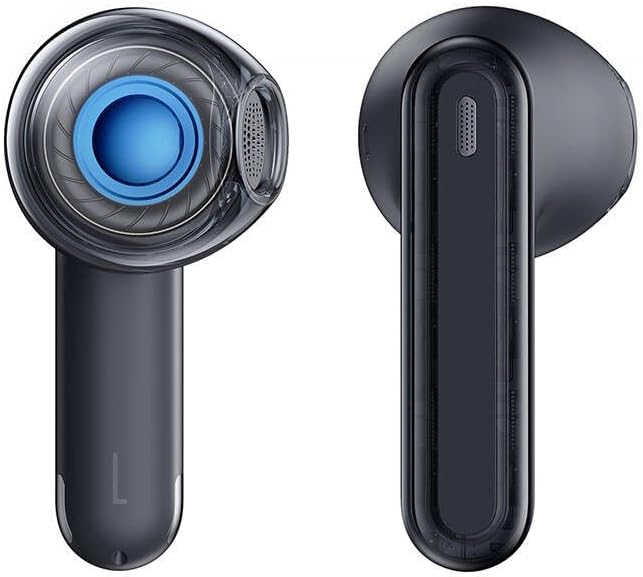
Figure 3: Left and Right Baseus Bowie E5x Earbuds
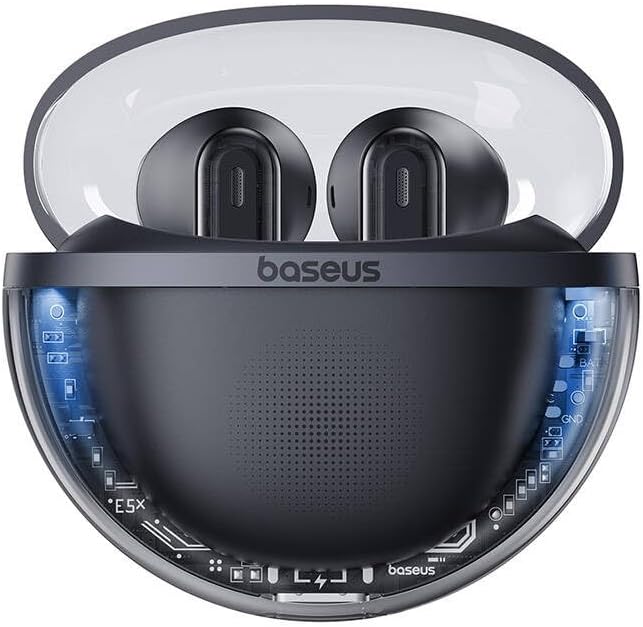
Figure 4: Baseus Bowie E5x Charging Case with Earbuds Inserted
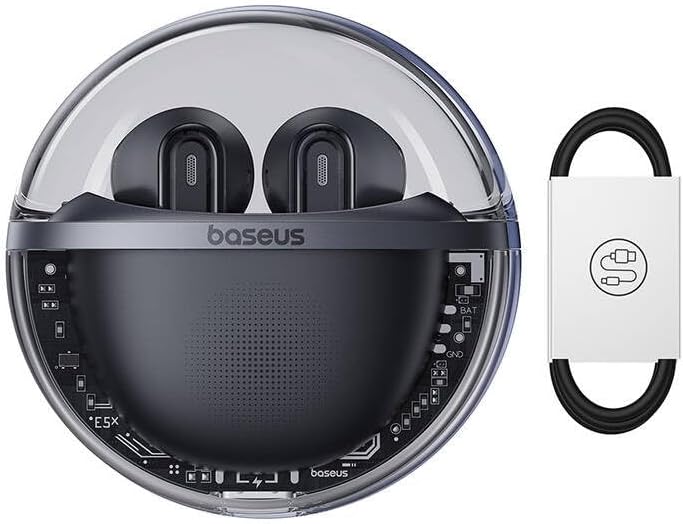
Figure 5: Close-up of an Earbud's Speaker
4. Настройка
4.1 Зарадка навушнікаў і чахла
- Першапачатковая плата: Перад першым выкарыстаннем цалкам зарадзіце зарадны чахол і навушнікі. Змесціце навушнікі ў зарадны чахол.
- Зарадка кейса: Connect the provided USB-C cable to the charging port on the case and the other end to a USB power adapter (not included). The LED indicator on the case will show charging status.
- Зарадка навушнікаў: When placed in the charging case, the earbuds will automatically begin charging. The case's indicator lights will show the charging status of the earbuds.
4.2 Спалучэнне па Bluetooth
- Уключэнне: Open the charging case. The earbuds will automatically power on and enter pairing mode (indicated by flashing LED lights on the earbuds).
- Актываваць Bluetooth: На вашай прыладзе (смартфоне, планшэце, камп'ютары) уключыце Bluetooth.
- Выберыце прыладу: In your device's Bluetooth settings, search for available devices and select "Baseus Bowie E5x".
- Падключыць: Once selected, the earbuds will connect to your device. A voice prompt or steady LED light will confirm successful pairing.
- Паўторнае падключэнне: After initial pairing, the earbuds will automatically connect to the last paired device when taken out of the case, provided Bluetooth is enabled on the device.
5. Інструкцыя па эксплуатацыі
The Baseus Bowie E5x earphones feature intuitive touch controls:
| Функцыя | Дзеянне (левы/правы навушнік-ўкладыш) |
|---|---|
| Уключэнне | Open charging case / Long press touch area (if off) |
| Выключэнне | Place earbuds into charging case and close lid / Disconnect Bluetooth and wait |
| Прайграванне/Паўза | Double tap touch area |
| Наступны трэк | Тройчы націсніце правы навушнік |
| Папярэдні трэк | Тройчы націсніце левы навушнік |
| Адказаць/завяршыць выклік | Double tap touch area |
| Адхіліць выклік | Доўгі націск на сэнсарную вобласць на працягу 2 секунд |
| Актывуйце галасавой памочнік | Доўгі націск на сэнсарную вобласць на працягу 3 секунд |
| Switch to Gaming Mode (Low Latency) | Specific gesture (refer to product packaging or Baseus app for exact control) |
Заўвага: Specific touch controls for features like volume adjustment or gaming mode may vary. Refer to the official Baseus app or product packaging for the most accurate and customizable controls.
6. Тэхнічнае абслугоўванне
To ensure the longevity and optimal performance of your earphones, follow these maintenance tips:
- Уборка: Рэгулярна працірайце навушнікі і зарадны футляр мяккай, сухой тканінай без ворса. Не выкарыстоўвайце агрэсіўныя хімічныя рэчывы або абразіўныя матэрыялы.
- Кантакты для зарадкі: Пераканайцеся, што кантакты зарадкі на навушніках і ўнутры футляра чыстыя і без смецця, каб забяспечыць належную зарадку.
- захоўванне: Калі навушнікі не выкарыстоўваюцца, захоўвайце іх у зарадным чахле, каб абараніць ад пылу і пашкоджанняў.
- Пазбягайце экстрэмальных умоў: Не падвяргайце навушнікі ўздзеянню экстрэмальных тэмператур, вільготнасці або вадкасцей.
7. Выпраўленне непаладак
If you encounter issues with your Baseus Bowie E5x earphones, try the following solutions:
- Няма гуку:
- Пераканайцеся, што навушнікі зараджаныя.
- Check if Bluetooth is enabled on your device and connected to "Baseus Bowie E5x".
- Адрэгулюйце гучнасць як на прыладзе, так і на навушніках.
- Паспрабуйце зноў спалучыць навушнікі з прыладай.
- Earbuds Not Pairing with Each Other:
- Змесціце абодва навушнікі назад у зарадны футляр, зачыніце вечка, пачакайце некалькі секунд, а затым зноў адкрыйце вечка.
- Пераканайцеся, што абодва навушнікі дастаткова зараджаныя.
- Праблемы з зарадкай:
- Праверце кабель USB-C і адаптар харчавання.
- Ачысціце зарадныя кантакты на навушніках і ўнутры кейса.
- Пераканайцеся, што сам зарадны чахол зараджаны.
- Connection Drops/Unstable:
- Падыдзіце бліжэй да падключанай прылады.
- Пазбягайце асяроддзяў з моцнымі электрамагнітнымі перашкодамі.
- Адключыце і паўторна падключыце злучэнне Bluetooth.
If the issue persists, consult the Baseus official website or customer support for further assistance.
8. Тэхнічныя характарыстыкі
| Асаблівасць | Дэталь |
|---|---|
| Марка | Басейс |
| мадэль | Bowie E5x |
| Колер | Чорны |
| Кампаненты ў камплекце | 1 package (Earphones, Charging Case, USB-C Cable, Manual) |
| Сувязь | Сапраўднае бесправадное стэрэа (TWS) |
| Порт для зарадкі | USB-C |
Заўвага: тэхнічныя характарыстыкі могуць быць зменены без папярэдняга паведамлення.
9. Гарантыя і падтрымка
Baseus products come with a manufacturer's warranty. Please refer to the warranty card included in your package or visit the official Baseus webпадрабязныя гарантыйныя ўмовы для вашага рэгіёна глядзіце на сайце.
For technical support, troubleshooting, or service inquiries, please contact Baseus customer support through their official webсайт або кантактную інфармацыю, указаную на ўпакоўцы вашага прадукту.
Афіцыйны Webсайт: www.baseus.com