
1. Уводзіны
Thank you for choosing the RORRY D2 Portable Charger. This compact and versatile power bank is designed to keep your Apple Watch, iPhone, AirPods, and other compatible devices charged while you are on the go. Please read this manual carefully to ensure safe and optimal use of your device.
Што ў скрынцы:
- RORRY Portable Charger (1 unit)
- 1M USB-C to USB-C Charging Cable (1 unit)
- Кіраўніцтва карыстальніка (1 адзінка)
2. Асноўныя магчымасці
- Універсальная сумяшчальнасць: Designed for Apple Watch Ultra/11/10/9/8/7/6/SE, iPhone 17/16/15/14/13/12/11/Pro/Pro Max, AirPods, and Android devices.
- Вялікая ёмістасць 5000 мАг: Provides approximately 7-10 charges for Apple Watch, 1 full charge for iPhone 15, and 6-8 charges for AirPods.
- Адначасовая зарадка: Capable of charging multiple devices concurrently, including Apple Watch, iPhone, AirPods, and other Android devices.
- Партатыўны дызайн: Features a compact and lightweight keychain design for easy portability in pockets or attached to backpacks.
- Вышэйшая бяспека: Equipped with built-in protection against over-temperature, over-current, over-voltagе, і кароткае замыканне.
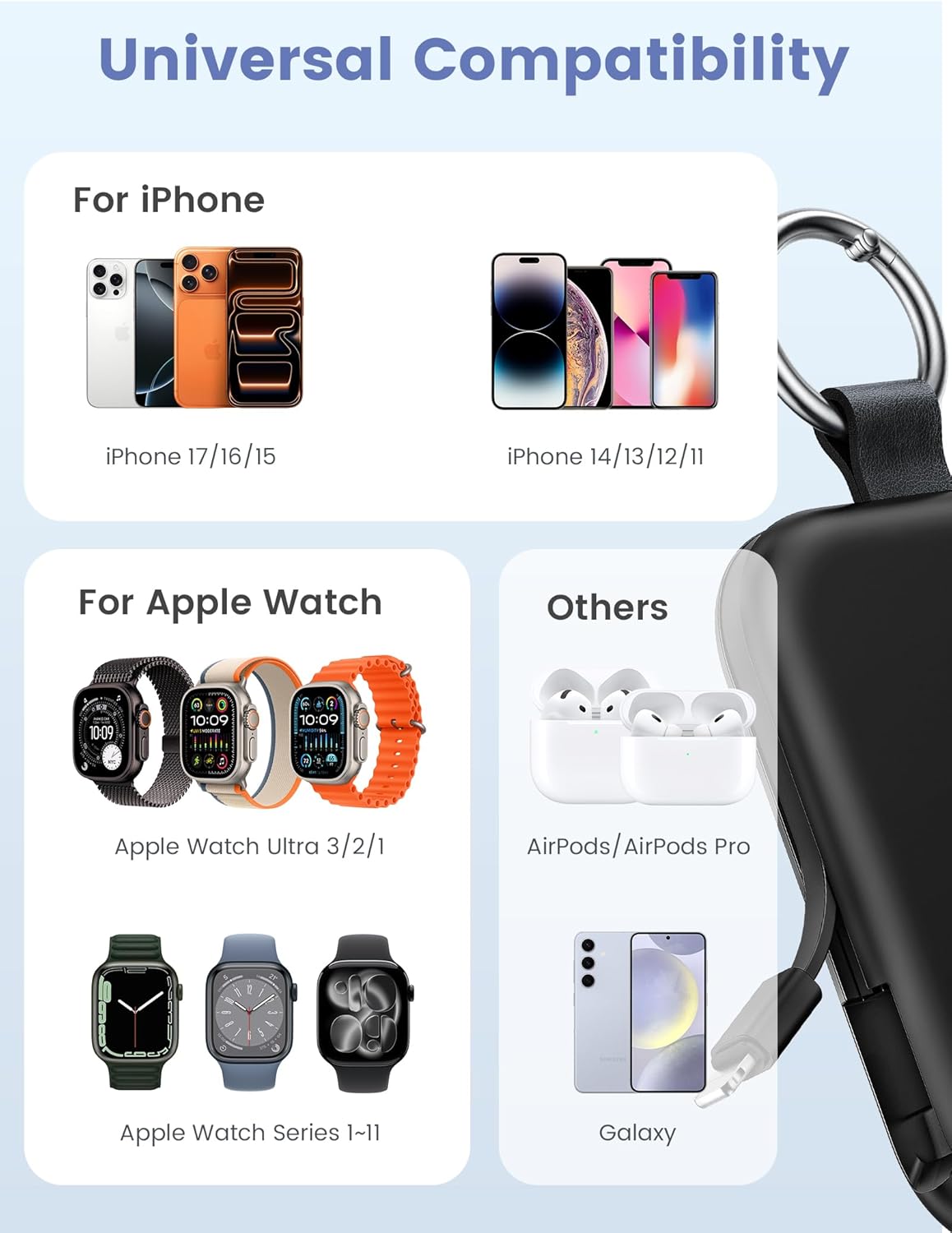
Image: Universal compatibility of the RORRY portable charger with various devices.
3. Усталёўка і першапачатковая зарадка
3.1 Зарадка знешніх акумулятараў
- Connect the provided USB-C to USB-C charging cable to the USB-C input port on the RORRY D2 Portable Charger.
- Connect the other end of the cable to a compatible USB-C wall adapter (not included).
- The LED indicator lights on the power bank will illuminate to show the charging status. A full charge typically takes approximately 2.5 hours.
- Once fully charged, all LED indicators will be solid. Disconnect the power bank from the charger.

Image: Charging the RORRY D2 Portable Charger using the included USB-C cable.
4. Інструкцыя па эксплуатацыі
4.1 Charging Apple Watch
- Press the power button on the side of the RORRY D2 Portable Charger to activate the wireless charging pad.
- Place your Apple Watch onto the magnetic charging pad located on the top surface of the power bank.
- Ensure the watch is properly aligned for optimal charging. The watch screen will indicate charging status.
4.2 Charging iPhone and USB-C Devices
- Locate the built-in Lightning cable (for iPhone) or USB-C cable (for Android/other USB-C devices) on the sides of the power bank.
- Gently pull out the appropriate cable.
- Connect the cable to your device's charging port. The device should begin charging automatically.
- To charge multiple devices simultaneously, use the wireless charging pad for Apple Watch and the built-in cables for other devices.

Image: RORRY D2 Portable Charger actively charging an Apple Watch and an iPhone.

Выява: Зверхуview of charging times and capacities for various devices with the RORRY D2.
4.3 Індыкатар харчавання
The LED lights on the front of the power bank indicate the remaining battery level. Press the power button once to check the current battery status.
Video: Demonstration of the RORRY Portable Apple Watch Charger's features and usage.
5. Тэхнічныя характарыстыкі
| Нумар мадэлі | D2 |
| Ёмістасць батарэі | 5000 Міліamp Гадзіны |
| Памеры прадукту | 3.86 х 2.82 х 0.65 цалі |
| Вага прадмета | 4.4 унцыі |
| Тып раздыма | Built-in Cable L+C, USB-C Port |
| Асаблівасці | Compact, Built-in Cables, All-in-one, Keychain Design |
6. Safety Features and Precautions
The RORRY D2 Portable Charger is equipped with multiple safety features to protect your devices and the power bank itself:
- Абарона ад перагрэву: Prevents overheating during charging and discharging.
- Абарона ад току: Абарона ад празмернага току.
- Над-тtagе абарона: Абараняе ад волуtagэлектронныя скокі.
- Абарона ад кароткага замыкання: Аўтаматычна адключаецца ў выпадку кароткага замыкання.
Агульныя меры бяспекі:
- Do not disassemble, squeeze, or hit the device.
- Keep away from fire, water, and heat sources.
- Захоўваць у месцах, недаступных дзецям.
- Do not use the power bank in extremely high or low temperatures.
- Не кідайце прыладу і не падвяргайце яе моцным ударам.
7. Догляд і абслугоўванне
- Працірайце знешні акумулятар мяккай сухой тканінай. Не выкарыстоўвайце агрэсіўныя хімічныя рэчывы або абразіўныя матэрыялы.
- Калі прылада не выкарыстоўваецца, захоўвайце яе ў прахалодным сухім месцы.
- If the power bank will not be used for an extended period, charge it fully at least once every three months to maintain battery health.
8. Выпраўленне непаладак
Прылада не зараджаецца:
- Ensure the power bank is sufficiently charged. Check the LED indicators.
- Verify that the charging cables are securely connected to both the power bank and your device.
- For Apple Watch, ensure it is correctly placed on the magnetic charging pad and the power button has been pressed.
- Try using a different charging cable or wall adapter to charge the power bank itself.
Павольная зарадка:
- Ensure you are using a compatible wall adapter for optimal charging speed.
- Адначасовая зарадка некалькіх прылад можа знізіць хуткасць зарадкі асобных прылад.
Паўэрбанк не ўключаецца:
- Charge the power bank fully. If the battery is completely depleted, it may take a few minutes for the LED indicators to light up.
9. Гарантыя і падтрымка
RORRY products are designed and manufactured to the highest quality standards. For warranty information, after-sales service, or technical support, please refer to the contact details provided in the packaging or visit the official RORRY webсайт.
Кантактная інфармацыя:
- вытворца: Shenzhen Xianyang Innovation Technology Co., Ltd
- Webсайт: www.rorry.com (Звярніце ўвагу: гэта запаўняльнік URL, refer to actual product for correct webсайт)