
IPC672LR-AX4DUPKC
універview IPC672LR-AX4DUPKC 2MP IR WDR 2D/3D DNR LightHunter Active Deterrence Outdoor Network Ultra 265 PoE PTZ Dome Camera User Manual
мадэль: IPC672LR-AX4DUPKC | Брэнд: Generic (Manufactured by Uniview)
1. Уводзіны
This manual provides comprehensive instructions for the installation, operation, and maintenance of the Uniview IPC672LR-AX4DUPKC 2MP IR WDR 2D/3D DNR LightHunter Active Deterrence Outdoor Network Ultra 265 PoE PTZ Dome Camera. This advanced surveillance camera is designed for outdoor security applications, offering high-resolution imaging, robust night vision capabilities, and intelligent deterrence features.
Key features include LightHunter illumination for superior low-light performance, Wide Dynamic Range (WDR) for clear images in varying light conditions, and advanced noise reduction (2D/3D DNR). It supports Ultra 265 video compression for efficient storage and bandwidth usage, and features a built-in microphone and speaker for two-way audio, along with an alarm light for active deterrence. The camera's motorized zoom lens allows for flexible field of view карэкціроўкі.
2. Інфармацыя па бяспецы
Please read all safety instructions carefully before installation and operation to prevent damage and ensure proper functioning.
- крыніца харчавання: Use only the specified Power over Ethernet (PoE) or external power supply. Ensure the power source meets the camera's voltagэлектронныя патрабаванні.
- Асяроддзе ўстаноўкі: Install the camera in a stable location that can support its weight. Avoid direct exposure to extreme temperatures, humidity, or corrosive environments. Ensure proper ventilation.
- Вада і вільгаць: The camera is rated IP66 for outdoor use, providing protection against dust and powerful water jets. However, do not immerse the camera in water.
- Уборка: Disconnect power before cleaning. Use a soft, dry cloth. Do not use strong detergents or abrasive cleaners.
- Абслугоўванне: Не спрабуйце разбіраць або мадыфікаваць камеру. Звяртайцеся па ўсё абслугоўванне да кваліфікаванага персаналу.
3. Змесціва ўпакоўкі
Пераканайцеся, што ўсе прадметы ёсць у наяўнасці і ў добрым стане пасля распакавання:
- універview IPC672LR-AX4DUPKC PTZ Dome Camera
- Мантажны кранштэйн і шрубы
- Камплект воданепранікальнага раздыма
- Шаблон свідравання
- Кароткае кіраўніцтва
- Гарантыйны талон (калі ёсць)
4. Прадукт скончыўсяview
The IPC672LR-AX4DUPKC camera integrates advanced features for reliable surveillance.
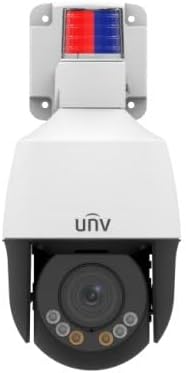
Малюнак 4.1: Спераду view of the IPC672LR-AX4DUPKC camera, showing the dome lens, IR illuminators, and the active deterrence alarm light at the top.
- Motorized Zoom Lens: 2.8-12mm AF automatic focusing lens for flexible field of view.
- IR Illuminators: Provides infrared light for night vision up to 50m (164 ft).
- Цёплае святло: Additional illumination for color night vision up to 10m (33 ft).
- Святло сігналізацыі: Integrated red and blue alarm light for active deterrence.
- Убудаваны мікрафон і дынамік: Забяспечвае двухбаковую аўдыёсувязь.
- Ethernet Port (PoE): For network connection and power supply.

Figure 4.2: Feature icons highlighting LightHunter technology, WDR, Ultra H.265 compression, Edge Storage, Built-in Microphone, and Power over Ethernet (PoE).
Дадатковыя магчымасці:
- LightHunter Illumination: Enhances low-light performance for clear images in challenging conditions.
- Optical WDR (Wide Dynamic Range): Up to 120 dB for balanced exposure in scenes with both bright and dark areas.
- 2D/3D DNR (Digital Noise Reduction): Reduces image noise for cleaner video streams.
- Ultra 265 Compression: Efficient video compression standard, also supporting H.265, H.264, and MJPEG.
- Triple Streams: Allows for multiple video streams at different resolutions and bitrates.
- ROI (Region of Interest): Focuses encoding resources on specific areas for higher quality.
5. Настройка і ўстаноўка
Follow these steps for proper installation of your camera.
5.1 Мантаж камеры
- Выберыце месца: Выберыце месца на адкрытым паветры, якое забяспечвае патрэбныя viewing angle and is within range of your network infrastructure. Consider the camera's IP66 rating for weather resistance.
- Падрыхтуйце паверхню: Use the provided drilling template to mark the screw holes on the mounting surface.
- Свідраваць адтуліны: Drill pilot holes according to the template. Insert wall anchors if mounting on masonry or drywall.
- Прымацуйце мантажны кранштэйн: Secure the mounting bracket to the surface using the supplied screws.
- Прымацаваць камеру: Mount the camera onto the bracket, ensuring it is securely fastened.
5.2 Падключэнне да сеткі і электрасілкавання
The camera supports Power over Ethernet (PoE) for simplified installation, requiring only a single Ethernet cable for both power and data.

Figure 5.1: An Ethernet cable, used for both power and data with PoE-enabled cameras.
- Падключэнне кабеля Ethernet: Connect one end of an Ethernet cable to the camera's Ethernet port. Use the waterproof connector kit to ensure a sealed connection for outdoor use.
- Connect to PoE Switch/NVR: Connect the other end of the Ethernet cable to a PoE-enabled network switch or a Network Video Recorder (NVR) with PoE ports.
- Alternative Power (if not using PoE): If PoE is not available, connect a compatible 12V DC power adapter (not included) to the camera's power input.
- Канфігурацыя сеткі: Refer to the camera's Quick Start Guide or the full user manual (available online) for initial network configuration, including setting up IP addresses and accessing the camera's web інтэрфейс.
6. Кіраванне камерай
Once installed and configured, you can begin operating your Uniview PTZ Dome Camera.
6.1 Доступ да жывой трансляцыі View
- Via NVR/DVR: If connected to an NVR, access the live view directly through the NVR's interface or connected monitor.
- Праз Web Браўзэр: Увядзіце IP-адрас камеры ў web browser on a computer connected to the same network. Log in using your credentials.
- Праз мабільнае прыкладанне: Download the official Uniview mobile application (if available) and add your camera for remote viewінж.

Малюнак 6.1: Выпample of a multi-camera surveillance feed displayed on a monitor.
6.2 PTZ Control and Zoom
The camera features Pan, Tilt, and Zoom (PTZ) capabilities with a 2.8-12mm motorized zoom lens.
- Панарамаванне/нахіл: Use the PTZ controls in your NVR interface, web browser, or mobile app to remotely adjust the camera's horizontal (pan) and vertical (tilt) viewныя вуглы.
- Маштаб: Utilize the zoom controls to optically zoom in or out, adjusting the focal length from 2.8mm (wide) to 12mm (telephoto). The automatic focusing (AF) ensures clear images at all zoom levels.

Figure 6.2: Remote monitoring of camera feeds via a tablet device.
6.3 Night Vision and Active Deterrence
- IR Начны бачанне: The camera automatically switches to IR mode in low light, providing clear black and white images up to 50m (164 ft).
- Цёплае святло: For enhanced color night vision, the camera can utilize its warm light illuminator up to 10m (33 ft).
- Актыўнае стрымліванне: Configure motion detection or other events to trigger the built-in alarm light and audible warnings via the speaker, deterring intruders.
7. Тэхнічнае абслугоўванне
Рэгулярнае тэхнічнае абслугоўванне забяспечвае аптымальную прадукцыйнасць і даўгавечнасць вашай камеры.
- Ачыстка аб'ектыва: Gently wipe the lens with a soft, lint-free cloth. For stubborn dirt, use a lens cleaning solution designed for optical surfaces. Do not use abrasive materials.
- Уборка жылля: Ачысціце корпус камеры ад рэкламыamp тканіна. Пазбягайце рэзкіх хімікатаў.
- Абнаўленні прашыўкі: Перыядычна правярайце інфармацыю вытворцы website (Uniview) for firmware updates. Updating firmware can improve performance, add new features, and enhance security.
- Праверка кабеля: Рэгулярна правярайце ўсе кабелі і злучэнні на наяўнасць прыкмет зносу або пашкоджанняў, асабліва пры ўсталёўцы на вуліцы.
8. Выпраўленне непаладак
Звярніцеся да гэтага раздзела, каб даведацца пра распаўсюджаныя праблемы і іх рашэнні.
| праблема | Магчымая прычына | Рашэнне |
|---|---|---|
| Няма сілы | No PoE power; faulty power adapter; loose connection. | Verify PoE switch/NVR is supplying power; check power adapter and connections. |
| Няма відэаканала | Network issue; incorrect IP address; camera offline; firewall blocking. | Check network cable; verify camera's IP address; restart camera/NVR/router; check firewall settings. |
| Дрэнная якасць выявы | Dirty lens; improper focus; low bandwidth; insufficient lighting. | Clean lens; adjust focus/zoom; check network bandwidth; ensure adequate lighting or IR/warm light is active. |
| PTZ Control Not Working | Software issue; camera malfunction; network latency. | Restart camera; update firmware; check network connection stability. |
9. Тэхнічныя характарыстыкі
Detailed technical specifications for the IPC672LR-AX4DUPKC camera.
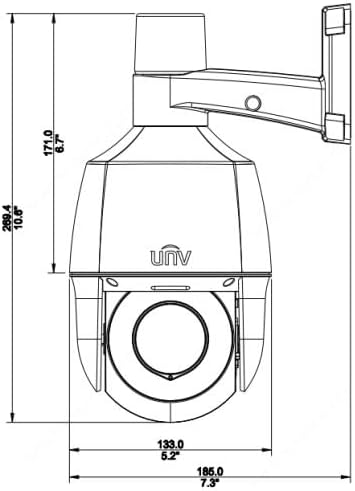
Figure 9.1: Dimensional drawing of the camera, indicating its physical size.
| Асаблівасць | Дэталь |
|---|---|
| Нумар мадэлі | IPC672LR-AX4DUPKC |
| Дазвол відэазахопу | 2 МП |
| Аб'ектыў | 2.8-12mm AF Automatic Focusing and Motorized Zoom Lens |
| Дыяпазон начнога бачання | Up to 50 m (164 ft) IR, 10m (33 ft) warm light |
| Тэхналогія падлучэння | Правадное (PoE) |
| Пратакол злучэння | Wi-Fi (for certain functions/setup, primarily wired for operation) |
| Кампрэсія відэа | Ultra 265, H.265, H.264, MJPEG |
| Аўдыё | Убудаваны мікрафон і дынамік |
| Дынамічны дыяпазон | Up to 120 dB Optical WDR |
| Зніжэнне шуму | 2D/3D DNR |
| Рэйтынг абароны ад пранікнення | IP66 |
| Формаў-фактар | Купал |
| Памеры (Д х Ш х У) | 5.2 х 5.2 х 10.6 цалі |
| Вытворца | універview |
| Рэкамендуемае выкарыстанне | Ахова на адкрытым паветры |
| Тып абвесткі | Толькі рух |
| Тэхналогія фотадатчыка | CMOS |
10. Гарантыя і падтрымка
For warranty information, please refer to the warranty card included with your product or contact the seller/manufacturer directly. Technical support may be available through the manufacturer's official webсайт або каналы абслугоўвання кліентаў.
вытворца: універview
Ask a question about this manual
Ask about setup, troubleshooting, compatibility, parts, safety, or missing instructions. Manuals+ will review the question and use this page’s manual context to help answer it.