
Maxcom FW58
Maxcom FW58 Vanad Pro Smartwatch User Manual
Мадэль: FW58
1. Уводзіны
Thank you for choosing the Maxcom FW58 Vanad Pro Smartwatch. This manual provides essential information for setting up, operating, and maintaining your device. The FW58 Vanad Pro is designed to enhance your daily life by offering comprehensive health monitoring, seamless communication, and robust activity tracking capabilities. Its lightweight design and customizable features make it an ideal companion for both busy individuals and active sports enthusiasts.
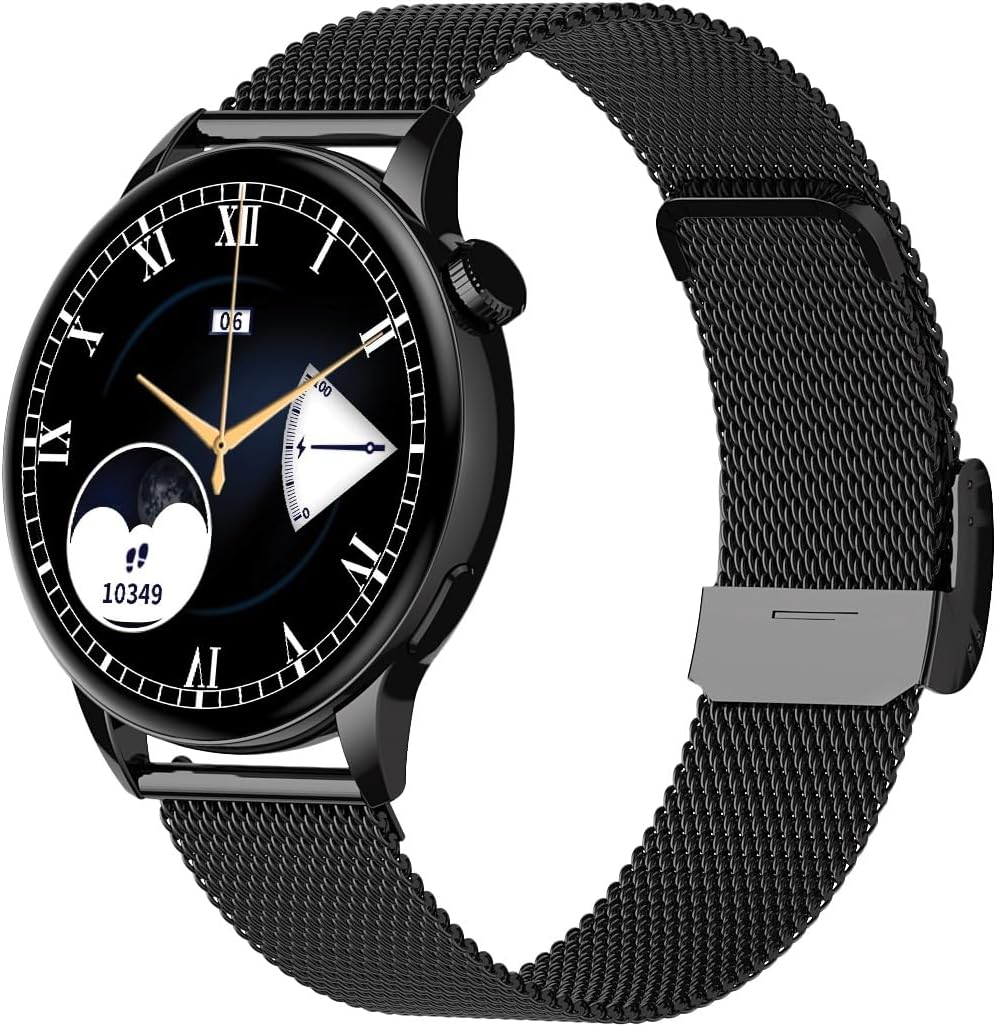
Image 1.1: Maxcom FW58 Vanad Pro Smartwatch, showcasing its elegant design with a black mesh strap and a classic watch face.
2. Настройка
2.1. Змесціва ўпакоўкі
Перад пачаткам пераканайцеся, што ў вашай упакоўцы ёсць усе неабходныя рэчы:
- Maxcom FW58 Vanad Pro Smartwatch
- Магнітны зарадны кабель
- Additional Silicone Strap
- Кіраўніцтва карыстальніка (гэты дакумент)
2.2. Зарадка разумнага гадзінніка
Для аптымальнай прадукцыйнасці цалкам зарадзіце свой разумны гадзіннік перад першым выкарыстаннем.
- Connect the magnetic charging cable to the charging contacts on the back of the smartwatch. Ensure the pins align correctly.
- Падключыце USB-кабель да стандартнага USB-адаптара сілкавання (рэкамендуецца 5 В/1 А) або да USB-порта кампутара.
- На дысплеі гадзінніка будзе паказвацца стан зарадкі. Поўная зарадка звычайна займае прыблізна 2 гадзіны.

Малюнак 2.1: ззаду view of the Maxcom FW58 Smartwatch, highlighting the optical sensor for health monitoring and the magnetic charging contacts.
2.3. Спалучэнне са смартфонам
To unlock all features, pair your smartwatch with the dedicated Maxcom smartwatch application on your smartphone.
- Download the official Maxcom smartwatch application from your smartphone's app store (e.g., Google Play Store or Apple App Store). Пошук "Maxcom Smartwatch" or refer to the QR code in the quick start guide if provided.
- Пераканайцеся, што Bluetooth уключаны на вашым смартфоне.
- Open the Maxcom app and follow the on-screen instructions to add a new device.
- Select "FW58" from the list of available devices. Confirm the pairing request on both your phone and the smartwatch.
3. Кіраванне разумным гадзіннікам
3.1. Базавая навігацыя
The Maxcom FW58 features a responsive touchscreen and a side button/crown for navigation.
- Сэнсарны экран: Правядзіце пальцам улева/управа, уверх/уніз, каб перамяшчацца па меню і функцыях. Націсніце, каб выбраць.
- Бакавая кнопка/Каронка: Press to wake the screen, return to the home screen, or access the app menu. Rotate the crown (if applicable) to scroll through lists or adjust settings.

Малюнак 3.1: Бакавы прафесіяналfile of the Maxcom FW58 Smartwatch, illustrating the physical crown and button for intuitive control and navigation.
3.2. Асаблівасці сувязі
- Здзяйсненне/прыём званкоў: Once paired, you can answer incoming calls directly from your smartwatch. You can also initiate calls from your watch's call log or contacts (synced via the app).
- Апавяшчэнні: Receive real-time notifications for SMS messages, app alerts, emails, social media updates, and news directly on your wrist. Manage notification settings through the Maxcom app.
3.3. Маніторынг здароўя
The smartwatch provides various health metrics to help you monitor your well-being.
- Частата сардэчных скарачэнняў: Бесперапынны або па патрабаванні маніторынг пульса.
- Артэрыяльны ціск: Measure your blood pressure (for reference only, not a medical device).
- Кісларод крыві (SpO2): Кантралюйце ўзровень насычэння крыві кіслародам.
- Адсочванне сну: Automatically monitors your sleep patterns, including deep sleep, light sleep, and awake times.
3.4. Адсочванне актыўнасці і спартыўныя рэжымы
Track your daily activity and specific workouts.
- Штодзённая актыўнасць: Records steps taken, calories burned, and distance traveled (mileage).
- Спартыўныя рэжымы: Select from various sports modes such as fitness, hiking, running, badminton, cycling, and football to track specific workout data.
3.5. Музычны кантроль
Control music playback on your connected smartphone directly from your smartwatch. Play, pause, skip tracks, and adjust volume without needing to access your phone.
3.6. Налада
Personalize your smartwatch experience.
- Гадзіннік: Choose from over 100 pre-installed watch face models or download more via the Maxcom app to match your style or mood.
- Стыль меню: Customize the layout and appearance of your smartwatch menu.
- Замена раменьчыка: Easily change between the included mesh and silicone straps to suit different occasions or activities.

Image 3.2: A digital watch face on the Maxcom FW58 Smartwatch, showing steps and heart rate data.

Image 3.3: The Maxcom FW58 Smartwatch showcasing a dynamic and colorful digital watch face option.
4. Тэхнічнае абслугоўванне
4.1. Cleaning the Smartwatch
Рэгулярная чыстка дапамагае падтрымліваць знешні выгляд і функцыянальнасць прылады.
- Працярыце экран і корпус мяккай тканінай без ворса.
- Для ўстойлівых плям злёгкуampпрамыйце тканіну вадой. Пазбягайце выкарыстання агрэсіўных хімічных рэчываў або абразіўных матэрыялаў.
- Clean the sensor area on the back of the watch regularly to ensure accurate readings.
4.2. Сыход за батарэяй
Каб падоўжыць тэрмін службы батарэі:
- Пазбягайце экстрэмальных тэмператур.
- Не пакідайце гадзіннік цалкам разраджаным на працяглы час.
- Зараджайце прыладу, выкарыстоўваючы толькі кабель для зарадкі, які ўваходзіць у камплект.
4.3. Воданепранікальнасць (IP67)
The Maxcom FW58 Vanad Pro Smartwatch is rated IP67, meaning it is protected against dust ingress and can withstand immersion in water up to 1 meter for up to 30 minutes. While it is suitable for daily use and splashes, it is not recommended for swimming, diving, or high-pressure water activities.
5. Выпраўленне непаладак
If you encounter issues with your smartwatch, try the following solutions:
| праблема | Рашэнне |
|---|---|
| Гадзіннік не ўключаецца | Ensure the watch is fully charged. Press and hold the side button for 5-10 seconds. |
| Немагчыма спалучыць прыладу са смартфонам | Ensure Bluetooth is on. Restart both the watch and phone. Clear app cache/data. Try pairing again. |
| Няправільныя паказчыкі здароўя | Ensure the watch is worn snugly on your wrist. Clean the sensor area. Remain still during measurements. |
| Апавяшчэнні не атрыманы | Check app notification permissions on your phone. Ensure the watch is connected via Bluetooth. Verify notification settings within the Maxcom app. |
5.1. Скід да заводскіх налад
If problems persist, you may need to perform a factory reset. This will erase all data on the smartwatch and restore it to its original settings. Navigate to 'Settings' on your smartwatch, then look for 'System' or 'Reset' options.
6. Тэхнічныя характарыстыкі
| Асаблівасць | Дэталь |
|---|---|
| Нумар мадэлі | FW58 |
| Памер дысплея | 1.5 цаляў |
| Тэрмін службы батарэі | 6-10 days (intensive use) |
| Вага | 46 г |
| Габарыты корпуса | 44 х 38 х 10 мм |
| памер планкі | 255 х 20 мм |
| Воданепранікальнасць | IP67 (да 1 метра на 30 хвілін) |
| Сувязь | Bluetooth |
| У камплекце рамяні | Mesh and Silicone |
7. Гарантыя і падтрымка
7.1. Інфармацыя аб гарантыі
Maxcom products are manufactured to the highest quality standards. For detailed warranty terms and conditions, please refer to the warranty card included with your purchase or visit the official Maxcom webсайт. Захоўвайце пацвярджэнне пакупкі для прэтэнзій па гарантыі.
7.2. Падтрымка кліентаў
If you require further assistance or have questions not covered in this manual, please contact Maxcom customer support:
- Webсайт: Visit the official Maxcom support website for FAQs, software updates, and contact forms.
- Электронная пошта/тэлефон: Refer to the contact information provided on the Maxcom webсайт або ўпакоўку вашага прадукту.